Tolky as a HubSpot Alternative: Feature-by-Feature Comparison 2026
Evaluating HubSpot for B2B? See where it shines and where an AI CRM built for conversational engagement delivers more. HubSpot now has a service agent; in Tolky, agents are the core.

Marlos Carmo
Founder of Tolky
Updated on November 16, 2026

Share
Just want the side-by-side table? See Tolky vs. HubSpot, with the official sources we checked.
Every serious CRM evaluation eventually lands on HubSpot. The platform has a large marketplace, a reputation built over nearly two decades in inbound marketing, and a brand presence that often puts its name on the shortlist before any technical criteria are even defined.
But the market has changed. B2B companies operating today have a different center of gravity from what they had in 2018: customer relationships happen primarily on WhatsApp, response time expectations are immediate, and interaction volume makes it unviable to have humans execute every step of support and sales processes.
In this context, the question has shifted from "which is the best CRM?" to:
Which platform was built for the operating model I actually need to run today, a marketing suite with integrated AI, or an AI CRM where agents are the core from the very first conversation?
This guide answers that question directly. First we detail what each platform really is, then we compare them feature by feature, and finally we map out which type of operation each one is right for.
The 30-Second Summary
For those who will not read the full guide, the table below condenses the differences that weigh most on the decision.
| Dimension | Tolky | HubSpot |
|---|---|---|
| Category | Conversational AI CRM | Marketing, sales and CRM suite |
| AI architecture | Autonomous agents are the core | Breeze Customer Agent (knowledge sources and configured actions) inside the suite and Smart CRM |
| Channels | WhatsApp, webchat, Microsoft Teams and voice, all native; Instagram coming soon | WhatsApp in the inbox or help desk on eligible subscriptions, with Customer Agent answering there; email and forms |
| CRM updates | Automatic after each conversation | The agent reads and updates Smart CRM properties within granted permissions |
| Resolution without humans | Over 67% of interactions | Depends on scope, permissions and deployed channels |
| AI configuration | Natural language, no code | Customer Agent setup: knowledge sources, permissions and handoff rules |
| Go-live time | Days | Varies by products, channels and setup |
| Cost model | Per conversation volume | Subscription + seats + HubSpot Credits per resolved conversation |
| LGPD compliance | Native, data processed in Brazil | Depends on plan and configuration |
| Support and product | In Portuguese, team in Brazil | Localized, global support |
Both platforms are good, but for different problems. The rest of this guide shows exactly where each difference shows up in real operations.
What HubSpot Is
HubSpot was founded in 2006 at MIT and effectively coined the term "inbound marketing." For nearly two decades it has been the reference for attracting visitors with content, capturing leads with forms and landing pages, and nurturing those contacts by email until the sale. It is a mature, broad and well-documented platform.
Today HubSpot is organized into modules, sold separately or bundled:
- Marketing Hub: email marketing, landing pages, nurturing automation, campaign management and attribution reporting.
- Sales Hub: deal pipeline, email sequences, meeting scheduling and quotes.
- Service Hub: support tickets, knowledge base and satisfaction surveys.
- Content Hub (formerly CMS Hub): website and blog management integrated with the CRM.
- Operations Hub and Commerce Hub: data sync and billing.
HubSpot's AI layer is called Breeze, launched in 2024. It includes Breeze Copilot (an assistant that summarizes, suggests and helps draft), Breeze Customer Agent (an agent that serves customers), other agents for specific tasks and Breeze Intelligence (data enrichment). Customer Agent answers from knowledge sources, runs configured actions, can read and update Smart CRM properties within the permissions you grant, and has rules for handing conversations to your team. The key point is where this layer comes from:
In HubSpot, AI was brought into a suite that already existed. Customer Agent resolves requests, but within the scope, permissions and channels you configure.
This is not a criticism, it is a description of the architecture. HubSpot started as a system of record and orchestration for people to operate, and AI arrived as another layer on top of it. In Tolky, the agent is the starting point of the design.
Where HubSpot Is Strong
It is worth being specific about the platform's real strengths, because they are genuine:
- Inbound marketing at scale. Email marketing, landing pages, CMS and lead nurturing form a cohesive, mature ecosystem. Few platforms in the world do this better.
- Integration marketplace. Over 1,500 native integrations with global tools. If the operation depends on ready-made connectors, HubSpot rarely falls short.
- Attribution reporting. RevOps dashboards, touchpoint analysis and multi-channel attribution with a depth few platforms reach.
- Ecosystem and community. Certifications, partners, materials and a huge installed base that makes it easy to hire people who already know the tool.
What Tolky Is
Tolky was built in the opposite direction. Instead of a marketing suite that gained AI, it is an AI CRM: a platform where AI agents are the operational core, not an add-on.
The agents conduct real conversations, qualify leads, update the CRM, query systems, execute actions and escalate to humans only when context requires it. The human team steps in where situational judgment and relationship-building are irreplaceable, not in the middle of repetitive flows.
In practice, you set up specialized agents for each stage of the relationship. Each one gets a mission, such as support or sales and relationships, and can cover roles like these:
- SDR Agent: qualifies inbound and outbound leads against ICP criteria and hands the team only what is ready to advance.
- CRM Agent: monitors all interactions and updates records automatically, without anyone opening the system.
- Sales Agent: answers questions based on the catalog, presents arguments and routes at the right moment.
- Closer Agent: generates personalized proposals, follows up at the right timing and works objections.
- Outbound Agent: runs active prospecting in real two-way conversations, not mass email blasts.
- Support Agent: resolves tickets autonomously, checks orders and escalates complex cases with full context.
Each agent has its own identity, name, mission, tone of voice, scope and behavioral profile, all defined in natural language, no code.
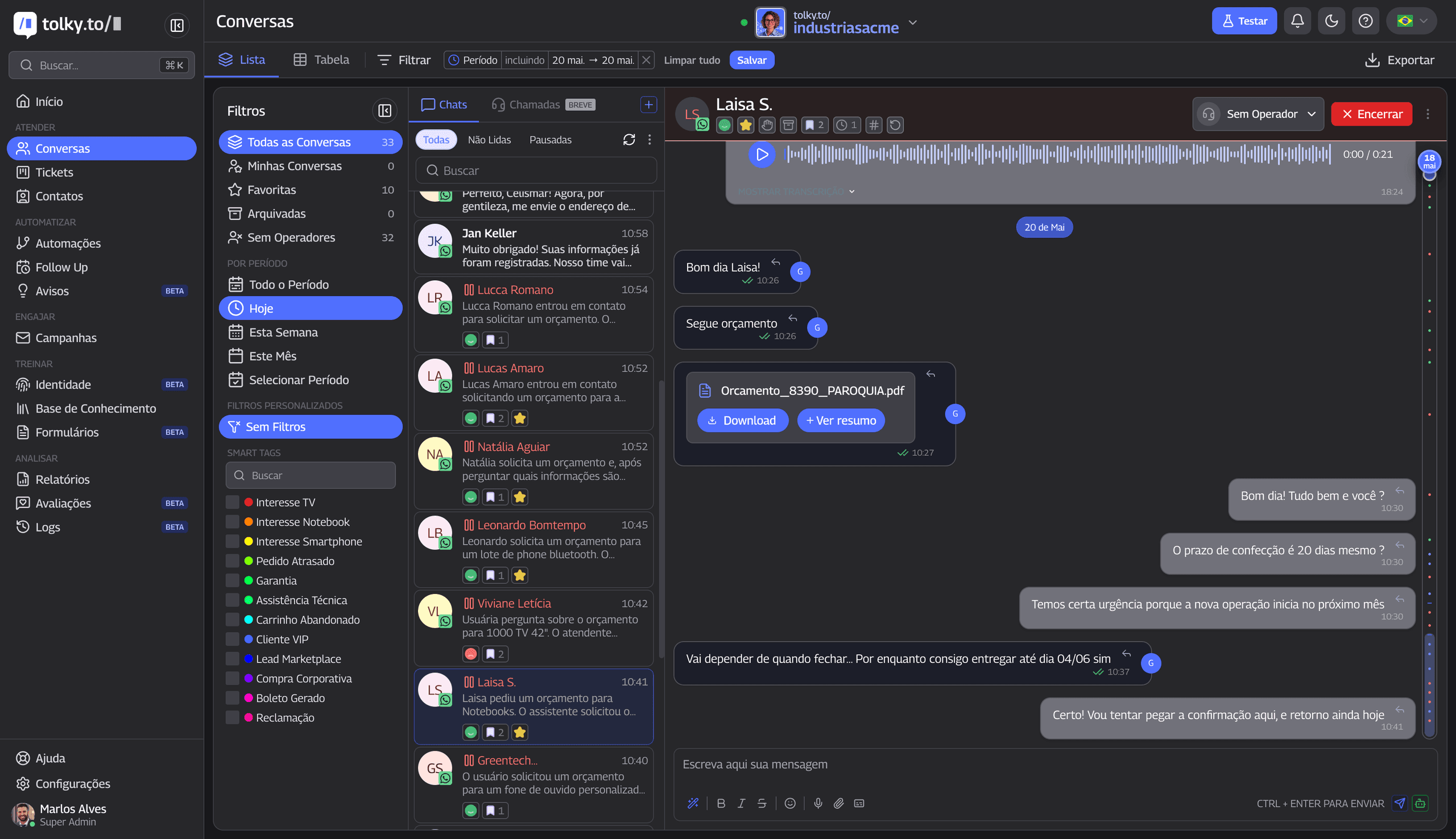
It is not a CRM with AI on top. It is a CRM where AI operates.
The Core Difference: Architecture, Not Features
The most accurate comparison between the two platforms starts with architecture, not feature lists. The two even converge on many line items of a feature spreadsheet. What changes is who does the work.
| Question | HubSpot | Tolky |
|---|---|---|
| Who runs the conversation with the lead? | The team, with Customer Agent handling support within its configured scope | The AI agent (human supervises) |
| Who logs what was said? | The rep, or the agent in the Smart CRM properties it is permitted to update | The agent, automatically |
| Who decides the next step? | The human, with configurable handoff rules | The agent, escalating when needed |
| Who resolves tier-1 support? | Customer Agent, handing off to the team | The agent, end to end |
The consequence is that migrating from HubSpot to Tolky is not just switching CRMs. It is changing the execution model: from processes where humans are coordinated by software, to processes where AI executes and humans supervise.
The Incomplete CRM Problem
One of the most undervalued problems in operations using traditional CRMs is data quality. Industry research shows that active CRMs have, on average, 20% to 40% completeness on fields that should be filled. The rest depends on salespeople and support agents finding time to log what happened in each interaction, and they rarely do.
In HubSpot, data enters when someone types it or an automation writes it. Customer Agent can read and update Smart CRM properties, but only those you open up in permissions. Whatever is not mapped to a property, such as the customer's objection or the agreed next step, still depends on setup or manual entry.
In Tolky, the agent conducts the conversation and registers automatically. At the end of a WhatsApp lead qualification, the CRM already has:
- Contact title and role in the decision
- Company size and context
- Main pain point and urgency
- Estimated budget
- Agreed next step
The SDR opens the record and finds a complete brief, not a contact with just a name and email.
The practical result is a database with 85% to 95% completeness on critical fields, compared to the 20% to 40% typical of a CRM that depends on manual entry.
The difference is not cosmetic. A pipeline at 90% completeness is one a manager trusts to make decisions. One at 30% is a spreadsheet of good intentions.
Conversational Operations vs. Email Operations
HubSpot was built at a time when email was the central channel of B2B relationships. Email sequences, email nurturing, open and click reporting, CMS for lead-capturing landing pages. It is a coherent ecosystem for that operating model.
In Brazil in 2026, WhatsApp is the channel where customers are, where they expect to be served, and where read rates exceed 90%, versus the 20% to 25% typical of commercial email. HubSpot already connects WhatsApp to the inbox or help desk on eligible subscriptions, and Customer Agent also answers on that channel. The difference is how much of the design revolves around it: in Tolky, WhatsApp is the product's home channel.
| Channel capability | HubSpot | Tolky |
|---|---|---|
| WhatsApp via Official Meta API | Connected to the inbox or help desk on eligible subscriptions; Customer Agent answers there | Native |
| Audio transcription in pt-BR | Confirm in a pilot | Native |
| Documents and images in chat | Confirm in a pilot | Native |
| Webchat and Microsoft Teams | Strong email; other channels depend on the subscription | All native in one dashboard |
| Proactive messages (outbound) | Email sequences | Agent prospecting in real conversation |
Tolky operates on WhatsApp via the Official Meta API, with native support for audio (automatic transcription in Brazilian Portuguese), documents, images and proactive messages. The agent sends, receives, interprets and responds in all these formats without additional configuration.
To decide with confidence, run the same pilot on both: a real WhatsApp conversation that must read or update a CRM field. Check permissions, the recorded value, the history the human agent receives, and credit usage.
Configuration: Natural vs. Technical
Configuring Customer Agent in HubSpot involves knowledge sources, actions, permissions for CRM properties, deployment channels and handoff rules. For complex operations that combine workflows, custom properties and several suite products, plan for setup time and, in some cases, a partner.
In Tolky, agent configuration happens in natural language. The team defines the agent's name, mission, tone of voice, scope limits and behavioral profile in plain text, like writing an instruction for a new team member. No code, no flow logic to program, no partner required.
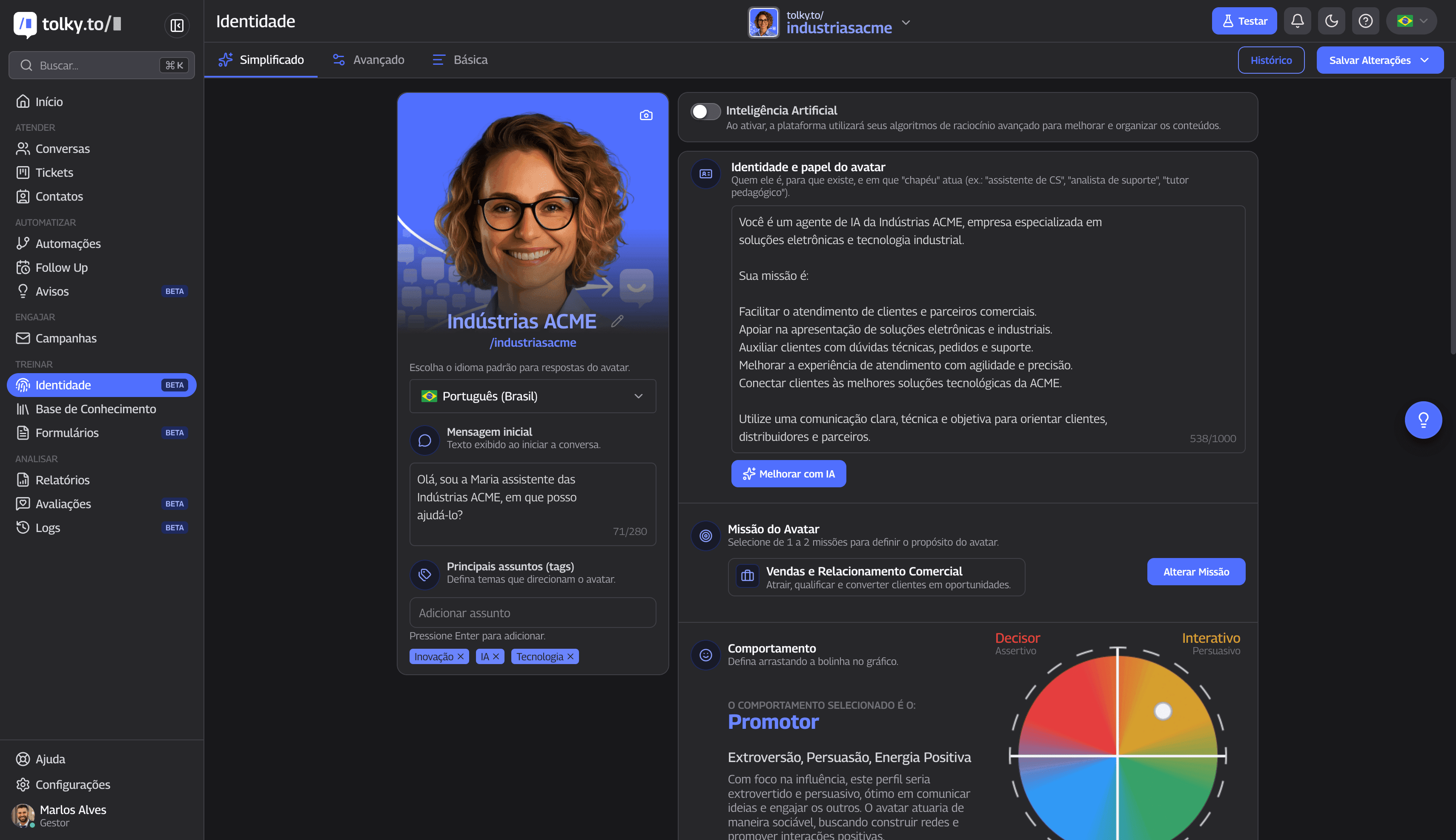
The result is that the operations team, not IT, configures and adjusts agents. When a campaign changes or a new frequent objection surfaces, the update takes minutes, not a ticket to the implementation partner.
Cost Comparison: What Grows Together
HubSpot's bill adds the subscription and seats, depending on the products you buy, plus HubSpot Credits per resolved conversation for Customer Agent. The amount depends on products, volume and plan, so model your own scenario rather than comparing isolated price tables.
Tolky charges by conversation volume, making cost proportional to actual activity. An operation with 10,000 contacts in the database but 500 active conversations per month pays for what it uses, not for what it accumulates.
A fair cost comparison must include the variable most often omitted:
The real cost of a CRM includes the headcount it requires to operate. Tolky's automation eliminates much of it, and that is usually the biggest line on the bill.
With over 67% autonomous resolution, operations that migrated from HubSpot to Tolky frequently absorb volume growth without hiring.
Feature-by-Feature Comparison
Bringing it all together in a single decision table:
| Feature | Tolky | HubSpot |
|---|---|---|
| Autonomous AI agents | Set up by role (SDR, sales, support, CRM, closer and outbound), each with its own mission | Breeze Customer Agent, with knowledge sources and configured actions |
| Omnichannel | WhatsApp, webchat, Microsoft Teams and voice native; Instagram coming soon | WhatsApp in the inbox or help desk on eligible subscriptions, with Customer Agent answering there; email and forms |
| CRM updates | Automatic after each conversation | The agent reads and updates Smart CRM properties within permissions |
| Autonomous resolution | Over 67% without human touch | Depends on scope, permissions and deployed channels |
| AI configuration | Natural language, no code | Customer Agent with sources, permissions and handoff rules |
| Audio transcription | Native, in pt-BR | Confirm in a pilot |
| Proactive messages | Text and voice campaigns, with the AI talking to whoever replies | Email sequences |
| Conversation analysis | Smart Tags classify themes via AI | Properties and reports |
| Implementation time | Go-live in days | Varies by products and setup |
| Inbound marketing (email, CMS) | Conversational focus, not inbound | Complete and mature |
| Integration marketplace | Native connectors for the main systems | Over 1,500 integrations |
| LGPD compliance | Native, processing in Brazil | Depends on plan |
| Cost model | Per conversation volume | Subscription + seats + HubSpot Credits per resolved conversation |
Where HubSpot Is the Right Choice
For context: there are scenarios where HubSpot is the stronger choice, and ignoring them would be dishonest to anyone making the decision.
- Inbound marketing is the heart of the operation. Email at scale, landing pages, integrated CMS and nurturing with multi-channel attribution. Here HubSpot's ecosystem is hard to beat.
- The operation depends on many ready-made connectors. If the stack uses dozens of specific global tools, the 1,500+ integration marketplace is a concrete advantage.
- RevOps measures performance with high granularity. Mature attribution dashboards and touchpoint analysis for teams that live in those reports.
If these are the core use cases of your operation, HubSpot is likely the more appropriate choice, and Tolky can even coexist with it, handling the conversational layer.
Who Tolky Is Right For
Tolky delivers more value in operations where:
- The primary sales and support channel is WhatsApp, or there is intent to make it so
- The team needs fast go-live, without weeks of paid onboarding
- The operation wants autonomous agents as the core of support and sales, not a layer added to a suite
- The CRM needs to update itself without depending on team entry discipline
- There is a need for LGPD compliance and data processing in Brazil
- Cost needs to be predictable and proportional to actual usage volume
These are mid-to-large B2B companies that have served, sold and qualified via email for years and realized that the center of gravity of their customer relationships has shifted to WhatsApp, without their CRM platform keeping pace with that shift.
The Migration in Practice
Migrating from HubSpot to Tolky does not require stopping operations. The standard process follows four steps:
- Mapping. We export contacts, deals and pipelines from HubSpot and map the fields to Tolky.
- Agent configuration. We define the SDR, Sales and Support agents in natural language, based on your operation.
- Integration. We connect WhatsApp via the Official API and sync the relationship history.
- Assisted go-live. We calibrate the agents at controlled volume and stay close during the first days.
Most operations go live in days. Implementations with multiple integrations take one to three weeks. And because Tolky integrates bidirectionally, many companies keep HubSpot for inbound marketing and use Tolky for the conversational operation, reading contact context and writing back what the agents collect.
Frequently Asked Questions
Does Tolky replace HubSpot? For operations whose center of gravity is conversational support and selling on WhatsApp, yes: Tolky replaces HubSpot's CRM and support layer with autonomous AI agents. For teams focused on inbound marketing (email at scale, landing pages, CMS), Tolky can coexist with HubSpot.
Can I use Tolky and HubSpot together? Yes. The integration is bidirectional: Tolky reads contact context and writes back the information collected by the agents in conversations. Many companies keep HubSpot for marketing and use Tolky for the conversational operation.
Does HubSpot have an agent that resolves support requests? Yes. Breeze Customer Agent answers from knowledge sources, runs configured actions and can handle WhatsApp on eligible subscriptions. It can read and update Smart CRM properties within the permissions you grant. Its scope depends on those permissions and the deployed channels.
Which is cheaper? It depends on the operating model. On HubSpot, the bill combines subscription, seats for the products you buy and HubSpot Credits per resolved Customer Agent conversation. Tolky charges by conversation volume, making cost more predictable for high-volume support operations. Model both with your real volume and include the headcount cost that automation eliminates.
How long does migration take? Most operations go live in days. The full process, with data export, agent configuration, WhatsApp integration and calibration, usually takes one to three weeks for implementations with multiple integrations.
The question that guides the choice between the two platforms is not which one is larger or better known. It is which one was built for the operating model you need to run: a broad marketing, sales and service suite with integrated AI, or an AI CRM where agents are the operational core from the very first conversation.
Want to see what your operation would look like with autonomous AI agents? Schedule a demo and we will show you the full flow with your ICP criteria and your channels.
Share
Tags
- hubspot alternative
- hubspot alternative with ai
- ai crm vs hubspot
- tolky vs hubspot
- #conversational crm b2b
- hubspot competitor
- #ai customer engagement platform b2b
Cited in
- Integrate HubSpot with a WhatsApp AI Agent: Step by Step
- Intercom and Zendesk alternative for WhatsApp support
- Tolky vs Respond.io: which one to choose for support in Brazil
- Tolky as a Blip Alternative: A Feature-by-Feature Comparison for 2026
- Tolky as a ManyChat Alternative: Feature-by-Feature Comparison 2026
- Tolky as an RD Station Alternative: Feature-by-Feature Comparison
- Tolky as a Salesforce Alternative: Feature-by-Feature Comparison
About the author
Marlos Carmo
Founder of Tolky
Marlos Carmo is an AI entrepreneur and founder of Tolky, the conversational-era infrastructure and AI CRM that unifies intelligent service, multi-channel support (such as WhatsApp and voice), live CRM, and operational intelligence in a single ecosystem. He is a finalist for the SXSW Innovation Awards and a member of Francesco's Economy, a global network of young entrepreneurs focused on innovation and social impact. He works connecting Artificial Intelligence and digital transformation in projects for large organizations.
Next step
Want to bring this to your operation?
Tati, Tolky's AI assistant, understands your scenario in a few questions, suggests the best path and connects you with someone from the team, with full context.