Single-agent vs multi-agent architecture: how to choose the right one
Single-agent vs multi-agent: what each architecture is, when each one wins on cost, latency and debugging, the signs it is time to split, and a decision table.
TL;DR
In a single-agent architecture, one language model with instructions and tools handles the whole task; in a multi-agent architecture, an orchestrator agent splits the work among specialists. Start with a single agent: it costs less, answers faster and is easier to debug. Split only when domains need instructions, tools or permissions that do not fit well in one agent.
Share
Anyone putting AI in front of customers runs into the same question early on: can one well-configured agent handle it, or is a team of agents with a coordinator the better call? The answer affects cost, response time, how easy it is to fix mistakes and who will maintain the system.
Many teams start with the most sophisticated design because it looks more robust, and only discover the price in production. This guide helps you decide between single-agent vs multi-agent with objective criteria, migration signals and a decision table. If your question is already how to coordinate several agents, the AI agent orchestration guide covers patterns, layers and a production checklist.
Updated in November 2026.
What is a single-agent architecture?
A single-agent architecture is a design in which one AI agent, that is, an LLM with instructions, memory and tools, receives the request, decides the steps and carries out the task from start to finish. The agent runs in a loop: it reads the context, picks a tool, observes the result and repeats until it is done or hits a stop condition.
Tools give the agent its reach (looking up an order, opening a ticket, booking a visit), triggered through function calling or MCP servers.


A single agent can have many tools and a large knowledge base; what defines it is one "brain" making the decisions, with one set of instructions and one history.
In Building effective agents (December 19, 2024), Anthropic recommends "finding the simplest solution possible, and only increasing complexity when needed." For most customer service, the simplest solution is a single, well-integrated agent.
What is a multi-agent architecture?
A multi-agent architecture is a design in which several specialized agents work together, usually coordinated by an orchestrator agent that receives the request, decides who acts and combines the results. Together they form a multi-agent system, and each specialist has the instructions, tools and permissions of its own domain.


Orchestrator and specialists
The orchestrator agent is the agent that plans and delegates: it understands the intent, calls the right specialist and consolidates the answer. Anthropic describes this pattern (orchestrator-workers) as one in which "a central LLM dynamically breaks down tasks, delegates them to worker LLMs, and synthesizes their results." Specialists might be, for example, a billing agent, a technical support agent and a sales agent.
Routing and handoffs between agents
There are two common ways to pass work between agents. The OpenAI Agents SDK documentation (checked on November 18, 2026) calls the first one agents as tools: a manager agent keeps control of the conversation and calls specialists as if they were tools. The second is the agent handoff: a triage agent handles the routing and the chosen specialist takes over the conversation.
Do not confuse a handoff between agents with a handoff to a human. The first changes which agent answers; the second takes the AI out of the conversation and hands the case to a person with a summary, as the rules for AI-to-human handoff explain.
Single-agent vs multi-agent: what is the practical difference?
The practical difference is the price of coordination: a single agent spends fewer tokens, answers faster and is easier to debug; a multi-agent setup isolates domains and allows parallel work.
| Criterion | Single agent | Multi-agent |
|---|---|---|
| Cost | Lower: one reasoning loop per step | Higher: each agent consumes its own tokens |
| Latency | Lower: no hand-offs between agents | Higher when agents run in sequence; lower for parallelizable tasks |
| Debugging | One history, one prompt, one path | Several histories and routing decisions to trace |
| Reliability | One decision point | A routing or planning error spreads to the specialists |
| Context | Everything in the same context window, which can fill up | Each specialist sees only what it needs; the orchestrator decides what to pass |
| Permissions | One set of access rights for everything | Each agent accesses only its domain |
| Maintenance | One set of instructions to review | Several agents and the rules between them |
In its post on its multi-agent research system (June 13, 2025), Anthropic reports that agents use about 4 times more tokens than chat and that multi-agent systems use about 15 times more. The same post notes that the multi-agent system outperformed a single agent by 90.2% on the company's internal research eval: the gain is real, but it has a price and depends on the task.
When does a single agent win?
A single agent wins when the task belongs to one domain, the context has to be shared from start to finish and the customer is waiting for a real-time answer. That describes most customer service.
- Continuous conversation with the customer: the agent has to remember what was said three messages ago. Splitting the conversation across agents means passing context at every hand-off, and that is where conversational memory gets lost.
- One domain, or closely related ones: product questions, order status, scheduling. A well-organized knowledge base does the job, as the guide on training an agent with a knowledge base shows.
- Response time matters: in chat and voice, every hand-off between agents adds seconds.
- Small team to maintain it: reviewing one agent is a task; reviewing five plus the rules between them is a project.
- Controlled budget: with fewer tokens per conversation, the cost per conversation stays predictable.
Anthropic itself notes in its 2025 post that domains in which all agents must share the same context are not a good fit for multi-agent systems.
When does a multi-agent architecture pay off?
A multi-agent architecture pays off when the task splits into independent parts, with instructions, tools or permissions that do not sit well together in one agent. OpenAI's Building agents track (checked on November 18, 2026) says multi-agent "shouldn't be your go-to solution," but something to consider when you have separate tasks that do not overlap.
- Truly distinct domains: billing, technical support and sales with different rules, systems and tone, each with long instructions.
- Permissions that must be isolated: the agent that answers questions should not be able to refund a payment. Separate agents mean separate access.
- Parallelizable work: research across several sources at once, analysis of many documents, independent lookups. This is where the gain Anthropic measured shows up.
- Different teams owning each part: finance maintains the billing agent, support maintains the support agent, and neither touches the other's prompt.
- Evaluation per specialist: each agent is tested on its own, with its own AI evaluation.
This is the territory of agentic AI in long-running processes, more than of quick customer conversations.
What are the signs it is time to split?
It is time to split a single agent when it starts failing from too much responsibility, not from a lack of information. First, confirm that clearer instructions or better-described tools do not fix it.
- Instructions full of exceptions: the prompt has become a tree of "if it is billing, do this; if it is technical, do that," and every tweak breaks another case.
- Tools that get mixed up: the agent calls the wrong tool because two of them do similar things. Sometimes renaming and describing them better is enough; if not, split by domain.
- Conflicting access rules: part of the conversation needs a permission the rest should not have.
- Context overflowing: instructions, knowledge and history no longer fit comfortably in the context window, and quality drops at the end of long conversations.
- Metrics getting worse in one topic only: the AI resolution rate falls for billing while everything else is fine.
How to split without breaking customer service
- Measure first: resolution, transfers and cost per conversation for the current agent.
- Split one domain at a time: start with the topic that fails most.
- Start with simple routing: a clear rule for who handles what, before an orchestrator that plans on its own.
- Test with real conversations and compare with the baseline.
- Keep the path to a human, with context, at every agent hand-off.
What are the common mistakes when choosing an architecture?
The most common mistake is choosing the architecture for the nicest diagram rather than for the problem.
- Starting a pilot with five agents: the project gets expensive and slow before it proves any value. Start with one.
- Splitting by org chart instead of by task: one agent per department, when conversations cross departments, means a hand-off on every message.
- Losing context in the agent handoff: the specialist receives only the last message and asks again what the customer already said.
- An orchestrator that calls every agent "just in case": cost goes up without improving the answer.
- No tracing per agent: when something goes wrong, nobody knows whether routing or the specialist failed. See what to monitor in AI governance in customer service.
- Confusing a workflow with an agent: Anthropic separates workflows, which follow paths defined in code, from agents, which decide their own steps. Many tasks that seem to need several agents are a fixed flow with an agent at a single point.
Decision table: which architecture to use in each case?
The general rule is simple: a single agent by default, a workflow when the path is fixed, and multi-agent when there are independent domains or parallel work. Use the table as a starting point.
| Scenario | Recommended architecture | Why |
|---|---|---|
| Product questions and order status on WhatsApp | Single agent | One domain, continuous context, fast answers |
| Lead qualification with scheduling | Single agent with tools | Few tools, one conversation |
| Process with fixed steps (open a ticket, notify, log) | Workflow with an agent at one point | The path is known; the AI only interprets |
| Support, billing and sales with distinct rules and systems | Multi-agent with routing | Separate domains and permissions |
| Research across many sources or batch document analysis | Multi-agent with an orchestrator | Parallelizable work |
| High-impact action (refund, cancellation) | Either, with human approval | The risk calls for human-in-the-loop |
To estimate the cost of each design, see how much it costs to implement an AI agent.
Where does Tolky fit?
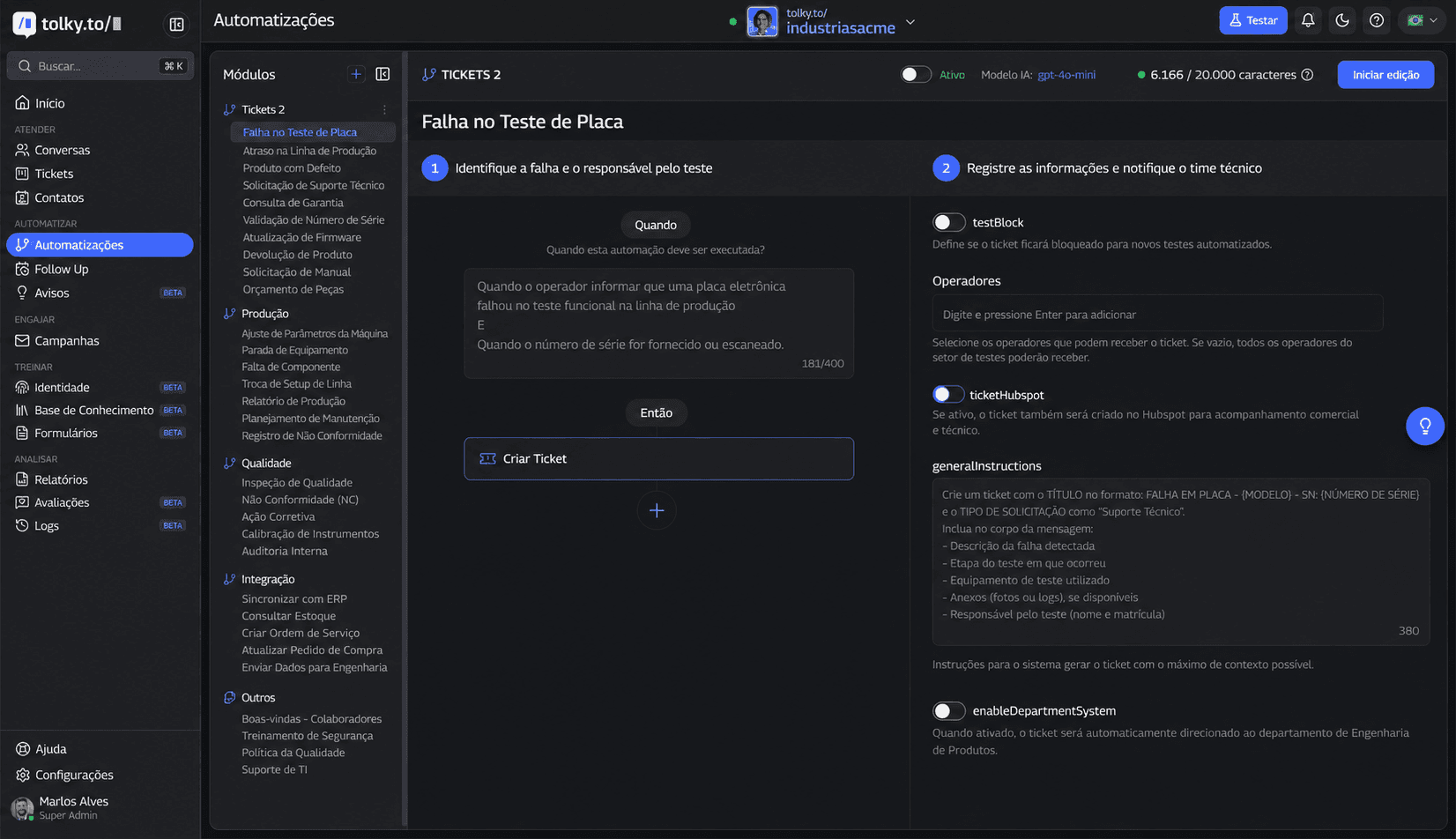
Tolky is an AI conversational CRM in which a company configures AI agents by mission (such as support, sales and relationships, or engagement) and connects them to automations, Flows, the CRM and the team, without orchestration code. The decision in this guide becomes configuration.
- The agent: in the agent's identity you choose the mission and write the scope and limits, forbidden topics and what to do when it cannot resolve something. To get started, there are ready-made AI agent prompts.
- The fixed path: in automations, each module has a plain-language rule for when to run and an action, such as creating a ticket. In Flows, the Decision step splits the paths and the Agents step puts AI only where you want it.
- The systems: HTTP requests, webhooks, MCP tools and more than 1,000 apps in the Integration node; the list is on the integrations page.
- The person: transfer rules written in plain language and the Transfer to human step, which hands over the conversation history and summary.
What Tolky is not: a framework for building any agent graph in code. For autonomous research or batch documents, an agent framework is the right path. For customer conversations on WhatsApp, the website, email, Teams and voice, see AI customer service on WhatsApp.
Frequently asked questions
What is a single-agent architecture?
It is a design in which one AI agent, a language model with instructions, memory and tools, receives the request and carries out the whole task. It decides the steps in a loop until it finishes or hands the case to a person.
What does an orchestrator agent do?
The orchestrator agent receives the request, identifies the intent, decides which specialized agents to call and in what order, and combines the results into one answer. It is the center of a multi-agent architecture, so a mistake it makes affects every specialist.
Is multi-agent always better than a single agent?
No. Multi-agent uses more tokens, adds latency when agents run in sequence and is harder to debug. It is worth it when there are independent domains, permissions that must be isolated or work that can run in parallel.
What is the difference between an agent handoff and a handoff to a human?
In an agent handoff, one agent passes the conversation to another, specialized agent. In a handoff to a human, the AI leaves the conversation and a person takes over with the history and summary. Both require the context to travel with the conversation.
How many tools can a single agent handle?
There is no fixed number. Similar tools that the model confuses get in the way more than the count itself. Describe each one clearly and split by domain if the mistakes persist.
Does Tolky use a single agent or multiple agents?
Tolky does not ask you to choose the architecture in code: you configure agents by mission, automations and Flows with decisions and transfer to a human.
Conclusion
Choosing between a single-agent and a multi-agent architecture is a trade-off between simplicity and specialization. Start with one well-integrated agent, measure resolution and cost, and split only when the signs show up: instructions full of exceptions, tools that get mixed up, conflicting permissions or parallelizable work. Whatever the design, handing over to a person with context is still part of the architecture. Let's talk?
See the plans, explore Flows, read the orchestration guide or talk to the team →
Share
Tags
- single-agent architecture
- single-agent vs multi-agent
- orchestrator agent
- ai agent architecture
- multi-agent system
- agent handoff
- agent orchestration
- #conversational CRM
About the author

Co-founder of Tolky
Marlos Carmo is an AI entrepreneur and founder of Tolky, the conversational-era infrastructure and AI CRM that unifies intelligent service, multi-channel support (such as WhatsApp and voice), live CRM, and operational intelligence in a single ecosystem. He is a finalist for the SXSW Innovation Awards and a member of Francesco's Economy, a global network of young entrepreneurs focused on innovation and social impact. He works connecting Artificial Intelligence and digital transformation in projects for large organizations.
Next step
Want to bring this to your operation?
Tati, Tolky's AI assistant, understands your scenario in a few questions, suggests the best path and connects you with someone from the team, with full context.
Share