CRM with access control: roles, permissions and the audit trail
How a CRM with access control works: roles and permissions, least privilege, the audit trail, SSO login, what Brazil's LGPD requires and a checklist to evaluate one.
TL;DR
A CRM with access control defines, by profile, who sees each conversation and contact, who exports and who deletes, and records every action in an audit trail. The rule behind the setup is least privilege: each person gets only the access their role needs. Brazil's LGPD (art. 46) requires technical and administrative measures against unauthorized access, and profiles, activity logs and individual logins are the practical way to meet it in a CRM.
Share
The customer base is usually the sales team's most valuable asset, and also the easiest one to walk out with. A sales rep exports the list the day before resigning, someone deletes a customer's history by accident, a conversation with billing details sits on an agent's personal phone. None of this takes an attack: all it takes is a CRM where everyone can do everything.
This guide explains what a CRM with access control is, how to design roles and permissions, what to record in an audit trail, what Brazil's data protection law (LGPD) requires and how to roll it out without slowing the team down.
Updated in November 2026.
What is a CRM with access control?
A CRM with access control is a CRM where each user signs in with their own account and can only see and do what their profile allows, with every relevant action recorded. It answers three questions: who the person is (authentication), what they can do (authorization) and what they did (audit).
In practice, there are four pieces: individual logins, access profiles by role, data scope (for example, only your own conversations) and an activity log. The role-based model is also known as RBAC (role-based access control). In a conversational CRM, it matters even more, because the CRM stores the entire conversation.
What risks does access control prevent?
The most common risks in a CRM without access control are internal: people inside the company seeing, taking or deleting what they shouldn't.
- The rep who leaves with the base. If every user can export contacts, the whole book of business fits in a spreadsheet.
- Uncontrolled exports. The downloaded file becomes a copy outside the system, with no permission and no record. Exporting should be the exception, with an owner.
- WhatsApp conversations on a personal phone. The history leaves with the person, and the company doesn't even know what was said. See why WhatsApp is not a CRM.
- Accidental or deliberate deletion. Deleting a conversation or clearing history should be a rare permission, with a record.
- Shared passwords. With one login for everyone, nobody knows who did what.
- Former employees with active access. Without an offboarding process, the account keeps working after the person leaves.
How do roles and permissions work in a CRM?
An access profile bundles the permissions of a role, and each user gets one profile: when someone changes roles, they change profiles, with no person-by-person setup. Permissions are set by module (conversations, contacts, reports, settings) and by action (view, edit, export, delete).


Profiles by role
An illustrative starting point to adapt to your operation:
| Profile | Views | Edits | Exports | Deletes |
|---|---|---|---|---|
| Agent or sales rep | Only their own conversations | Only their own conversations | No | No |
| Supervisor or manager | The team and its reports | Team conversations | Reports | No |
| Finance or collections | Contacts and billing data | Billing data | On request | No |
| Administrator | Everything | Everything, including profiles | Yes, logged | Yes, logged |
| Viewer or auditor | Reports and activity log | Nothing | Activity log | No |
Scope: your own conversations or the whole team
Scope is the slice of data inside a permission. Two people can both have the "view conversations" permission, but one sees only those assigned to them and the other sees all of them. Scope is what answers "who sees which accounts".
The principle of least privilege
Least privilege means giving each person only the access they need to do their job. The agent replies but doesn't export; the manager follows the team but doesn't delete; the administrator does everything, which is why there are few of them. The LGPD has a similar principle, necessity (art. 6, III), which limits processing to the minimum needed for its purpose.
What is an audit trail in a CRM?
An audit trail (or activity log) is the history of actions taken in the CRM: who did it, in which module, what action, what changed and when. It turns a suspicion ("did someone export the base?") into an answer with a name and a time.


A good log has four qualities:
- Identity: each row shows the user, which only works with individual logins.
- Detail: module, action, description, date and time.
- Search: filters by period, person and action type.
- Export: the log can be downloaded for legal or internal audit.
With AI agents, the trail has a second layer: what the AI used to answer. See AI governance in customer service.
How does login fit into access control?
Login is the first layer of control: it guarantees that every recorded action belongs to an identified person. There are three common methods, and they can coexist in the same account.
- Email and password: the basic option, which works in any company.
- Google or Microsoft account: people sign in with the work account they already use, with no extra password to remember.
- Single sign-on (SSO) with SAML: the company's identity provider authenticates the person. When HR deactivates someone in the directory, CRM access goes with it.
SSO fixes the most overlooked problem, former employees with active access, and is often an IT requirement in companies with many tools.
What does the LGPD require for access control in a CRM?
The LGPD doesn't list software features, but it requires security measures against unauthorized access, and profiles, individual logins and activity logs are the practical way to meet that in a CRM. The core is article 46.
Article 46 says, in free translation, that "processing agents must adopt technical and administrative security measures able to protect personal data from unauthorized access and from accidental or unlawful situations of destruction, loss, alteration, communication or any form of inappropriate or unlawful processing". Paragraph 2 adds that these measures apply from the design of the product or service through its execution (Law No. 13,709/2018, in Portuguese, accessed on November 18, 2026).
Other parts of the law connect to the topic:
- Art. 6, VII: security as a principle of all processing.
- Art. 37: the controller and the processor keep records of processing operations.
- Art. 48: the controller notifies the ANPD (Brazil's data protection authority) and the data subject of any security incident that may cause relevant risk or harm.
The notification deadline is set by ANPD Resolution No. 15/2024: three business days, unless a specific law sets another (ANPD page on incident notification, accessed on November 18, 2026). The ANPD states that incident records must be kept for at least five years (ANPD news release of April 26, 2024). Without an audit trail, it's hard to know what happened within three days. This is not legal advice: confirm your case with your data protection officer or legal team, and see LGPD in the glossary.
Checklist: how to evaluate a CRM's access control
Evaluate a CRM's access control by asking for a demo of each item with a test user, not by reading the feature list on the website.
| Item | What to ask | Red flag |
|---|---|---|
| Individual logins | Does each person have their own user? | A user shared by the team |
| Google, Microsoft and SSO | Can people sign in with a work account or SAML? | SSO only as a separate project, with no defined plan |
| Custom profiles | Can I create profiles beyond the built-in ones? | Only "admin" and "user" |
| Permission by action | Are view, edit, export and delete separate? | Whoever views can also export |
| Scope | Can I limit someone to their own conversations? | Every rep sees the whole base |
| Export and delete | Do they require their own permission and get logged? | Any user exports or deletes |
| Activity log | Does it show person, action and time, with filters and export? | Log only on request to support |
| Offboarding | Can I block or remove a user in one click? | Former employee's account still active |
| Official channels | Does WhatsApp run on the official API, off personal phones? | Service run on employees' devices |
For the full purchase review, including data residency and contracts, use the guide to security and privacy in AI platforms. To compare vendors, see the best CRMs for WhatsApp in 2026.
How to roll out access profiles in five steps
The rollout starts with a map of roles, not with the settings screen: first decide who needs what, then turn it into profiles.
- List the roles. Agent, sales rep, supervisor, finance, marketing. Each one becomes a candidate profile.
- Build the matrix. By module, mark what each profile views, edits, exports and deletes, starting from the minimum.
- Define the scope. Decide who sees only their own conversations and who sees the whole team.
- Turn on the right login. Individual users for everyone; SSO if the company has an identity provider.
- Review every quarter. Check the log, the exports and the user list. Anyone who leaves loses access the same day.
The most common mistake is handing out administrator profiles "so nobody gets blocked". Start restricted and open up when a real need shows up.
How does access control work in Tolky?
Tolky is a conversational AI CRM with access profiles by module and action, a scope limited to your own conversations, an exportable activity log and login with email, Google, Microsoft or SSO with SAML on Enterprise. The verified controls are listed on the security and privacy page.
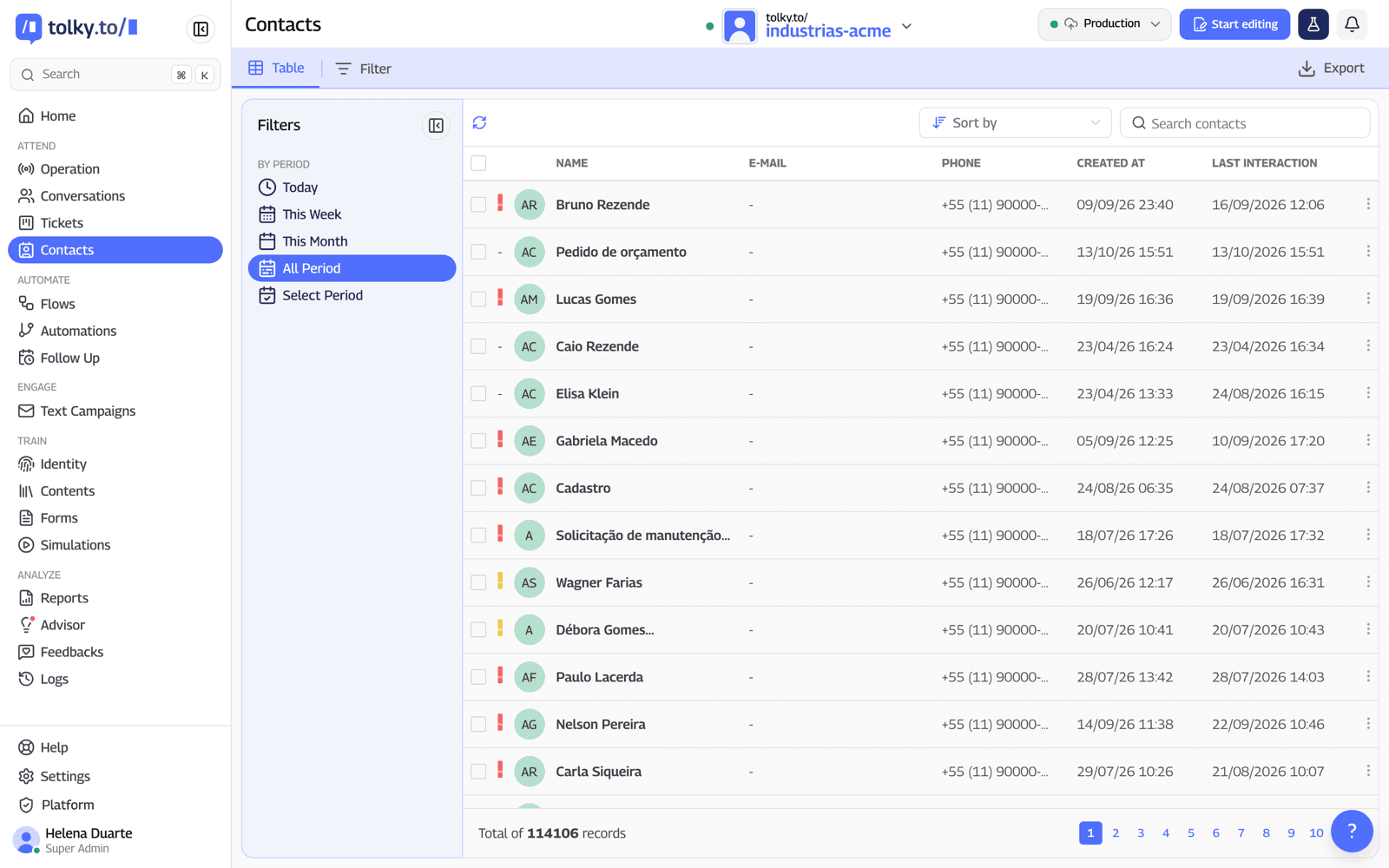
- Built-in and custom profiles. Administrator, Manager, Operator and Viewer, plus your own profiles with permissions by module and action.
- Separate actions. Viewing, editing, exporting contacts, exporting conversations, deleting a conversation, clearing history and pausing the AI are distinct permissions.
- Per-person scope. You can limit someone to the conversations and tickets where they are the operator, and choose which reports each profile sees.
- Profile per AI agent. The same person can have a different profile in each agent on the account.
- Offboarding. The administrator deactivates or removes users and can block access for 24 hours, 7 days or permanently.
- Activity log. The Logs screen shows user, module, action, description, date and time, with filters and export to CSV or Excel.
- Encrypted sensitive data. Data from sensitive forms is encrypted with AES-256, and only people with permission can see it.
Across the plans, the activity log comes with all of them; access profiles and exports start on Starter; single sign-on with SAML is Enterprise only. WhatsApp runs on the official API, so the conversation lives in Tolky's CRM, not on the agent's phone.
What Tolky doesn't do: it doesn't offer data anonymization or a customer-configurable retention period, and the own-items restriction currently applies to conversations and tickets.
Frequently asked questions
What is access control in a CRM?
It's the set of rules that defines who gets into the CRM, what each person sees and does and what gets recorded, through individual logins, profiles by role, data scope and an activity log.
What's the difference between an access profile and a permission?
A permission is one action in one module, such as exporting contacts. A profile is the set of permissions for a role, such as sales rep. A person inherits the permissions of the profile they're given.
How do I stop a sales rep from taking the customer base?
Remove the export permission from anyone who doesn't need it, limit each rep to their own conversations and track exports in the log. When someone leaves, remove their access the same day.
Does the LGPD require access profiles in a CRM?
The law doesn't name software features, but article 46 requires technical and administrative measures against unauthorized access. Profiles, individual logins and activity logs are the most direct way to show those measures in a CRM.
What should an audit trail show?
Who took the action, in which module, what action and when. The log needs filters by period, person and action, and it must be exportable.
Do I need SSO to have access control?
No. Individual logins with email and password or a Google or Microsoft account already make sure every action has an owner. SSO with SAML helps companies with an identity provider, because deactivating someone in the directory cuts off every access.
Conclusion
A CRM with access control isn't red tape: it's what lets you open the CRM to the team without losing control of the base. Start with a map of roles, apply least privilege, separate export and delete from the other actions and review the audit trail. That way, "who did this?" always has an answer.
See the plans, explore Tolky's CRM, see the security controls or talk to the team →. Let's talk?
Share
Tags
- crm with access control
- crm access control
- access profiles
- crm user permissions
- audit trail
- crm data privacy
- single sign-on sso
- least privilege
About the author

Co-founder of Tolky
Marlos Carmo is an AI entrepreneur and founder of Tolky, the conversational-era infrastructure and AI CRM that unifies intelligent service, multi-channel support (such as WhatsApp and voice), live CRM, and operational intelligence in a single ecosystem. He is a finalist for the SXSW Innovation Awards and a member of Francesco's Economy, a global network of young entrepreneurs focused on innovation and social impact. He works connecting Artificial Intelligence and digital transformation in projects for large organizations.
Next step
Want to bring this to your operation?
Tati, Tolky's AI assistant, understands your scenario in a few questions, suggests the best path and connects you with someone from the team, with full context.
Share