WhatsApp AI agent with n8n: step-by-step setup and when to migrate
How to build a WhatsApp AI agent with n8n and the official API: credentials, trigger, AI Agent node with memory, testing, total cost and the signs it is time to migrate.
TL;DR
A WhatsApp AI agent with n8n connects the official WhatsApp API (Cloud API) to a workflow with the WhatsApp Trigger, the AI Agent node with a model, memory and tools, and the WhatsApp Business Cloud node to reply. Building it takes a few hours; running it takes a team inbox, a queue, a CRM, monitoring, 24/7 hosting and care with personal data. When that outweighs the workflow, it is time to migrate, and Tolky Flows import n8n JSON.
Share
You can build a WhatsApp AI agent with n8n in an afternoon: a trigger receives the message through the official API, an AI agent node thinks and a WhatsApp node replies. The most popular tutorials stop there.
They do not show the next day: the customer who asks for a person, the token that expires, the duplicate reply, the bill from Meta. This guide covers the step-by-step setup, what is missing to run it as an operation, the total cost and when to migrate.
Updated in November 2026.
What is a WhatsApp AI agent with n8n?
A WhatsApp AI agent with n8n is an n8n workflow that receives WhatsApp messages through the official API, hands each one to a language model with memory and tools, and sends the reply back to the customer. The AI agent decides what to say and when to use a tool, such as looking up a spreadsheet.
The pieces: the WhatsApp Cloud API, n8n, the language model and the memory of each conversation.
n8n is an excellent automation tool, but it is not a customer service platform: it has no team inbox, queue or CRM.
What do you need before you start?
You need an n8n instance reachable over HTTPS, a Meta app with WhatsApp, a phone number and an API key for a language model. The list follows the n8n WhatsApp credentials documentation, checked on November 19, 2026.
- n8n in the cloud or on your server. n8n Cloud is a paid subscription; the self-hosted version is free for internal use under the Sustainable Use License (license FAQ).
- A Meta developer account and business portfolio, with an app that has the WhatsApp product and is in Live mode.
- A phone number. Meta provides a test number; for production, use the business number. See how to get the official WhatsApp Business API.
- An API key for a language model, with a spending cap.
- A public address with a valid certificate. Meta only delivers webhooks to HTTPS endpoints and does not accept self-signed certificates (Meta documentation, checked on November 19, 2026).
The n8n installation documentation recommends self-hosting only for experienced users.
How to build a WhatsApp AI agent in n8n, step by step
The minimum workflow has five steps: credentials, an incoming message trigger, a filter, the AI Agent node with a model, memory and a tool, and the reply. Node names are the ones in the n8n documentation on November 19, 2026.


| Step | n8n node | What to configure | How to check |
|---|---|---|---|
| 1 | Credentials | API key (Access Token and Business Account ID) and OAuth2 (Client ID and Client Secret) | Credential test passes |
| 2 | WhatsApp Trigger | Messages event | A message to the number creates an execution |
| 3 | If | Continue only with customer messages | Status updates never reach the agent |
| 4 | AI Agent | Chat model, memory, at least one tool and instructions | The reply remembers what was said |
| 5 | WhatsApp Business Cloud | Send operation, sender and customer number | The reply arrives on the phone |
1. Create the Meta credentials in n8n
The WhatsApp Business Cloud node uses an API key credential, with the Access Token and the WhatsApp Business Account ID (under WhatsApp > API Setup in the Meta app). The WhatsApp Trigger uses OAuth2, with the App ID and App Secret from App settings > Basic.
The detail that breaks many agents on day two: the token from the setup screen is a user access token, which expires within hours. For production, Meta says to use a long-lived system user access token (access tokens, checked on November 19, 2026).
2. Set up the incoming message trigger
Use the WhatsApp Trigger node with the Messages event. According to the WhatsApp Trigger documentation, WhatsApp allows only one webhook per app: switching between the test and production URLs overwrites the registration. Publishing the workflow also does not subscribe the app to the WhatsApp Business Account; without that subscription, nothing arrives and no error shows up.
The Messages event also carries status updates (sent, delivered, read), which Meta delivers in the same field. An If node right after the trigger lets only customer messages through.
3. Build the AI Agent node with memory and tools
The AI Agent works with a chat model and at least one connected tool (AI Agent in n8n). Write the system instructions (who the agent is, what it answers, when it hands off to a person) and connect the tool, such as an HTTP request to your system.
For memory, Simple Memory asks for a Session Key: use the customer's number, so each conversation has its own. The Simple Memory documentation warns that it does not work in production when n8n runs in queue mode; in that case, use a database-backed memory such as Postgres Chat Memory.
4. Send the reply and test
In the WhatsApp Business Cloud node, use the Send operation, with the customer's number from the trigger as the recipient. Test with Meta's test number by sending off-topic questions, a voice note and three messages in a row.
There are ready-made community workflows with AI on the WhatsApp Business Cloud integration page at n8n; review every node before using one.
What are the most common setup mistakes?
The most common mistakes are infrastructure, not AI: duplicate messages, an overwritten webhook, an unsubscribed app and message types nobody handled.
- Duplicate replies. Meta retries unacknowledged webhooks for up to 7 days and recommends handling repeats. Store each message ID.
- The agent replying to statuses. Without the filter, every "delivered" can trigger a reply.
- Total silence. The app is not subscribed to the WhatsApp Business Account.
- A workflow that stops after a test. The test URL overwrote the production one.
- Voice notes, images and documents. The trigger receives them, but the agent only understands what you handle.
- Made-up answers. Missing clear instructions and a knowledge base.
What is missing to run the agent as an operation?
A workflow that replies is not customer service: what is missing is where the team works, how a case reaches a person and how the business measures and protects what happens.
- An inbox for humans. n8n has no conversation screen for the team to reply on the same number, with WhatsApp multi-agent inbox.
- Queue and handoff with context. The case reaches the right person with a summary. See the rules for AI-to-human handoff.
- CRM and history in one place, not scattered across n8n executions.
- Templates to reach customers outside the 24-hour window.
- Metrics for AI resolution, response time and handoffs.
- Monitoring and 24/7 hosting, with alerts, backups and updates.
- Security and privacy. Brazil's LGPD, for example, requires technical and administrative measures that protect personal data from unauthorized access (Law 13,709, art. 46). That covers the server, the execution logs and what goes to the model (LGPD).
How much does a WhatsApp AI agent with n8n cost?
The total cost adds up n8n hosting, AI model usage, Meta's fees and maintenance hours, and the last one is usually the largest. Only Meta's fees have a fixed public price.
| Component | How it is billed | Illustrative monthly example |
|---|---|---|
| n8n | n8n Cloud subscription, or your own server and database | US$ 30 |
| AI model | Per token, depending on the provider | US$ 40 |
| Meta fees | Per delivered message, with 1,000 free service replies per number each month | (6,000 − 1,000) × US$ 0.0034 = US$ 17 |
| Maintenance | Hours of whoever looks after the workflow and incidents | 10 h × US$ 50 = US$ 500 |
| Illustrative total | US$ 587 |
Server, model and hourly figures are made up, just to show the math. Meta's fees are real: under the rate card in effect since October 1, 2026, checked on November 17, 2026, a service message to a US number costs US$ 0.0034 after the 1,000 free ones, and a marketing template US$ 0.025 (WhatsApp Business Platform pricing). Rates vary by country: run your numbers in the WhatsApp API cost calculator and see how much a WhatsApp AI agent costs.
When should you stay on n8n and when should you migrate?
n8n is the best choice when WhatsApp is one piece of a larger automation and someone technical looks after the workflow; migrating makes sense when customer service becomes the center.
Stay on n8n when volume is small, with no human team on the number, or when the company already runs n8n and has someone to maintain it.
Signs it is time to migrate:
- more than one person needs to reply on the same number;
- customers get repeated, lost or late replies;
- only one person understands the workflow;
- management asks for customer service metrics;
- legal asks where conversations are stored and who can access them;
- maintenance hours exceed the price of a platform.
To compare the paths (n8n, a platform or Meta's own AI), see how to build a WhatsApp AI agent and the guide to WhatsApp automation for businesses.
What about unofficial APIs such as Evolution API and WAHA?
Many n8n tutorials connect the number through WhatsApp Web by scanning a QR code, without the official API. It is free and quick to test, but WhatsApp says unofficial apps violate its terms and that the account may be banned.
Evolution API supports both WhatsApp Web (through the Baileys library) and the official Cloud API: the risk lies in the connection method. The details are in the guide to the unofficial WhatsApp API.
How do you migrate from n8n to Tolky without losing your work?
Tolky Flows import the JSON of an n8n workflow for review in the visual editor and export flows in n8n format, with caveats for steps that have no equivalent. If you started on n8n, you do not redesign from scratch.


The path, described on the n8n integration page:
- Export the workflow from n8n as JSON.
- In Flows, use Import and choose the file.
- Review the nodes and publish. Steps with no equivalent are rebuilt, usually with an HTTP request or advanced code.
What were loose pieces in n8n come built in: a native incoming message trigger, an AI agent with the account's knowledge base, a handoff to a person that pauses the AI and carries the history, and CRM steps (deal, stage, tag and task). See WhatsApp automation flows and Tolky's CRM.
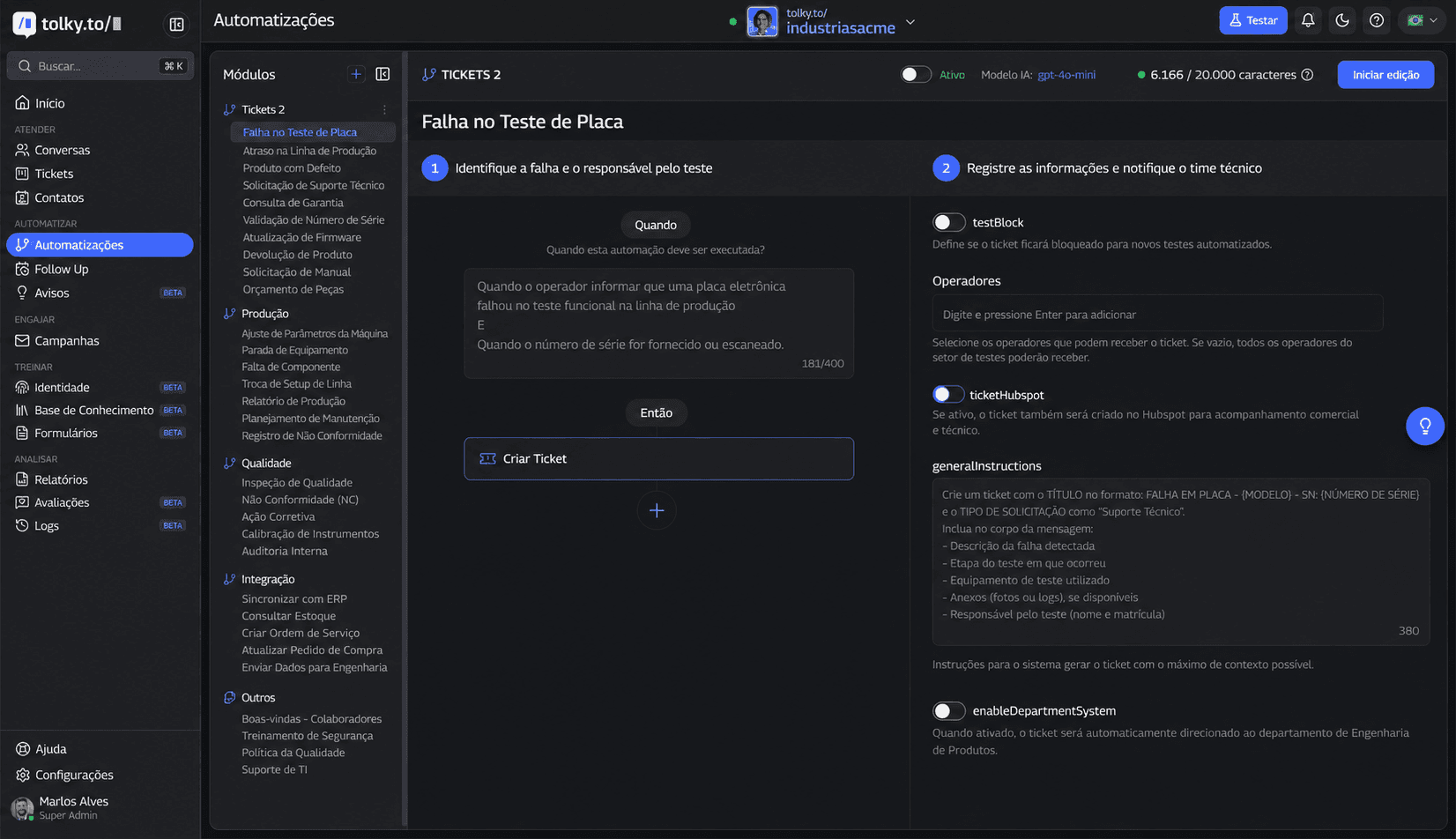
Automations, shown in the screenshot, act during the conversation with conditions written in natural language. For other systems, there are more than 1,000 apps, HTTP requests, webhooks, a REST API and MCP (integrations).
What Tolky does not do: it has no ready-made Zapier or Make connector (the bridge is webhooks and HTTP requests, as the question about Zapier and Make explains), and the import does not convert every n8n node. WhatsApp starts on the Starter plan (US$ 90 or R$ 500 a month, 500 attendances, 2 users, 10 flows and 1,000 runs); the Individual plan is free, but without WhatsApp. Meta's fees are not part of the plan. See the plans.
Frequently asked questions
Can you build a WhatsApp AI agent with n8n for free?
Self-hosted n8n is free for internal use, but the server, the AI model and Meta's fees are paid. Meta gives 1,000 free service messages per number each month; above that, each reply is billed.
Which WhatsApp API should you use with n8n?
The official one, through Meta's Cloud API, which has its own n8n nodes: WhatsApp Trigger to receive and WhatsApp Business Cloud to send. Connections through WhatsApp Web carry a risk of the number being banned.
Is there a ready-made WhatsApp AI agent template for n8n?
Yes. The WhatsApp Business Cloud integration page on the n8n site lists community workflows with AI. Review credentials, memory and rules before using one.
Does n8n support multiple agents on the same number?
Not directly. n8n automates the workflow but has no team inbox. For several people on the same number, you need a customer service platform connected to the official API.
Why does my n8n agent reply twice?
Usually Meta retried the webhook, or the trigger fired on a status update. Filter customer messages and store each message ID.
Can I bring my n8n workflows to Tolky?
Yes. Tolky Flows import n8n JSON for review in the visual editor and export in n8n format. Steps with no equivalent need manual adjustment.
Conclusion
A WhatsApp AI agent with n8n is a great way to validate a use case. Once it becomes customer service, with a team, a queue, a CRM and metrics, the cost shifts to maintenance, and it is worth comparing with a platform that already has those pieces.
See the plans, explore Tolky Flows, bring your n8n workflows or talk to the team →. Let's talk?
Share
Tags
- whatsapp ai agent n8n
- whatsapp ai agent n8n template
- how to build a whatsapp ai agent with n8n
- whatsapp api for n8n
- whatsapp automation n8n
- #whatsapp cloud api
- migrate from n8n
- #conversational CRM
Cited in
- Unofficial WhatsApp API: ban risks and what Meta actually allows
- WhatsApp automation for business: what to automate and how to start
- How to build a WhatsApp AI agent: n8n, a platform or Meta's AI
- WhatsApp AI agent pricing: platform, Meta fees and what you really pay
- WhatsApp Chatbot: How it Works and How to Create One
About the author

Co-founder of Tolky
Marlos Carmo is an AI entrepreneur and founder of Tolky, the conversational-era infrastructure and AI CRM that unifies intelligent service, multi-channel support (such as WhatsApp and voice), live CRM, and operational intelligence in a single ecosystem. He is a finalist for the SXSW Innovation Awards and a member of Francesco's Economy, a global network of young entrepreneurs focused on innovation and social impact. He works connecting Artificial Intelligence and digital transformation in projects for large organizations.
Next step
Want to bring this to your operation?
Tati, Tolky's AI assistant, understands your scenario in a few questions, suggests the best path and connects you with someone from the team, with full context.
Share