AI technical assistant on WhatsApp: photos, voice notes and manuals
How to build an AI technical assistant on WhatsApp: read the customer's photo and voice note, answer from the product manual, know what goes to a specialist and hand off the case with context.
TL;DR
An AI technical assistant is an agent that answers questions about installing, using, alerts and defects of a product on WhatsApp, reading the photo, voice note or document the customer sends and answering from the manual and specifications the company provides. It solves what is documented and hands off to a specialist, with a summary and the photos, anything that needs a diagnosis, involves safety or decides a warranty claim.
Share
"This light came on in the dashboard, can I keep driving?" "The machine shows E4, what do I do?" "I installed it and it won't turn on." These messages reach after-sales teams every day, almost always with a photo, sometimes with a voice note, rarely with the model and serial number. In many cases the answer is in the manual, but the customer could not find it, and the question joins the same queue as serious defects.
An AI technical assistant takes these questions out of the queue. It looks at the photo, listens to the voice note, searches the manual the company provided and answers right away. When the case needs a specialist, it hands over a conversation that is already triaged. This guide shows how to build that assistant, what it can answer, what it must never decide and what consumer law expects from technical after-sales support, using Brazil as the reference market.
Updated November 2026.
What is an AI technical assistant?
An AI technical assistant is an agent that answers technical questions about a product, such as installation, use, alerts, error codes and warranty, from the company's knowledge base, and routes anything that needs a diagnosis to a specialist. It works on WhatsApp, on the website and by voice, and it understands what the customer shows, not only what they type.


It differs from an FAQ chatbot in two ways. First, the input: the customer sends a photo of the dashboard, a voice note describing the noise or the PDF of the invoice, and the AI uses that content. Second, the source: the answer comes from the manual and specifications of the right model, not from a generic reply. For the tier structure of a support team, see AI helpdesk with tier 1, 2 and 3; for the concept of after-sales service, see the glossary.
Why do technical questions clog after-sales support?
Technical questions clog after-sales support because the customer cannot describe the problem, the agent does not know the answer by heart and the specialist becomes the only way out for everything. The result is a queue where a five-minute question waits behind a two-hour defect.
Three situations show up in almost every operation:
- The customer does not know what the problem is called. They say "a yellow light", not "tire pressure warning". Without the photo, the conversation turns into a guessing game.
- The agent is not technical. They open the manual, search, cannot find it and pass it to the specialist, who gets the question with no model, no photo and no history.
- The manual exists, but nobody reads it. Brazil's Consumer Defense Code (CDC) even requires the warranty certificate to come with an illustrated instruction, installation and use manual written in plain language (art. 50, sole paragraph, of the CDC). The content is ready. What is missing is delivering it when the question comes up.
How does the AI understand photos, voice notes and documents?
The AI reads the image, transcribes and interprets the voice note and extracts the text of the document sent in the conversation, then uses that content to search the knowledge base for the answer. The customer shows; the AI translates what it saw into the language of the manual.
A few examples of what this allows:
| The customer sends | What the AI extracts | What it does with it |
|---|---|---|
| Photo of the dashboard with an alert | The symbol and color of the indicator | Looks up its meaning in the model's manual |
| Photo of the display with an error code | The code, such as E4 or F21 | Finds the procedure for that code |
| Voice note describing a noise | When it happens and what it sounds like | Asks the planned triage questions |
| Photo of the product label | Model and serial number | Identifies the right version of the manual |
| PDF of the invoice | Purchase date and store | Reports the warranty status under the stored rule |
Image reading has limits. A dark, blurry or cropped photo creates doubt, and the AI must be instructed to ask for another photo instead of guessing. The agent's instructions should say what to ask for when information is missing: "send a photo of the display with the screen on" or "send a photo of the label on the back of the unit".
How do you turn the manual into a knowledge base?
A manual becomes a knowledge base when it is organized by model, by symptom and by procedure, in short passages that each answer one question. A 200-page PDF dropped into the base works worse than 50 well-named passages.
- Split by model and version. A procedure for one model does not work for another. Tag each passage with the model it applies to.
- Write by symptom. The customer asks "it won't turn on", not "startup procedure". Use their words in the headings.
- Include the error codes. A table of codes with meaning and action is the most consulted content of any technical assistant.
- Flag what is for specialists only. Procedures that involve opening the equipment or touching gas, electrical parts or brakes do not go to the customer.
- Write the fixed answers. Warranty, recalls, safety and deadlines come from approved text, word for word.
- Review against conversations. The questions the AI could not answer show what is missing from the base.
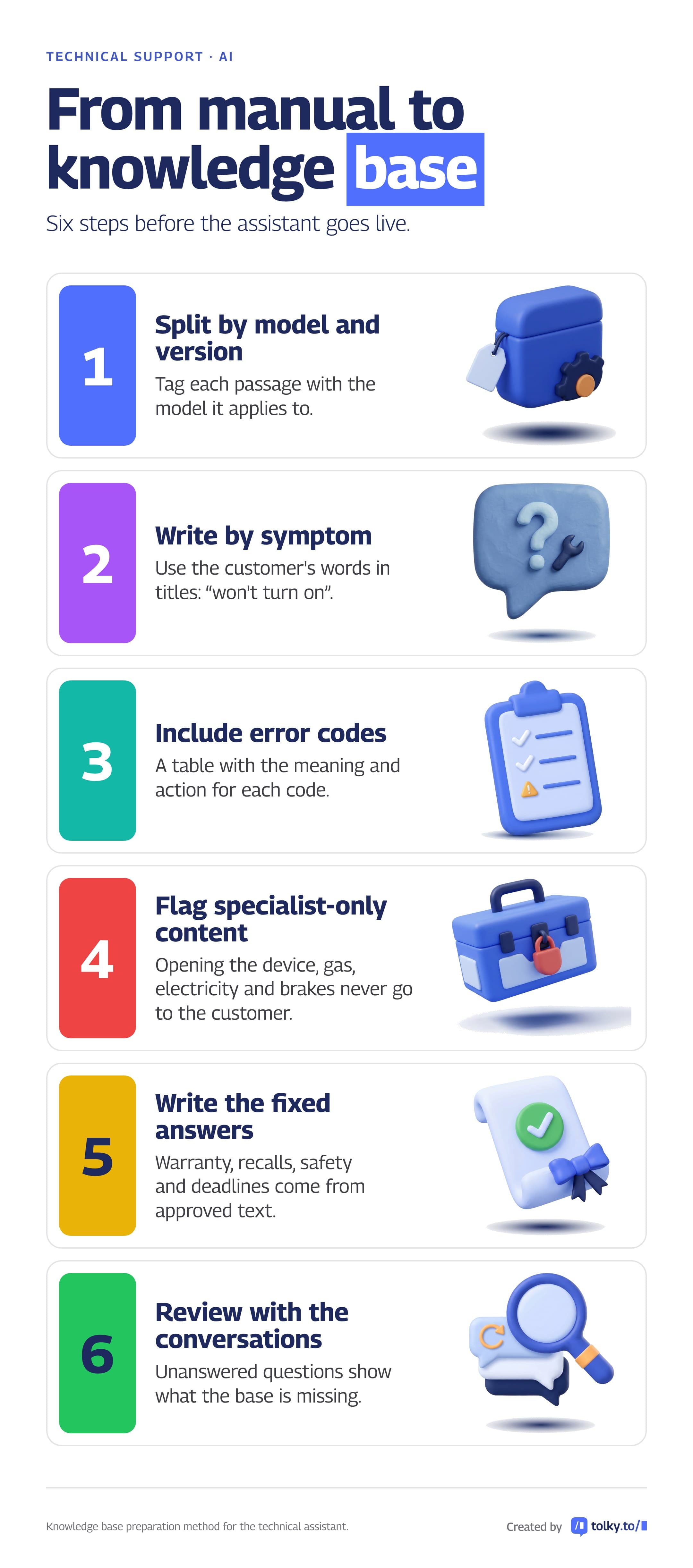 The six steps to prepare the technical assistant's knowledge base.
The step by step for maintaining the base is in how to train an AI agent with a knowledge base.

What does the AI answer and what goes to the specialist?
The AI answers what is documented and safe for the customer to do alone; anything that needs a diagnosis, involves a safety risk or decides warranty and replacement goes to the specialist. The company draws that line, by topic, before the assistant goes live.
| Topic | The AI answers | Goes to the specialist |
|---|---|---|
| Installation and first use | Step by step from the manual | Installation that requires a certified technician |
| Alert or error code | Meaning and action stated in the manual | Code that requires inspection or keeps coming back |
| Routine maintenance | Intervals and care | Service with part replacement |
| Warranty | Term and coverage under the stored rule | Decision on replacement, repair or refund |
| Safety | Fixed guidance: stop using it and seek service | The whole case, with priority |
| Defect with no answer in the base | Collects photos, model and description | Diagnosis |
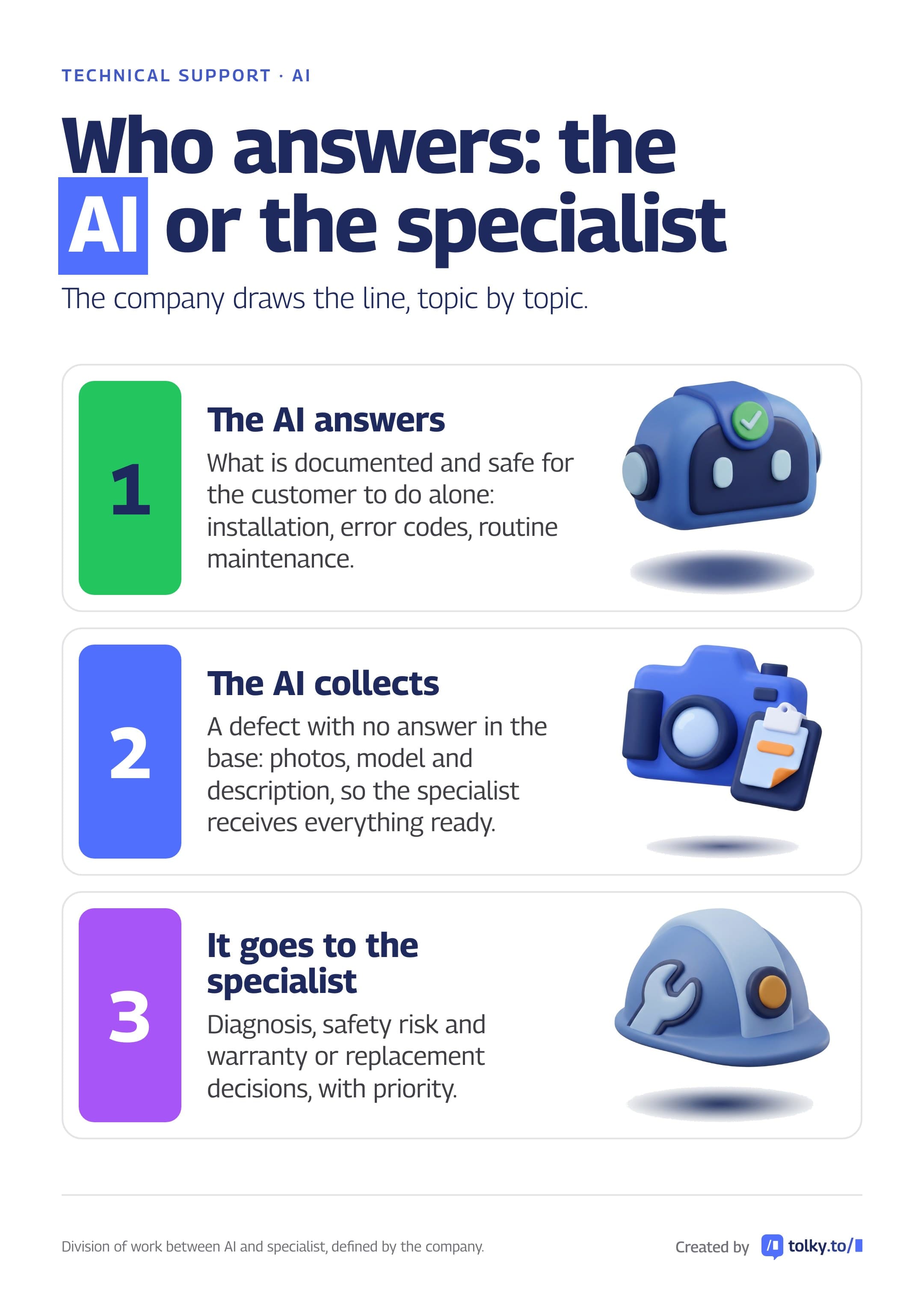 Who answers what: the AI, the AI's intake and the specialist.
The safety rule deserves emphasis. If the photo shows smoke, a leak, exposed wiring or a critical dashboard alert, the answer is fixed and short: stop using it, contact the service center, and the conversation goes to the queue with priority. The AI does not judge whether "it is fine to keep going".
How do you hand the case to a specialist with context?
The case reaches the specialist with context when the handoff carries the summary, the photos, the model, the serial number and what has already been tried, so the customer does not have to repeat anything. Without that, the AI only moved the queue somewhere else.


A good handoff summary answers five questions:
- Who they are and what they bought: customer, model, serial number, purchase date.
- What is happening: the symptom in the customer's words and what the AI identified in the photo or voice note.
- What has been tried: manual procedures the customer followed and the result.
- Why it was transferred: no answer in the base, safety, warranty or customer request.
- What the customer expects: guidance, a technician visit, a replacement.
With queues by department, one operation can separate end customers, the reseller or dealer network and the service center, and each one receives the right case. A ticket with stages follows the case to the end. The handoff rules are in AI to human handoff.
What does consumer law require from technical after-sales support?
Brazil's Consumer Defense Code (CDC) sets deadlines for reporting defects, a deadline for the supplier to fix them and the content of the warranty certificate, and the assistant must respect those rules when guiding the customer. The articles below were checked against the consolidated text of the CDC on November 24, 2026.
- Deadline to report (art. 26). The right to complain about apparent or easily noticed defects expires in 30 days for non-durable products and in 90 days for durable products.
- Deadline to fix (art. 18, § 1). If the defect is not fixed within 30 days, the consumer may demand, at their choice, a replacement product, a refund or a price reduction.
- Contractual warranty (art. 50). The manufacturer's warranty supplements the legal one and must be provided in a written certificate that explains what it covers, how to use it and for how long.
In practice, this means two things for the assistant. It cannot deny a warranty claim or say "it cannot be fixed": that decision belongs to a person, with the case documented. And the date of the complaint matters, so the conversation record, with photos and timestamps, protects both the customer and the company. This summary does not replace your legal team's review.
Examples by industry
The technical assistant works for any company that supports a product, but the knowledge base content and the handoff rule change by industry.
Automakers, dealerships and repair shops
A photo of a dashboard alert explained with the model's manual, a warranty question answered with the stored rule and a service appointment booked when the case needs a shop. See the automotive industry page and the post on WhatsApp appointment reminders for the service booking part.
Manufacturers and durable goods retail
Installation steps in the conversation, the error code from the photo checked against the base and a service ticket opened with photos and serial number. The store network can have its own queue. See retail and e-commerce.
Insurance and vehicle protection
Roadside assistance and claims start with a photo of the damage. The AI receives and records the photos, explains the next step and hands off to the analyst with the history. Coverage decisions stay with a person. See conversational AI for vehicle protection.
How do you measure an AI technical assistant?
Measure resolution by topic, repeat contacts, time to reach a specialist and the most frequent topics, not just conversation volume. A good assistant solves what is documented and speeds up what is not.
- Resolution without transfer by topic: installation, error code, warranty, maintenance.
- Repeat contact within seven days: did the customer come back with the same problem? The answer did not solve it.
- Time to reach the specialist in transferred cases, with the summary ready.
- Most frequent and unanswered topics: the work list for the knowledge base and, sometimes, for product engineering.
- NPS at the end of the conversation, split between cases solved by the AI and by the specialist.
To avoid inflating the AI's number, follow the method in AI resolution rate.
Where Tolky fits in technical support
Tolky is a conversational AI CRM in which the AI reads the customer's photo, voice note and document, answers from the product knowledge base and hands off to the specialist with a summary. The full design is on the AI technical assistant solution page.


- Images, audio and documents. The AI understands what the customer sends in the WhatsApp conversation.
- Knowledge base and scope. Manuals, specifications, warranties and procedures, with fixed answers for warranty and safety and protection against off-scope messages.
- A record behind every answer. For each AI message, the instructions, knowledge base passages and external calls that produced it.
- Specialist with context. Queues by department, conversation summary, tickets with stages and priority, and NPS at the end.
- Topics in plain view. Smart Tags classify each conversation, and reports show the most frequent questions.
- Voice too. Callers are served by the same AI, with the same base. Voice is enabled during implementation.
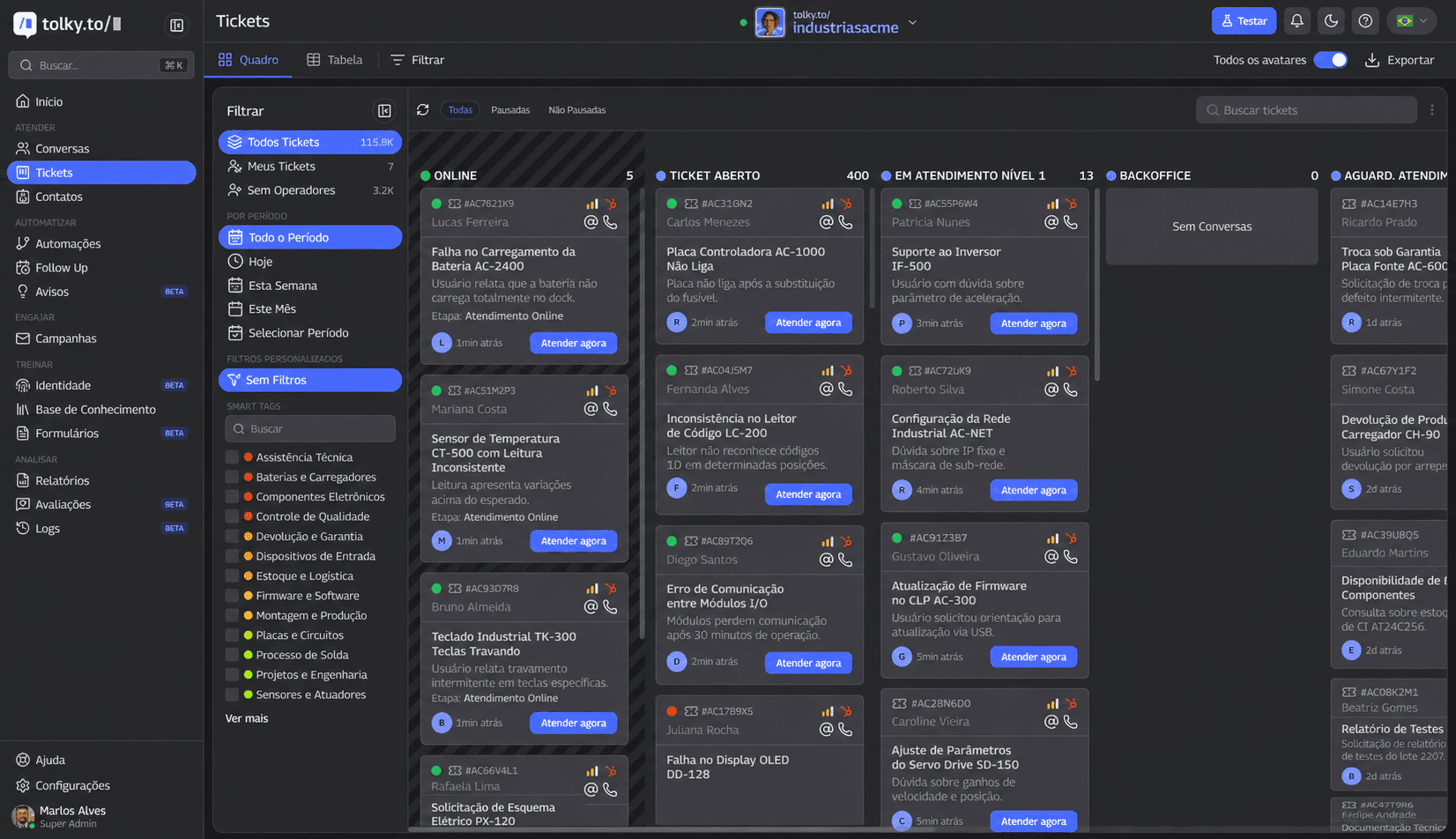
Division of work: Tolky handles the conversation, the record and the routing; equipment diagnostics and decisions on warranty, replacement or coverage stay with the technical team, which receives the documented case. Telemetry data comes in through the REST API, webhooks or MCP tools, and the technical answer follows the knowledge base the company provides.
Frequently asked questions
What does an AI technical assistant do?
It answers questions about installing, using, alerts, error codes and warranty for a product, based on the manual and specifications the company provides. It reads the photo, voice note and document the customer sends and hands off to a specialist anything that needs a diagnosis.
Can the AI understand a photo of a defect?
It can read what appears in the image, such as a dashboard symbol, an error code on a display or the label with the model, and use it to search the knowledge base. If the photo is dark or cropped, the AI should ask for another one instead of guessing.
Can the technical assistant deny a warranty claim?
It should not. It reports the warranty term and coverage under the stored rule, but the decision on replacement, repair or refund belongs to a person, with the case documented. Brazil's Consumer Defense Code sets deadlines for reporting and fixing defects that must be respected.
Where do the AI's technical answers come from?
From the knowledge base the company provides: manuals, specifications, error code tables, warranties and procedures. The AI answers within the agent's scope and deflects anything outside it.
When does the conversation go to a specialist?
When there is no answer in the base, when the case involves a safety risk, when a warranty or replacement decision is needed and when the customer asks. The specialist receives the summary, the photos, the model and what has already been tried.
What is the difference between an AI technical assistant and a helpdesk?
A helpdesk is the tiered support structure, with tickets and SLAs. An AI technical assistant is the first tier specialized in the product, which reads photos and voice notes and answers from the manual, feeding the helpdesk with cases that are already triaged.
Conclusion
An AI technical assistant solves documented questions right away and hands the specialist the cases that need a diagnosis, already with photos, model and history. Organize the manual by model and symptom, write the safety and warranty rules, define the handoff to a person and track the topics the knowledge base does not cover yet.
Explore the AI technical assistant, see the plans or talk to the team →. Let's talk?
Share
Tags
- ai technical assistant
- technical support on whatsapp
- ai after-sales service
- ai technical customer service
- ai that reads photos and audio
- product knowledge base
- warranty and consumer law in support
- #conversational CRM
About the author

Co-founder of Tolky
Marlos Carmo is an AI entrepreneur and founder of Tolky, the conversational-era infrastructure and AI CRM that unifies intelligent service, multi-channel support (such as WhatsApp and voice), live CRM, and operational intelligence in a single ecosystem. He is a finalist for the SXSW Innovation Awards and a member of Francesco's Economy, a global network of young entrepreneurs focused on innovation and social impact. He works connecting Artificial Intelligence and digital transformation in projects for large organizations.
Next step
Want to bring this to your operation?
Tati, Tolky's AI assistant, understands your scenario in a few questions, suggests the best path and connects you with someone from the team, with full context.
Share