
WhatsApp NPS surveysent at the right moment, no spreadsheets.
Tolky sends its NPS survey over WhatsApp when the conversation is over: the AI recognizes the end of the conversation and sends it on its own, an operator sends it with one click, or a flow sends it on close. Every score lands on a dashboard with the NPS, the 0 to 10 distribution and a comparison between AI-only service and service by your team.
What a WhatsApp NPS survey is
A WhatsApp NPS survey is the Net Promoter Score recommendation question, scored from 0 to 10, sent to the customer over WhatsApp right after a conversation so they can answer in the same chat. In Tolky it is built in: it goes out on its own when the AI determines the conversation is over, or through an operator or a flow, and every answer lands on the Feedbacks screen, which calculates NPS (promoters minus detractors) and separates AI-only conversations from conversations with an operator.


At a glance
- Sending
- Automatic by the AI, by an operator or by a flow
- Channel
- WhatsApp, with the score answered in the same chat
- Dashboard
- NPS, average score, 0 to 10 scores and AI or operator

From the end of the conversation to the score on the dashboard
Step 01
The conversation ends
After the customer has been silent for the time you set, the AI checks whether the conversation is over. An operator or a flow can also close it with the survey.
Step 02
The survey goes out on WhatsApp
The customer gets the NPS survey in the same chat and answers with a score from 0 to 10.
Step 03
The AI follows up on the score
Following your instructions, it thanks a promoter or asks why the score was low, and the conversation can close on its own.
Step 04
The score reaches the dashboard
NPS, average score, score distribution and the list of feedbacks, with a filter by operator and export.
How the Tolky NPS survey works
Seven features handle sending, the conversation after the score and reading the results. All of them are in the platform today.
01
Automatic collection
The AI sends the survey when the conversation is over
With automatic collection on, Tolky waits for the customer to be silent for the time you set, from 5 to 1,380 minutes. The AI then checks whether the conversation is over and, if it is, sends the NPS survey. You write instructions to guide that decision, for example to wait for confirmation that the issue was solved.
Configurable silence time, from 5 to 1,380 minutes
The AI checks the conversation is over before sending
Your own instructions for that decision
02
Sent by an operator
One click in the chat, or required on close
Operators send the NPS survey from the recommended actions in the chat. With the option to require the survey on close turned on, a WhatsApp conversation can only be closed after the survey is sent, and the rule also applies to bulk closing and to moving tickets.
Sent from the recommended actions in the chat
Option to require the survey on close
Rule also applied to bulk closing and moving tickets
03
Flows
The flow closes and asks for the score
In flows, the close conversation action can send the NPS survey and keep the conversation open while it waits for the score. That way an automated process, such as a delivery confirmation, also ends with the customer's rating.
Close conversation action that sends NPS
The conversation stays open until the score arrives
Works in the flows that close a conversation
04
After the score
The AI knows what to do with each answer
You write behavior instructions for after the score is sent, and the AI follows them when the customer answers: it asks why a score was low, thanks a promoter or offers help. The list of feedbacks shows each customer's score and comment.
Your own instructions for after the score
Examples: ask why, say thanks, offer help
Score and comment in the list of feedbacks
05
Closing
The conversation closes on its own after the survey
Automatic closing after the survey can be off, apply only to NPS sent by an operator, or apply to both manual and automatic surveys. You set how long the customer has to answer, from 30 to 1,380 minutes, and the closing message. If the WhatsApp 24-hour window has already closed, Tolky uses an approved template.
Three modes: off, manual NPS only, manual and automatic
Time to answer from 30 to 1,380 minutes
Approved template when the 24-hour window has closed
06
Rules
The right amount of surveys, without wearing customers out
You decide the frequency: evaluate every conversation (a new ticket after the last survey), set a minimum interval between feedbacks and give unanswered surveys an expiration time.
One feedback per conversation
Minimum interval between feedbacks
Expiration of unanswered surveys
07
Dashboard
NPS calculated, score by score
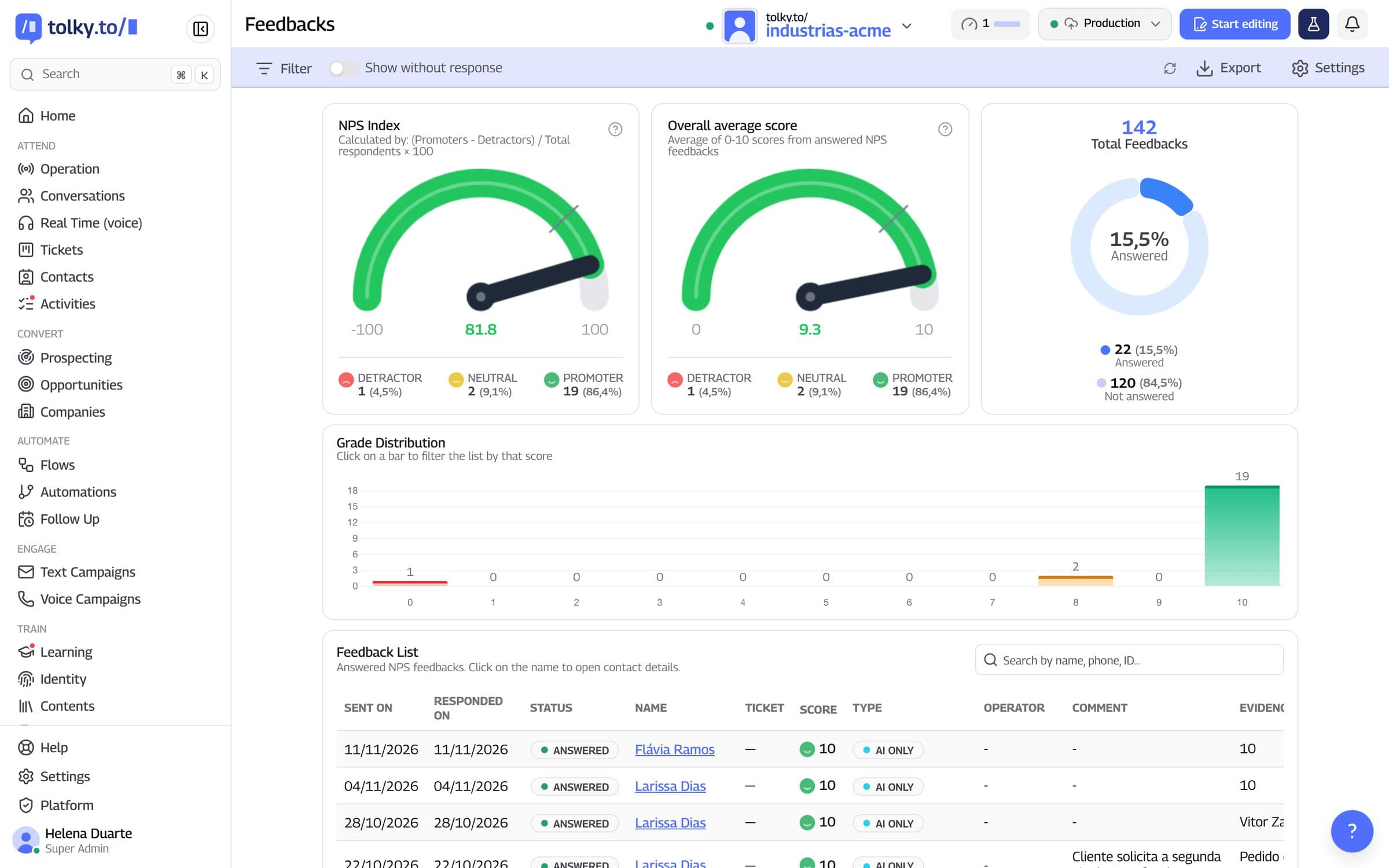
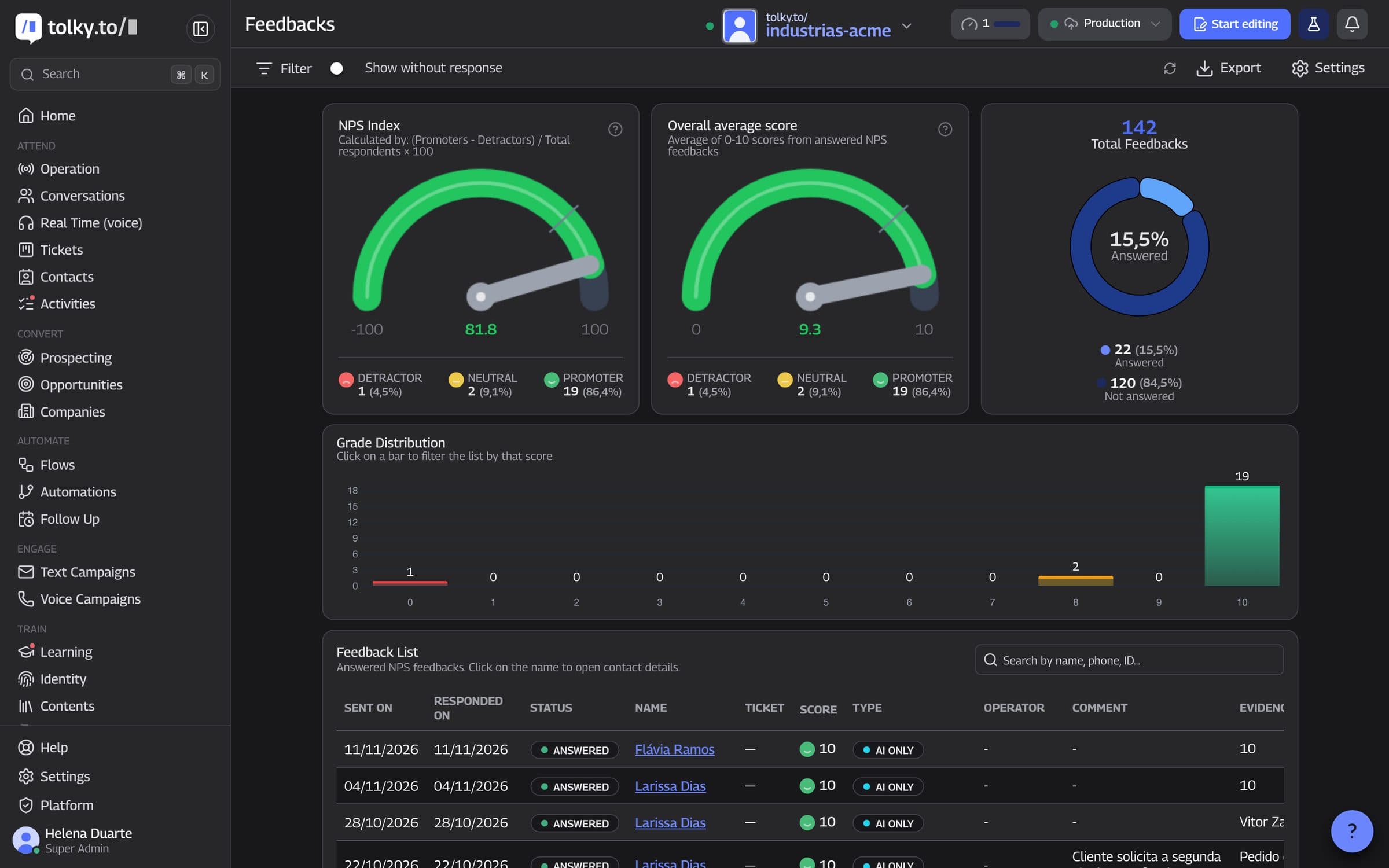
The Feedbacks screen shows the NPS from -100 to 100, the average score, total feedbacks answered and unanswered, and the distribution of scores from 0 to 10; clicking a bar filters the list. Each feedback shows the sent and answered dates, contact, ticket, score, type, operator and comment. The type separates AI-only conversations from conversations with an operator, so you can compare satisfaction with AI-only service against service where a person stepped in.
NPS, average score and 0 to 10 distribution
AI only or with an operator, filtered by operator and by mode
Show unanswered surveys and export the list

Survey link or WhatsApp NPS with Tolky
Sending a form link depends on someone remembering, and it keeps the score away from the conversation. The table shows what changes when NPS is built into WhatsApp service.


| Situation | Form link | WhatsApp NPS with Tolky |
|---|---|---|
| When to send | Someone has to remember after the conversation | The AI recognizes the end of the conversation and sends it |
| Where the customer answers | In a form outside the conversation | In the same WhatsApp chat, with a score from 0 to 10 |
| Low score | The score lands in a spreadsheet, with no conversation | The AI follows your instructions, such as asking why |
| Too many surveys | The same customer gets several invitations | One per conversation and a minimum interval between feedbacks |
| Closing after the score | The conversation stays open until someone closes it | Automatic closing, with a template if the 24-hour window has closed |
| AI or team | You have to cross-reference spreadsheets | The dashboard separates AI-only from with an operator |
| Calculating NPS | A formula done by hand | NPS, average score and 0 to 10 distribution on the dashboard |
Frequently asked questions
In Tolky, the NPS survey is built in: you turn on automatic collection and set the customer silence time and the instructions the AI uses to decide whether the conversation is over. The survey goes out in the same WhatsApp chat, the customer answers with a score from 0 to 10, and the result lands on the Feedbacks screen.
Yes. After the customer has been silent for a time you set, from 5 to 1,380 minutes, the AI checks whether the conversation is over and, if it is, sends the survey. Operators can also send it from the chat, and a flow can send it when it closes the conversation.
Tolky's built-in NPS survey measures likelihood to recommend, scored from 0 to 10, and splits scores between AI-only conversations and conversations with your team. CSAT measures satisfaction with a specific interaction. For another survey format, talk to our consultants; the NPS vs. CSAT guide on the blog explains when to use each metric.
NPS is the percentage of promoters (scores of 9 and 10) minus the percentage of detractors (scores from 0 to 6), on a scale from -100 to 100. The dashboard calculates it for you and also shows the average score and how many customers are detractors, passives and promoters.
Yes. With the option to require the survey on close, a WhatsApp conversation can only be closed after the NPS survey is sent, including bulk closing and moving tickets.
The AI follows the after-score behavior instructions you wrote, such as asking why or offering help. The score and comment stay in the list of feedbacks, which you can filter by score. That way, the team finds low scores and follows up with the conversation history.
Yes. Each feedback is tagged as AI-only or with an operator, and the dashboard filters by mode and by operator. That lets you compare NPS for conversations the AI solved on its own with NPS for conversations where a person stepped in.
Today the Tolky NPS survey is sent over WhatsApp, in the same chat as the conversation.
Automatic follow-up and NPS is included in the Professional plan, at $450 a month, and in Enterprise, which is quoted on request. Meta's WhatsApp fees are charged separately.
The same feature, other angles.
Solution
WhatsApp ServiceAI that answers, resolves and hands off to the team with context, on your company's official number.
Feature
WhatsApp shared inboxSeveral agents and the AI on the same WhatsApp number, with departments, queues, automatic distribution and handoffs with context.
Feature
WhatsApp automation flowsHow Tolky Flows automate WhatsApp: triggers, conditions, the AI agent, 1,000+ apps, HTTP requests, webhooks, REST API and MCP.
Pricing
Plans and pricingBilled per conversation, with a free plan to start. Meta's WhatsApp fees are charged separately.
Find out what customers thoughtright after the conversation.
Book a demo and see the NPS survey going out on WhatsApp and the scores arriving on the dashboard.