AI CRM: Why the Next CRM Will Be Conversational and Integrated
CRM relies on manual data entry, yet the buying decision happens in the conversation. See why the next CRM starts from WhatsApp and customer service, and how that changes sales, support and renewals.

Marlos Carmo
Founder of Tolky
Updated on November 15, 2026
Share
Picture a scene that is common in many B2B companies: marketing invests in ads, a lead clicks the button and starts a WhatsApp conversation. The salesperson discusses pain points, budget and urgency, and agrees on a demo date.
Where is that conversation? On the salesperson's phone. Where is the record in the CRM? Nowhere, or summed up in a vague line like "Interested lead, demo scheduled", entered days later.
The core problem in customer relationships is not a lack of technology. It is the distance between where the conversation happens (WhatsApp, website chat, email) and where management happens (the CRM). This is the thesis of this article: the conversation is where the decision happens, and the next CRM has to be born from it.
This post covers the thesis and the journey. For the full definition, selection criteria and cost, read the complete AI CRM guide. For the vocabulary (omnichannel vs chatbot vs conversational CRM), see What is conversational CRM. For field mapping between AI and CRM, see AI and CRM integration.
Why a CRM that depends on typing always arrives late
A CRM is only useful if someone feeds it. This architecture has three flaws in modern operations:
- Dependence on manual entry: salespeople are hired to sell, not to do admin work. Pressure to fill in fields creates friction and incomplete data.
- Information latency: the customer talks in real time; the record (when it exists) is made at the end of the day or week.
- Lost context: structured fields do not capture the tone of urgency, the objections about competitors or the real pain, which stay in the WhatsApp history of whoever handled the lead.
That does not mean market CRMs stood still. Today, HubSpot (Breeze Customer Agent) and Salesforce (Agentforce) offer AI agents that can query and update records when authorized, and RD Station offers agents in Conversas. The useful question is no longer "does the AI act in the CRM or not?" but: where is your customer's main channel, and how many tools do you need to stitch together to have conversation, CRM and AI in one place?
What changes with an AI CRM
An AI CRM puts the conversation at the center: AI agents run service across channels, read and write the customer record, and hand off to a person when human judgment is needed. The difference is where the data is born.
| Pillar | CRM with manual entry | AI CRM (conversational) |
|---|---|---|
| Data capture | Typed by the team | Extracted from the conversation, with rules and review |
| Pipeline updates | In forecast meetings | At each relevant interaction |
| Main channel | Email and forms | Omnichannel, focused on WhatsApp |
| First response to a lead | Depends on an available SDR | Immediate, by the AI, with handoff to a human |
| Follow-up | Easily forgotten | Contextual, based on the conversation |
| Tickets | Separate from sales history | In the same customer view |
| Reports | Number of activities | Contact reasons, intent and bottlenecks |
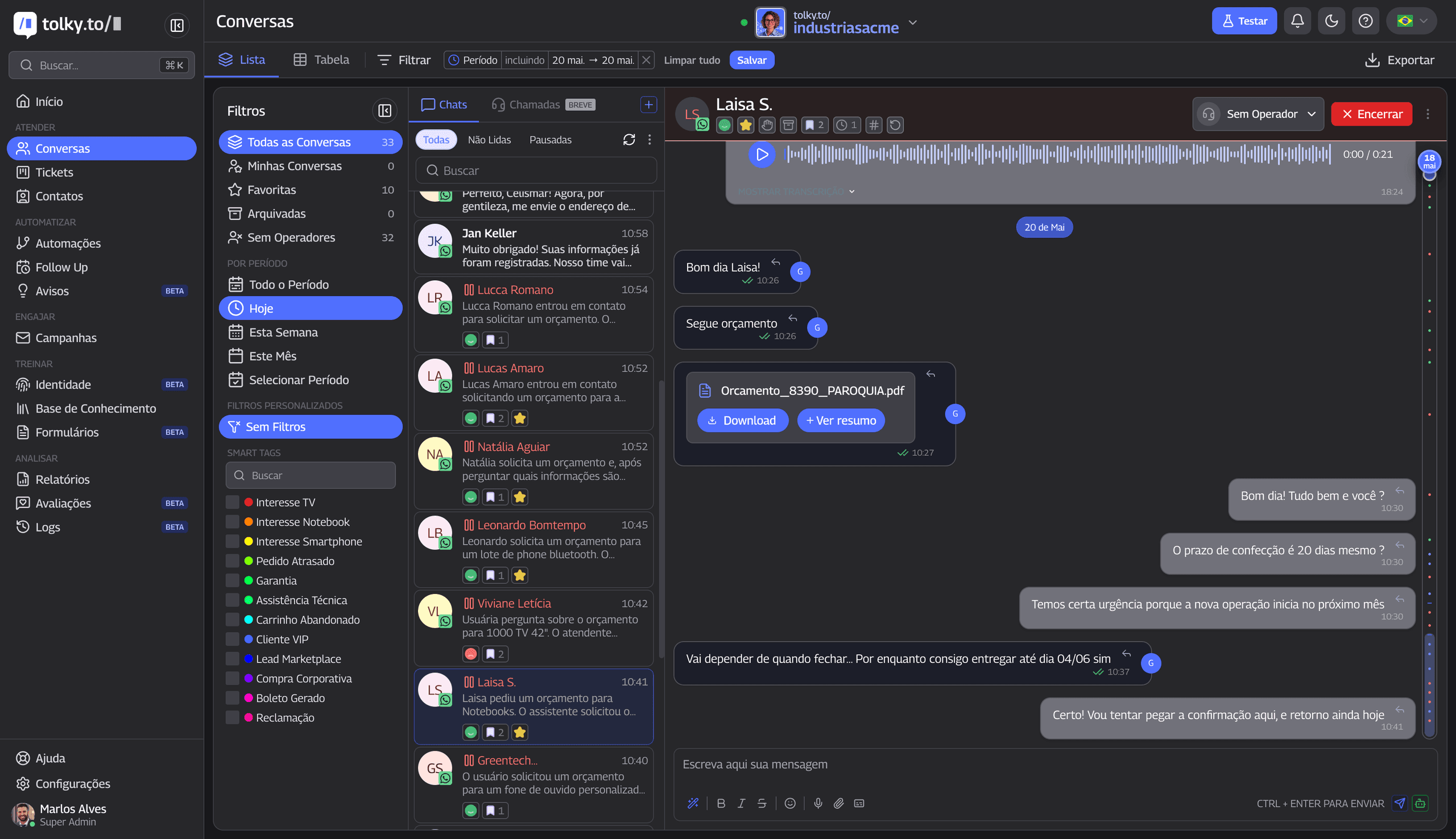
Conversations are commercial data disguised as customer service. When a customer asks "Do you integrate with our ERP?", they reveal their infrastructure and maturity. When they say "I need this running by early next month", they set the buying timeline. If nobody records it, the company wastes its largest source of data.
A full journey: from ad to renewal
See how history turns into decisions across a customer's life (hypothetical example):
- Ad lead. Marina, at a distributor, clicks an ad and writes on WhatsApp at 10 pm. The AI agent replies in seconds, asks about the size of the operation, her role and timeline, and saves this in the lead record.
- Qualification. She sends a voice note saying she is comparing two solutions and must decide by next month. The conversation is transcribed and kept in the history. The qualified lead is handed to the salesperson with a summary, so they do not repeat the questions.
- Proposal. The salesperson takes over the chat, sends the proposal and agrees on next steps. If the proposal sits unanswered for three days, the agent can follow up based on what was discussed.
- Closing and onboarding. The deal moves forward and the context (deadlines, objections, agreements) follows the customer to whoever implements.
- Support ticket. Months later, Marina opens a billing question. The agent sees, on the same screen, the commercial stage, earlier conversations and anything pending.
- Renewal. Near expiry, the history of contacts and tickets shows whether the account is healthy. The success team decides with real data whether a proactive approach is worth it.
At no point did anyone have to "remember to update the CRM". The history built itself from the conversations.
What the AI does with the conversation
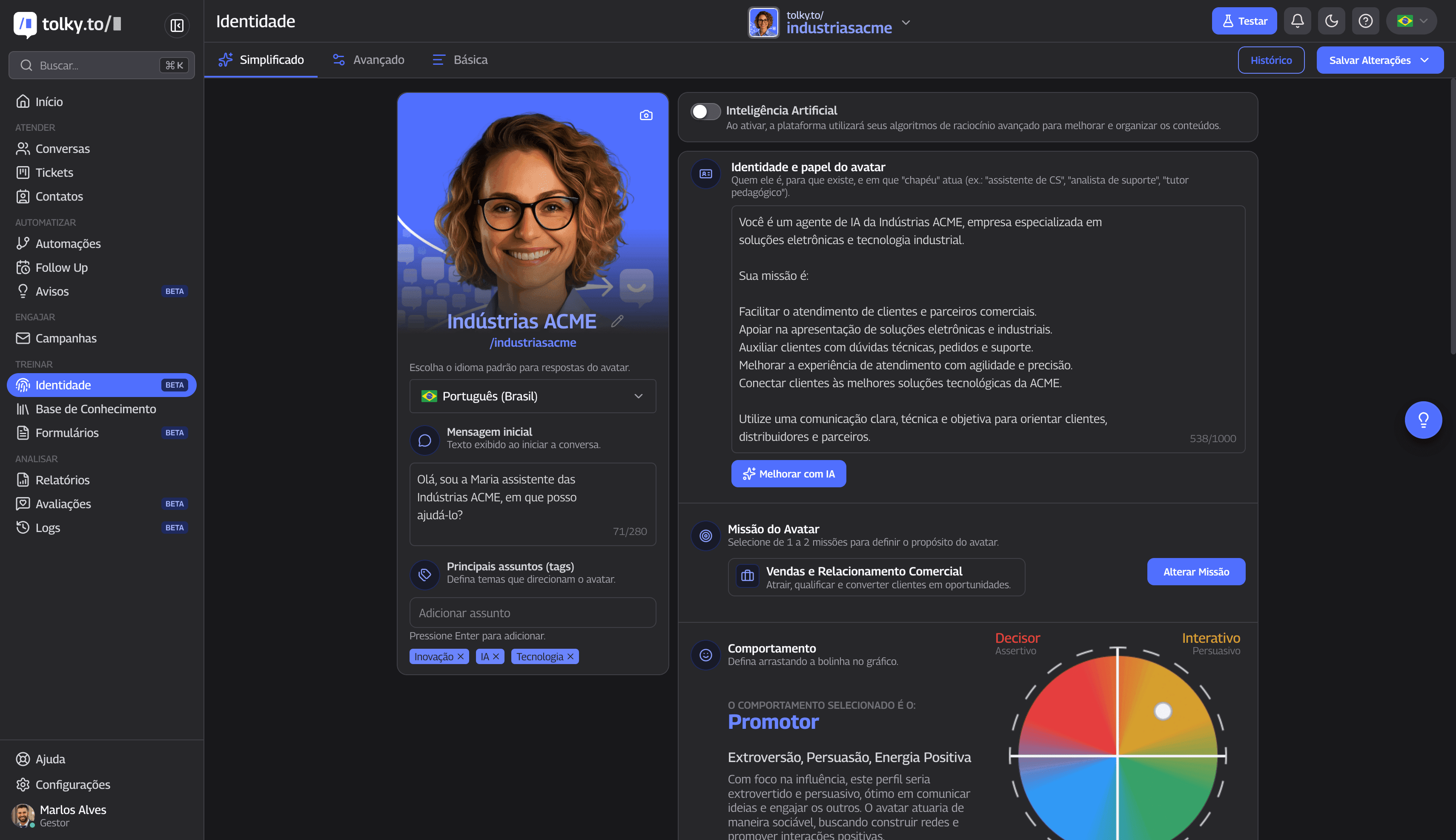
Turning conversations into actionable information involves three steps:
- Capture and transcription: text and audio messages from connected channels are processed and become searchable.
- Entity and sentiment extraction: the AI identifies budget figures, competitors mentioned, tools in use and the contact's tone (frustration, urgency, satisfaction).
- Actions on the record: according to the configured rules, the AI moves the lead to another stage, writes notes on the record, creates tasks for the salesperson or alerts managers. Sensitive actions go through authorization rules or human approval.
At scale, this lets you spot objections by segment, questions that come before closing and churn risk signals (recurring complaints, competitor mentions).
Response speed and qualification
Response time is one of the biggest bottlenecks for B2B companies. The study "The Short Life of Online Sales Leads" (Harvard Business Review, 2011, 2,241 companies) showed that contact within the first hour significantly raises the chance of qualifying a lead, and that the chance drops quickly afterward. The data is more than a decade old; the point stands: the sooner, the better.
With an AI agent on WhatsApp, first contact can be immediate at any hour. The AI applies the qualification script (BANT or the company's ICP): challenge and current scenario, role and decision power, urgency and budget. If the lead meets the criteria, the AI can send the booking link configured by the company or pass the conversation to the salesperson. If the lead is not ready, it continues with educational content.
Follow-up works the same way: instead of generic mass messages (which get numbers blocked and annoy customers), the AI resumes conversations based on the real history. Example: "Hi, [Name]. Were you able to review the cost reduction scenario we sent on Tuesday?" This reduces lost opportunities from lack of contact; it does not eliminate them.
Humans remain essential
AI works best as a first line and triage for high-performing teams. It absorbs volume, repetition and speed: the same questions about price, integrations and hours, and the leads that do not fit your profile. That frees the team for relationships, complex negotiations and unhappy customers.
The critical point is the handoff. When the lead qualifies or the subject needs special attention, the AI transfers to the right agent, who takes over the chat with all the previous context.
Integrations: where AI gets access to what matters
An AI without access to company data becomes just a generic answer generator. Via API, and depending on the project, the agent can:
- Query the ERP: order or delivery status.
- Query finance: find an invoice and send a duplicate, within the customer authentication rules.
- Feed the CRM: if the company already uses Salesforce, HubSpot or another CRM with an API, the agent works at the conversational edge and writes structured data from conversations.
Tolky's paid plans include API integrations and an MCP agent (up to 3 on Starter and up to 10 on Professional; see details on /precos). Specific ERP and finance integrations depend on the project and are validated in a pilot.
Metrics an AI CRM should track
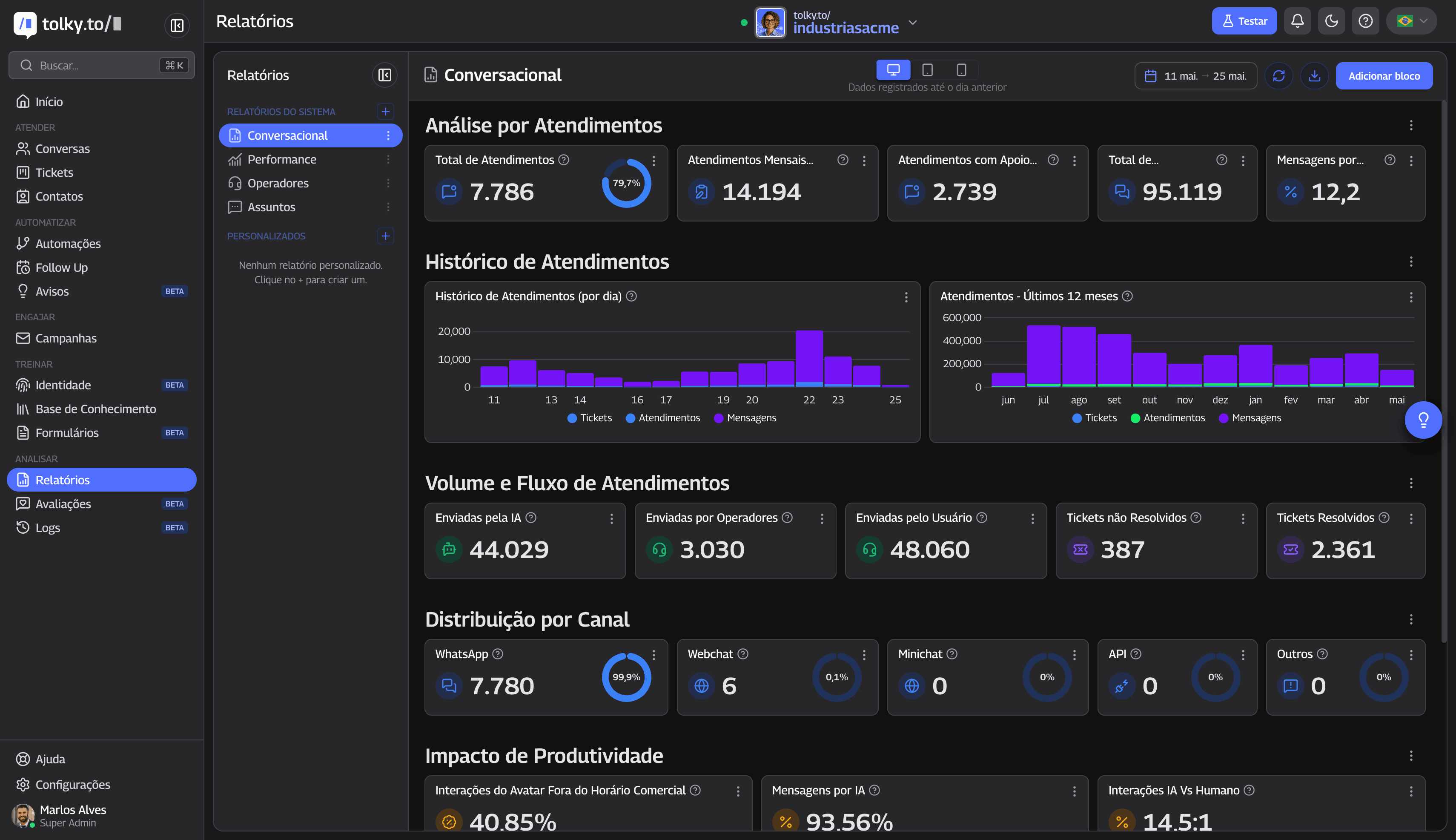
- Leads qualified by the AI and delivered ready to the sales team.
- Qualification rate (MQL to SQL) according to your ICP.
- First response time (speed to lead): with AI, the goal is to reply in seconds.
- Autonomous resolution rate: share of conversations resolved without transfer to a human. Tolky internal data: more than 67% of customer conversations are resolved by the AI, and the figure varies with the maturity of the knowledge base and the project.
- Transfer-to-human rate: shows whether the knowledge base needs tuning.
- Sales productivity: hours saved on manual CRM updates.
- Opportunities that went cold from lack of follow-up.
- Repeat contacts about the same issue.
Common mistakes when using AI in CRM
- Treating AI as a rigid robot: replicating "press 1 for sales" trees wastes the flexibility of natural language.
- Running without a reliable knowledge base: without accurate information on products, prices and policies, the AI makes things up or fails.
- Operating without supervision and without handoff: the customer needs a clear way out to talk to a person.
- Ignoring Meta's policies: mass sends without authorization and without approved templates put the number at risk.
How to prepare the company
- Map processes and scripts: what does ideal qualification look like? What are the 20 most common support questions?
- Structure the knowledge base: product, prices, policies and FAQs in one central document.
- Define the handoff: for example, strong buying intent, transfer to the account owner; unhappy customer, transfer to the CX lead (requires rules and users to be configured).
- Tune and monitor: in the first weeks, audit the AI's conversations and adjust tone and knowledge base.
Diagnostic: where is your operation?
- Do conversations from salespeople's personal WhatsApp enter the lead history?
- Are ad leads answered and qualified within minutes, at any hour?
- Does the salesperson get the lead's full context before the meeting?
- Is the pipeline updated from what is discussed in conversations?
- Do sales, service and support see the same customer history?
- Do you measure conversion and revenue per WhatsApp conversation?
- Are simple, repetitive questions resolved autonomously?
- Is the CRM integrated with the ERP and finance for queries and invoices?
Result (self-assessment):
- 0 to 3 items: the operation depends on memory and typing. The gain from an AI CRM is large; start with one case, such as qualification.
- 4 to 6 items: there are isolated automations. The challenge is unifying data and conversations.
- 7 or 8 items: mature operation. The next step is scaling with more agents and metrics.
Answered "no" to 4 or more? Request a diagnostic with the Tolky team: we bring your scenario into a practical conversation, no commitment.
How Tolky sees the future of AI CRM
The future of B2B sales and service will not be designed around screens with forms and dozens of clicks. The next CRM will not just be filled in. It will converse.
At Tolky, CRM, customer service and AI agents live in the same environment, with WhatsApp as the main channel and plans based on monthly service allowances, without requiring a whole suite. Compare with HubSpot, Salesforce, RD Station, Manychat and Blip on the alternatives page and see the plans.
Conclusion
If your company has a CRM but its most strategic customer interactions remain scattered across personal WhatsApp histories, the challenge is not collecting more data: it is connecting real conversations to commercial decision processes. AI CRM is an operating logic that puts the customer at the center, on the channel they prefer, and keeps the human team focused on what creates value: human connection.
Want to see this on your WhatsApp? Talk to the Tolky team or explore the plans.
FAQ: frequently asked questions about AI CRM
Does an AI CRM replace my company's current CRM?
Not necessarily. Tolky can act as a conversational layer connected to your CRM (such as Salesforce or HubSpot, via API, depending on the project), bringing WhatsApp conversation data into the records.
Does AI CRM work with WhatsApp?
Yes. WhatsApp is Tolky's main channel, integrated with the official WhatsApp Business API (available from the Starter plan; Meta fees are charged separately). The AI answers, sends files, transcribes audio and records the history. Webchat is available on all plans.
Is AI CRM only for sales?
No. It benefits support (level-1 questions), collections (depending on finance integration), marketing (lead quality) and management (visibility into conversations).
Where can I find the full definition and how to choose a platform?
In the complete AI CRM guide.
Share
Tags
- #AI CRM
- CRM with AI
- CRM for WhatsApp
- #conversational AI
- AI for sales
- #customer service automation
- lead management
- #conversational CRM
About the author
Marlos Carmo
Founder of Tolky
Marlos Carmo is an AI entrepreneur and founder of Tolky, the conversational-era infrastructure and AI CRM that unifies intelligent service, multi-channel support (such as WhatsApp and voice), live CRM, and operational intelligence in a single ecosystem. He is a finalist for the SXSW Innovation Awards and a member of Francesco's Economy, a global network of young entrepreneurs focused on innovation and social impact. He works connecting Artificial Intelligence and digital transformation in projects for large organizations.
Next step
Want to bring this to your operation?
Tati, Tolky's AI assistant, understands your scenario in a few questions, suggests the best path and connects you with someone from the team, with full context.