Cloud PBX with AI: how to add a voice agent to your phone system
How to put an AI voice agent in front of or next to your cloud PBX: a new number, call forwarding or a SIP trunk, transfer to extensions, latency, recording, privacy and a pilot plan.
TL;DR
A cloud PBX with AI is a hosted phone system with a voice agent answering part of the calls in natural language, before or alongside the extensions. The agent connects in three ways: a new number on the voice platform, call forwarding from the PBX or a SIP trunk. What decides the project is the handoff to people, latency and how recordings and transcripts are handled.
Share
If you run a company's phone system, you probably already have a cloud PBX in place: extensions, a keypad IVR, queues and numbers from your carrier. Then someone asks for "AI on the phones," and the IT question is practical: where does the agent go without breaking what already works?
Below: what changes with AI, the three ways to connect a voice agent to your phone system, transfers to extensions, what to evaluate and how to run a pilot.
Updated in November 2026.
What is a cloud PBX with AI?
A cloud PBX is a company's phone system running in the cloud: extensions, IVR, queues, schedules and numbers live in an internet service, with no hardware box in the office. A cloud PBX with AI is that system with a voice agent answering part of the calls in natural language.
The PBX keeps routing calls between extensions and queues. The voice agent takes over the conversation: it understands the spoken request, checks systems, answers and hands off to a person when needed.
The two pieces talk over voice over IP. The most common protocol for that is SIP, which the IETF describes in RFC 3261 (checked on November 20, 2026) as a signaling protocol for creating, modifying and ending sessions such as internet phone calls. The term is explained in SIP telephony in our glossary.
What changes when AI joins the phone system?
With AI, the phone system swaps the keypad menu for a conversation and resolves repetitive calls without tying up an extension with a person. Extensions and queues stay; what changes is who handles the first contact.
- The menu becomes a conversation. Instead of "press 2 for billing," the caller says what they need. That is a semantic IVR, covered in our post on voice AI and semantic IVR.
- Triage with a reason. The call reaches the agent with the request understood, not just a digit pressed.
- Simple requests resolved on the line. Duplicate invoices, order status, opening hours, scheduling: the agent checks the system and answers.
- A written record. The conversation becomes a transcript that can be read and searched later.
The number, the extensions and the need for a person to handle what the AI cannot resolve stay the same. For the full picture of the agent, see AI voice agent for customer service.
Should the agent sit in front of or next to the PBX?
A voice agent can sit in two positions: in front, answering every call before the PBX, or next to it, receiving only the calls the PBX sends. That choice sets the project's risk and the speed of the pilot.
In front: the agent answers first
The main number rings the voice agent. It greets the caller, understands the reason, resolves what it can and transfers the rest to the team. This is the design of an AI-powered contact center, and it gets the most out of the AI, but the transfer has to work from day one, because every call goes through it.
Next to it: the PBX sends only some calls
The PBX keeps answering and forwards only certain cases to the agent: one option in the current IVR, after-hours calls or overflow, when nobody picks up after a few rings. This is the safest place to start, because a problem with the agent affects only a slice of the volume.
A common path is to start next to the PBX, measure and then move in front. AI for call centers covers other designs for operations with large queues.
Three ways to connect a voice agent to your phone system
A voice agent connects to telephony in three ways: its own number on the voice platform, call forwarding from the PBX or the carrier, or a SIP trunk between the PBX and the platform. Not every platform offers all three, and not every PBX supports all three; check with both vendors before you design anything.


- A new number on the platform. The voice platform provides or receives a number, and the agent answers it. The PBX is not touched. It works for a new line, such as a scheduling line.
- Call forwarding. The PBX, or the carrier itself, forwards calls to the agent's number based on a rule: IVR option, time of day, busy, no answer. It is easy to turn on and off.
- SIP trunk. The PBX and the voice platform exchange calls directly over the network, as if the agent were one more destination in the PBX. It allows finer transfers, but it needs configuration on both sides and someone from telephony involved.
| Approach | How it works | When it makes sense | Watch out for |
|---|---|---|---|
| New number | The agent answers its own number | A new line or separate service | Customers need to know the number |
| Forwarding | The PBX or carrier forwards by rule | Pilot, after hours, overflow | Each forward may create a new call leg and cost |
| SIP trunk | PBX and platform exchange calls over the network | Agent in front, transfers to extensions | Depends on compatibility and setup on both sides |
How do transfers to an extension or agent work?
The transfer carries the most weight in the design: the voice agent has to pass the call to a person with the reason and the context, and the path depends on where that person answers.
There are three typical situations:
- The human agent works inside the voice platform. The transfer happens there, with the transcript on screen.
- The human agent answers at a PBX extension. The call has to go back to the PBX, through the SIP trunk or by dialing a number that reaches the extension or queue. Test whether the context travels with it.
- Nobody answers. Decide what happens: ring another agent, take a message, schedule a callback or end with a clear message.
Write the handoff rules before you switch the agent on: which reasons go straight to a person, what happens when the caller asks for someone and what the team receives with the call. Our guide on AI to human handoff and the term handoff help you build that list.
What should you evaluate in AI telephony?
Evaluate five points: latency, audio quality, transfers, fallback and data handling. The first two are the ones callers notice right away.


Latency
Latency is the time between the caller stopping and hearing the reply. Every step adds to it: network, transcription, language model, speech synthesis and the path between PBX and platform. Measure it on real calls, from a cell phone to the production number, not only in the vendor's demo.
Audio quality
Regular phone lines usually carry narrower audio than an internet call, which makes names, numbers and accents harder to transcribe. Test with background noise, speakerphone and cell phone calls. Also check whether the caller can interrupt the agent, known as barge-in, because it changes how the conversation feels.
The other three points round out the list:
- Transfers. Test every path from the previous section, including nobody answering.
- Fallback. If the voice platform goes down, the call has to go back to the PBX or a queue. With forwarding, you just switch the rule off.
- Data. Where audio and transcripts live, who can access them and for how long. That is the next section.
Recording, transcription and privacy law
A recording is the call's audio; a transcript is the text of what was said. They are different data with different uses and risks, and privacy law applies to both. Many PBXs already record; voice agents generally transcribe.
Privacy rules vary by country. In Brazil, where Tolky is based, the general data protection law, Law No. 13,709/2018 (LGPD), checked on November 20, 2026, requires in Article 6 a purpose disclosed to the data subject, processing limited to what is necessary, transparency and security measures. In practice: say at the start that the call is answered by AI and transcribed, keep only what you need and restrict who can read it. See LGPD in our glossary.
Some sectors have their own rules. In Brazil, Decree No. 13,135/2026, which governs customer service for federally regulated services and digital financial services, allows AI in triage as long as consumers can reach a person in real time (Art. 3), and requires recordings to be kept for at least 90 days (Art. 19), checked on November 20, 2026. If your company falls under a rule like this, decide who records the audio, the PBX or another tool, before you change the call flow.
Step by step: a cloud PBX with AI pilot
A good pilot starts small: one call reason, one agent position and clear targets, for a few weeks. The table shows the sequence.
| Step | What to do | Done when |
|---|---|---|
| 1. Pick the reason | Choose a frequent, simple request from your calls | One reason has volume and a clear rule |
| 2. Pick the position | Next to the PBX (IVR option, after hours or overflow) or in front | IT has set up the forwarding rule or number |
| 3. Prepare the knowledge base | Write answers, rules and the systems the agent checks | The agent answers correctly in internal tests |
| 4. Design the transfer | Reasons, destinations and what happens if nobody answers | Every path was tested with a real call |
| 5. Test the voice | Latency, audio, interruptions, accents | The internal team notices no long pauses |
| 6. Open to customers | Run the pilot in limited hours or volume | There are enough real calls to measure |
| 7. Measure and decide | Resolution, transfers, abandonment and repeat calls | There are numbers to expand, adjust or stop |
To estimate the gain upfront, use the customer service ROI calculator. To measure afterward, track first contact resolution.
Where Tolky fits in
Tolky is a conversational AI CRM with voice customer service: the same AI that answers by text answers calls on phone lines, on WhatsApp and on your website, and the transcript lands in the contact's history. Phone lines are activated on request, with the number you choose, and each number has its own agent.
- Natural conversation. Chosen voice and accent, an opening greeting, short replies and interruptions allowed, in cascade or real-time mode.
- People on the line. The team follows calls live and can listen in; when an agent joins the audio, the AI goes silent. If the assigned agent does not pick up a transfer, the call rings for other agents.
- Systems in the conversation. The agent pulls data through integrations: native HubSpot, REST API, webhooks and MCP tools.
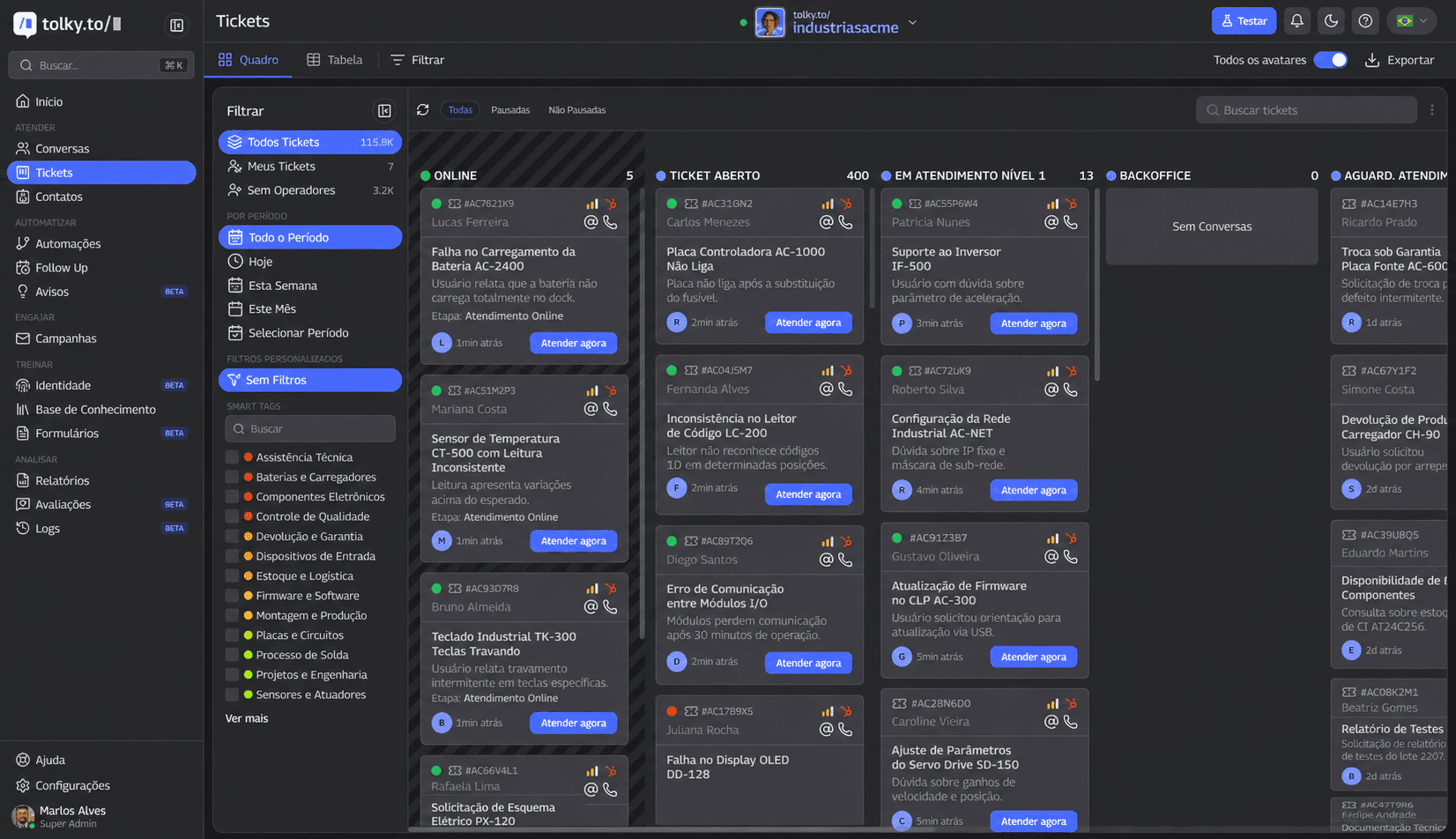
On the same platform, the team organizes work into tickets by stage:
What Tolky does not do: it is not a PBX and does not replace your extensions, and we do not advertise a ready-made integration with any specific PBX. If the agent sits in front of your PBX, through forwarding or a SIP trunk, the design is agreed with our team before activation. For outbound calls to your contact list, there are Voice Campaigns.
Frequently asked questions
What is a cloud PBX with AI?
It is a hosted phone system with a voice agent that answers part of the calls in natural language. The PBX keeps routing calls between extensions and queues, while the agent talks, resolves simple requests and transfers to people.
Do I need to replace my PBX to use AI?
Not necessarily. The agent can sit next to your current PBX, receiving calls through forwarding, or connect through a SIP trunk. What decides it is what your PBX and the voice platform support.
Can I keep the same phone number?
Usually, yes: with forwarding or a SIP trunk, customers keep calling the usual number. With a new number on the platform, the business has to publicize it. Confirm with your carrier and your voice vendor.
Can the AI transfer a call to an extension?
It depends on the design. If the human agent works inside the voice platform, the transfer happens there. To go back to a PBX extension, you need a return path, such as a SIP trunk or dialing a number that reaches the extension.
What is the difference between recording and transcription?
A recording is the call's audio; a transcript is the text of what was said. Both are personal data under laws like Brazil's LGPD, and some sectors set a minimum retention period for recordings, such as regulated customer service under Brazil's Decree No. 13,135/2026.
How much does it cost to add AI to a PBX?
The cost adds up the carrier's rate, voice and AI processing per minute and the platform. Compare by cost per resolved call and see Tolky's plans for the platform part.
Conclusion
A cloud PBX with AI does not require replacing your phone system: the voice agent goes in front or next to it, through a new number, forwarding or a SIP trunk, and the real decision lies in the handoff to people, latency and how recordings and transcripts are handled. Start next to the PBX with one call reason, measure for a few weeks and expand with numbers in hand.
Explore voice customer service, see Voice Campaigns, see the plans or talk to the team →. Let's talk?
Share
Tags
- cloud pbx with ai
- ai pbx
- ai phone system
- virtual pbx ai
- #ai voice agent
- sip trunk
- #conversational ivr
- #conversational CRM
About the author

Co-founder of Tolky
Marlos Carmo is an AI entrepreneur and founder of Tolky, the conversational-era infrastructure and AI CRM that unifies intelligent service, multi-channel support (such as WhatsApp and voice), live CRM, and operational intelligence in a single ecosystem. He is a finalist for the SXSW Innovation Awards and a member of Francesco's Economy, a global network of young entrepreneurs focused on innovation and social impact. He works connecting Artificial Intelligence and digital transformation in projects for large organizations.
Next step
Want to bring this to your operation?
Tati, Tolky's AI assistant, understands your scenario in a few questions, suggests the best path and connects you with someone from the team, with full context.
Share