AI to answer business calls: how to set it up step by step
How to put an AI on your company's phone line: channel and number, greeting and voice, knowledge base, transfer rules, business hours, testing, live monitoring and metrics.
TL;DR
To put an AI to answer business calls, choose the number and channel (phone line, WhatsApp or website), write the greeting and pick the voice, fill the knowledge base, decide what the AI resolves and when it transfers, set business hours, test and monitor calls live. Success is measured by calls resolved, not calls answered.
Share
Search for "AI to answer calls" and you get two topics mixed together. One is the feature on your personal phone that screens unknown callers. The other is putting an AI agent on the company's phone line to talk to customers and resolve requests. This guide covers only the second: your business number, not your cell phone.
The phone rings at peak time, the team is busy and the customer gives up; at night, nobody answers. A voice AI picks up right away, resolves the repetitive requests and hands to a person whatever needs judgment. Below is the step-by-step setup, from channel to metrics, with a checklist at the end.
Updated in November 2026.
What is AI phone answering for a business?
AI phone answering is the use of a voice agent that answers the company's calls, understands what the customer says in natural language, replies with a synthetic voice and transfers to a person when the case calls for it. It differs from old-school automated phone answering, where an IVR read a menu and the caller pressed keys.
The voice agent repeats three steps with every turn: it transcribes the audio into text, decides the reply with a language model and turns the reply into speech. The technical side is covered in AI voice agent for customer service; if you are starting from a keypad IVR, read voice AI and semantic IVR.
Step 1: choose the number and the call channel
The first step is deciding where the AI will answer: on the company's phone number, on WhatsApp calls or through voice on the website. Each channel has its own audience and rules, and many companies use more than one.
Phone line
The AI answers a regular number, with SIP trunking connecting the phone network to the platform. It reaches anyone, including people who do not use WhatsApp. Decide whether the AI answers your main number or a new one, and whether each number gets its own agent (sales, support).
The customer taps the call button inside the chat and the AI answers. With WhatsApp calls, the contact must give permission before the business can call back, as the post on the WhatsApp Business Calling API explains.
Voice on the website
The visitor clicks and talks in the browser, with no phone number. It works for support and pre-sales, and for testing the AI with real traffic before you turn on the phone line.
If you already run a phone system, read virtual PBX with AI.
Step 2: write the greeting and choose the voice
The greeting is the first sentence the caller hears, and in a few seconds it must say three things: the company name, that the speaker is an AI assistant and how it can help.


An illustrative example: "Hi, this is the virtual assistant at Example Clinic. I can book, reschedule or answer questions. How can I help?".
Then choose the voice. Four decisions matter most:
- Voice and accent. Listen to the preview before publishing; an accent close to your audience sounds more natural.
- Reply length. On the phone, short sentences work better. Callers cannot "rewind" the audio.
- Interruptions. The caller must be able to cut the AI off mid-sentence, which is called barge-in.
- Response time. Long pauses make callers repeat themselves. Latency drops with short replies and streaming processing.
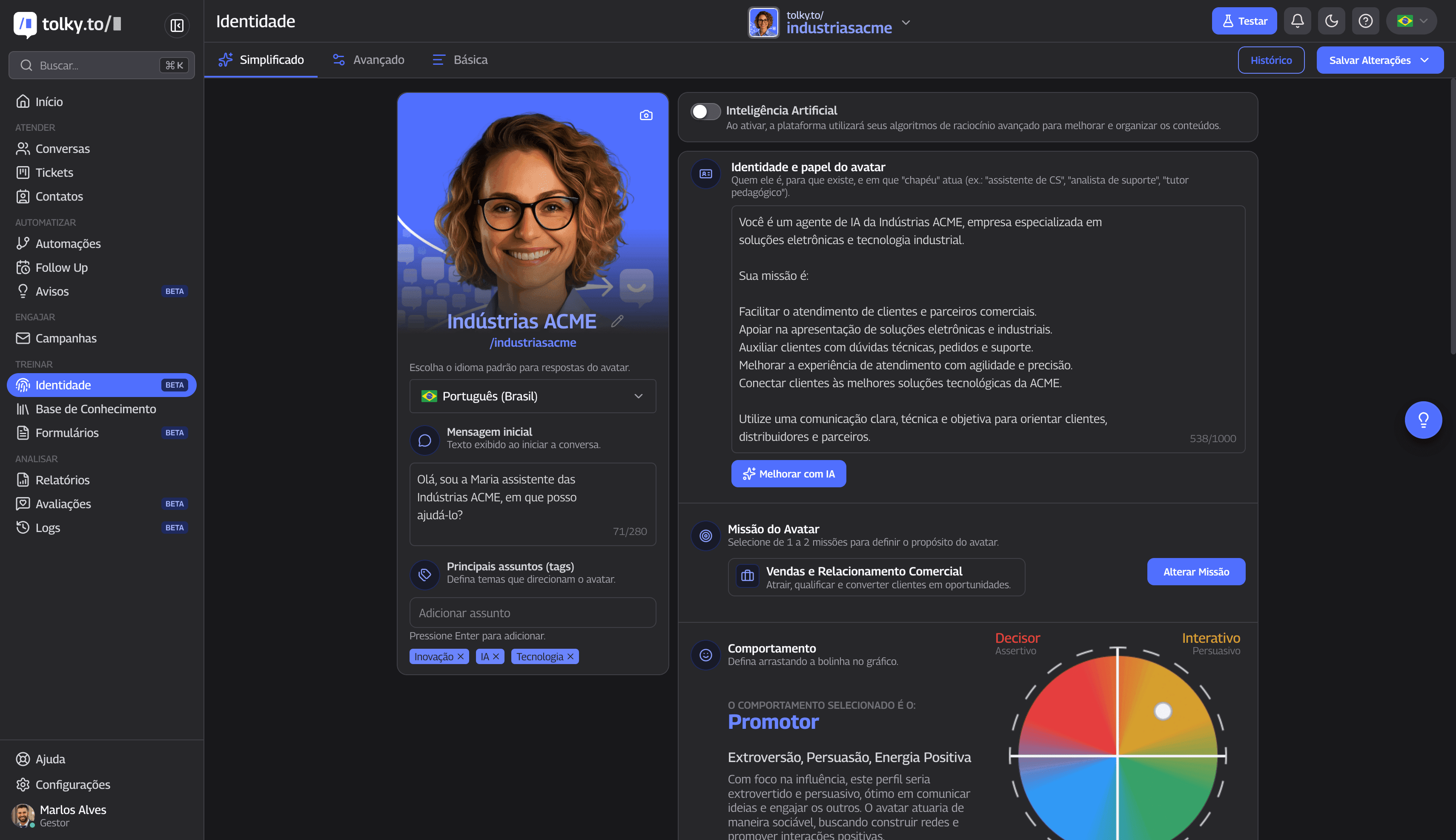
The agent's identity, with role, mission and tone, applies to everything it says. Review it with an ear for how it sounds out loud.
Step 3: build the knowledge base and define what the AI resolves
The AI can only answer well what is written in the knowledge base, so the third step is listing the reasons people call and deciding, for each one, whether the AI resolves it, collects data or transfers.
Listen to or read one week of calls and group them by reason. Write the answer to each in the knowledge base, in sentences that sound good spoken. The guide on training the agent with a knowledge base shows how to organize that material.
| Reason for the call | What the AI does | When it hands to a person |
|---|---|---|
| Hours, address, payment methods | Answers from the knowledge base | Almost never |
| Order or case status | Checks the system and reports back | When there is a delay or a record error |
| Book, reschedule or cancel | Collects the preference and confirms by the calendar rules | When no slot fits or the case is an exception |
| Invoice copy or billing details | Explains the path and sends the link on the agreed channel | When the customer wants to negotiate |
| Complaint | Logs the reason and acknowledges it | Always, with the summary ready |
| Sensitive or out-of-scope topic | Says it will transfer | Always |
The middle column is the AI's scope. Anything not in it should lead to a transfer, not to a made-up answer.
Step 4: set transfer rules and business hours
Transfer to a person is the most important rule in the setup: the caller must be able to reach someone, and the person who picks up must receive the reason and the conversation.


Write the rules in plain sentences:
- Transfer when the caller asks for a person, at any point in the call.
- Transfer by reason: complaint, negotiation, sensitive topic or a request outside the knowledge base.
- Transfer on signals: the AI failed to understand twice in a row or the caller sounds frustrated.
- Decide where it goes: a department, a queue or the account owner, and who picks up if that person does not.
The guide on AI to human handoff has templates for these rules, and handoff is in the glossary.
What Brazil's customer service rule says
In Brazil, Decree No. 13,135/2026, checked on November 20, 2026, governs customer service (SAC) for providers of services regulated by the federal government and for digital financial services supervised by the Central Bank. It allows artificial intelligence for triage and resolution, as long as the consumer has the option of real-time service from a person (art. 3, § 3). On the phone, that option must be available at every menu level (art. 16, § 2), and human service runs from 8 a.m. to 8 p.m., every day (art. 14, § 1). Rules vary by country, so check your own market; where no rule applies, this one is still good practice.
Business hours. Decide what the AI does during and after hours. During hours, it answers first and transfers when needed. After hours, it can resolve what has a clear rule, log the request and say when the team will get back, without promising a callback nobody will make.
Step 5: test before going live
Test the AI with real calls from your team before opening it to customers, using a script with the most common reasons, the hard cases and requests for a person.
A minimum test script:
- Call with each reason from the table in step 3, using words different from those in the knowledge base.
- Interrupt the AI mid-sentence and change the subject.
- Ask for a person right away and check that the transfer lands in the right place.
- Call from a noisy place and ask something out of scope: the AI should transfer, not improvise.
- Call after hours and listen to the message.
Read the transcript of each test: it shows where the AI misunderstood, where a reply ran long and where information was missing. Adjust and test again.
Step 6: monitor live and measure results
In the first weeks, someone on the team needs to follow calls in progress and read transcripts, because that is where the adjustments no test predicted show up. After that, metrics tell you whether the AI is helping.
See which calls are with the AI and which are with people, and step in when a conversation goes off track. Real-time transcription helps you decide without listening to everything.
The metrics that matter:
- AI resolution: calls closed without a person, with the request handled. See how to measure AI resolution rate.
- Transfers: how much goes to the team and why. A repeated reason is a gap in the knowledge base.
- First contact resolution (FCR): the customer does not call again about the same issue.
- Average handle time (AHT): a long call for a simple request points to wordy replies.
- Abandonment: callers who hang up before being served or resolved.
To estimate the gain before you start, use the customer service ROI calculator.
Checklist for putting AI on your phone line
Use this table as a final checklist: each row is a decision that must be made before the AI answers its first customer.
| Item | Check question |
|---|---|
| Channel and number | Which channels does the AI answer, and which agent answers each number? |
| Greeting | Does it say the company name, that it is an AI and how it can help? |
| Knowledge base | Do the most common call reasons have a written answer? |
| Scope | Is it clear what the AI resolves and what it transfers? |
| Transfer | Can the caller ask for a person at any time? |
| Hours | What does the AI do after hours? |
| Personal data | Are voice and transcripts treated as personal data, under laws such as Brazil's LGPD? |
| Testing | Did the test script pass, including the hard cases? |
| Monitoring | Who follows live calls during the first weeks? |
| Metrics | Do resolution, transfers, FCR, AHT and abandonment have a target and an owner? |
If you run a clinic, a practice or a law office, the guide on the AI virtual receptionist adapts this checklist for scheduling, messages and triage.
Where Tolky fits in
Tolky is a conversational AI CRM in which the same AI agent that handles text also answers calls on the phone line, on WhatsApp and through voice on the website, with Voice Service. The phone line is turned on by activation, and each number gets the agent you choose.
The steps in this guide map to product features:
- Channel and number: WhatsApp, phone line and website voice, each number with its own agent.
- Greeting and voice: voice with preview, regional accent, opening greeting and shorter replies; the caller can interrupt the AI.
- Transfer: the AI transfers to an agent; if the owner does not pick up, the call rings other operators. There is a call alert requesting an agent and transfer music.
- Live monitoring: the team sees calls in progress, filters by AI or person and can listen in. When an operator joins the audio, the AI goes silent.
- History: the transcript stays in the contact's history, next to the text conversations.
If your company also needs to call customers, Voice Campaigns have the AI call your base with a script, a goal, time windows and a daily spending cap. Technical details are in AI voice agent.
What Tolky does not do: it is not the call-screening feature on your personal phone, nor a voiceover or voice cloning tool. And voice is not on by default: it depends on activation.
Frequently asked questions
How do I set up AI to answer my company's calls?
Choose the channel (phone line, WhatsApp or website), write the greeting, pick the voice, fill the knowledge base with the most common call reasons and set the transfer rules. Test with your team before opening it to customers and monitor the first weeks live.
Can the AI answer on the number my company already uses?
It depends on the platform and the carrier. The AI answers a number connected to the platform, either your main one or a new one. With Tolky, you choose the number and the agent that answers each one.
Do callers need to know they are talking to an AI?
It is the recommended practice, and the greeting is the best place to say it. The option to speak with a person must also be available at all times.
What is the difference between automated phone answering and AI?
Traditional automated answering uses keypad menus and recorded messages. AI understands free speech, replies in conversation, accepts interruptions and transfers with the reason logged.
How much does AI phone answering cost?
The cost adds up the channel fee (phone line or WhatsApp), per-minute voice and AI processing and the platform. Compare vendors by cost per resolved call. Tolky's plans are on the pricing page.
Conclusion
Putting AI on your business phone line is a sequence of decisions: channel, greeting, voice, knowledge base, scope, transfer, hours, testing and monitoring. Start with the most repeated reasons, tell callers it is an AI, guarantee a way out to a person and measure by resolution.
Explore Voice Service, see Voice Campaigns, see the plans or talk to the team →. Let's talk?
Share
Tags
- ai to answer business calls
- ai phone answering
- ai phone answering service
- automated phone answering
- #ai voice agent
- #conversational ivr
- #whatsapp calling
- #conversational CRM
About the author

Co-founder of Tolky
Marlos Carmo is an AI entrepreneur and founder of Tolky, the conversational-era infrastructure and AI CRM that unifies intelligent service, multi-channel support (such as WhatsApp and voice), live CRM, and operational intelligence in a single ecosystem. He is a finalist for the SXSW Innovation Awards and a member of Francesco's Economy, a global network of young entrepreneurs focused on innovation and social impact. He works connecting Artificial Intelligence and digital transformation in projects for large organizations.
Next step
Want to bring this to your operation?
Tati, Tolky's AI assistant, understands your scenario in a few questions, suggests the best path and connects you with someone from the team, with full context.
Share