AI voice agent for business: use cases by team, costs and rollout
Where an AI voice agent pays off in customer service, sales, collections, post-sale and scheduling, what to evaluate before you buy, what drives the cost and how to roll it out in stages.
TL;DR
An AI voice agent for business answers and places calls in natural language, resolves requests that follow clear rules and hands the rest to a person with the transcript attached. The highest-return uses are inbound support, first contact with leads, payment reminders, post-sale and scheduling. Its cost adds up the channel, voice and AI minutes and the platform, and should be compared by cost per resolved call.
Share
If you are about to buy an AI voice agent, you already know the technology works. The real questions are different: which team should get it first, what has to be ready before the first number goes live, and what the operation will actually cost once you add everything up.
This guide is built for that decision. It does not repeat how the AI transcribes, thinks and speaks (that is covered in the guide to AI voice agents for customer service). Here the focus is where to use it, what to evaluate, what goes into the cost, how to roll it out and how to tell whether it is working.
Updated November 2026.
What is an AI voice agent for business?
An AI voice agent for business is software that answers or places calls on behalf of a company, talks in natural language, checks your systems during the call and transfers to a person when the case calls for it. You will also see it called a voice AI agent, voicebot, AI phone agent or conversational IVR when it sits at the front door of a contact center.
What sets it apart from a personal voice assistant is that it is accountable for a business outcome. The agent follows the scope the company defines, uses the company's knowledge base and logs every call in the customer's history. The short definition is in the glossary under voice agent.
Where does an AI voice agent pay off for each team?
An AI voice agent pays off wherever there is a high volume of similar calls and a clear rule for resolving them: customer service, sales, collections, post-sale and scheduling. Where every call is unique and needs judgment, its job is to triage and pass the call along with context.


Customer service
In customer service, the agent takes the first call: it figures out why the person is calling, resolves anything with a ready answer (a copy of an invoice, order status, opening hours, an address) and transfers the rest with the topic already identified. It also covers nights and weekends, when the team is off.
Sales and pre-sales
In sales, the most common use is the first call to leads who came in through a form or an ad and then went quiet. The AI calls, confirms interest, asks the lead qualification questions and passes sales-ready leads to a rep. The SDR role is something you configure in the agent, with its own script and goal.
Collections
In collections, the agent reminds customers of a due date, states the amount, offers a way to pay and transfers anyone who wants to negotiate terms. Tone matters more here than anywhere else: firm, polite and never pushy. See the guide to AI for debt collection.
Post-sale and scheduling
In post-sale, the AI confirms deliveries, runs short surveys, invites customers to renew and reactivates dormant accounts. In appointment-based businesses such as healthcare and auto repair, it confirms, reschedules or cancels visits, which frees the front desk to focus on the people in the room.
| Team | Typical use | Call direction | When to hand off to a person |
|---|---|---|---|
| Customer service | Triage, invoice copies, status, common questions | Inbound | Complaint, case outside the knowledge base, explicit request |
| Sales | First contact, qualification, scheduled callback | Outbound | Qualified lead or request for a proposal |
| Collections | Due date reminder, sending the payment link | Outbound | Request to negotiate or dispute of the debt |
| Post-sale | Delivery confirmation, survey, renewal | Outbound | Dissatisfaction or cancellation request |
| Scheduling | Confirm, reschedule and cancel appointments | Inbound and outbound | Clinical issue, emergency or rule exception |
Inbound or outbound: where should you start?
Start with inbound when the pain is long queues and missed calls; start with outbound when the pain is a call list your team cannot get through. Both use the same AI, but they need different preparation.
With inbound, the customer already wants to talk to you. The work is a solid knowledge base, transfer rules and a short greeting. Risk is low, and the gains show up quickly during peak hours and after hours.
With outbound, the person picking up was not expecting the call. The agent needs a script, a goal, calling windows, a retry limit and a do-not-call list. Before you dial at scale, check the telemarketing and consent rules that apply to your industry and region, since they vary by country. The guide to inbound and outbound IVR compares the two in detail.
Which channels can a voice agent handle?
A voice agent can handle three channels: WhatsApp calls, regular phone lines and voice on your website. The right mix depends on where your customers already are and who is calling whom.
- WhatsApp. The customer taps the call button inside the chat. For the business to call, the contact must grant permission first. The post on voice AI on WhatsApp explains permission and limits.
- Phone. A regular number connected to the platform through SIP trunking. It reaches anyone, including people who do not use WhatsApp.
- Website. Visitors talk through the browser, with nothing to install. Good for support and pre-sales.
One thing none of them can skip: the call transcript belongs in the contact's history, next to the text conversations, so whoever picks up next knows what was already said.
What should you evaluate before buying a voice agent?
Evaluate a voice agent on five points: conversation quality, handoff to people, access to your data, cost control and compliance. A polished demo with a rehearsed script shows none of them, so ask to test it with your real cases.


| Criterion | What to ask the vendor | Why it matters |
|---|---|---|
| Natural conversation | Can callers interrupt? How long is the pause before a reply? Are regional accents available? | Barge-in and low latency keep callers from hanging up |
| Handoff to people | Can an agent join the audio? Does the transfer carry the reason and transcript? | Without it, the caller repeats everything and the AI becomes one more obstacle |
| Channels | Do WhatsApp, phone and web share one agent and one history? | Avoids three knowledge bases and three setups |
| Data and systems | Can it look up the CRM, calendar and orders during the call? | Resolving takes data, not just a polite answer |
| Cost | Does it estimate spend before a campaign? Is there a daily cap? Does it show cost per goal? | Long calls with no result are the biggest waste |
| Compliance | Does it disclose that it is an AI? Honor do-not-call lists? Treat voice and transcripts as personal data? | Privacy laws such as Brazil's LGPD and local consumer rules |
One question separates vendors quickly: what happens when the agent does not know the answer. The right answer is "it transfers, or logs the request and tells the customer," never "it comes up with something plausible."
How much does an AI voice agent for business cost?
The cost of a voice agent has four parts: the channel fee, voice and AI processing per minute, the platform that runs it all and your team's time on transferred calls. Since every vendor packages these differently, compare by cost per resolved call.
- Channel. For WhatsApp, Meta's Calling API pricing page, checked on November 20, 2026, says user-initiated calls are free. Business-initiated calls are billed in 6-second pulses based on the destination country and the month's volume tier, and the permission request is billed as a message. On phone lines, the rate depends on the carrier and the destination.
- Voice and AI. Transcription, the language model and speech synthesis all consume minutes. Short answers and a lean script cut this cost.
- Platform. A license, credits or a minutes bundle, depending on the vendor. Get the billing rule in writing.
- Team. Every transfer uses a person's time. An AI that transfers too often costs more than it looks.
The number to bring to leadership is simple: add up the four parts for the month and divide by the number of resolved calls, either with no person involved or with a short handoff. To compare with your current operation, use the customer service ROI calculator.
How do you roll out a voice agent in stages?
Roll out a voice agent in five stages, starting with a single call flow and expanding only after you measure. Turning everything on at once hides where the AI gets it wrong.
- Pick one use case. A call reason with high volume and a clear rule, such as invoice copies or appointment confirmation.
- Prepare the knowledge base. Reviewed answers, the data the AI may look up and what it must never say. The guide to training an agent on your knowledge base helps.
- Define the exit. When to transfer, to whom and what happens if nobody picks up. The AI to human handoff rules apply to voice too.
- Test with your team. Internal calls with accents, background noise and interruptions. Tune the greeting and answer length.
- Open it to part of the volume. One number, one time slot or one queue. Listen to a sample of calls each week, then expand.
For outbound, add a step between 4 and 5: start with a small number of calls per day to protect your number's reputation.
Which metrics show the voice agent is working?
A voice agent is working when it resolves calls without repeat contacts, transfers with context and costs less per resolved call than your previous setup. Call volume on its own tells you nothing.
- AI resolution rate: calls closed with the request handled. See how to measure AI resolution rate.
- First contact resolution (FCR): the customer does not call back about the same issue.
- Transfer rate and reason: how much goes to the team, and why.
- Abandonment: callers who hang up before being served or mid-conversation.
- Goal reached, for outbound: meeting booked, payment sent, attendance confirmed.
- Cost per resolved call: the metric that closes the business case.
Where Tolky fits
Tolky is an AI conversational CRM where the same agent handles text and voice, with the customer's history in one place. Voice Customer Service answers calls on WhatsApp, on phone lines (you choose the number, with one agent per number) and through voice on your website. It is enabled on request, not on by default.
In practice, you choose the voice, the regional accent, the greeting and the answer length, in cascade or real-time mode. Callers can interrupt the AI. Your team follows calls live with real-time transcription, can listen in and can join the audio, at which point the AI goes silent. The transcript stays in the contact's history, next to the text conversations.
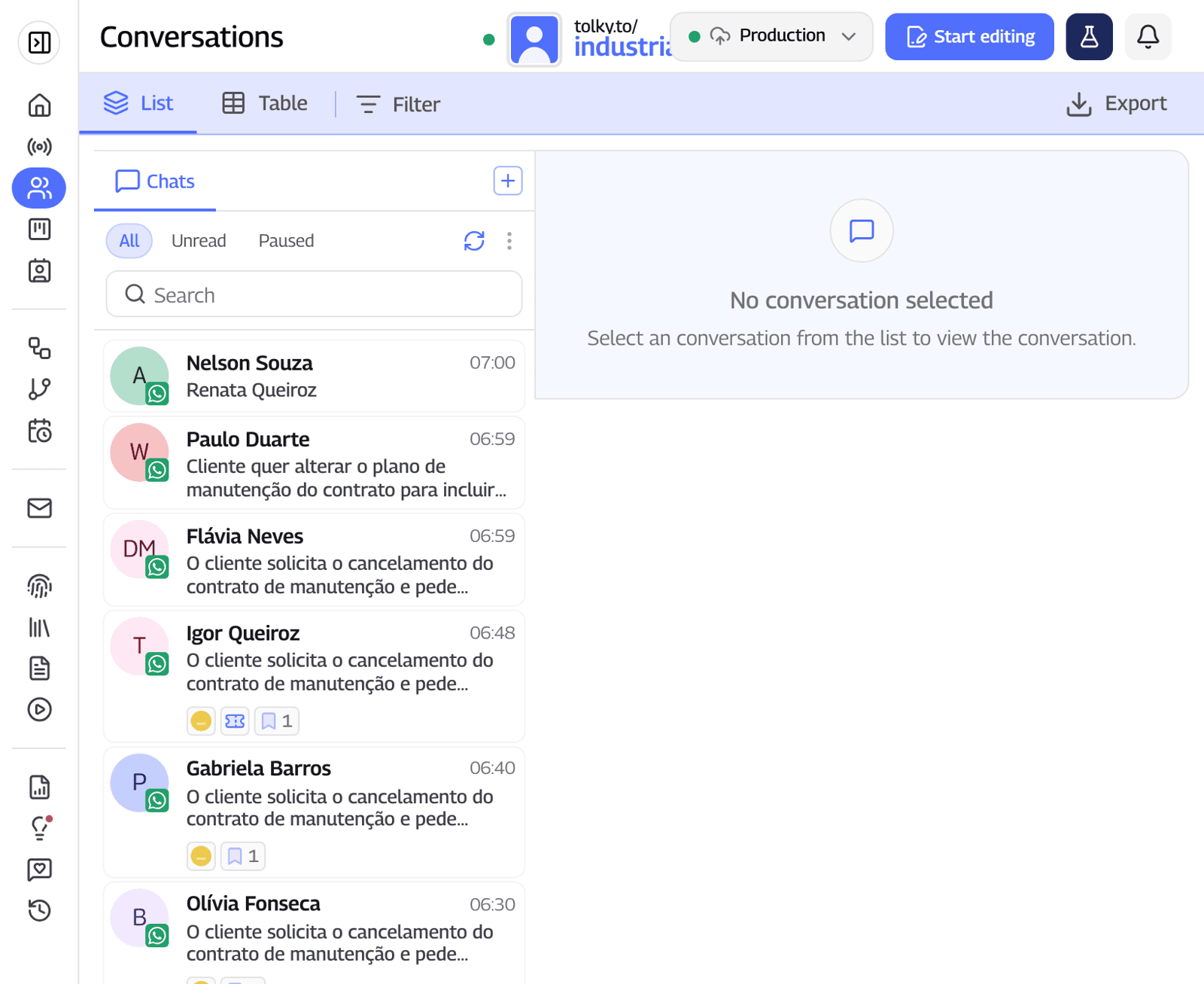
To call your base, Voice Campaigns follow an AI-generated script toward a goal, over WhatsApp, phone lines or both, with calling windows, a do-not-call list, a credit estimate before launch and a daily spending cap. The technical details are on the AI voice agent page.
What Tolky does not do: it is not a voiceover or voice cloning tool. And if your operation requires keeping call audio recordings for a set period, confirm with the team how that works for your case before you buy.
Frequently asked questions
What is the difference between a voice agent and an IVR?
A traditional IVR routes calls through keypad menus. A voice agent talks in natural language, understands the request, checks your systems and resolves it or transfers with the reason logged. A conversational IVR is the front door of a voice agent.
Which team should start with a voice agent?
The team with the most similar calls and a clear rule for resolving them. For many companies that is inbound support or appointment confirmation. When the pain is a stalled list, start with first contact with leads.
Does a voice agent replace the team?
No. It absorbs repetitive calls and initial triage, and the team keeps the cases that need judgment. A person must be able to join the call at any time.
How long does it take to roll out a voice agent?
It depends on the use case and how ready your knowledge base is. A single flow with a reviewed base and clear transfer rules goes live much faster than a full contact center. Expand only after you measure.
Do I need to tell callers they are talking to an AI?
It is the recommended practice, because hiding it erodes trust. Rules vary by country. In Brazil, Decree 13,135/2026, which governs customer service for federally regulated services, allows AI for triage as long as consumers can reach a person (checked on November 20, 2026).
How do I compare voice agent vendors on price?
Add up the channel, voice and AI minutes, the platform and your team's time on transfers, then divide by resolved calls. Price per minute alone is misleading, because it does not show how much the AI actually resolves.
Conclusion
An AI voice agent for business pays off when it goes into a team with volume and a clear rule, always has an open path to people and is measured by cost per resolved call. Start with one flow, inbound or outbound, listen to the calls and expand with data in hand.
Explore Voice Customer Service, see Voice Campaigns, see the plans or talk to the team →. Let's talk?
Share
Tags
- ai voice agent for business
- #ai voice agent
- voice ai agent
- ai phone agent
- ai voice customer service
- ai outbound calling
- #conversational ivr
- #conversational CRM
About the author

Co-founder of Tolky
Marlos Carmo is an AI entrepreneur and founder of Tolky, the conversational-era infrastructure and AI CRM that unifies intelligent service, multi-channel support (such as WhatsApp and voice), live CRM, and operational intelligence in a single ecosystem. He is a finalist for the SXSW Innovation Awards and a member of Francesco's Economy, a global network of young entrepreneurs focused on innovation and social impact. He works connecting Artificial Intelligence and digital transformation in projects for large organizations.
Next step
Want to bring this to your operation?
Tati, Tolky's AI assistant, understands your scenario in a few questions, suggests the best path and connects you with someone from the team, with full context.
Share