CX tools: categories and how to build your customer experience stack
What CX tools are, what each category solves, which metric to track, and how to build and integrate a customer experience stack for small, mid-size and large companies.
TL;DR
CX tools are the systems a company uses to serve, know, measure and improve the customer experience: help desk, conversational platform, CRM, satisfaction surveys, voice, knowledge base, conversation analytics and journey management. The right stack starts with one channel and a CRM sharing the same history, then grows in layers as the company grows. A tool without integration becomes one more place where the customer has to repeat themselves.
Share
Every company that takes customer experience seriously reaches the same point: support uses one tool, sales uses another, the satisfaction survey comes from a third and nobody can bring the data together. The customer tells the same story three times, and the manager builds the report in a spreadsheet.
The problem is rarely a lack of tools. It is choosing without knowing each tool's role and buying without an integration plan. This guide organizes CX tools by category, shows what each one solves and which metric it moves, and proposes how to build the stack for small, mid-size and large companies.
Updated in November 2026.
What are CX tools?
CX (customer experience) tools are the software a company uses to serve, know, measure and improve the customer experience across every touchpoint, from the first question to after-sales. Together they form the CX stack: the systems that hold who the customer is, talk to them and show whether the experience is getting better.
Customer experience is broader than customer service: it includes product, billing, delivery and communication. The complete customer experience guide covers strategy, the journey and metrics; this one focuses on the right tool for each role.
What are the categories of CX tools?
CX tools fall into eight categories that play three roles: serving the customer, keeping what the company knows about them, and measuring the experience to improve it. Many vendors cover two or three categories in one product, so think about the role first and the tool's name second.


Tools to serve the customer
- Customer service and help desk. Organizes requests into tickets, with queues, priority and SLA. It answers "who is handling this and by when."
- Conversational platform and WhatsApp. Puts human agents and AI agents on conversation channels, in a shared inbox. It handles the volume of repeated questions and slow first responses. See the WhatsApp customer service platform guide.
- Voice and IVR. Answers calls with a keypad menu or a semantic IVR that understands what the caller says. See voice AI and semantic IVR.
Tools to keep what you know
- CRM. Stores contacts, history, opportunities and agreements. A conversational CRM logs every conversation on the contact without manual typing.
- Knowledge base. Gathers policies, manuals and approved answers for the team, self-service and AI agents. It ends the problem of different answers to the same question.
Tools to measure and improve
- Satisfaction surveys. Ask customers how it went, using NPS (likelihood to recommend), CSAT (satisfaction with an interaction) or CES (effort to get a resolution). NPS was proposed by Frederick Reichheld in Harvard Business Review in December 2003; CES gained traction with the July 2010 article by Dixon, Freeman and Toman. Compare them in NPS vs. CSAT.
- Conversation analytics and BI. Reads what customers say at scale: topics, sentiment, contact reasons. BI dashboards cross that with sales, churn and cost.
- Journey management. Maps and, in some tools, orchestrates which message goes out at each stage, to whom and on which channel.
Table: category, what it solves, metric and examples
The fastest way to understand a CX stack is to tie each category to the problem it solves and the metric it should move. The examples are market names, listed only to guide your research; we do not evaluate pricing or features for any of them here.
| Category | What it solves | Main metric | Market examples |
|---|---|---|---|
| Customer service and help desk | Requests with an owner, deadline and stage | SLA met, AHT | Zendesk, Freshdesk, Movidesk |
| Conversational platform and WhatsApp | Volume on conversation channels, AI and team on the same number | First response time, AI resolution | Blip, Zenvia, respond.io, Tolky |
| Voice and IVR | Calls with triage and voice service | Abandonment rate, FCR | Genesys, NICE, Twilio |
| CRM | One customer history and opportunities | Retention, LTV | HubSpot, Salesforce, RD Station CRM, Tolky |
| Knowledge base | Consistent answers for team, customer and AI | Self-service, reopen rate | Zendesk Guide, Confluence, Notion |
| Satisfaction surveys | Customer opinion on the relationship or the interaction | NPS, CSAT, CES | Qualtrics, Medallia, SurveyMonkey |
| Conversation analytics and BI | Contact reasons and trends | Topics by volume, cost per contact | Power BI, Looker Studio, Tableau |
| Journey management | The right message at each stage and channel | Conversion by stage, churn | Adobe Journey Optimizer, Braze |
Tolky shows up in two rows because it is a conversational AI CRM: conversation-based service and CRM in the same product. To compare vendors side by side, see the alternatives, such as Tolky vs. Zendesk.
How do you build a CX stack by company size?
Start with the channel where your customers already are and a single customer record; add measurement, analytics and journey tools when volume and team size call for them. Buying everything at once creates fixed costs, half-done integrations and tools nobody uses.
| Size | Starting point | What to add later | Sign that it is time to grow |
|---|---|---|---|
| Small | Conversational platform with CRM and knowledge base | Automatic NPS and ready-made reports | Repeated questions take up the whole day |
| Mid-size | Channels on the same history, queues by team, AI with handoff | Help desk for multi-step cases, BI, ERP integration | Reports built by hand; cases stuck between teams |
| Large | Conversation, CRM and voice integrated via API, with access profiles and activity logs | Advanced surveys, journey management, corporate BI | Each unit on its own tool; audits are hard |
These sizes are guidelines, not rules. A small company with heavy WhatsApp volume may need AI agents before a mid-size company with little contact. The deciding factor is how big the pain is.
Three decisions apply to any size:
- Choose the contact owner. One system, usually the CRM, holds the customer; the others read from and write to it.
- Pick the metric before the tool. If the goal is shorter waits, first buy what moves first response time.
- Prefer fewer, well-connected tools. The guide to customer service software and platforms lists the criteria for the service piece.
How do you integrate CX tools with each other?
Integrating a CX stack means making sure three things flow between tools: who the customer is, what happened to them and how each contact ended. Without that, the customer repeats themselves, the report does not add up and the AI answers without context.


Think of the stack as four stacked layers:
- Channels: WhatsApp, website chat, email, phone.
- Service: queues, AI agents, human agents, tickets.
- Data: CRM and knowledge base.
- Measurement: surveys, conversation analytics, BI and journeys.
Each layer reads from and writes to the data layer, through a REST API, webhooks or ready-made connectors. When evaluating, ask: is the contact the same on every channel? Do the conversation outcome and the survey score flow back to the CRM on their own? Does the AI query company systems or only return fixed text?
Omnichannel service is the visible part of an integrated stack: the customer starts on website chat, continues on WhatsApp and repeats nothing. See the omnichannel customer service guide and the one on integrating AI with your CRM.
What are the most common mistakes when building a CX stack?
The most common mistake is buying from a feature list and finding out later that the tool does not talk to the rest of the operation. The others share the same root: deciding by tool instead of by process.
- One tool per team, no contact owner. Three different records for the same customer.
- Surveys without action. Measuring NPS every month without following up with detractors or digging into causes.
- AI without a reviewed knowledge base. The agent answers with what it finds, and what it finds is outdated. See how to train an AI agent on your knowledge base.
- Handoff without context. The human agent gets the conversation with no summary and asks everything again. See AI-to-human handoff.
- Counting only the license. Forgetting integration, implementation, channel fees (such as Meta's for WhatsApp) and the time it takes to maintain each tool.
What is CX 2.0?
CX 2.0 is a market expression, with no official author or definition, used for customer experience built on connected data, conversation channels and AI, as opposed to CX based on periodic surveys and siloed channels. The "2.0" comes from tech language and signals a new generation, not a standard.
Each vendor uses the term its own way, but it usually brings together:
- Connected data: the same customer history across every channel and team.
- Conversation as the main channel: WhatsApp, chat and voice instead of forms and ticket numbers.
- AI with people: AI agents handle what repeats and hand off with context what calls for judgment.
- Continuous listening: beyond surveys, analyzing conversations shows what customers think.
In our customer experience guide, we call the relationship-focused phase of the 2010s "Customer Experience 2.0" and today's AI phase CX 3.0. Both readings coexist. When buying, the version number matters less than whether the tools share the same customer.
Where does Tolky fit in the CX stack?
Tolky is a conversational AI CRM: it covers the channel, service and data layers in one platform, with AI agents and the team on the same history and every conversation logged in the CRM. It makes sense for companies that serve and sell through conversations and want fewer disconnected tools.
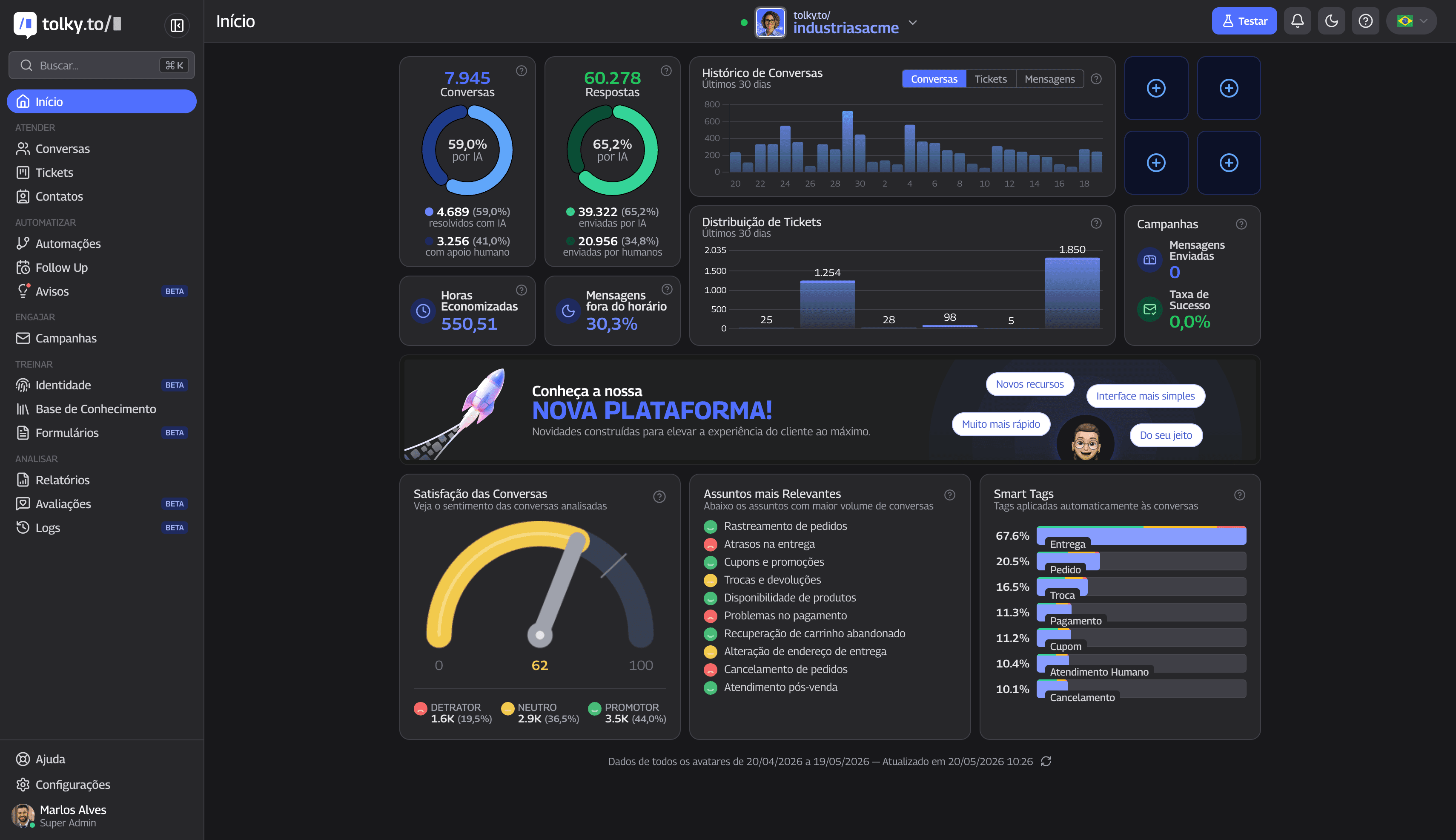
- Channels: WhatsApp on the official API, website chat, email, Microsoft Teams and voice with semantic IVR (upon activation).
- Service: mission-based AI agents, knowledge base, queues, tickets and handoff with context. See the solutions.
- Data: built-in CRM, native HubSpot integration, 1,000+ apps in Flows, REST API, webhooks and MCP (integrations).
- Measurement: automatic NPS at the end of the conversation, reports, top topics and smart tags.
The platform handles more than 5 million AI messages per month and more than 67% AI resolution across all operations; these are platform figures, not a single customer's results.
What Tolky does not do: it has no CSAT or CES (the survey is NPS), it is not a marketing journey management tool, it has no native Salesforce integration, and Instagram and SMS are coming soon. If your operation depends on those pieces, Tolky works alongside them through APIs and webhooks.
Frequently asked questions
What are the main CX tools?
There are eight categories: customer service and help desk, conversational platform and WhatsApp, voice and IVR, CRM, knowledge base, satisfaction surveys, conversation analytics and BI, and journey management. Many products cover more than one.
Which CX tool should you buy first?
The one that serves the channel where your customers already are, backed by a single customer record. For many companies, especially where WhatsApp is the main channel, that means a conversational platform with a CRM. Surveys, BI and journeys come in as volume grows.
Is a CX tool the same as customer service software?
No. Customer service software is one category of the CX stack, which also includes CRM, satisfaction surveys, conversation analytics and journey management.
Which metrics should a CX stack track?
At least one per layer: first response time in service, first contact resolution or AI resolution in operations, and NPS, CSAT or CES for customer perception. Retention and churn show the business impact.
What does CX 2.0 mean?
It is a market expression, with no single author or definition, for customer experience built on connected data, conversation channels and AI. Ask each vendor what it includes in practice.
Does Tolky replace every CX tool?
No. Tolky covers conversation channels, service with AI and the team, CRM and automatic NPS. It does not do CSAT or marketing journey management, and it connects to other tools through APIs, webhooks and Flows.
Conclusion
CX tools work when each one has a clear role and all of them share the same customer. Start with the channel where your customers already talk and a single record, pick the metric before the tool and grow in layers. For day-to-day operations, see the AI contact center.
See the plans, explore the solutions, discover Tolky's CRM or talk to the team →. Let's talk?
Share
Tags
- cx tools
- customer experience tools
- cx tech stack
- customer experience 2.0
- customer service software
- customer satisfaction survey
- #conversational crm
About the author

Co-founder of Tolky
Marlos Carmo is an AI entrepreneur and founder of Tolky, the conversational-era infrastructure and AI CRM that unifies intelligent service, multi-channel support (such as WhatsApp and voice), live CRM, and operational intelligence in a single ecosystem. He is a finalist for the SXSW Innovation Awards and a member of Francesco's Economy, a global network of young entrepreneurs focused on innovation and social impact. He works connecting Artificial Intelligence and digital transformation in projects for large organizations.
Next step
Want to bring this to your operation?
Tati, Tolky's AI assistant, understands your scenario in a few questions, suggests the best path and connects you with someone from the team, with full context.
Share