CRM for small business: when to adopt, what it costs, how to choose
A guide to CRM for small business: signs it is time, what to prioritize, what it costs per user or per attendance, and a one-week rollout plan that keeps sales running.
TL;DR
A CRM for small business is a simple system that stores every customer, every open deal and the next task, so sales do not depend on anyone's memory. A small business needs one when customers wait for replies that never come, nobody knows how many quotes are open or the history lives on someone's phone. You can start for free and roll it out in a week; when sales happen on WhatsApp, the criterion that matters most is whether the CRM records the conversation on its own.
Share
In a small business, the CRM is usually the owner's memory, the salesperson's WhatsApp and a spreadsheet nobody has updated since March. It works until the day a customer asks for a callback and nobody remembers who handled it, or a salesperson leaves and takes the client list with their phone.
This guide shows when a small business needs a CRM, what to prioritize when choosing one, what it costs based on prices checked on official pages, and how to get it running in a week without stopping sales.
Updated in November 2026.
What is a CRM for small business?
A CRM for small business is a lean customer management system that records contacts, deals and tasks in one place, without an IT team or months of setup. The general concept of CRM is in the guide what is a CRM; here the focus is the size of the operation.
The legal definition of a small business varies by country. For this guide, it means a company with 1 to 10 people selling or serving customers, often over WhatsApp. That is the scale this guide is written for.
When does a small business need a CRM?
A small business needs a CRM when selling starts to depend on remembering: who asked for a quote, who got no reply, which stage each deal is in. While one person can keep it all in their head, a spreadsheet is enough. The signs that point has passed:


- Customers complain that they asked for a reply and got none.
- Two people answer the same customer, or nobody does.
- Nobody knows how many quotes are open or what they are worth.
- The customer history lives on one salesperson's phone.
- The owner cannot say how many conversations turned into sales this month.
- The spreadsheet has three versions and none of them is right.
Two or more of these signs are enough to justify a CRM, even a free one. The full list, with how to measure each sign, is in selling without a CRM: signs you need one.
What should a small business prioritize in a CRM?
For a small business, three criteria outweigh the feature list: ease of use, connection to WhatsApp and the pricing model. A full CRM that nobody updates is worth less than a simple one used every day.
Simplicity before features
Salespeople only update the CRM if it is faster than writing in a notebook. Choose a sales funnel with 4 to 6 stages, few required fields and a mobile app. Features such as forecasting and territories can wait.
WhatsApp inside the CRM, not next to it
If sales happen on WhatsApp, a CRM that does not read the conversation doubles the work: someone copies the summary, and usually forgets. There are three ways to connect them, from simplest to most complete: a WhatsApp Web extension, paid conversation syncing and a CRM connected to the official API, with the whole team on the same number. The guide to free CRM for WhatsApp shows what each free option delivers.
Per-user or per-attendance pricing
Most CRMs charge per user: each person on the team pays the full plan price. Some conversational CRMs charge per attendance, with a monthly allowance of conversations and a set number of users included. Per-user pricing pays off when few people handle many conversations; per-attendance pricing pays off when the team is larger than the conversation volume, or when AI answers part of them.
How to compare CRMs for small business
Compare CRMs by how your team will actually use them, not by the feature page: who will use it, where customers come from and what it costs to grow. The table lists the criteria and the question each one answers.
| Criterion | Question for the vendor | Red flag |
|---|---|---|
| Ease of use | Can a new salesperson use it alone on day one? | Weeks of training |
| Does the conversation reach the history without copy and paste? | Extension only, no shared team history | |
| Free plan or trial | Can I use it with real data before paying? | Neither |
| Pricing | Per user, per attendance or per contact? | Minimum seats above your team size |
| Contract | Can I pay monthly and cancel? | Long minimum term paid up front |
| Export | Can I take my data with me if I switch? | Export limits or closed format |
| Support | Do they answer in my language, in my hours? | Only a help center in another language |
How much does a CRM for small business cost?
A CRM for a small business ranges from free, with a user limit, to a few hundred dollars a month for a team of 3 to 5 people, before WhatsApp fees. The examples below come from official pages checked on November 19, 2026.


| Model | Example | Published price | What to weigh |
|---|---|---|---|
| Free plan | HubSpot, Capsule, Agendor | US$0, up to 2, 2 and 3 users | User and feature limits |
| Per user | HubSpot Starter | US$20 per seat/month (list price) | WhatsApp only from Professional |
| Per user | Capsule Starter | US$18 per user/month billed yearly | No WhatsApp listed |
| Per user, Brazil | Agendor Pro | R$59 per user/month | Grows in a straight line with the team |
| Per attendance | Tolky Starter | US$90 (R$500)/month, 2 users, 500 attendances | Conversation allowance |
Illustrative math for 3 salespeople: HubSpot Starter at list price costs 3 × US$20 = US$60 a month, but WhatsApp in HubSpot's inbox requires Marketing Hub or Service Hub Professional. Capsule Starter costs 3 × US$18 = US$54 a month, with no WhatsApp. Tolky Starter costs US$90 a month with 2 users, WhatsApp through the official API and AI; with 3 people, the next plan is Professional, at US$450.
Some costs sit outside every plan. Through the official WhatsApp API, Meta charges per delivered message, by category and country, according to the WhatsApp Business Platform pricing page; estimate yours with the WhatsApp API cost calculator. The full math, with setup and billing units, is in how much a conversational CRM costs. If your budget is zero, compare the free plans in best free CRM in 2026.
How to roll out a CRM in one week
A small business can roll out a CRM in five working days if it starts small: one pipeline, few fields and only active customers. The schedule below is illustrative and assumes a team of up to 5 people.


- Day 1, draw the pipeline. List the real sales stages, 4 to 6 of them, each with a clear rule for moving forward. Example: new contact, quote sent, negotiation, won, lost.
- Day 2, define the fields. Name, phone, source, value and next task. Anything nobody will fill in stays out.
- Day 3, import only what is alive. Customers and deals from the last 90 days. Old history can wait.
- Day 4, connect WhatsApp and train. Connect the channel customers use and run a one-hour session with the team, using real cases.
- Day 5, set the rule. A deal that is not in the CRM does not exist. Schedule a 15-minute pipeline review every Monday.
After 30 days, look at three numbers: open deals with no next task, time to first reply and conversion by stage. They tell you whether the CRM is being used or just filled in.
Common mistakes when choosing and rolling out
The most common mistake is buying a CRM for its feature list rather than for the team's habits. The others show up in the first few months:
- Too many pipeline stages. Ten stages become ten places for a deal to stall.
- Importing the whole spreadsheet. Contacts from five years ago clutter the database and hide the active ones.
- CRM separate from WhatsApp. If the conversation does not flow in on its own, the record disappears in the first busy week.
- Choosing by license price. Add up licenses, the WhatsApp module, Meta's fees and the team's time.
- Nobody owns the CRM. Without one person reviewing the pipeline weekly, the system empties out.
- Automating before organizing. A WhatsApp chatbot helps a lot, but it answers better once the pipeline is clear.
Where Tolky fits
Tolky is an AI conversational CRM for small and midsize businesses that sell and serve customers on WhatsApp: the conversation feeds the customer record and an AI agent answers alongside the team. It makes sense when the main problem is conversation volume, not just pipeline organization.
Starter, at US$90 (R$500) a month, includes WhatsApp through the official API, 2 users, 500 attendances, conversation routing across the team, access profiles and the sales CRM, with opportunities, companies, activities and goals. The AI answers, looks up the knowledge base and hands off to a person with the conversation history. See Tolky's WhatsApp CRM and the prices on Tolky's pricing page.
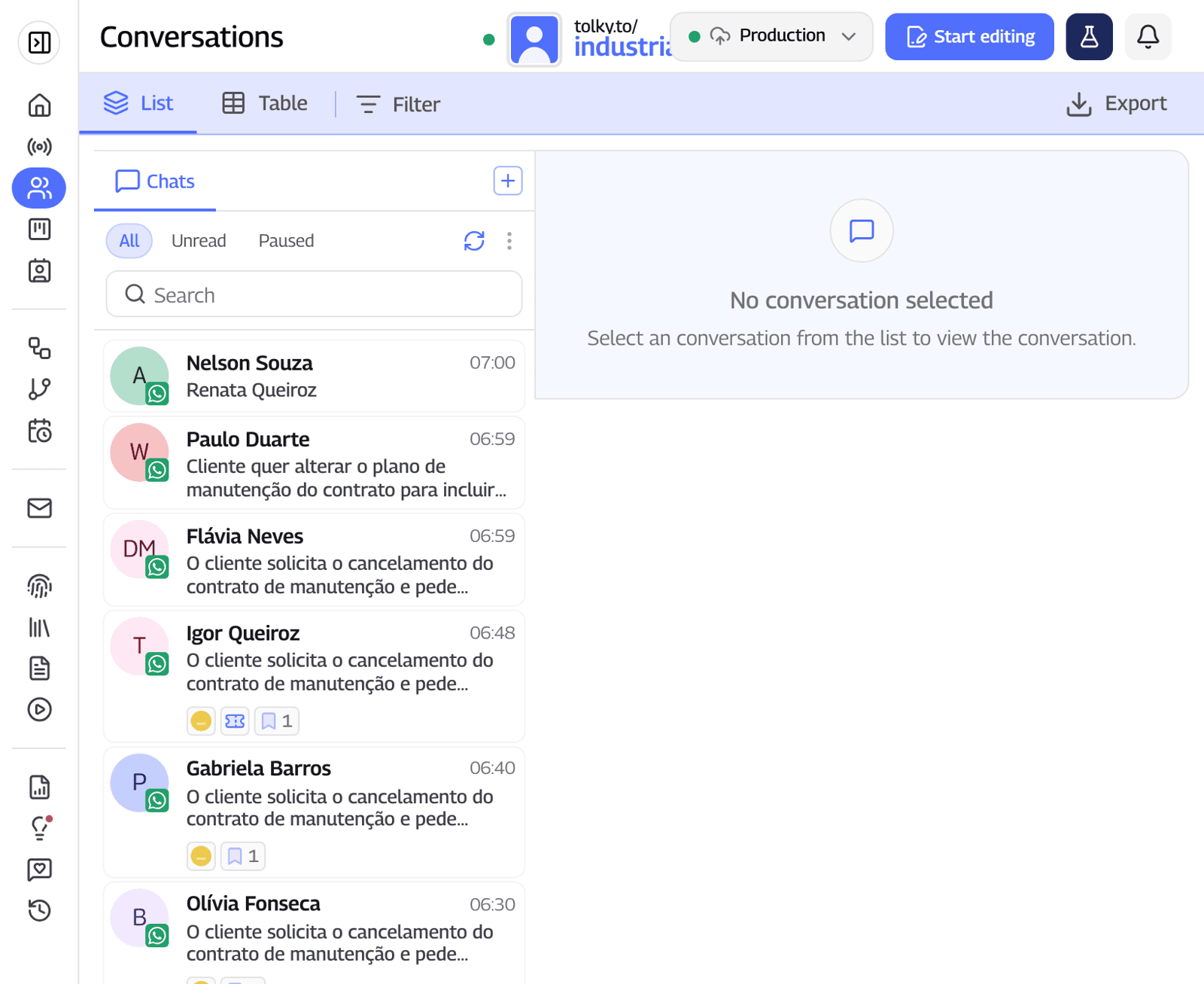
What Tolky does not do: the free Individual plan has no WhatsApp and no sales CRM; it is for training the AI and serving website visitors. WhatsApp campaigns and automatic follow-up start on Professional, at US$450 (R$2,500) a month. The only native integration with another CRM is HubSpot, and Meta's fees are outside every plan. For a team that only needs a pipeline, without conversation volume, a per-user sales CRM is cheaper.
Frequently asked questions
What is the best CRM for small business?
The one your team uses every day. To start at no cost, HubSpot, Capsule, Agendor and RD Station CRM have free plans; if sales happen on WhatsApp with several people, prioritize a CRM that records the conversation on its own. Compare options in best free CRM in 2026.
Does a small business really need a CRM?
It does once selling depends on remembering who asked for what. If customers go without replies, nobody knows how many quotes are open or the history lives on someone's phone, going without a CRM already costs more than a plan.
How much does a CRM for small business cost?
From US$0 on free plans with user limits to about US$18 to US$20 per user per month on entry plans such as Capsule Starter and HubSpot Starter at list price, according to their official pages on November 19, 2026. WhatsApp may be billed separately, and Meta's fees are outside every plan.
How long does it take to roll out a CRM?
A team of up to 5 people can run the basics in a week: pipeline, fields, import of active customers, WhatsApp connection and training. The habit takes about a month of weekly reviews.
Is a free CRM good enough for a small business?
It is good for getting started and building the habit. The limits show up in the number of users, automations and WhatsApp, which on free plans comes at most through a WhatsApp Web extension.
Is Tolky a good fit for small businesses?
It fits small businesses that sell and serve customers on WhatsApp and want AI answering alongside the team. Starter, at US$90 (R$500) a month, includes 2 users, 500 attendances and WhatsApp through the official API.
Conclusion
A CRM for a small business does not need to be expensive or slow to set up: choose for simplicity, for the connection to WhatsApp and for a pricing model that follows your growth. Start with a short pipeline and only active customers, and review it every week until it becomes a habit.
See the plans, explore the WhatsApp CRM, compare free CRMs or talk to the team →. Let's talk?
Share
Tags
- crm for small business
- small business crm
- simple crm
- crm cost for small business
- crm with whatsapp
- how to implement a crm
- free crm
- #conversational CRM
About the author

Co-founder of Tolky
Marlos Carmo is an AI entrepreneur and founder of Tolky, the conversational-era infrastructure and AI CRM that unifies intelligent service, multi-channel support (such as WhatsApp and voice), live CRM, and operational intelligence in a single ecosystem. He is a finalist for the SXSW Innovation Awards and a member of Francesco's Economy, a global network of young entrepreneurs focused on innovation and social impact. He works connecting Artificial Intelligence and digital transformation in projects for large organizations.
Next step
Want to bring this to your operation?
Tati, Tolky's AI assistant, understands your scenario in a few questions, suggests the best path and connects you with someone from the team, with full context.
Share