What is a CRM: meaning, types, examples and how to choose one
What a CRM is, what the acronym stands for, what it is used for, the types (operational, analytical, collaborative and conversational), examples by team, what it costs and how to choose.
TL;DR
A CRM (Customer Relationship Management) is the system that keeps a company's contacts, conversations, deals and tasks in one place, so the team can sell and support customers with full history. The classic types are operational, analytical and collaborative; the conversational CRM, or AI CRM, is the next step, where AI fills in the CRM from the conversations.
Share
Every company that sells already has a CRM, even if it does not call it that. Sometimes it is a spreadsheet, sometimes a salesperson's phone, sometimes the memory of whoever has been around the longest. The trouble starts when that person leaves, when a lead gets lost in a WhatsApp thread or when nobody can say how many deals will close this month.
This guide explains what a CRM is without jargon: what the acronym means, what it is for, the types that exist, examples by team, how it differs from a spreadsheet, what it costs and how to choose one. At the end, we show where a conversational CRM like Tolky fits and when it is not the best choice.
Updated in November 2026.
What is a CRM?
CRM stands for Customer Relationship Management: the system that keeps, in one place, who your customers are, what they have discussed with your company, which stage each deal is in and what the next step is. The term covers both the strategy (treating relationships as a company asset) and the software behind it. See the short definition in the glossary: CRM.
In practice, a CRM system organizes four things:
- Contacts and companies: name, phone, email, job title, source and history.
- Interactions: conversations, calls, emails, meetings and notes.
- Deals: each open negotiation, with value, stage and owner, laid out in a pipeline.
- Activities: tasks with due dates, such as calling someone back or sending a proposal.
The value of a CRM is not in storing data. It is in answering questions fast: "who spoke to this customer last?", "which proposals have been stuck for two weeks?" and "how much should we close this month?".
What is a CRM used for?
A CRM keeps you from losing customers to forgetfulness, makes sales more predictable and lets anyone on the team pick up a conversation exactly where it stopped.
The most common uses are:
- Organizing the sales funnel. Each lead enters a stage and moves forward until it is won or lost, with the reason recorded.
- Remembering the next step. The system creates tasks and flags contacts that have gone without a reply.
- Giving support teams context. Agents see past purchases, conversations and issues before they answer.
- Measuring. Conversion rate, sales cycle, loss reasons and productivity per person come from reports, not guesswork.
- Targeting campaigns. With clean data, you only message the people it makes sense to reach, on the right channel.
If you are not sure your team needs one yet, read the signs your sales need a CRM.
What are the types of CRM?
The three classic types of CRM are operational, analytical and collaborative. The conversational CRM, also called AI CRM, is the newest step, where the customer conversation is the source of the data and AI is part of the record keeping. Most systems today mix the types.


| Type | Focus | What it does in practice | Who it matters most to |
|---|---|---|---|
| Operational | Day-to-day sales, marketing and support | Pipeline, tasks, stage automation, contact history | Teams that need to organize daily work |
| Analytical | Data and decisions | Reports, segmentation, sales forecasting, loss analysis | Managers and companies with a large customer base |
| Collaborative | Sharing information across teams and channels | One history seen by sales, support and finance | Companies where customers deal with several teams |
| Conversational (AI CRM) | The conversation as the data source | AI answers, qualifies and fills in the CRM from chat, voice and email | Teams that sell and support over WhatsApp and other messaging channels |
Operational, analytical and collaborative CRM
The operational CRM is the best known: the stage board, the tasks and the automations that move a lead forward. The analytical type looks back and ahead, with reports and forecasts. The collaborative type makes sure sales, support and finance see the same customer. A good system covers all three to some degree.
Conversational CRM and AI CRM
In a conversational CRM, the funnel starts in the conversation. Instead of a salesperson typing what the customer said, AI reads the conversation, suggests field values, creates the deal and schedules the next activity, and the team reviews it. The difference from the classic types is covered in depth in what is a conversational CRM and in the complete guide to AI CRM.
CRM examples by team
The same CRM serves different teams, each looking at one part of the relationship: sales tracks deals, support tracks tickets and marketing tracks segments. The examples below are illustrative of common uses.
- Sales. A distributor logs each quote request as a deal, tracks the proposal and creates a follow-up task two days later. See how this works for sales teams and in the sales CRM guide.
- Customer support. A clinic checks the patient's history before replying on WhatsApp and avoids asking for the same details again.
- Marketing. A school separates people who asked about the evening program and sends the campaign only to that group.
- Collections. A lender records payment promises and reaches out again on the agreed date, as in collections.
- Post-sale. A store follows delivery, returns and satisfaction, and turns happy customers into repeat buyers.
Small businesses use a CRM the same way, with fewer stages and fewer users. The guide to CRM for small businesses shows how to start lean.
CRM or spreadsheet: what is the difference?
A spreadsheet stores data; a CRM stores data, history, owners and next steps, and tells you when something is stuck. A spreadsheet works at the start, with few customers and one person doing everything. It starts to fail when two people edit it at once, when the conversation history lives on a phone and when a manager needs a number they can trust.


| Criterion | Spreadsheet | CRM |
|---|---|---|
| Conversation history | Lives elsewhere, in WhatsApp or email | Linked to the contact and the deal |
| Next step | Depends on someone remembering | Task with a due date and a reminder |
| Teamwork | Conflicting versions, no access control | Owner per contact, access profiles and a log of who changed what |
| Reports | Built by hand | Pipeline, conversion and loss reasons out of the box |
| Automation | Formulas and macros | Rules that move stages, create tasks and send messages |
| Cost | Free | Free with limits, or paid per user or per volume |
A good test: if you have lost a sale because you forgot to follow up, or you cannot say how many proposals are open right now, the spreadsheet has stopped working. When the problem is WhatsApp, WhatsApp is not a CRM explains why the app alone does not fix it either.
How to choose a CRM
Choose a CRM based on the process you already have and the channel where your customers talk to you, not on the longest feature list.


- Map your funnel before looking at tools. List the real stages of the sale, from first contact to post-sale.
- Find out where customers talk to you. If most conversations happen on WhatsApp, the CRM needs to record them without manual copying.
- Count users and volume. Some CRMs charge per user, others per contact or per conversation. The math changes a lot with team size.
- Check integrations. Email, calendar, ERP and billing need to talk to the CRM, through a native integration, an API or webhooks.
- Test with real data. Use the trial or a free plan for two weeks with real cases.
- Name a CRM owner. Someone needs to look after stages, fields and data quality.
To compare options at no cost, see the best free CRMs of 2026. If you sell over messaging, the list of the best WhatsApp CRMs compares ten tools.
How much does a CRM cost?
A CRM can cost anywhere from nothing to thousands of dollars a month: there are free plans with user limits, paid plans billed per user and platforms that charge by contact or conversation volume. The pricing model matters more than the list price.
Two examples from official pages, checked on November 19, 2026:
- HubSpot: the HubSpot CRM pricing page lists a free plan for up to 2 users, with no credit card, and Starter at US$10 per seat per month month-to-month, or US$7 with annual billing, as an offer for new customers. More in HubSpot CRM pricing.
- RD Vendas (the new name of RD Station CRM), in Brazil: the RD plans page shows a Free plan for up to 4 users, Basic at R$73 per user per month (R$65.70 on the annual plan), Pro at R$131 (R$117.90 annually) with a 4-user minimum and Advanced on request. More in RD Station CRM pricing.
Beyond the subscription, the bill includes onboarding (setup, migration and training), paid integrations and, if you use the official WhatsApp API, Meta's per-message fees. The guide on how much a conversational CRM costs adds up every part.
Common CRM implementation mistakes
The most common mistake is buying a CRM before defining the process; the second is relying on the team to type everything by hand.
- Too many fields. Every required field is a reason for a salesperson not to log anything. Start with the minimum that changes decisions.
- Stages that do not match the real sale. If nobody knows when to move a card, the pipeline becomes decoration.
- Conversations outside the system. When WhatsApp stays on a personal phone, the CRM shows only half the story.
- No owner. Without someone looking after the data, duplicates and unassigned contacts pile up within weeks.
- Measuring only volume. Lead count says little; conversion by stage and loss reasons tell you what to fix.
Where Tolky fits
Tolky is an AI conversational CRM: it handles WhatsApp, website, voice and email with AI and your team, and records everything in its own CRM, with configurable pipelines, deals, proposals and activities. AI suggests field values from the conversation, a text or a file, and the team reviews them.
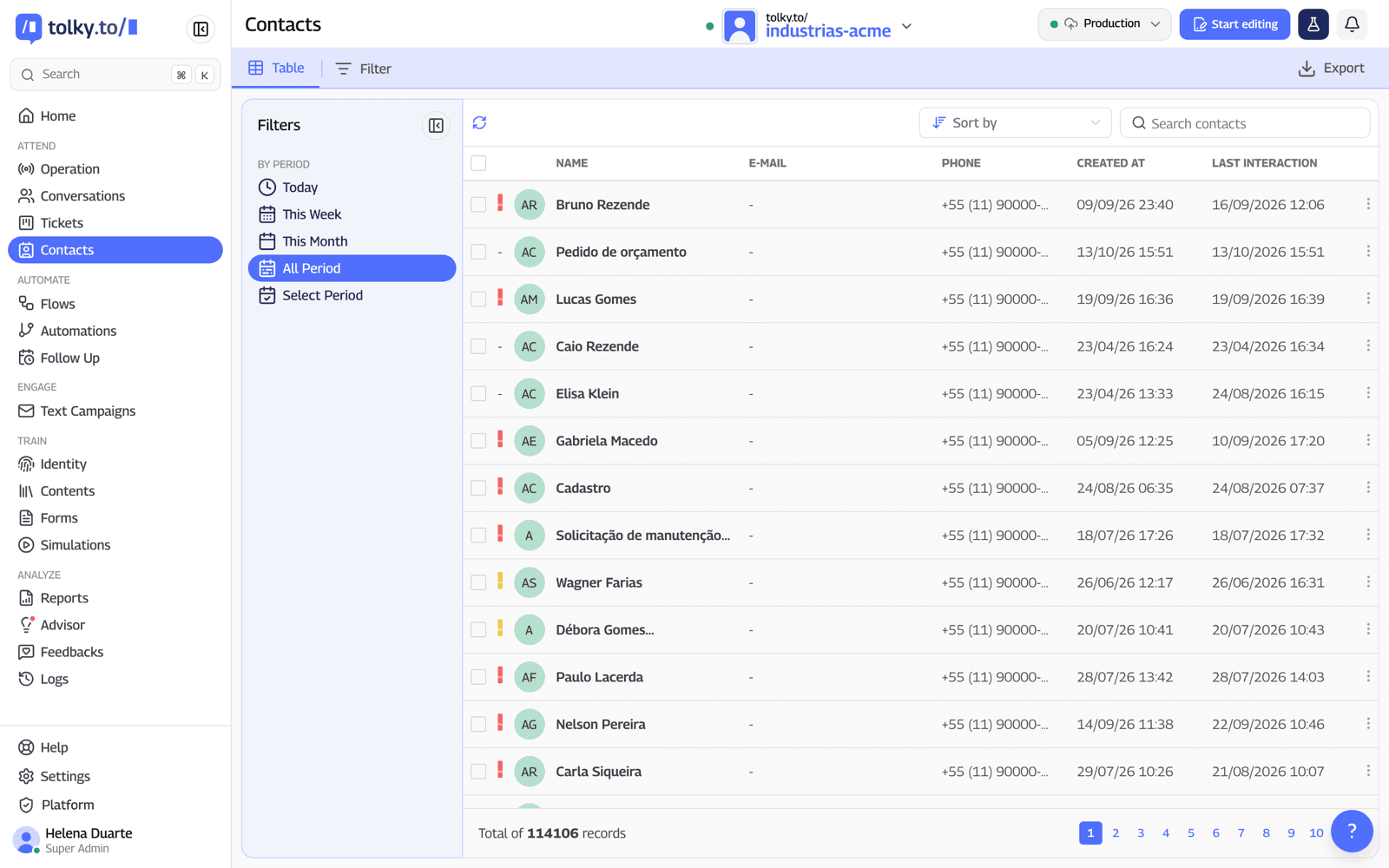
In practice, Tolky makes sense when the relationship happens in conversation. Tolky's CRM shows pipeline, goals and loss reasons, and the WhatsApp CRM explains how conversations become deals. The native integration is with HubSpot; other systems connect through the API, webhooks or the more than 1,000 apps in the Flows Integration node.
Pricing is per attendance, not per user: Individual is free (150 attendances and 1 user, without WhatsApp), Starter is US$90 a month (500 attendances and 2 users, with WhatsApp), Professional is US$450 (1,000 attendances and 10 users) and Enterprise is on proposal, according to the pricing page on November 19, 2026.
When Tolky is not the best choice: if your sales happen almost entirely over email and meetings, with little conversation volume, a traditional per-user CRM may be simpler and cheaper. And if you need a native Salesforce or Pipedrive integration, it does not exist; the connection is through the API.
Frequently asked questions
What does CRM stand for?
CRM stands for Customer Relationship Management. The term describes both the strategy of managing customer relationships and the software that stores contacts, conversations, deals and tasks.
What are the types of CRM?
The classic types are operational (day-to-day sales and support), analytical (reports and forecasting) and collaborative (information shared across teams). The conversational CRM, or AI CRM, is the next step, where AI fills in the CRM from the conversations.
What is the difference between a CRM and an ERP?
A CRM manages the customer relationship before, during and after the sale. An ERP manages internal operations, such as inventory, invoicing, tax and finance. The two usually integrate: the CRM closes the sale and the ERP issues the invoice.
Is there a free CRM?
Yes. HubSpot and RD Vendas, for example, have free plans with user limits, and Tolky has a free Individual plan without WhatsApp. See the comparison in the best free CRMs of 2026.
Does a small business need a CRM?
It does once the number of contacts exceeds what one person can remember, or once more than one person handles the same customers. A free or entry-level plan is usually enough at the start.
What is an AI CRM?
It is a CRM where artificial intelligence does part of the work: it answers, qualifies, summarizes conversations and suggests field values, with the team reviewing. See the complete guide to AI CRM.
Conclusion
A CRM is where the customer relationship stops depending on someone's memory. Start with your process and the channel where customers talk to you, pick a pricing model that grows with you and keep few fields and a clear data owner. If your sales happen in conversation, a conversational CRM saves you from copying everything by hand.
See the plans, explore Tolky's CRM, read about sales CRMs or talk to the team →. Let's talk?
Share
Tags
- what is a crm
- #crm
- crm meaning
- types of crm
- crm system
- crm for small business
- #ai crm
- #conversational CRM
About the author

Co-founder of Tolky
Marlos Carmo is an AI entrepreneur and founder of Tolky, the conversational-era infrastructure and AI CRM that unifies intelligent service, multi-channel support (such as WhatsApp and voice), live CRM, and operational intelligence in a single ecosystem. He is a finalist for the SXSW Innovation Awards and a member of Francesco's Economy, a global network of young entrepreneurs focused on innovation and social impact. He works connecting Artificial Intelligence and digital transformation in projects for large organizations.
Next step
Want to bring this to your operation?
Tati, Tolky's AI assistant, understands your scenario in a few questions, suggests the best path and connects you with someone from the team, with full context.
Share