AI that calls customers: use cases, rules and how to get started
How an AI that calls customers works, how it differs from a prerecorded robocall, which rules apply in Brazil and how to start with a small, measured voice campaign.
TL;DR
An AI that calls customers is a voice agent that places outbound calls, talks in natural language, follows a script and works toward a goal, such as confirming an appointment or winning back a customer, handing off to a person when needed. To use it safely, call only people who have a relationship with your company, disclose that the call is transcribed, honor do-not-call requests and start with a small campaign.
Share
Every company has a list of people someone should call and nobody does: appointments to confirm, customers who went quiet, contracts about to expire, leads who asked to be contacted and have been waiting for days. The team can't keep up, and the list goes stale.
An AI that calls customers takes on part of that work. It places the calls, talks like a person, logs the outcome and passes the people who need attention to your team. This guide is for beginners: what it is, what it's for, which rules apply (with Brazil as the example) and how to run your first campaign.
Updated in November 2026.
What is an AI that calls customers?
An AI that calls customers is a voice agent that places outbound calls to a contact list, talks in natural language, follows a script and records whether the goal of the call was reached. People also call it an AI calling agent, an AI dialer or, loosely, a calling robot.
A set of calls with the same goal and the same list is a voice campaign. The AI dials, listens, understands the answer, responds and decides the next step: wrap up, try again later, schedule a callback or transfer to a person.
This post covers calls your company places. For an AI that answers incoming calls, see the guide to the AI voice agent for customer service.
Prerecorded robocall or conversational AI: what changes?
A prerecorded robocall plays the same audio for everyone and, at most, reads a keypress; a conversational AI understands what the person says and adapts the call to each answer. It's the difference between an announcement and a conversation.
The prerecorded call, sometimes called a voice broadcast, still works for short mass notices. The trouble starts when the customer says something off script, like "I already paid" or "can you call tomorrow?". The robot doesn't understand, and the call ends with nothing to show for it.
| Criterion | Prerecorded robocall | Conversational AI |
|---|---|---|
| How it speaks | Recorded audio, same for everyone | Synthetic voice, a reply to each turn |
| How it understands | Keypress or nothing | Free speech, in natural language |
| Off-script question | No answer | Answers or transfers |
| Objections | Not handled | Handled with replies prepared in the script |
| Outcome logged | Call connected or not | Goal reached, reason and transcript |
| Handoff to a person | Rare, no context | During the call, with the history |
If you already use a dialer and want to know where AI fits, the guide to the AI-powered auto dialer compares the models.
What is an AI calling agent used for?
An AI calling agent is built for short, repetitive conversations with a clear goal, at a volume your team can't cover. The most common uses fall into seven groups:


- Confirmation. Confirm an appointment, visit, delivery or event attendance, and reschedule when the date doesn't work. Common in healthcare and appointment-based services.
- Reminders. Flag a due date, a missing document or a step the customer needs to complete.
- Win-back. Reconnect with customers who stopped buying and learn why.
- Renewal. Offer to renew a contract, plan or policy before it expires, with the usual objections already answered. See the insurance segment.
- Surveys. Ask two or three questions after a purchase or support case and record the answers.
- Qualification. Make first contact with leads, ask about budget, timing and need, and pass the ready ones to a sales rep. The guide to the AI SDR that makes calls covers this use.
- Collections. Remind the customer of the balance, give the amount and payment channel, and transfer anyone who wants to negotiate. See AI for collections and the collections area.
Long, sensitive or complex negotiation calls are better handled by a person. The AI can open the conversation and transfer with the context ready.
How does an AI-placed call work?
An AI-placed call follows a cycle: goal, script, call and outcome logging. What decides quality is the work done before the first dial.
- Goal. One sentence that defines success: "appointment confirmed or rescheduled," "lead with budget and timing defined."
- Script. Opening, permission to continue, questions, offer, objection handling and close.
- List. Who gets the call, at what time and how many attempts each contact gets.
- Call. The AI transcribes speech in real time, decides the reply and speaks. The customer can interrupt at any moment.
- Outcome. Goal reached or not, the reason, the transcript and the next step, all in the contact's history.
The transcript is what lets you review the campaign: you see where people hung up, which objections came up and where the script needs to change.
Over WhatsApp or over the phone?
The AI can call over WhatsApp, which requires the contact's prior permission, or over regular phone lines, which reach any number. Many teams use both: they try WhatsApp with people who opted in and call everyone else by phone.
On WhatsApp, Meta sets the rules. According to its call permissions documentation, checked on November 20, 2026:
- The business needs the user's permission before calling. The request goes out as a message inside the customer service window or as a template.
- Temporary permission lasts 7 days; permanent permission lasts until the user revokes it.
- The business can send at most 1 request in 24 hours and 2 in 7 days.
- Four consecutive unanswered calls revoke the permission automatically.
The technical details are in the WhatsApp Business Calling API guide and the WhatsApp calls glossary entry. On the phone network, calls go out over SIP trunking and follow your telecom regulator's rules. Below is how that works in Brazil.
Which rules apply to AI calls in Brazil?
In Brazil, an AI that calls customers follows the same rules as any outbound call: the telecom regulator Anatel's limits on abusive calling, do-not-call registries and the LGPD, Brazil's data protection law. The fact that an AI is speaking creates no exception. These are Brazilian rules; other countries have their own, so check where your contacts are.


Anatel and abusive calling
Since November 12, 2026, a line that places more than 1,000 calls in a day, or more than 10,000 across all lines of the same customer, with 85% or more short calls, has its outbound calling blocked for 15 days. A short call includes unanswered calls, calls that reach voicemail and answered calls lasting up to six seconds. The rule comes from Provisional Measure No. 1,396/2026, enforced by Anatel (checked on November 20, 2026). The measure is still before Congress and may change.
The 0303 prefix for outbound telemarketing has been optional since Anatel's Ruling No. 201/2025, according to Anatel's page. Each rule is covered in detail in the AI telemarketing guide.
Do-not-call requests
People who don't want sales calls can sign up for Não Me Perturbe, a registry run for participating carriers and financial institutions, with up to 30 days for the block to take effect (checked on November 20, 2026). Some states keep their own lists, such as São Paulo's Não Me Ligue from Procon-SP. On top of that, anyone who asks during a call not to be contacted again should come off your list.
Data protection and transcription notice
The LGPD requires a legal basis for using a contact's phone number (Art. 7), such as consent or legitimate interest, and clear information about the purpose (Art. 6). Say at the start that the caller is a virtual assistant and that the conversation is transcribed. See the LGPD glossary entry.
How do you start with a small campaign?
Start with a list of a few hundred contacts who already know your company and a simple goal, such as confirmation or win-back. A small campaign surfaces script mistakes before they reach thousands of people.
- Pick a measurable goal. "Confirm tomorrow's appointment" beats "talk to the customer."
- Clean the list. Remove anyone who asked not to be contacted, anyone called recently and invalid numbers.
- Write and rehearse the script. Play the customer yourself, and test objections and off-script answers.
- Set hours and attempts. Call during business hours, space out retries and leave a short voicemail.
- Agree on the handoff. Decide who on the team takes transferred calls and when.
- Read the transcripts. After the first few dozen calls, adjust the opening and the replies before scaling up.
Call the same contact only a few times. Many unanswered attempts annoy the customer and raise the line's share of short calls.
Which metrics should you track?
Track the campaign by goals reached and the cost of each goal, not by the number of calls placed. Calling a lot and resolving little burns through the list and the number's reputation.
| Metric | What it shows | Warning sign |
|---|---|---|
| Answer rate | How many calls were picked up | A sudden drop, which may mean the number was flagged as spam |
| Goals reached | How many calls hit the defined outcome | High answer rate, few goals |
| Transfers | How many went to a person and why | A recurring reason the script could handle |
| Cost per goal | Campaign spend divided by goals reached | Cost rising with each new attempt |
| Do-not-call requests | How many people asked to be removed | A spike right after changing the opening |
| Average sentiment | The tone of the conversations | Negative sentiment at one specific step |
To compare with inbound service, see how to measure AI resolution rate.
Where Tolky fits
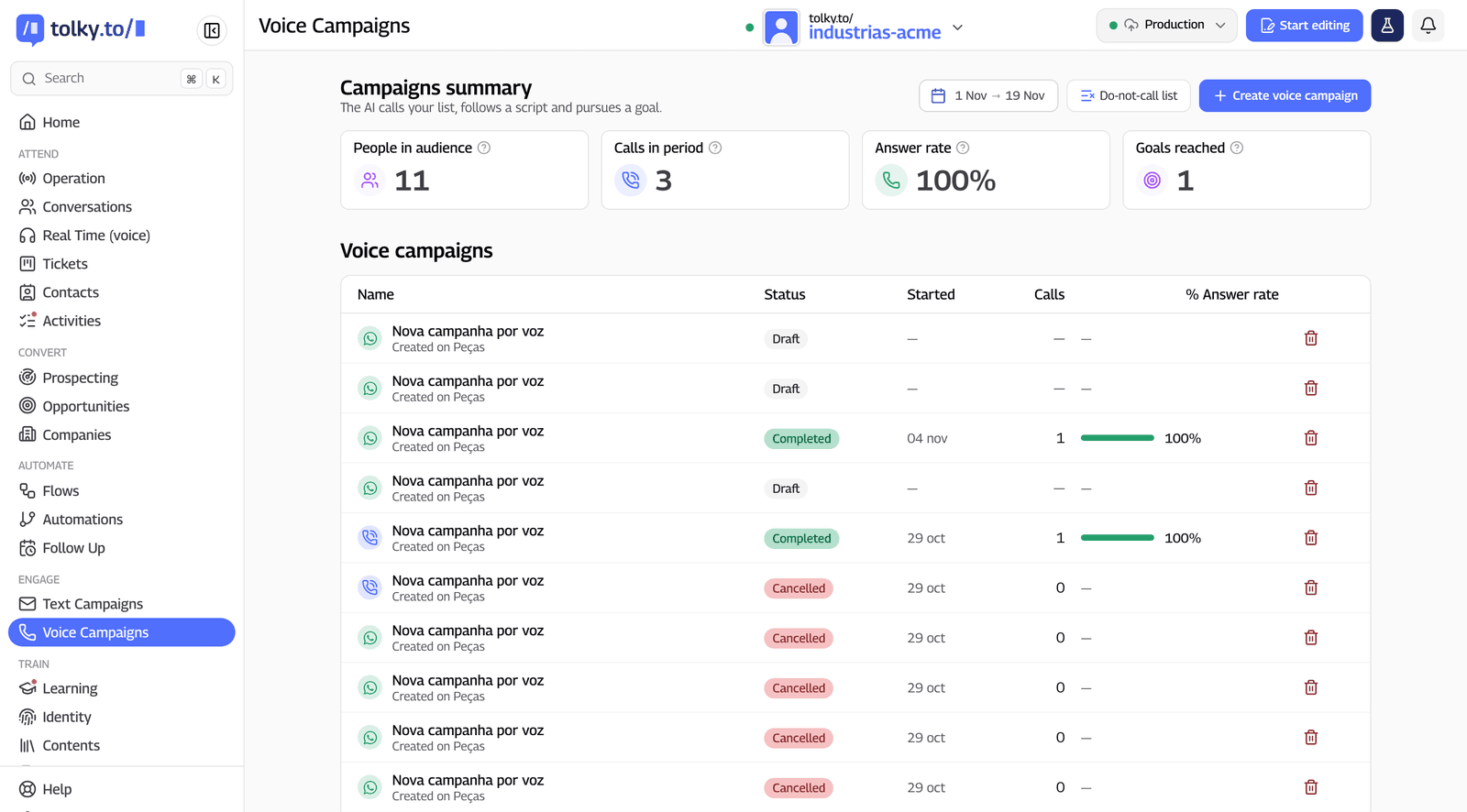
Tolky is a conversational AI CRM with Voice Campaigns: the AI calls your contact list over WhatsApp, over the phone or both, follows a script and works toward a goal. The goal can be free text or a step in a flow, and the AI generates the script with opening, permission, discovery, presentation, offer, close and objections. Before calling, you rehearse by playing the lead.
- Channel. In combined mode, Tolky tries WhatsApp and, without permission, calls over the phone. It sends the permission request and shows its status.
- Hours and retries. Time windows, retries with intervals and a voicemail message.
- Number protection. Gradual ramp-up, skips anyone called recently, a do-not-call list that applies to every campaign and an alert when the number may have been flagged as spam.
- People when needed. Transfer during the call and a scheduled callback when the customer asks.
- Cost under control. A credit estimate before launch, a daily spending cap and cost per goal reached.
- Transcripts. Every call opens with a transcription notice that can't be turned off, and the transcript lands in the contact's history.
For people who call back, Voice Customer Service puts the same AI on WhatsApp, the phone and your website. What Tolky doesn't do: it isn't a voiceover or voice cloning tool, and voice requires activation. Pricing is on the plans page.
Frequently asked questions
Is it legal to use AI to call customers?
Generally yes, as long as the call follows the same rules as any outbound call. In Brazil, that means Anatel's limits on abusive calling, honoring do-not-call requests and a legal basis under the LGPD for using the phone number. Rules vary by country, so check the ones where your contacts live.
What is the difference between a robocall and a conversational AI?
A traditional robocall plays recorded audio and, at most, reads a keypress. A conversational AI understands free speech, answers off-script questions, handles objections and transfers to a person when needed.
Can the AI call over WhatsApp?
Yes, as long as the contact gives permission first. According to Meta, temporary permission lasts 7 days and permanent permission lasts until the user revokes it. Contacts who haven't opted in can be reached over regular phone lines.
Will customers notice they are talking to an AI?
Modern voices sound natural, but the right move is to say so at the start. Hiding it usually leads to complaints when people find out, and the transcription notice already makes clear how the call is handled.
Where should I start?
With a small campaign, contacts who already know your company and a simple goal, such as appointment confirmation or win-back. Rehearse the script, read the first transcripts and only then scale up.
Does an AI calling agent replace the sales or collections team?
No. It covers the repetitive volume and first contact, and the team gets the people who are ready to buy, negotiate or work through a hard case. A person must be able to join the call when the customer asks.
Conclusion
An AI that calls customers turns the list nobody gets to into conversations with logged outcomes: confirmations, renewals, win-backs and qualified leads. The safe path is the same as for any outbound call: call people who know your company, honor opt-outs, disclose that it's an AI and start small, measuring by goals reached.
See Voice Campaigns, explore Voice Customer Service, see the plans or talk to the team →. Let's talk?
Share
Tags
- ai that calls customers
- ai phone calls
- ai calling agent
- outbound ai calls
- ai robocall alternative
- #voice campaigns
- #ai voice agent
- #conversational CRM
About the author

Co-founder of Tolky
Marlos Carmo is an AI entrepreneur and founder of Tolky, the conversational-era infrastructure and AI CRM that unifies intelligent service, multi-channel support (such as WhatsApp and voice), live CRM, and operational intelligence in a single ecosystem. He is a finalist for the SXSW Innovation Awards and a member of Francesco's Economy, a global network of young entrepreneurs focused on innovation and social impact. He works connecting Artificial Intelligence and digital transformation in projects for large organizations.
Next step
Want to bring this to your operation?
Tati, Tolky's AI assistant, understands your scenario in a few questions, suggests the best path and connects you with someone from the team, with full context.
Share