WhatsApp Business Calling API: what it is, pricing and AI use
A practical guide to the WhatsApp Business Calling API: who can use it, call permissions, pricing, SIP or WebRTC, country availability and how to put an AI voice agent on the line.
TL;DR
The WhatsApp Business Calling API is the part of the official WhatsApp API that lets a business receive and place voice calls over WhatsApp, on the same number it uses for messaging. User-initiated calls are free; business-initiated calls need the user's permission and are billed by duration in 6-second pulses. Signaling runs through the Graph API with WebRTC or through SIP, and an AI voice agent can answer or place those calls.
Share
Search for "WhatsApp Business Calling API" and you mostly land on Meta's developer docs, split across a dozen pages. What is missing is one plain guide that pulls the essentials together: what the API does, who can use it, what it costs and how to put an AI on the call.
This guide summarizes Meta's official documentation, checked on November 20, 2026, with a link for every rule. Where the source does not give a number, we show you where to look instead of guessing.
Updated in November 2026.
What is the WhatsApp Business Calling API?
The WhatsApp Business Calling API is the feature of the official WhatsApp Business Platform that lets a business start and receive voice calls with WhatsApp users over the internet (VoIP), using the same number it uses for messages. The customer taps the call icon in the chat and talks to the business; with permission, the business calls the customer inside the app.
According to the Calling API overview, calls do not go through the phone network: they are internet voice calls, like calls between people on WhatsApp. Meta lists video and screen sharing as features still in development.
Our glossary covers it under WhatsApp calls. If your question is about making and receiving calls in the WhatsApp Business app itself, see WhatsApp Business calls.
Who can use the Calling API?
Any business whose number runs on the Cloud API, the official WhatsApp API, with a high enough messaging limit and calling enabled on the number can use the Calling API. Businesses that only use the WhatsApp Business app do not get access.
The requirements in Meta's documentation, checked on November 20, 2026:
- A number on the Cloud API, not just in the app. The path is in how to get the official WhatsApp Business API.
- A messaging limit of at least 2,000 unique recipients per day.
- Calling turned on for the number, since it ships disabled.
- An app subscribed to the messages and calls webhooks (the calls webhook is not required when you use SIP), with WhatsApp messaging permission for the number.
- A valid payment method on the account before the business can place calls.
In the call settings, the business sets voice business hours, inbound call control, callback requests and where the call icon shows up, including by country.
User-initiated vs. business-initiated calls: what is the difference?
A user-initiated call is free and needs no authorization; a business-initiated call only happens with the user's permission and is billed by duration.
| Criterion | User-initiated | Business-initiated |
|---|---|---|
| Who dials | The customer, via the call icon or a button | The business, via the API |
| Permission | Not needed | User permission required |
| Call cost | Free | Billed by duration, in 6-second pulses |
| Availability | Wherever the Cloud API is available | Wherever the Cloud API is available, with a few country exceptions |
| Typical use | Support, questions, pre-sales | Agreed callbacks, confirmations, follow-ups, campaigns |
| Risk | Queues and uncovered hours | Unanswered calls and lost permission |
Pricing rules live on the Calling API pricing page and permission rules on the call permissions page, both checked on November 20, 2026.
How do call permissions work?
To call a customer on WhatsApp, the business needs the customer's permission first, and only the customer can grant or revoke it. Meta calls this a call permission request.
How to ask for permission
The call permissions documentation lists four paths:
- A free-form interactive message, only inside a customer service window opened by the customer.
- A template, which can be sent outside that window. The window rules are covered in the 24-hour window and templates.
- Callback permission: when the customer calls the business, they automatically grant temporary permission, as long as the business turns on the callback setting for the number.
- Business profile: the customer can grant permission straight from the business profile.
The customer picks temporary permission, which lasts 7 calendar days (168 hours), or permanent permission, which never expires until they revoke it. They can also decline or ignore the request.
Request limits and unanswered calls
Meta caps how hard you can push. Per business and user pair, you get at most 1 permission request in 24 hours and 2 in 7 days; the counters reset whenever a call connects. After 2 consecutive unanswered calls, the user gets a system message asking them to reconsider the permission; after 4, the permission is revoked automatically.
The same page lists a cap of 100 connected calls every 24 hours. Meta has revised these limits before, so check the page before you plan volume.
How much does the WhatsApp Business Calling API cost?
On the Calling API, user-initiated calls are free and business-initiated calls are billed by duration in 6-second pulses, at a rate that depends on the country of the number called and the monthly volume tier. The business always pays.


The rules on the pricing page, checked on November 20, 2026:
- 6-second pulses. A partial pulse counts as a full one: in Meta's example, a 56-second call is 9.33 pulses and is billed as 10.
- Volume tiers. The tier comes from the minutes called in the calendar month. If a call crosses a tier boundary, the whole call is priced at the lower rate.
- Permission requests. They are billed as messages, under messaging pricing, not calling pricing. Per-message rates are in our guide to WhatsApp API pricing in 2026.
- Meta's recording and transcription. The page says both features currently carry no extra charge and will get separate pricing later, with no date set.
How to look up your country's rate
The page does not print per-minute prices in the text: rates live in CSV and PDF rate cards, one per billing currency (USD, EUR, GBP, MXN and others). A Brazilian real (BRL) rate card took effect on July 1, 2026. To find your rate, open the pricing page, download the rate card for your account's currency and look up the row for the recipient's country and your volume tier.
To estimate the messaging side (permission requests, templates and conversations), use the WhatsApp API cost calculator. It covers messages, not call minutes.
SIP or Graph API with WebRTC: which one?
The Calling API supports two ways to control a call: the Graph API with webhooks, enabled by default, and SIP, which you turn on separately and which plugs into phone systems you already run. For the customer, the call looks the same either way.


| Criterion | Graph API with WebRTC | SIP |
|---|---|---|
| Signaling | HTTPS, through the Graph API and webhooks | SIP over TLS, with digest authentication |
| Media | WebRTC (ICE, DTLS, SRTP) | WebRTC or SRTP with SDES |
| Setup | Default once calling is enabled | Explicit enablement, with server and port (default 5061) |
| Call webhooks | Yes | Off by default; can be turned on as informational only |
| Best for | New, custom-built integrations | Teams with a PBX, contact center or SIP provider |
| Limits | You build the WebRTC side | One SIP server per number; no calling Graph API endpoints |
Opus is the audio codec in both options, and Meta also lists support for G.711 (PCMA and PCMU). Details are on the Calling API SIP page, checked on November 20, 2026. New to the term? See SIP trunking in the glossary.
Where is the Calling API available?
According to Meta, user-initiated calling works everywhere the Cloud API is available, and so does business-initiated calling, except when the business number's country code is the United States, Canada, Egypt, Vietnam or Nigeria. In other words, a US business number can receive WhatsApp calls but cannot place them (checked on November 20, 2026).
The restriction looks at the business number, not the customer: the person you call can be in any Cloud API country. Brazil, Mexico and the rest of Latin America are not on the exception list. There is also a quality-based calling model, in limited availability, where eligible numbers can skip the prior permission request. Per the business-initiated calls page, numbers from Colombia and Mexico are enrolled automatically. Rules vary by country and change often, so check the page for your market.
How do you put an AI voice agent on the Calling API?
For an AI agent to answer or place WhatsApp calls, it has to receive the call audio, transcribe the speech, decide the reply and send synthetic voice back fast enough to feel like a conversation. The Calling API delivers the audio; the rest is the voice platform's job.
What needs to be in place
- A media bridge. A server that receives audio over WebRTC or SIP and passes it to the agent.
- Recognition and synthesis. STT to turn speech into text and TTS to speak back, or one realtime model that does both.
- Natural conversation. Low latency and barge-in, so the customer can interrupt.
- Permission rules. Ask before calling, respect the limits and have a plan for people who declined.
- A way out to people. Handoff with the transcript, as the AI-to-human handoff guide explains.
Building this from scratch takes a voice engineering team. How a voice agent works in general is in AI voice agents for customer service, and the three ways to use voice in the app (understanding voice notes, replying with audio and handling calls) are in voice AI on WhatsApp.
Where Tolky fits
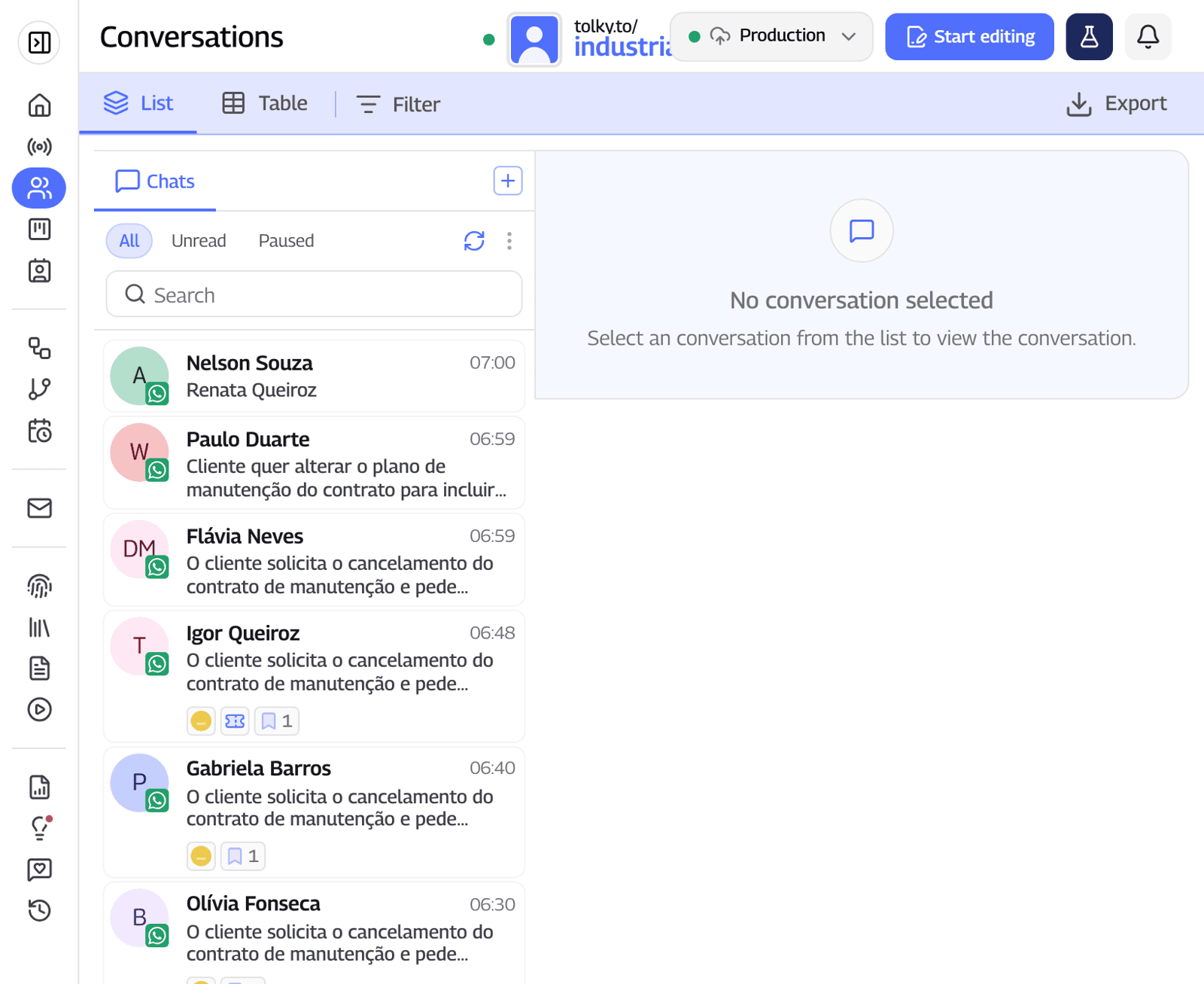
Tolky is an AI conversational CRM that connects its AI agent to the Calling API, so the same agent that answers WhatsApp messages also answers WhatsApp calls. Voice is enabled on request, and the solution is Voice Customer Service.
- The AI answers the call on WhatsApp, on the phone line and by voice on your website, with regional voices and accents, an opening greeting and interruptions allowed.
- Permission is handled in the chat. Tolky sends the request as a template or message and shows the status: granted, declined or pending. For people who did not grant it, the call can go over a regular phone line.
- Agents call from the chat, over WhatsApp or the phone, and can join an AI call: when the agent speaks, the AI goes quiet.
- The transcript lands in the contact's history, next to the text conversations.
For outbound calls at scale, Voice Campaigns use combined mode: they try WhatsApp first and, without permission, dial over the phone line, with a script, a goal, calling windows and a daily spending cap.
What Tolky does not do: it does not work around Meta's rules. Without the user's permission there is no WhatsApp call, and Meta's per-minute rate applies on any platform.
Frequently asked questions
What is the WhatsApp Business Calling API?
It is the feature of the official WhatsApp API that lets a business receive and place internet voice calls with WhatsApp users, on the same number it uses for messages. A person or an AI voice agent can take the call.
Is the WhatsApp Business Calling API free?
User-initiated calls are free. Business-initiated calls are billed by duration in 6-second pulses, based on the country of the number called and the monthly volume tier. Permission requests are billed as messages.
Do I need permission to call a customer on WhatsApp?
Yes. The customer has to authorize it first, through a message, a template, your business profile or by calling you with callback enabled. Temporary permission lasts 7 days; permanent permission lasts until the customer revokes it.
Can I use the Calling API with the WhatsApp Business app?
No. According to Meta, the number has to be on the Cloud API, the official API, with calling enabled and a messaging limit of at least 2,000 unique recipients per day.
Does the WhatsApp Calling API support SIP?
Yes. Besides the Graph API with WebRTC, Meta accepts SIP over TLS for signaling, which lets you connect WhatsApp calls to a PBX or SIP provider. With SIP on, the calling Graph API endpoints stop working for that number.
Can US businesses place WhatsApp calls?
Not with a US number, as of November 20, 2026. Meta excludes business-initiated calls from numbers with US, Canada, Egypt, Vietnam or Nigeria country codes, while user-initiated calls still work.
Conclusion
The WhatsApp Business Calling API moves voice calls into the chat: customers call for free, businesses call with permission and pay by duration, and an AI agent can handle it all with a way out to your team. Start with inbound calls, which cost no minutes, ask for permission with context and check your currency's rate card before planning outbound calls.
Explore Voice Customer Service, see Voice Campaigns, see the plans or talk to the team →. Let's talk?
Share
Tags
- whatsapp business calling api
- whatsapp calling api pricing
- whatsapp voice api
- whatsapp calling api sip
- whatsapp call permission request
- whatsapp business voice calls
- ai voice agent whatsapp
- #conversational CRM
Cited in
- Build a voice agent with n8n, ElevenLabs or Vapi, or use a platform?
- Voice AI on WhatsApp: an agent that takes calls and voice notes
- AI to answer business calls: how to set it up step by step
- AI that calls customers: use cases, rules and how to get started
- WhatsApp Business calls: how to make, receive and answer them with AI
- Voice AI platform for customer service: how to choose (checklist)
- AI telemarketing: Brazil's rules, call scripts and key metrics
- AI voice agent for customer service: what it is and how it works
About the author

Co-founder of Tolky
Marlos Carmo is an AI entrepreneur and founder of Tolky, the conversational-era infrastructure and AI CRM that unifies intelligent service, multi-channel support (such as WhatsApp and voice), live CRM, and operational intelligence in a single ecosystem. He is a finalist for the SXSW Innovation Awards and a member of Francesco's Economy, a global network of young entrepreneurs focused on innovation and social impact. He works connecting Artificial Intelligence and digital transformation in projects for large organizations.
Next step
Want to bring this to your operation?
Tati, Tolky's AI assistant, understands your scenario in a few questions, suggests the best path and connects you with someone from the team, with full context.
Share