WhatsApp automation for business: what to automate and how to start
WhatsApp automation for business: a map of 11 automations across the customer journey, with trigger, template and Meta category, the rules that sink a number and 5 steps to start.
TL;DR
WhatsApp automation is sending or answering messages without a person typing, set off by a trigger: a customer message, an event in a system or a date. For businesses, the authorized path is the official API, with free-form replies inside the 24-hour window and Meta-approved templates outside it, always with opt-in. Start with the journey stage that takes up most of your team's time and measure each automation.
Share
Every business that serves customers on WhatsApp repeats the same messages dozens of times a day: welcome, opening hours, invoice copies, order confirmations, appointment reminders. Each one typed by hand is time the team does not spend selling or solving the hard case.
WhatsApp automation fixes that, but it has its own rules. A message sent outside the right window does not go out, a promotion without opt-in lowers the number's quality and a flow with no exit frustrates the customer. This guide maps automations by journey stage, covers the Meta rules that matter and gives five steps to start.
Updated in November 2026.
What is WhatsApp automation?
WhatsApp automation is sending or answering messages from the business number without a person typing, set off by a trigger and carried out by rules or by an AI agent. The trigger can be a customer message, an event in another system, such as a paid order, or a date, such as the day before an appointment.


Every automation has three parts: a trigger (what starts it), logic (what decides the path) and an action (the message, the CRM update, the handoff to a person). When the logic is a fixed rule, it is rule-based automation. When it is a language model that understands the request, it is an AI agent.
How does WhatsApp automation work?
WhatsApp automation works in two ways: in the WhatsApp Business app, with fixed greeting and away messages, or on the official API, where a platform receives each message, decides the reply and acts in your systems. The app is free and limited; the API allows flows, AI and integrations, and Meta charges per delivered message.
On the API, one rule outweighs all others: the 24-hour window. According to Meta's documentation on sending messages, checked on November 19, 2026, the window opens when the customer messages or calls you, resets with each new message from them and, once it closes, only pre-approved templates can be sent.
That splits every automation into two groups. Reactive automations reply to the customer while the window is open and use free-form messages. Proactive ones start with the business, usually with the window closed, and need a template. The app versus API choice for small teams is covered in WhatsApp chatbot for small business.
Map of WhatsApp automations by journey stage
The WhatsApp automations with the best return cover eleven stages of the customer journey, from welcome to re-engagement, and each has a trigger, a template rule, a Meta category and a metric. Use the table to pick where to start.


| Stage | Trigger | Template outside the window? | Meta category | What to measure |
|---|---|---|---|---|
| Welcome | Customer's first message | No, the window is open | Service | Time to first response |
| Triage | First message | No | Service | Conversations in the right queue |
| FAQ with AI | Customer question | No | Service | Resolution without a person |
| Qualification | Price request or form | Yes, if the lead came from a form | Service or marketing | Qualified leads |
| Booking | Request for a time slot | No | Service | Bookings made |
| Reminder | Appointment date | Yes | Utility | No-shows and reschedules |
| Order confirmation | Order paid in the system | Yes | Utility | Questions about the order |
| Billing | Due date near or past | Yes | Utility | On-time payments |
| After-sales | Delivery completed | Yes | Utility, if informational | Reopened cases and repeat purchases |
| NPS | End of the conversation | Yes, if the window closed | Utility, if tied to that interaction | Response rate |
| Re-engagement | Days without a purchase | Yes, with opt-in | Marketing | Replies and opt-outs |
"Service" is the free-form reply inside the window, with no template. The categories follow Meta's template categorization, checked on November 19, 2026: utility is non-promotional and tied to a user action or request, such as order confirmations, delivery updates and payment reminders. A feedback survey only counts as utility when it refers to a specific order or interaction; a generic survey is not approved as utility. Offers sent to people who already engaged are marketing, even if the user asked for them.
For the copy, use the WhatsApp message templates, with collections for order confirmation, payment reminders and NPS surveys. Bringing back leads who stopped replying has its own guide: how to follow up with leads on WhatsApp.
Which Meta rules break a WhatsApp automation?
Three rules break most automations: free-form messages outside the 24-hour window, sending without opt-in and a drop in the number's quality. All three are in Meta's official documentation.
- 24-hour window. Outside it, only approved templates. A reminder written as free-form text simply does not go out.
- Opt-in. Meta requires permission before a business sends messages, with the business name made clear to the person. Opt-in can be collected on a website, by phone, by SMS or in person, and does not have to be WhatsApp-specific, as long as local laws are followed (Meta's opt-in policy, checked on November 19, 2026).
- The right category. A utility template with promotional content is recategorized as marketing, and the cost changes. See message categories.
- Quality and limits. Meta measures number quality through blocks, reports, mutes and archives over the past seven days. New business portfolios start able to reach 250 people outside the window in any 24 hours, and the limit rises with high-quality sending (messaging limits, checked on November 19, 2026).
The full rules for templates and campaigns are in the 24-hour window, templates and campaigns. For sending at volume, see WhatsApp bulk messaging.
Rule-based automation or AI agent: when to use each?
Use rules when the path is always the same and mistakes are costly; use an AI agent when customers phrase things in many ways and the answer depends on context. In practice, good automations combine both.
| Situation | Rule-based automation | AI agent |
|---|---|---|
| Reminders, confirmations, billing | Best choice: predictable and auditable | Not needed |
| Open questions about a product or service | Long menu, customers get lost | Best choice: understands the question and answers from your knowledge base |
| Topic triage | Works with few options | Better with many reasons and free text |
| Lead qualification | Fixed form | Natural conversation that records the data in the CRM |
| Risky decisions (refunds, cancellations) | Clear rule and human approval | Only to collect details and hand off to a person |
An AI agent does not replace business rules. It comes in at the steps where understanding the request matters more than following a script, and hands the conversation to a person when the case calls for it. See how to balance it in automation without losing the human touch.
How to automate WhatsApp in 5 steps
To start automating WhatsApp, pick one journey stage, secure the official API and opt-in, write the messages, build the flow with a way out to a person and measure for two weeks before expanding.
- Pick one stage. Start with the one that takes up most of the team's time, usually repeated questions or confirmations. One automation done well beats ten half-built.
- Set up the number and opt-in. Connect the number to the official API through a platform and record where each contact gave permission.
- Write the messages and templates. Define the free-form text for reactive automations and submit templates for proactive ones in the right category.
- Build the flow with an exit. Trigger, conditions and action, always with a path to "talk to a person". Test with internal numbers.
- Measure and adjust. Track the metric from the table, blocks and cost per message. Only then automate the next stage.
What is the best WhatsApp automation tool?
The best tool depends on the size of the operation: the WhatsApp Business app for fixed messages, a platform on the official API for flows with AI and CRM, and general-purpose automation tools such as n8n for technical teams. Avoid extensions and bots that scan the WhatsApp Web QR code.
- WhatsApp Business app. Greeting, away messages and quick replies, for free. No conditional flows or integrations.
- Platform on the official API. Flows, AI agent, team on the same number and CRM, with a subscription plus Meta's rates. See what an AI-powered WhatsApp chatbot looks like on this model.
- n8n and similar tools. Lots of freedom, but you build and maintain the connection to the API, the AI and the history. See WhatsApp AI agent with n8n.
- Unofficial tools. Automating the app from the outside violates WhatsApp's terms and puts the number at risk. See the risks of unofficial WhatsApp APIs.
How much does WhatsApp automation cost?
Automation on the API has two costs: the platform, charged per user, contact or conversation, and Meta, charged per delivered message by category. Under the rate card in effect since October 1, 2026, checked on November 17, 2026, a message to a Brazilian number costs US$ 0.0068 for utility, authentication and service, and US$ 0.0625 for marketing, with 1,000 free service messages per number each month (Meta pricing). Rates vary by the recipient's country.
Illustrative example: a store sends 2,000 order confirmations and 500 re-engagement messages a month to Brazilian numbers. Meta's share comes to 2,000 × US$ 0.0068 + 500 × US$ 0.0625 = US$ 44.85. Re-engagement is a fifth of the volume and nearly 70% of the cost. Run your numbers in the WhatsApp API cost calculator.
Where does Tolky fit in WhatsApp automation?
Tolky is an AI conversational CRM with Flows, a visual automation editor tied to WhatsApp customer service through the official API, with an AI agent, CRM and team on the same number. Checked on November 19, 2026:
- Triggers: customer message, a call from another system via webhook, manual start and CRM pipeline events.
- Logic: if/then decisions, multiple paths by rule and waiting for a set time or until the customer replies.
- Actions: AI agent step, message with an approved template or free text, CRM steps, handoff to a person and HTTP requests to any API.
- More than 1,000 apps in the Integration step, rolling out gradually; the native integration is with HubSpot.
- n8n import: n8n workflows come into the editor, and Tolky flows export in n8n format, with caveats for steps without an equivalent. See the n8n page.
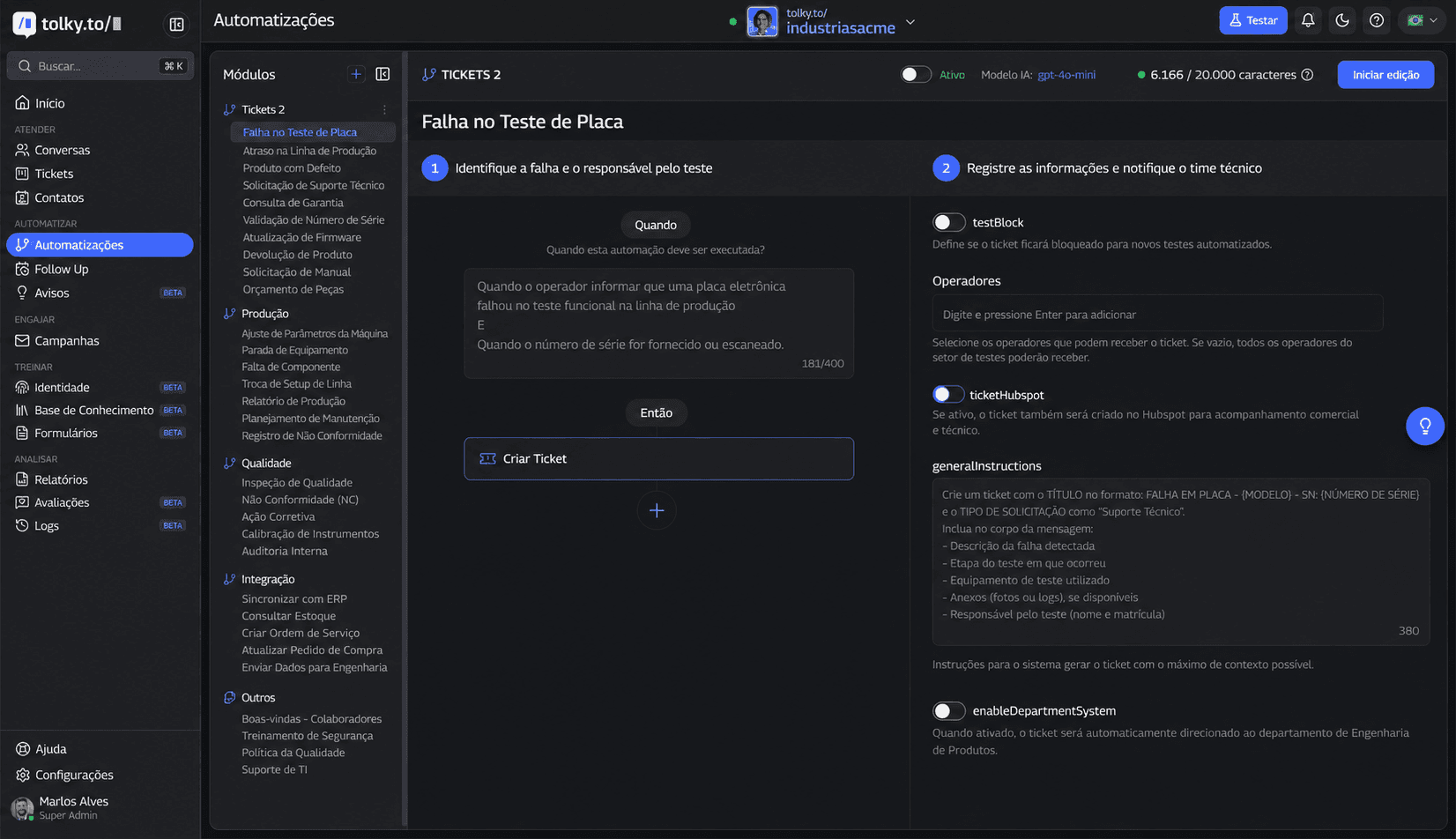
Beyond Flows, there are automations written in natural language, Follow Up for stalled conversations and automatic NPS at the end of each conversation. Starter, at US$ 90 a month, includes WhatsApp, 10 flows and 1,000 runs; the Individual plan is free but does not include WhatsApp (plans). Details in WhatsApp automation flows.
What Tolky does not do: it does not collect opt-in for you, it has no ready-made Zapier or Make connector and Meta's rates are not included in the plan. Instagram and SMS are coming soon.
Frequently asked questions
What can you automate on WhatsApp?
Welcome messages, triage, frequent questions with AI, qualification, bookings, reminders, order confirmations, billing, after-sales, NPS and re-engagement. Proactive messages outside the 24-hour window need an approved template.
Can you automate WhatsApp Business for free?
Yes, at the app level: greeting, away messages and quick replies are free. Flows with conditions, AI and integrations require the official API, with Meta's per-message rates and, usually, a paid platform.
How do you automate WhatsApp with AI?
Connect the number to the official API through a platform with an AI agent, feed the knowledge base and define when the AI hands the conversation to a person. Use rules for predictable steps, such as reminders.
Does WhatsApp automation require the official API?
For businesses, yes. The app only has fixed messages, and tools that automate the app or WhatsApp Web violate WhatsApp's terms and put the number at risk of a ban.
How much does it cost to automate WhatsApp?
The platform charges separately, and Meta charges per delivered message by country and category. To Brazil, US$ 0.0068 for utility, authentication and service and US$ 0.0625 for marketing, with 1,000 free service messages per number each month.
Does WhatsApp automation replace the team?
No. It takes repetitive work out of the queue and organizes the rest. Negotiations, complaints and sensitive cases go to a person, with the conversation history.
Conclusion
WhatsApp automation for business means picking the right stage, respecting the 24-hour window, opt-in and categories, and measuring before expanding. Rules for what is predictable, AI for what is conversation, a person for what is delicate.
See the plans, explore Tolky Flows, use the message templates or talk to the team →. Let's talk?
Share
Tags
- whatsapp automation for business
- how to automate whatsapp
- whatsapp automation with ai
- whatsapp business automation
- whatsapp api automation
- automated whatsapp messages
- whatsapp automation pricing
- #conversational CRM
About the author

Co-founder of Tolky
Marlos Carmo is an AI entrepreneur and founder of Tolky, the conversational-era infrastructure and AI CRM that unifies intelligent service, multi-channel support (such as WhatsApp and voice), live CRM, and operational intelligence in a single ecosystem. He is a finalist for the SXSW Innovation Awards and a member of Francesco's Economy, a global network of young entrepreneurs focused on innovation and social impact. He works connecting Artificial Intelligence and digital transformation in projects for large organizations.
Next step
Want to bring this to your operation?
Tati, Tolky's AI assistant, understands your scenario in a few questions, suggests the best path and connects you with someone from the team, with full context.
Share