WhatsApp bulk messaging: broadcast lists, the API and the rules
WhatsApp bulk messaging and broadcasts: compare broadcast lists, the official API and unofficial tools on limits, cost and risk, with Meta's rules, consent and 7 steps to keep your number safe.
TL;DR
WhatsApp bulk messaging means sending the same message, or personalized versions of it, to many contacts at once. There are three ways: the app's broadcast list (up to 256 contacts per list, only for people who saved your number), a campaign through the official API with approved templates and per-message pricing, and unofficial tools, which break WhatsApp's terms and put the number at risk. For businesses, the safe route is the official API, with opt-in, gradual sending and someone ready to reply.
Share
You have a customer list, an offer or an important notice, and you want everyone to get it on WhatsApp. The question is not whether you can send it, but how to send it to a lot of people without paying too much, getting blocked or losing the number your business uses every day.
WhatsApp bulk messaging has three routes, each with its own limits, cost and risk. This guide compares them, shows Meta's rules and what data protection law asks for, and gives 7 steps to avoid burning the number. The 24-hour window and template categories are covered in the guide to the 24-hour window, templates and campaigns.
Updated in November 2026.
What is WhatsApp bulk messaging?
WhatsApp bulk messaging is sending one message to many contacts at once, where each person gets it in an individual chat with the business. Unlike a group, nobody sees who else received it.
At a business, a bulk send becomes a WhatsApp campaign: a defined audience, a message with a goal (sell, notify, collect, re-engage) and a plan for replies. Broadcast list, broadcast or bulk message: the name changes, the rule does not. The person must have agreed to receive it.
What are the three ways to send bulk messages on WhatsApp?
There are three ways to send bulk messages on WhatsApp: the app's broadcast list, a campaign through the official API with approved templates, and unofficial tools that automate the app. Only the first two follow WhatsApp's rules.


| Method | Limit | Cost | Risk | Best for |
|---|---|---|---|---|
| App broadcast list | Up to 256 contacts per list; only people who saved your number receive it; monthly limit in some countries | Free in the app; marketing messages in the Business app are paid | Low, if people agreed to receive | Small businesses, contacts who already talk to you |
| Official API campaign | Starts at 250 unique people per 24 hours outside the window and goes up to unlimited | Meta fee per delivered message, plus the platform | Low, with opt-in and high quality | Companies with large lists, a team and a CRM |
| Unofficial tool | No stated limit, until the number is banned | Tool subscription | High: breaks WhatsApp's terms | Nobody who depends on the number |
Limits and rules checked on the official pages on November 19, 2026, with the sources below.
The app's broadcast list
A broadcast list is the free, manual route. According to the WhatsApp Help Center, checked on November 19, 2026, each list holds up to 256 contacts, only people who saved your number receive the message, and some countries have a monthly limit.
In the WhatsApp Business app, the broadcast list page shows you can build a list from labels and that replies arrive as individual chats. To reach people who have not saved your number, the app turns the list into a paid marketing message, charged only when delivered, which you can send now or schedule (how to create marketing messages).
A campaign through the official API
A campaign through the official WhatsApp API is the route for companies that talk to large lists. Outside the 24-hour window, each message is a Meta-approved template, sent to people who opted in and charged per delivered message. There is no 256-contact cap and no need for a saved number, but there is a messaging limit that grows with the quality of your sends.
The API runs inside a platform or CRM that organizes the audience, replies and reports. See how to get the official WhatsApp Business API.
Unofficial tools
Unofficial tools automate the regular app or WhatsApp Web. On its page about unauthorized use of automated or bulk messaging, WhatsApp says its products are not designed for this kind of sending and that, since December 7, 2019, it takes legal action against those who engage in or help others with this abuse. The risk is losing the number and its history. Details in the guide to the unofficial WhatsApp API and its risks.
Is WhatsApp bulk messaging free?
WhatsApp bulk messaging is only free through the app's broadcast list, for contacts who saved your number; through the official API, each delivered template carries a Meta fee. Marketing messages in the Business app are also paid.
On the API, the fee depends on the category and the recipient's country. Under Meta's rate card in effect since October 1, 2026, checked on November 17, 2026 (WhatsApp Business Platform pricing), a marketing template to a US or Canadian number costs US$0.025, and a utility one, US$0.0034. Replies inside the window are also charged, with 1,000 free service messages per number each month.
Illustrative example: a marketing campaign to 2,000 customers in the US costs 2,000 × US$0.025 = US$50 in Meta fees, not counting the platform. Run your numbers in the WhatsApp API cost calculator and see the WhatsApp Business pricing guide.
What are the official API's sending limits?
The official API's messaging limit is the maximum number of unique people a business can reach outside the customer service window in a moving 24-hour period, and it applies to the whole business portfolio. According to Meta's messaging limits documentation, checked on November 19, 2026:
- Starting point: new portfolios start at 250 unique people per 24 hours.
- Next levels: 2,000, 10,000, 100,000 and unlimited.
- First increase: verify the business, or deliver 2,000 messages outside the window to unique numbers within 30 days, using high-quality templates.
- Automatic increases: from 2,000 on, the limit rises one level when sends keep high quality and use at least half the limit over the last 7 days.
- Where to check: in WhatsApp Manager, under Messaging limits.
One number can use up the whole portfolio's capacity. Meta has changed these rules recently, so check the current page before a large send. See also number quality.
Opt-in, opt-out and data protection law
Every bulk send needs opt-in, meaning the person's permission to receive messages from that business, and an easy way out. The rule comes from Meta and lines up with data protection law.


According to Meta's opt-in page, checked on November 19, 2026, the opt-in must make clear that the person agrees to receive messages and from which business, and it can be collected on a website, by phone or on paper. Meta recommends opt-in by category and clear opt-out instructions, honoring every request to leave.
Data protection law also applies, and it depends on the recipient's country. In Brazil, the LGPD (Law 13,709/2018), checked on November 19, 2026, requires a legal basis for processing personal data. For bulk sends, the most common are consent (art. 7, I), which can be withdrawn at any time (art. 8, § 5), and legitimate interest (art. 7, IX), which requires transparency (art. 10). See the LGPD glossary entry, and check the rules where your customers live.
In practice:
- Record when, where and for what the person agreed.
- Separate what they agreed to, such as order updates or offers.
- Offer a way out in every message, such as "reply STOP".
- Remove people right away when they ask to leave, from every campaign.
- Do not buy lists. Someone who never talked to you did not opt in.
Why do numbers get blocked when sending bulk messages?
Numbers get blocked or lose reach when many people react badly to the messages or when the sending uses an unofficial tool. Meta measures quality from reactions over the last seven days, such as blocks, reports, mutes and archives (sending messages documentation, checked on November 19, 2026).
| Risk signal | Usual cause | How to avoid it |
|---|---|---|
| Many blocks and reports | List without opt-in, or bought | Send only to people who agreed |
| Template rejected or recategorized | Offer disguised as a notice | Pick the category by content |
| Limit that does not grow | Low-quality templates | Short, useful, personalized messages |
| Spike in mutes | Too many messages per day | Cap frequency per contact |
| Restricted or banned account | Unofficial automation of the app | Use the official API |
How to send WhatsApp bulk messages without losing the number, in 7 steps
A safe campaign combines an opted-in audience, a personalized message, gradual volume and someone ready to reply. The playbook works on any platform that uses the official API.
- Segment. Split the list by interest, funnel stage or purchase history. A message to everyone draws reports.
- Clean the list. Remove duplicates, people who asked to leave and anyone without opt-in.
- Pick the right category. Offers and re-engagement are marketing; a notice about something the customer asked for is utility. For ready-made copy, use the WhatsApp message templates.
- Personalize. Name, product, order or city in the message, and a clear way out at the end.
- Send gradually. Start with part of the list, watch blocks and quality, and only then expand.
- Respect the clock. Send during business hours in the recipient's time zone.
- Prepare for replies. When the contact replies, the 24-hour window opens. Let AI answer common questions and hand negotiation to a person, using the rules for AI to human handoff.
For people who did not reply, use a short WhatsApp lead follow-up cadence. For the whole operation, see WhatsApp automation for businesses.
What to measure after a bulk send
Measure a bulk send by delivery, replies and quality signals, not just by the volume sent. Six numbers are enough:
- Delivery rate: delivered ÷ sent. A high failure rate means an outdated list.
- Read rate: read ÷ delivered.
- Reply rate: contacts who replied ÷ delivered.
- Conversion: sales, bookings or payments ÷ delivered.
- Opt-outs and blocks: exits ÷ delivered. If it rises, cut the volume.
- Cost per result: fees plus platform ÷ conversions.
Where Tolky fits in WhatsApp bulk messaging
Tolky is an AI conversational CRM that runs bulk messaging as a campaign: text campaigns on WhatsApp (official API), Microsoft Teams and email, and voice campaigns on WhatsApp and phone lines, with AI talking to whoever replies. See the details in WhatsApp bulk messaging with AI and in the text campaigns solution.
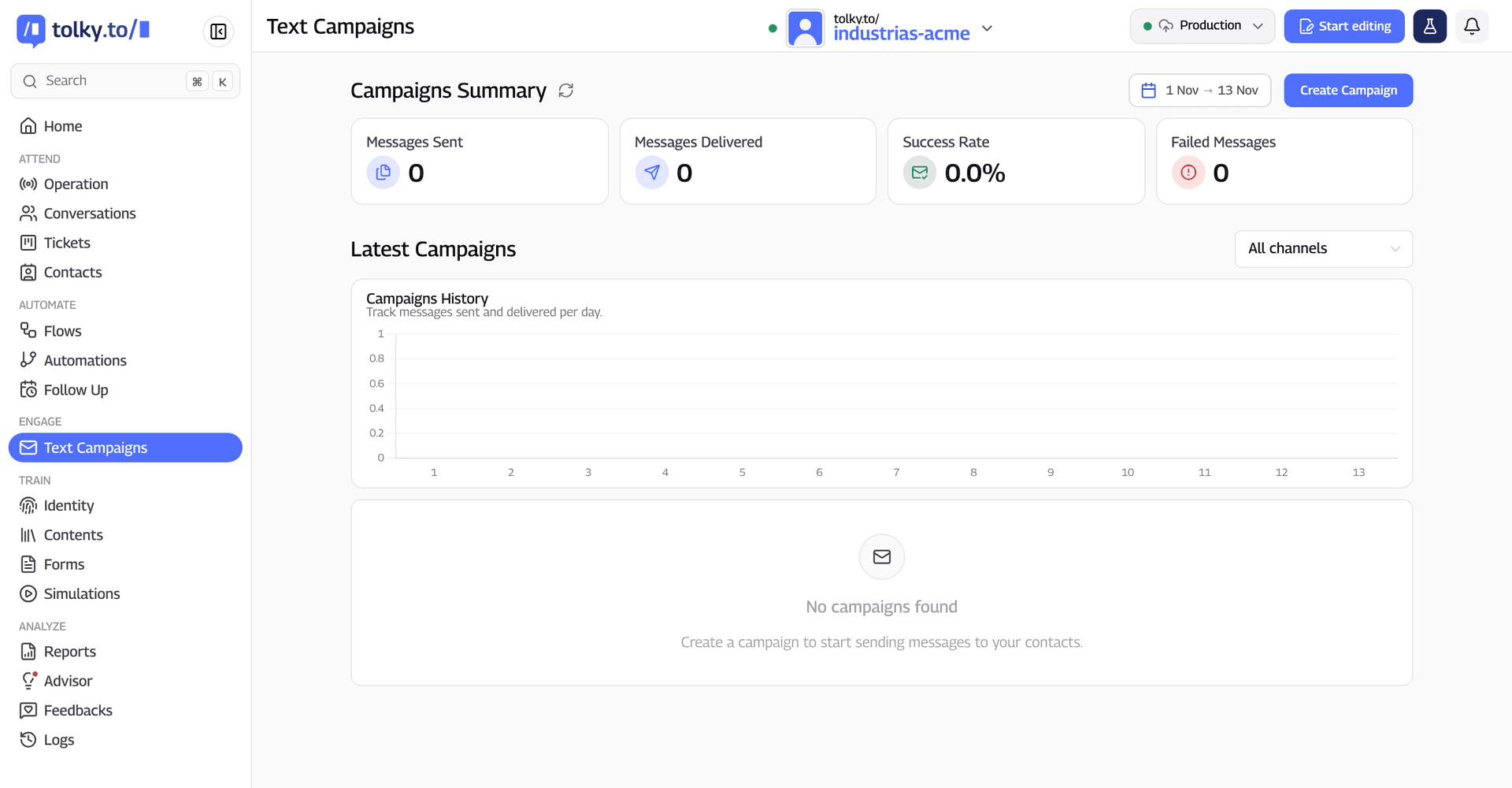
What a Tolky campaign does:
- Audience: an XLS or CSV spreadsheet, individual contacts or CRM opportunities.
- Message: a Meta-approved template, or free text inside the window, with variables, media, a test send and a button to copy a Pix payment code.
- Personalization: variables tied to spreadsheet columns, or AI writes each contact's message.
- Clean list: flags Brazilian numbers with and without the extra 9 digit and duplicates before sending, and leaves out contacts with no interest.
- Replies: AI talks with campaign-specific instructions, or the conversation goes to chosen agents.
- Results: sent, delivered, read and failed, with daily history.
Campaigns are on the Professional plan (from US$450 a month) and Enterprise; see plans and pricing. Meta's fees are not included in the plan.
What Tolky does not do for you: collect opt-in, choose the template category or pay Meta's fees. It also does not promise A/B testing or scheduled sends, and SMS and Instagram are coming soon.
Frequently asked questions
Is WhatsApp bulk messaging allowed?
Yes, through the app's broadcast list or the official API, to people who opted in. What breaks WhatsApp's terms is bulk sending through unauthorized tools.
How can I send WhatsApp bulk messages for free?
Through the app's broadcast list, with up to 256 contacts per list, and only to people who saved your number. To reach people who did not, the Business app offers paid marketing messages, and the official API charges per delivered template.
How many contacts fit in a WhatsApp broadcast list?
Up to 256 contacts per list, according to the WhatsApp Help Center, and you can create several lists. Some countries have a monthly limit on broadcast messages.
How much does WhatsApp API bulk messaging cost?
It depends on the category and the country. Under the rate card in effect since October 1, 2026, a marketing template to a US or Canadian number costs US$0.025, and a utility one, US$0.0034. The platform is billed separately.
Can I schedule WhatsApp bulk messages?
In the WhatsApp Business app, marketing messages can be sent right away or scheduled. On the official API, scheduling depends on the platform you use, so ask before you sign up.
Which CRM should I use for WhatsApp campaigns?
A CRM on the official API that imports your list, personalizes the message and logs replies in the contact history. Compare options in the best CRMs for WhatsApp in 2026.
Conclusion
WhatsApp bulk messaging is a choice between three routes: the broadcast list for small lists that saved your number, the official API for companies that talk to many people, and unofficial tools, which are not worth the risk. With opt-in, gradual sending and someone ready to reply, a bulk send turns into a conversation.
See the plans, explore text campaigns, estimate the API cost or talk to the team →. Let's talk?
Share
Tags
- whatsapp bulk messaging
- whatsapp broadcast
- whatsapp broadcast list
- send bulk messages on whatsapp
- free whatsapp bulk messages
- crm for whatsapp campaigns
- whatsapp campaign
- #conversational CRM
Cited in
- Unofficial WhatsApp API: ban risks and what Meta actually allows
- WhatsApp automation for business: what to automate and how to start
- Kommo pricing in 2026: plans, limits and what each one includes
- WhatsApp 24-hour window, templates and campaigns without blocks
- WhatsApp Business API: What It Is, How It Works, Pricing and Setup
About the author

Co-founder of Tolky
Marlos Carmo is an AI entrepreneur and founder of Tolky, the conversational-era infrastructure and AI CRM that unifies intelligent service, multi-channel support (such as WhatsApp and voice), live CRM, and operational intelligence in a single ecosystem. He is a finalist for the SXSW Innovation Awards and a member of Francesco's Economy, a global network of young entrepreneurs focused on innovation and social impact. He works connecting Artificial Intelligence and digital transformation in projects for large organizations.
Next step
Want to bring this to your operation?
Tati, Tolky's AI assistant, understands your scenario in a few questions, suggests the best path and connects you with someone from the team, with full context.
Share