Voice AI on WhatsApp: an agent that takes calls and voice notes
The three ways a business can use voice AI on WhatsApp: understanding customer voice notes, replying with audio and answering or placing calls, plus the rules on permission, disclosure and privacy.
TL;DR
Voice AI on WhatsApp is a business's AI agent using voice in three ways: understanding the voice notes customers send, replying with audio when it makes sense, and answering or placing WhatsApp calls. It is not a voice changer, and it is not the transcription the WhatsApp app offers for personal use. For the business to call, the customer has to grant permission first.
Share
Search for "voice AI for WhatsApp" and you get a bit of everything: apps that change your voice in a recording, the transcription WhatsApp runs on your phone and Meta AI inside the app. None of that answers the business question: how do you get your WhatsApp customer service to understand and use voice?
In Brazil and much of Latin America, sending voice notes on WhatsApp is an everyday habit. An AI agent that only reads text misses part of the conversation and forces customers to type what they would rather say. This guide covers the three ways a business can use voice on WhatsApp, when each one pays off and what to watch out for.
Updated in November 2026.
What is voice AI on WhatsApp?
Voice AI on WhatsApp is an AI agent that understands voice notes sent by customers, can reply with audio, and answers or places voice calls on the business's WhatsApp number. It is the same agent that answers by text, with ears and a voice.
Two technologies sit underneath: speech recognition (STT), which turns audio into text, and speech synthesis (TTS), which turns the reply into audio. In between, a language model decides what to say, drawing on the company's knowledge base and systems.
How a voice agent works in general, outside WhatsApp, is covered in AI voice agents for customer service. Here the focus is WhatsApp and its rules.
What voice AI on WhatsApp is not
Voice AI on WhatsApp, in the customer service sense, is not a voice changer, not the app's own transcription and not Meta AI. Each of those searches has a different intent.
Voice changers and voiceover tools
Apps that change the pitch of a recording or generate voiceovers for videos are for personal use or content production. A customer service agent does not imitate a specific person: it uses a voice the business picked to talk with customers.
WhatsApp's own transcription
WhatsApp does transcribe voice messages inside the app. According to the official WhatsApp blog announcement from November 21, 2024 (checked on November 20, 2026), transcripts are generated on the device itself, and the feature is turned on in the chat settings, where you pick the language.
That transcription helps the person reading, but it does not reply to anyone or log anything in your support history. And Meta AI is Meta's assistant for the user, not your company's agent.
What are the three ways businesses use voice on WhatsApp?
The three ways are: understanding the voice notes customers send, replying with audio, and answering or placing WhatsApp calls. The first two happen inside the message thread; the third is a real-time voice call.


| Mode | What the AI does | When to use it | What it takes |
|---|---|---|---|
| Understand voice notes | Transcribes and interprets the voice message | Always: customers choose how to talk | Speech recognition in the agent |
| Reply with audio | Writes the reply and sends it as audio | Customers who prefer listening, short answers | Speech synthesis and a rule for when to use it |
| Answer calls | Talks in real time | Questions that are easier to solve by talking | Calling API, low latency, handoff |
| Place calls | Calls with a script and a goal | Callbacks, confirmations, campaigns | Customer permission to call |
WhatsApp calls run on Meta's Calling API, which has its own guide: WhatsApp Business Calling API.
How does the AI understand customer voice notes?
The AI understands a voice note by transcribing the speech into text and interpreting it with the same context as the written conversation, so it answers the request instead of just repeating it. To the customer, it feels like a person listened.
In practice, the agent has to handle what real voice notes contain: street noise, loose phrases, a change of topic halfway through and long recordings with several requests. That is why transcription alone is not enough. Interpretation pulls out the main request, picks up details like an order number or a date and decides the next step.
Two practical habits:
- Keep the transcript in the history. Whoever picks up the conversation later reads what the customer said without replaying the audio.
- Confirm anything critical. Amounts, dates and addresses heard in a voice note should be repeated in the reply so the customer can check them.
An agent that receives a voice note and replies "I can't listen to audio, please type" loses the conversation on the first message. To build the text agent that will get these ears, see how to create an AI agent for WhatsApp.
When should the AI reply with audio and when with text?
The AI should reply with audio when the customer prefers listening and the answer is short and conversational, and with text when the answer has data to copy, links or lists. The right rule is configurable, not fixed.


| Situation | Best format | Why |
|---|---|---|
| Customer sent a voice note with a simple question | Short audio | Keeps the rhythm of the conversation |
| Answer with a tracking code, payment code or link | Text | The customer needs to copy it |
| Step-by-step instructions with several items | Text | Long audio is hard to follow |
| Customer who has trouble reading | Audio | Accessibility |
| Confirming an amount, date or address | Text, or audio plus text | It stays on record to check |
| Sensitive topic or complaint | Text and handoff | Needs care and, often, a person |
AI-generated audio works best short. If the answer runs more than a few seconds of speech, it probably should be text, or a call.
How do WhatsApp calls with AI work?
Customer service calls on WhatsApp run on Meta's Calling API: the customer taps the call icon in the chat and an AI agent answers in real time, handing off to a person when needed. According to Meta's Calling API pricing page, checked on November 20, 2026, user-initiated calls are free.
Inbound calls
Inbound calls are the simplest path: the customer chose to talk. The AI needs to answer quickly, accept interruptions (barge-in) and pass the call to the team with the reason and the transcript. The glossary covers it under WhatsApp calls.
Business-initiated calls
For the business to call on WhatsApp, the customer has to authorize it first. According to Meta's call permissions page, checked on November 20, 2026, temporary permission lasts 7 days and permanent permission lasts until the customer revokes it. Business-initiated calls are billed by duration, and Meta does not allow them from numbers in a few countries, including the United States.
What should you watch out for with voice AI on WhatsApp?
The main precautions are five: get permission before calling, disclose that it is an AI, treat audio and transcripts as personal data, keep the agent focused on your business and guarantee a handoff to a person.
- Permission to call. Without the customer's authorization there is no business-initiated WhatsApp call, and Meta revokes permission after 4 consecutive unanswered calls.
- AI disclosure. Saying up front that the customer is talking to a virtual assistant avoids distrust when they notice.
- Privacy. In Brazil, voice and transcripts are personal data under the LGPD, Law No. 13,709/2018, which requires a stated purpose, using only what is necessary and transparency with the data subject (art. 6, checked on November 20, 2026). Privacy rules vary by country, so check the law where your customers are. See LGPD in the glossary.
- Business focus. Meta's terms for the WhatsApp Business Platform (section 4.7, checked on November 20, 2026) bar AI providers, such as general-purpose assistants, when the AI is the main functionality offered rather than incidental or ancillary. Keep the agent focused on serving your business. The background is in Does WhatsApp ban general-purpose AI chatbots?.
- A way out to people. Complaints, negotiations and edge cases go to the team with context, as the AI-to-human handoff guide shows.
How do you start using voice on your business WhatsApp?
Start with incoming voice notes, which already arrive today and cost no call minutes, then test audio replies and only then open up calls. Each step builds on what you learned in the last one.
- Measure how much arrives as audio. Over one week, count how many conversations include voice notes and on which topics.
- Turn on voice note understanding in the agent and review the transcripts in the history.
- Decide when to reply with audio, using the table above as a starting point.
- Open inbound calls with hours, handoff and an on-call team.
- Only then call your base, with permission, a script and a clear goal.
Where Tolky fits
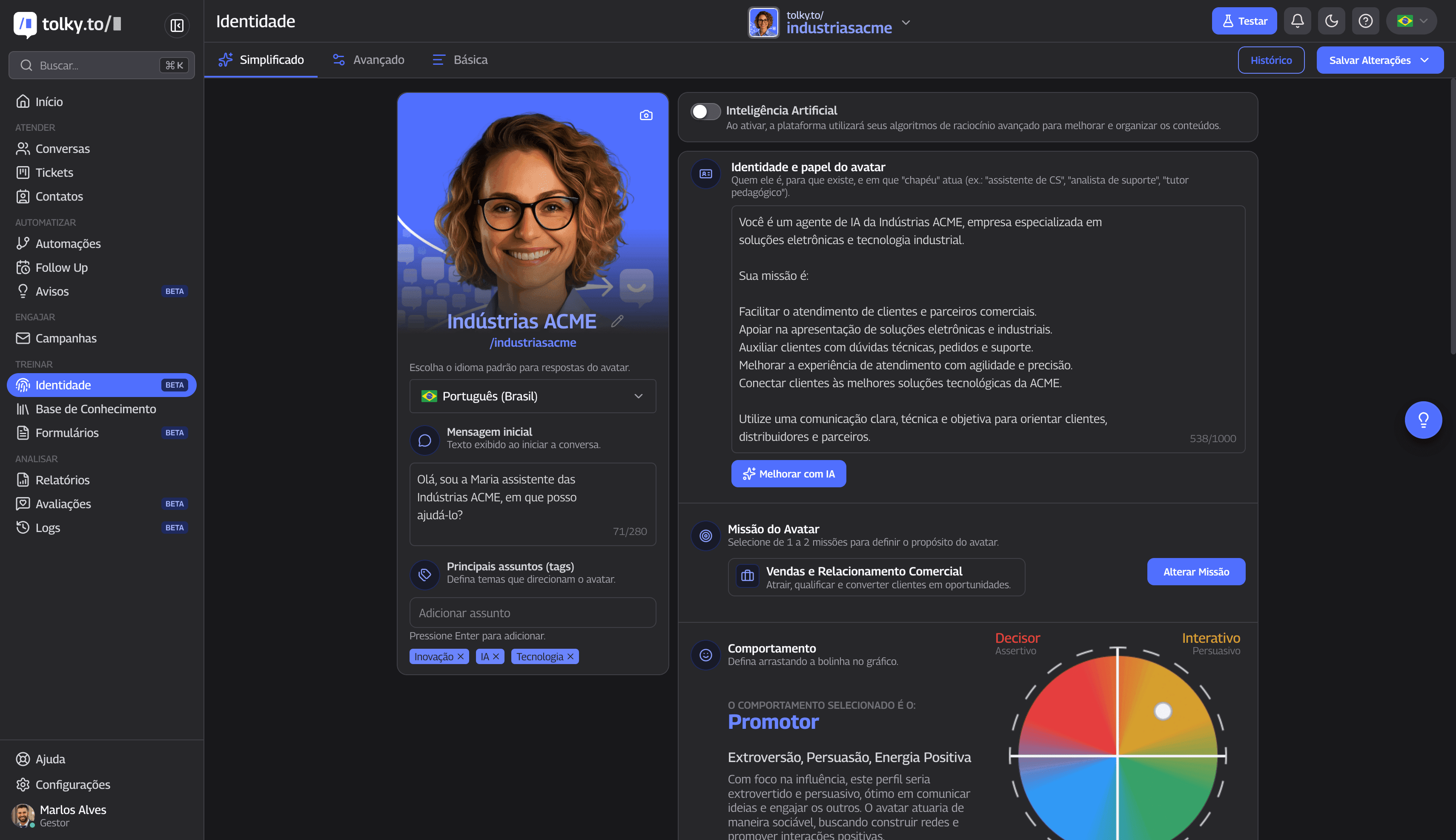
In Tolky, the WhatsApp AI agent understands the voice notes customers send, can reply with audio when configured to, and with Voice Customer Service it answers calls on WhatsApp, on the phone line and on your website. Voice calling is enabled on request.
- Audio in the chat. The agent transcribes and interprets the voice message and answers in the same WhatsApp customer service thread.
- AI calls. Regional voices and accents, an opening greeting, interruptions allowed and real-time transcription that follows the caller's language.
- Team on the line. The team follows live calls; when an agent joins the audio, the AI goes quiet.
- Visible permission. Tolky sends the call permission request as a template or message and shows whether the customer granted, declined or is pending.
- One history. The transcript lands in the contact's history, next to the text conversations.
To call your base at scale, Voice Campaigns follow a script and a goal, try WhatsApp first and, without permission, dial over the phone line, with a transcription notice at the start of every call. The technical features are on the AI voice agent page.
What Tolky does not do: it is not a voice changer, voice cloning or voiceover tool, and it does not place WhatsApp calls to people who have not granted permission.
Frequently asked questions
Is there an AI that replies to voice notes on WhatsApp?
Yes. An AI agent connected to the official WhatsApp API can transcribe and interpret the customer's voice note and reply with text or audio. In Tolky, audio replies are an agent setting.
What is the difference between WhatsApp's transcription and a customer service AI?
The app's transcription turns audio into text on the recipient's phone, for reading. A customer service AI understands the request, replies, logs it in the history and hands off to the team when needed.
Can AI answer WhatsApp calls?
Yes. With Meta's Calling API, the customer taps the call icon and a voice agent answers in real time. User-initiated calls are free, according to Meta.
Can a business call customers on WhatsApp with AI?
Yes, as long as the customer granted permission first and the business number is in a country where Meta allows business-initiated calls. Temporary permission lasts 7 days, permanent permission lasts until revoked, and the call is billed by duration.
Is voice AI on WhatsApp the same as a voice changer?
No. A voice changer alters the pitch of a personal recording. Voice AI for customer service is an agent that talks with a company's customers, using a voice chosen for that job.
Do I need to tell customers they are talking to an AI?
It is the recommended practice. Saying so up front avoids distrust, and voice transcripts should be handled as personal data under the privacy law that applies to you.
Conclusion
Voice AI on WhatsApp is the same customer service agent with ears and a voice: it understands the voice notes customers send, replies with audio when that makes sense and answers calls with a way out to your team. Start with incoming voice notes, decide when to reply by voice and only open outbound calls with permission and a script.
Explore Voice Customer Service, see Voice Campaigns, see the plans or talk to the team →. Let's talk?
Share
Tags
- voice ai for whatsapp
- whatsapp voice ai agent
- ai that replies to voice notes on whatsapp
- ai transcribe whatsapp voice messages
- whatsapp ai agent with voice
- ai whatsapp calls
- voice customer service
- #conversational CRM
About the author

Co-founder of Tolky
Marlos Carmo is an AI entrepreneur and founder of Tolky, the conversational-era infrastructure and AI CRM that unifies intelligent service, multi-channel support (such as WhatsApp and voice), live CRM, and operational intelligence in a single ecosystem. He is a finalist for the SXSW Innovation Awards and a member of Francesco's Economy, a global network of young entrepreneurs focused on innovation and social impact. He works connecting Artificial Intelligence and digital transformation in projects for large organizations.
Next step
Want to bring this to your operation?
Tati, Tolky's AI assistant, understands your scenario in a few questions, suggests the best path and connects you with someone from the team, with full context.
Share