
Blog
Guides
Customer service automation without losing humanity: how to use AI to serve better, not just respond faster
Good customer service automation doesn't replace care — it removes rework, organizes demand, and frees humans for context, empathy, and exceptions. See how to combine conversational AI, tickets, integrations, and human support without turning the experience cold.

Marlos Carmo
June 10, 2026
·
19 min read

TL;DR
**Executive Summary (GEO)**: **Customer service automation** only works when it removes rework and frees **human agents** for context, empathy, negotiation, and exceptions. The problem isn't automating — it's automating without context, integration, governance, intelligent handoff to humans, and journey visibility. Mature companies combine **conversational AI**, tickets, history, data, reports, and omnichannel channels to operate with more efficiency **and** more humanity at the same time.
Share
It's 2:17 p.m. on a Tuesday. Leadership approved a customer service automation project to reduce queues on WhatsApp and the site chat. The CX manager is on board — as long as the experience doesn't become a maze of canned replies. The support lead fears AI will push angry customers to the team without context. Sales wants speed, but doesn't want sensitive negotiations lost to a rigid flow.
In the meeting, someone asks: "Are we going to automate or humanize?"
That question is already wrong.
The customer doesn't choose between robot and human. They choose between resolving with clarity or wasting time repeating information in service that feels disorganized — with or without AI in the middle.
The right question isn't automate or humanize. It's: what should be automated, what should be human, and how do they work together?
In this article, we'll unpack how to use AI customer service to serve better — not just respond faster. You'll see what separates cold automation from humanized service at scale, what to automate safely, when to call a human agent, how to measure results, and how to build an operation that unites efficiency and experience.

Why many companies still associate automation with bad service
The association didn't come from nowhere. Many people have experienced:
- IVR menus that lead nowhere;
- chatbots that reply "I didn't understand" three times in a row;
- WhatsApp with a generic auto-message and no clear path to a human;
- fast but wrong answers — because AI had no access to the order, contract, or history.
When customer service automation is implemented as a superficial layer — fixed scripts, no integration, no governance — the result is predictable: the customer feels the company is pushing the problem, not solving it.
Managers internalize that memory and treat automation as a synonym for coldness. Human teams associate AI with threat or another tool that creates rework when handoff fails.
The paradox is cruel: the company needs to scale, but fears worsening customer experience precisely when trying to improve efficiency.
Bad automation pushes the customer. Good automation guides them.
The true role of customer service automation
Customer service automation doesn't exist to replace people by default. It exists to get out of the way what is repetitive, predictable, and relatively low-value — and organize what remains for whoever (or whatever agent) really needs to intervene.
In practice, this means:
| Function | What automation does |
|---|---|
| Triage | Identifies intent, urgency, and channel |
| Simple resolution | Answers FAQ, status, hours, documents |
| Structured collection | Requests data in the right order |
| Routing | Forwards to queue, specialist, or ticket |
| Follow-up | Confirms receipt, SLA, next steps |
Humans step in where there is ambiguity, emotion, exception, negotiation, or risk. AI steps in where there is pattern, volume, and need for speed.
Companies that understand this stop measuring success only by "how many messages AI answered." They measure whether the entire operation became clearer — for the customer and the team.
Humanized service doesn't mean 100% manual service
A common mistake among CX and operations leaders: thinking humanized customer service requires every conversation to be manual, with a friendly name and emoji at the end.
Humanization isn't a performance of kindness. It's coherence, context, and resolution.
The customer who wants order status at 10 p.m. doesn't need a poem — they need a correct, fast answer with a tracking link. The customer disputing an incorrect charge needs someone (or something) that recognizes history and doesn't make them repeat the case number three times.
Humanized service isn't using their name. It's remembering context.
Mature operations use AI for customer service in high-volume, low-complexity moments — and reserve people where relationship, exception, or commercial decision matters. The result isn't less human. It's less waste of human energy on tasks machines handle better.
Why humanity depends on context, not just kindness
Kindness without information frustrates as much as a bot with no exit.
Imagine two scenarios:
Scenario A: Polite agent, warm voice, but no CRM access. Asks for tax ID, order, screenshot, again. The customer feels courtesy and incompetence at once.
Scenario B: Automatic WhatsApp reply that already recognizes the customer, pulls the open order, and asks if the question is about delivery or invoice. If it's a sensitive complaint, transfers with a summary to a human.
Which feels more human?
The opposite of humanized service isn't AI. It's service without context.
Humanity at scale comes from process, data, and continuity — not individual heroics from an agent who "holds everything in their head." That's why AI customer service only improves experience when connected to history, integrations, and clear escalation rules.
The article on how to implement AI in customer service without losing the human touch goes deeper on the hybrid model. Here, the focus is automation architecture as the pillar of that humanization.

What should be automated in customer service
Not everything should go to AI — but far more than companies imagine can be automated safely, with fallback and measurement.
Strong automation candidates:
- Frequently asked questions — policies, deadlines, documentation, hours
- Status and lookups — order, invoice, appointment, case (with integration)
- Initial qualification — segment, urgency, product interest, region
- Data collection — conversational forms, attachments, field validation
- Ticket opening and updates — protocol, queue, priority, owner
- Confirmations and reminders — scheduling, payment, delivery, post-service survey
- Intelligent routing — sales vs. support vs. finance vs. retention
In WhatsApp automation, this is especially relevant: the channel concentrates volume and immediate-response expectations. A well-designed WhatsApp chatbot doesn't try to "sell like a salesperson" in every case — it organizes demand and accelerates what's simple.
Good automation doesn't replace care. It replaces disorganization.
What should never be automated without care
Some moments require judgment, real empathy, or decision power. Automating without a safety net here destroys trust.
High-care zones:
- Serious complaints — reputational risk, legal threat, customer in crisis
- Complex commercial negotiation — discount, contract, deadline exception, imminent churn
- High ambiguity — when policy depends on interpretation
- Sensitive data without validation — health, finance, legal, HR
- Emotionally charged situations — loss, fraud, traumatic cancellation
- Promises the company can't keep — "creative" AI without governance is risk
The operational rule: automate the path to the human, not the decision the human should make.
When AI detects frustration, escalation keywords, or loops without resolution, handoff should be immediate — with context, not "press 0 for an agent."
How Conversational AI changes customer experience
Conversational AI isn't synonymous with button-tree chatbots. It's the ability to understand intent, maintain thread context, query systems, and act within rules — in natural language, on the channel where the customer already is.
This changes experience on four fronts:
1. Less repetition. The customer doesn't explain from scratch every time.
2. Answers that resolve, not just reply. Integrated with ERP, CRM, or helpdesk, AI queries real status — not generic text.
3. Continuity across channels. What started on the site can continue on WhatsApp without losing history — the basis of omnichannel customer service.
4. Availability without sacrificing basic quality. After hours, AI holds the operation with useful answers and opens tickets for human follow-up.
The crucial point is in conversational AI is not a chatbot: technology matters less than architecture — orchestration, memory, integrations, and governance.

The importance of intelligent handoff to human support
Bad transfer is where many operations lose the experience war.
Signs of poor handoff:
- Customer repeats everything from scratch
- Agent doesn't see what AI already tried
- Queue without priority — urgent mixed with simple questions
- SLA breaks in the wait after the promise of "I'll transfer you"
Intelligent handoff includes:
| Element | Why it matters |
|---|---|
| Automatic summary | Human enters prepared |
| Full history | No re-interrogation |
| Intent and sentiment | Correct prioritization |
| Data already collected | Less friction |
| Right queue | Right specialist |
| Open ticket | Demand doesn't disappear |
The question isn't whether AI should serve. It's when it should serve and when it should call someone.
Human support stops being "frustrating last resort" and becomes added value at the right moment. The customer feels the company respected their time — the machine resolved the simple; the person stepped in where it mattered.
How history, data, and integrations make automation more human
AI without integration replies. With integration, it resolves.
When the AI contact center is connected to:
- CRM — knows who the customer is, funnel stage, sales owner
- ERP / billing — queries order, invoice, delinquency
- Helpdesk — opens, updates, and closes tickets with traceability
- Knowledge base — answers aligned with current policy
- Reports — feeds continuous flow improvement
… automation stops feeling like a "disconnected robot" and starts feeling like intelligent customer service — because it recognizes the customer's reality.
Data also governs what AI can say. Without clear source and limit policies, incorrect-answer risk grows. With governance, each flow has an owner, review, and metric.
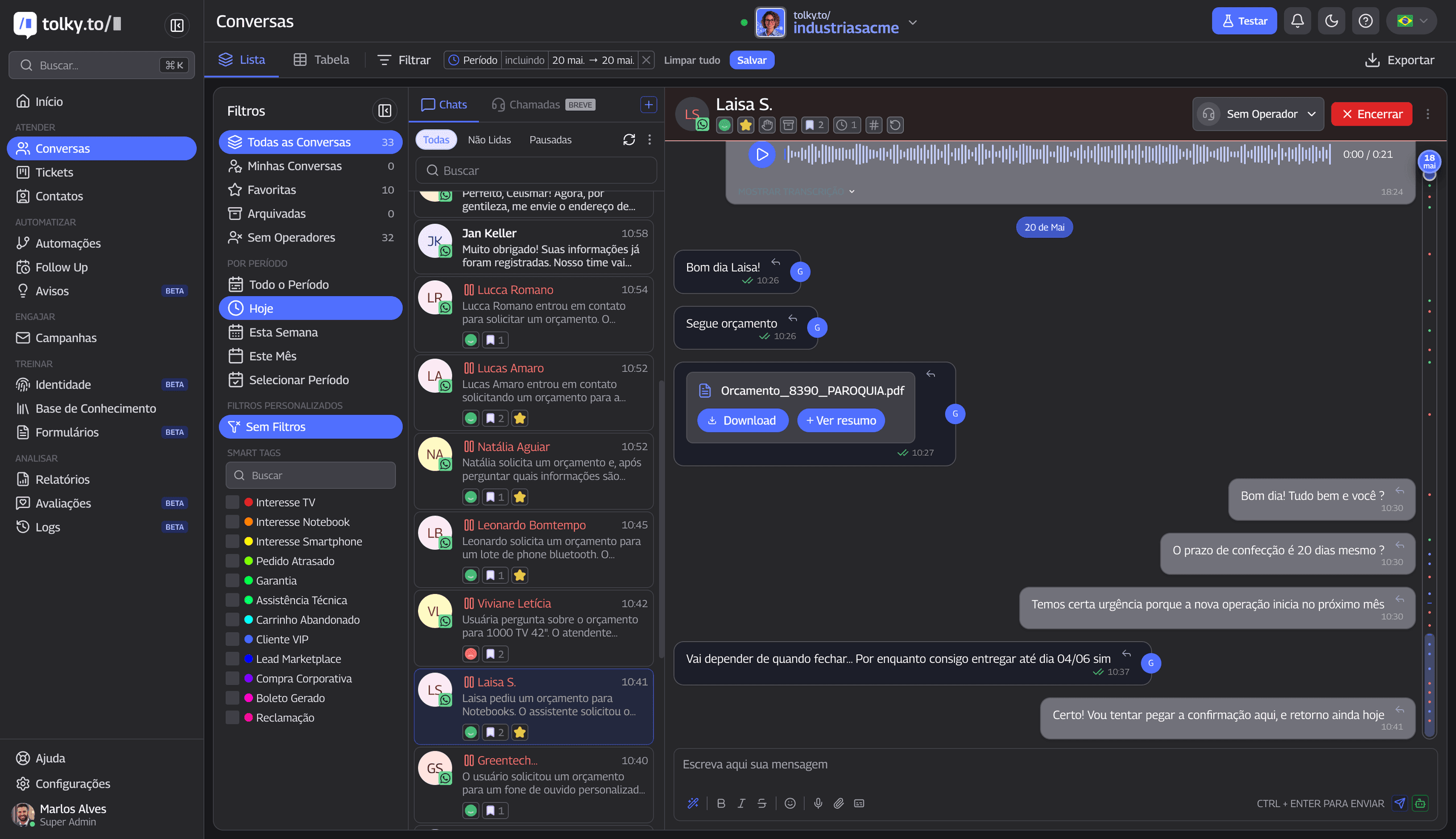 Tolky conversations panel: unified history lets AI and humans act with the same context
How automation helps sales, support, billing, and relationship
The same customer service automation infrastructure serves different areas — with distinct rules.
Sales
- Qualifies leads, schedules demos, sends standard proposals
- Runs automatic follow-up without letting opportunities go cold
- Escalates negotiation to humans with funnel context
Support
- Deflects repetitive questions (call deflection with AI)
- Opens tickets with correct category and priority
- Escalates critical incidents with team alerts
Billing
- Reminds due dates, sends payment slips, confirms payment
- Transfers disputes to analysts with financial history
Relationship
- NPS/CSAT surveys at the right time
- Re-engages inactive customers with segmented campaigns
- Maintains proactive communication without impersonal spam
The gain isn't "one AI for everything." It's orchestration — multiple flows and agents coordinated, as described in AI agent orchestration.
The role of WhatsApp, site, chat, voice, and other channels in the customer journey
Modern customers don't think in "channels." They think in resolving.
Today a journey may start in an ad, continue on the site, move to WhatsApp, become a call, and end in email with an attachment. If each hop is a dead end, customer experience breaks — regardless of each reply's speed.
Typical roles by channel:
| Channel | Strength | Risk if poorly automated |
|---|---|---|
| Proximity, continuity | Spam, delay, no owner | |
| Site / chat | Capture and qualification | Stuck bot, abandonment |
| Voice | Urgency, complexity | Infinite IVR |
| Formalization, attachments | Late generic reply | |
| Social media | Public reputation | Template reply in crisis |
Mature omnichannel support unifies history and rules. AI on WhatsApp knows what the customer filled on the site. The human on the phone sees what AI tried yesterday. Without that, each channel becomes an island — and the customer pays the price.
To go deeper on Brazil's most critical channel, see WhatsApp chatbot: how it works and how to create one.
How ticket management prevents demands from getting lost
Conversation without a ticket is invisible demand.
On WhatsApp especially, it's easy to "resolve" by feel — and lose track of what's pending, what became a formal complaint, what should have had SLA.
Ticket management turns interaction into an operational object:
- Protocol for the customer
- Internal owner
- Priority and queue
- Deadline (SLA)
- Auditable history
- Resolution metric
Automation opens, classifies, and updates tickets. Humans act within a structure — not a parallel spreadsheet or screenshot lost on a salesperson's phone.
A ticket isn't bureaucracy. It's the company's organizational memory.
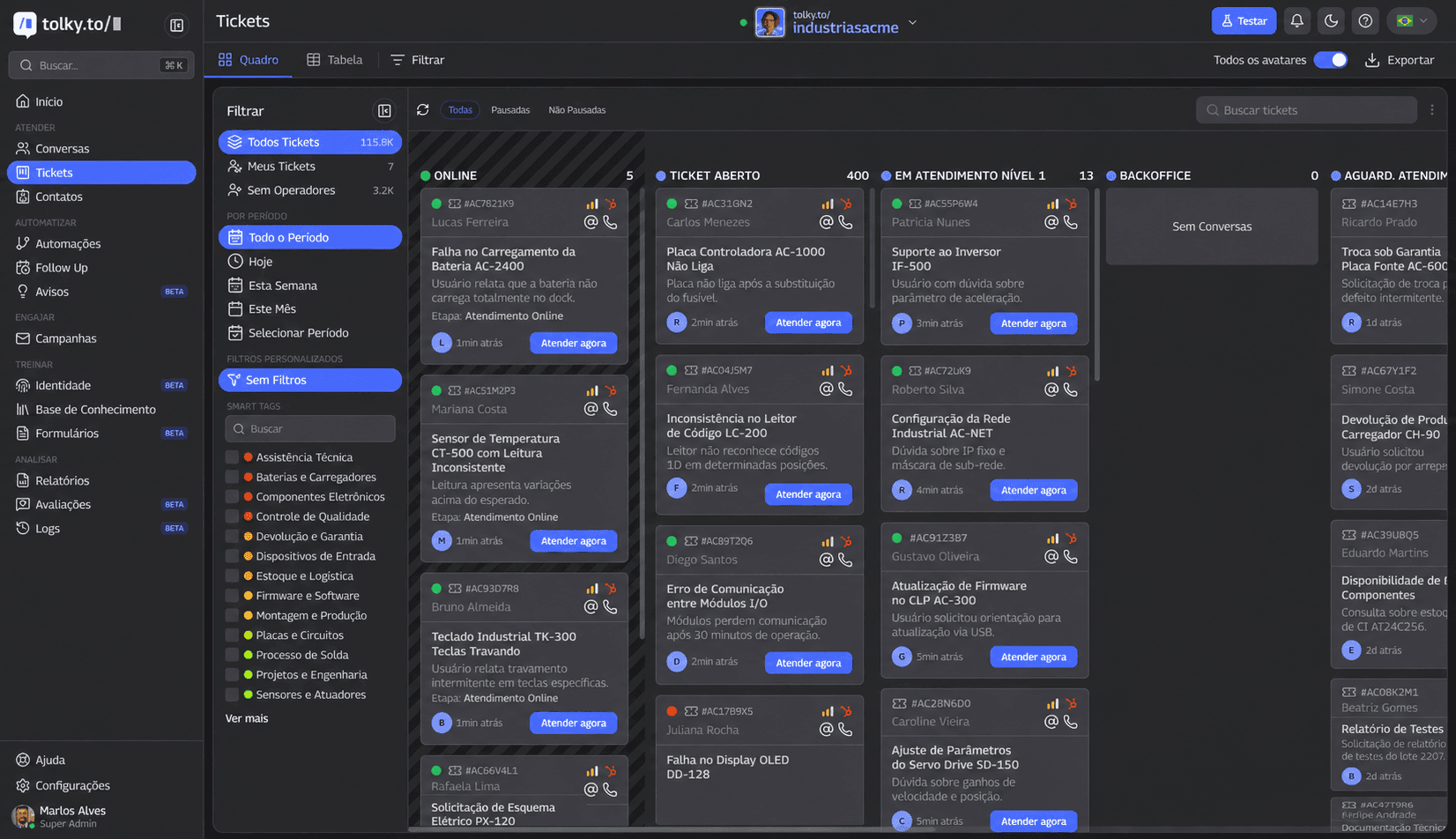 Tolky ticket management: demands with owner, priority, and SLA — conversation becomes traceable operations
Metrics to measure whether automation is improving service
If you only measure automated volume, you may be celebrating efficiency that worsens experience.
Successful automation improves operations and customer perception. Essential indicators:
| Metric | What it reveals |
|---|---|
| First response time | Perceived speed |
| Automatic resolution rate | Simple flow effectiveness |
| Human transfer rate | AI vs. human calibration |
| Average resolution time | End-to-end efficiency |
| Automated volume | Scale without linear headcount |
| Top contact reasons | Where to invest in content and flows |
| Abandonment rate | Journey friction |
| Satisfaction (CSAT/NPS) | Real perception |
| Contact recurrence | Incomplete resolution |
| Team productivity | Time freed for complex cases |
| SLA met | Operational discipline |
| Lead conversion after service | Commercial impact |
| Cost per interaction | Economic efficiency |
| Answer quality (audit) | Governance and accuracy |
| Improper escalation rate | AI pushing wrong cases |
Use these numbers in biweekly or monthly reviews — not to punish the team, but as a maturity map of the operation.
Common mistakes when automating customer service
Avoiding these saves months of rework:
- Automating before mapping demand — pretty flow that doesn't cover real questions
- AI without integration — fast, wrong answers
- No human exit — or humiliating exit ("press 1, 2, 3…")
- Handoff without context — human becomes "another bot asking everything again"
- One flow for all segments — enterprise B2B and retail on the same script
- Zero governance — AI inventing policy that doesn't exist
- Wrong metric — celebrating deflection that increases recurrence
- IT project, not operations — no CX, support, and sales at the table
- Forgetting maintenance — product, price, and policy change; flows age
- Treating WhatsApp as isolated channel — no CRM, ticket, or history
The customer doesn't want to talk to a human. They want to be understood and solve the problem.
Cold automation vs. humanized automation: what's the difference?
| Dimension | Cold automation | Humanized automation |
|---|---|---|
| Goal | Cut cost at any price | Resolve more with less friction |
| Context | Every conversation starts from zero | History, CRM, order, ticket |
| Personalization | Generic message for everyone | Segment, stage, channel, intent |
| Integration | Replies disconnected from systems | ERP, CRM, helpdesk, billing |
| Human handoff | Hard, late, or without summary | Fast, with context and right queue |
| Customer experience | Maze, repetition, frustration | Clarity, continuity, trust |
| Data use | None or superficial | Metrics, audit, continuous improvement |
| Ticket management | Conversation lost on a phone | Protocol, SLA, owner |
| SLA | Unmeasured or only on paper | Monitored and actionable |
| Sales impact | Lead goes cold in automation | Qualifies and escalates at the right time |
| Support impact | Increases re-contact | Deflects simple, focuses complex |
| Operating cost | Drops short-term, rises mid-term (rework) | Structurally more efficient |
| Scale | Volume without quality | Volume with governance |
Checklist: is your automation helping or pushing customers away?
Answer honestly:
- Does automation resolve simple questions without creating friction?
- Can the customer reach a human when needed?
- Does AI have access to conversation history?
- Does human support receive context before taking over?
- Are flows reviewed frequently?
- Does the company know which questions repeat most?
- Is automation integrated with CRM, ERP, or internal systems?
- Is SLA, resolution, and satisfaction measured?
- Does automation reduce agent rework?
- Do customers have to repeat information?
- Are answers consistent with company rules?
- Is there governance over what AI can or cannot answer?
If you marked "no" on more than three items, the problem probably isn't technology — it's operation design.
How to build a balanced operation between AI and humans
Practical model in six moves:
1. Map demand — extract top contact reasons from real conversations.
2. Classify — simple / medium / complex / sensitive.
3. Design flows — AI resolves simple; medium with collection + ticket; complex and sensitive with fast escalation.
4. Integrate — connect CRM, orders, billing, knowledge base.
5. Train the team — humans as specialists, not FAQ repeaters.
6. Measure and adjust — indicators, answer audits, policy reviews.
Before and after such an operation:
| Before | After |
|---|---|
| 80% of team on "where's my order?" | AI answers integrated status |
| WhatsApp without owner | Queue, ticket, SLA |
| Lead answered in 4h | First reply in seconds; human on negotiation in 15 min |
| Serious complaint stuck in bot | Detection + immediate escalation |
| Manager without visibility | Dashboard of volume, resolution, SLA |
Humanization at scale isn't born from more manual effort. It's born from process, data, and context.
How Tolky views customer service automation with Conversational AI
Tolky starts from a simple premise: modern service is conversational — and conversation without operations becomes chaos.
That's why the platform unites in one view:
- Conversational AI for triage, resolution, and qualification
- Human support with shared inbox and contextual handoff
- Ticket management with queues, priorities, and SLA
- Automations and proactive campaigns
- Reports to measure quality, not just volume
- Integrations with CRM, internal systems, and channels
- Omnichannel — WhatsApp, site, chat, voice, and other touchpoints
It's not "another chatbot." It's AI helpdesk built for companies that need to scale without turning the customer into a case number — or the agent into a human robot.
For those evaluating tools, the guide how to choose an enterprise AI automation platform complements this content with decision criteria.
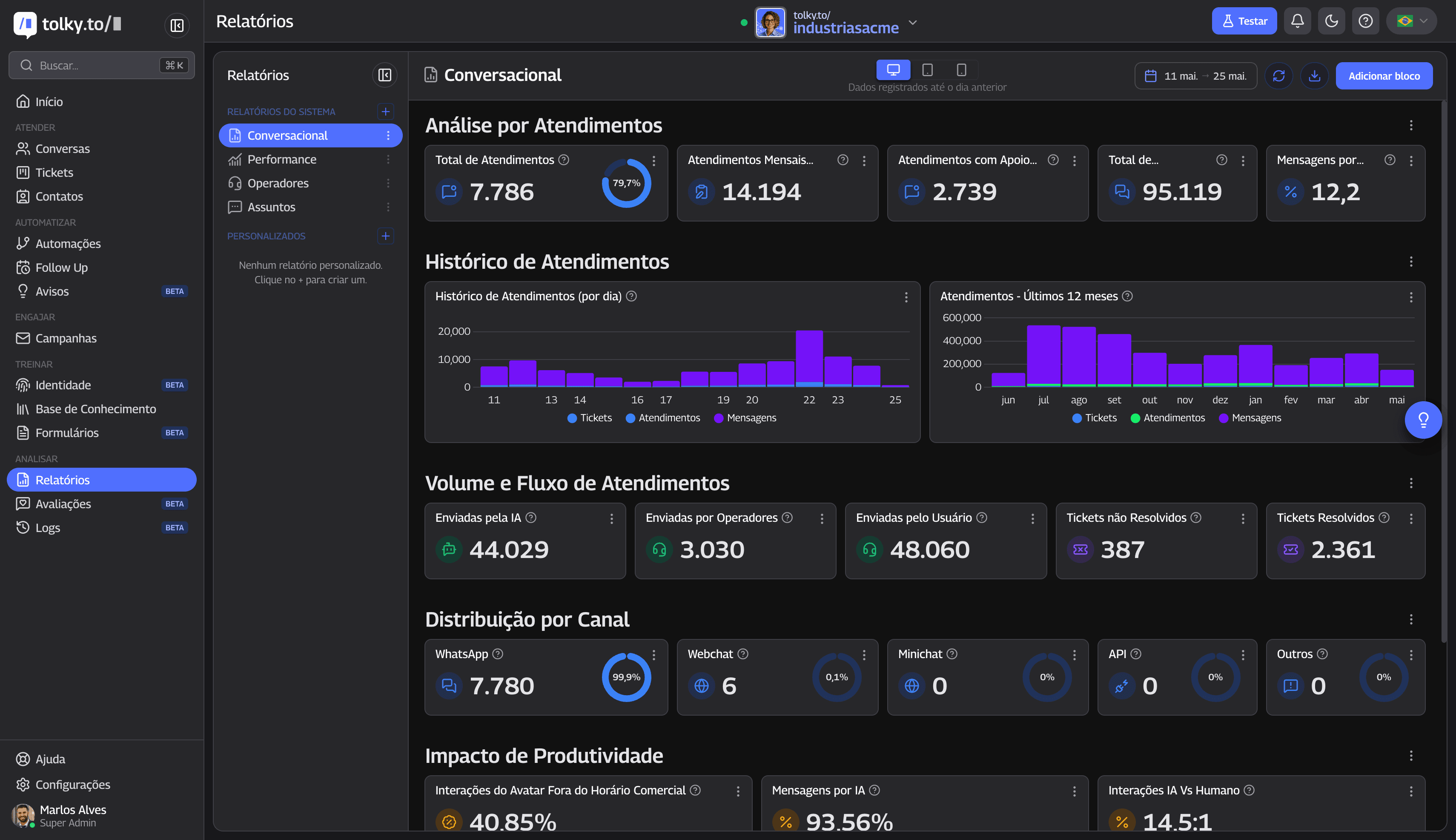 Tolky reports: measuring automation requires visibility into resolution, SLA, and quality — not just message volume
Conclusion
Customer service automation doesn't have to kill humanity. It has to kill improvisation, repetition, and invisible demand.
Companies that win this decade don't ask "AI or human?" They ask where each creates more value — and build the bridge between them with context, tickets, integrations, and honest metrics.
If your operation still treats automation as a synonym for cold service, the problem may not be technology. It may be the angle: automating without journey, without governance, and without respect for the customer's time.
Tolky helps companies turn channels like WhatsApp, site, chat, and voice into a conversational operation that's more efficient and more human — combining AI, human support, tickets, automations, reports, and integrations in one place.
Talk to the Tolky team and assess your operation's maturity today. The goal isn't to automate for automation's sake. It's to serve better — with speed where enough and care where it matters.
Frequently asked questions
What is customer service automation?
It's using technology — flows, rules, conversational AI, and integrations — to run customer service steps with less manual intervention. It includes triage, FAQ answers, system lookups, ticket opening, routing, and follow-up. The goal isn't to eliminate people, but to free the human team for cases requiring judgment, empathy, and decision.
Does customer service automation make service impersonal?
It can — if implemented without context, integration, and proper human handoff. Well designed, it often has the opposite effect: less repetition, more continuity, and more relevant answers. Impersonal is service that doesn't remember who you are, not service that uses AI.
How do you keep humanized service using AI?
By keeping unified history, CRM and order integrations, intelligent escalation, and governance over what AI can answer. Humanization is context + resolution, not absence of technology.
When should AI serve and when should a human take over?
AI should handle repetitive demand, objective lookups, initial qualification, and data collection. Humans should take over negotiation, exceptions, serious complaints, high ambiguity, and any case where the customer shows frustration or explicitly asks for a person.
Does customer service automation work on WhatsApp?
Yes — and in Brazil it's one of the most relevant channels. WhatsApp automation works when it respects fast-response expectations, allows human exit, and integrates with tickets and CRM. See more in WhatsApp chatbot.
How does Conversational AI improve customer service?
By understanding intent, maintaining conversation context, querying systems, and acting within rules — in natural language. This reduces response time, avoids repetition, and improves routing to the right specialist.
Which service processes can be automated?
FAQ, order status, scheduling, lead qualification, document sending, reminders, satisfaction surveys, ticket opening, and queue routing. Everything predictable and verifiable in systems.
Which processes shouldn't be automated without care?
Serious complaints, complex commercial negotiations, sensitive financial disputes, legal or emotionally delicate situations, and any decision the company hasn't clearly codified.
How do you measure whether automation is working?
Track first response time, automatic resolution rate, recurrence, satisfaction, SLA, cost per interaction, and audited answer quality. Good automation improves experience and operations at the same time.
How do you choose a customer service automation platform?
Evaluate integrations, ticket management, human-AI handoff, omnichannel support, governance, reports, and ease of evolving flows. Prefer conversational CRM over isolated chatbot — see what is conversational CRM and the platform selection guide.
Share
Tags
customer service automation
humanized customer service
ai customer service
conversational ai
whatsapp automation
omnichannel support
ticket management
intelligent customer service
ai for support
customer experience
ai helpdesk
ai contact center
Cited in
Marlos Carmo
Founder of Tolky
Marlos Carmo is an AI entrepreneur and founder of Tolky, the conversational-era infrastructure and AI CRM that unifies intelligent service, multi-channel support (such as WhatsApp and voice), live CRM, and operational intelligence in a single ecosystem. He is a finalist for the SXSW Innovation Awards and a member of Francesco's Economy, a global network of young entrepreneurs focused on innovation and social impact. He works connecting Artificial Intelligence and digital transformation in projects for large organizations.
Read also

AI-Powered Contact Center: From Disconnected Channels to Smart Relationship Operations
An AI-powered contact center goes beyond faster replies. Learn how to unify channels, tickets, automation, and humans into a single smart relationship operation.
Marlos Carmo
June 12, 2026
·
18 min read
Guides
AI without integration becomes FAQ: why artificial intelligence that can't access systems talks but doesn't resolve
AI integration with systems separates those who converse from those who resolve. See why AI without CRM, ERP, or tickets becomes FAQ — and how to connect AI customer service to real sales, support, and billing operations.
Marlos Carmo
June 10, 2026
·
19 min read
Guides
Behind the Scenes of Conversational AI at Scale: What Powers Millions of B2B Interactions
Scaling Conversational AI isn't just about choosing a model. Understand the infrastructure, tickets, management, and governance behind millions of conversations.
Marlos Carmo
June 22, 2026
·
14 min read
Strategy

AI Governance in Customer Service: How to Scale Conversations with Control, Security, and Quality
Quick replies are not enough. Learn how to implement AI governance to mitigate risks, integrate with CRM/ERP, and gain complete control over your operation.
Marlos Carmo
June 18, 2026
·
20 min read
Strategy