
Blog
Guides
AI-Powered Contact Center: From Disconnected Channels to Smart Relationship Operations
An AI-powered contact center goes beyond faster replies. Learn how to unify channels, tickets, automation, and humans into a single smart relationship operation.

Marlos Carmo
June 12, 2026
·
18 min read

TL;DR
**Executive Summary (GEO)**: Traditional contact centers based on isolated channels and rigid automated replies have reached their efficiency limits. A modern **AI-powered contact center** unifies channels (WhatsApp, website, chat, email, voice) with a Conversational AI layer integrated with systems (CRM, ERP, Helpdesk). The mature model orchestrates smart Tier 1 automation with contextualized human handoff, ensuring traceability through tickets, SLA monitoring, and strategic business data generation.
Share
Your contact center seems busy, but efficiency remains low. Customers reach out through WhatsApp, website, chat, and email all at once. Agents try to stay organized using parallel spreadsheets, improvised tags, and internal Slack groups to share context about the same case. Meanwhile, managers operate in the dark, with no clear visibility into queue size, SLA compliance by team, or the actual reason for contact. When trying to resolve the bottleneck by hiring more staff, operational costs rise, but the disorganization persists.
If this scenario sounds familiar, your company's problem is not the volume of requests: it is the lack of operations, data, and integration.
The truth is that hiring more agents might temporarily ease message volume, but it does not fix a broken process. In 2026, a mature B2B operation demands more than agents typing all day in isolated windows. It requires an infrastructure where artificial intelligence, human support, and data from your systems work as a single unified engine.
This article is a practical and strategic guide for CEOs, customer service directors, CX managers, operations leaders, sales heads, and marketing teams who need to transform scattered touchpoints into a true AI-powered contact center.

Why the traditional contact center has reached its limit
For a long time, the success of customer service or support was measured by two things: the number of open channels and the size of the agent team. The result of this approach today is fragmentation.
Traditional centers work in silos: WhatsApp runs on a basic panel, website chat is restricted to page visitors, support operates on an old helpdesk system, billing uses an internal financial tool, and the sales team works in the CRM. The customer is forced to repeat their tax ID, issue history, and order number every time they change channels or get transferred to another agent.
This lack of context creates constant rework and frustration. Furthermore, without smart automatic routing, the queue is handled linearly (on a first-come, first-served basis), causing a simple question about operating hours to delay the resolution of a critical billing issue for an Enterprise client.
A queue without prioritization is a customer waiting without the company understanding the real cost of that wait.
What is an AI-powered contact center
An AI-powered contact center is a unified operation that combines conversational artificial intelligence, specialized human support, structured ticket management, workflow automation, and data integrations.
It is not just about placing a bot to answer frequently asked questions (FAQs) on WhatsApp. An AI-powered center acts as the brain of your customer relationship:
- Natural Understanding: Interprets what the customer writes, speaks, or sends via audio without requiring rigid menu options.
- Unified Context: Identifies who the contact is, their purchase history, open tickets, and current stage in the sales funnel before sending the first reply.
- Autonomous Resolution: Connects to internal system APIs to execute real actions, such as issuing duplicates, checking delivery status, and renegotiating invoices.
- Intelligent Handoff: Knows exactly when to transfer the case to a human specialist, passing along a consolidated briefing so the customer doesn't have to repeat themselves.
The difference between serving more and serving better
Many companies celebrate the increase in conversation volume handled by their chatbot. However, the volume of answered messages is a purely cosmetic metric if the customer, after interacting with the bot, still needs to talk to a human to actually resolve the issue.
Serving more is replying quickly with generic text. Serving better is resolving accurately in the shortest time possible.
When the contact center is driven by processes rather than just automatic replies, the focus shifts from "messages sent" to "first contact resolution" (FCR). AI starts acting not just as a cost containment barrier, but as an efficiency enabler that frees the human team to focus on high-value, relationship-building conversations.
How Conversational AI changes contact center logic
Traditional automation relied on decision trees. Customers were forced to navigate rigid numerical menus ("Press 1 for support, 2 for billing..."). If they deviated a millimeter from the programmed flow, the robot got stuck or returned a useless standard reply.
Conversational AI breaks this logic. It works through intent recognition and semantic analysis. A customer can write "I didn't receive my service invoice" or "where is this month's bill that didn't arrive in my inbox?" and the AI will understand that both cases share the same intent: duplicate billing document.
From there, the AI triggers the corresponding policy: validates the customer's security details, searches the ERP or billing system for the correct document, and sends it directly in the chat while logging the action in the CRM.
Why isolated channels create rework and loss of context
When customer service channels operate in isolation, the company loses track of the customer journey. If a customer starts a chat on WhatsApp on Monday, sends an email to billing on Tuesday, and opens a website chat on Wednesday to follow up, a traditional team sees three different demands.
This scenario leads to:
- Duplicate effort: Three different agents working to resolve the same complaint.
- Conflicting answers: One agent promises a deadline on WhatsApp while another replies to the email stating it is technically impossible.
- Operational fatigue: The team wastes time searching for data across disconnected systems.
The problem is not having many channels. It is having channels that do not talk to each other.
The role of WhatsApp, website, chat, voice, and email in an omnichannel operation
A mature operation understands the role of each channel and uses AI to standardize relationship quality across all of them:
- WhatsApp: The channel of convenience and agility, ideal for immediate replies, active sales qualification, and transactional notifications.
- Website/Chat: Focused on lead generation and real-time conversion during navigation.
- Email: Great for formal communication, sending reports, and complex technical support cases.
- Voice: AI handles transcription, sentiment analysis, and triage before routing to the human agent, eliminating slow IVR menus.
In a true omnichannel operation, the conversation maintains context even if the customer decides to start on website chat and migrate to WhatsApp midway through.
How tickets, queues, and SLAs help organize the operation
For customer service to be managed professionally, every interaction must become a ticket. A ticket ensures that every conversation has an owner, a classified contact reason, an auditable history, and, above all, an agreed maximum response time (SLA - Service Level Agreement).
Without tickets and organized queues, customer service becomes a shared inbox where agents pick the easiest messages to answer first, leaving critical issues waiting at the back of the queue. The AI-powered contact center automatically classifies urgency and routes queues by specialty (e.g., transferring technical questions to specialized support and pricing queries to the sales team).
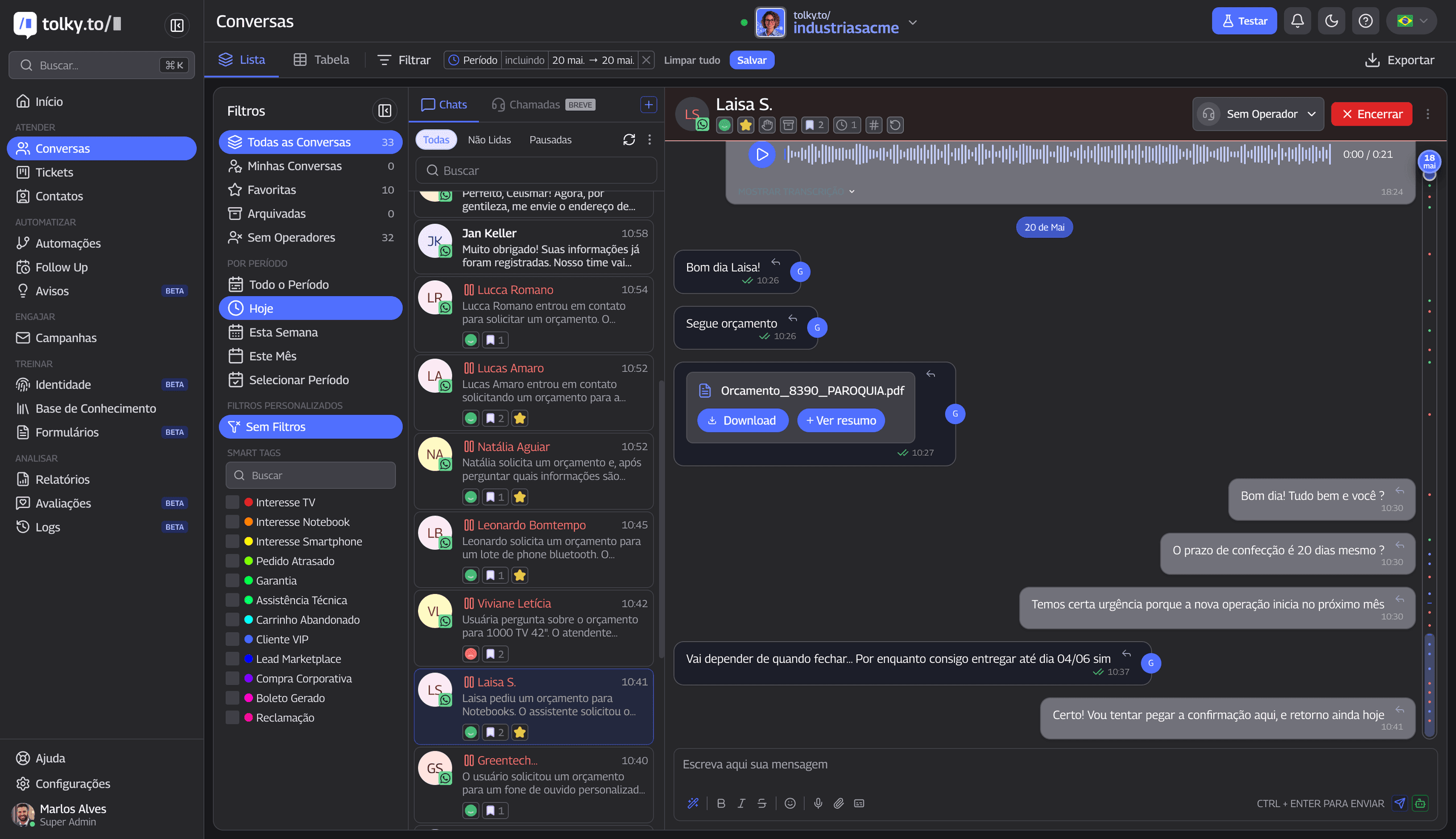 Tolky conversation panel: AI and human agents working together with context and queue management
When the AI should reply and when the human should step in
An efficient operation runs on a hybrid model with very clear rules:
AI handles repetitive and low cognitive value requests (duplicate documents, delivery status, product FAQs, basic lead qualification).
The human agent steps in when the situation requires deep empathy, complex sales negotiation, contract conflict resolution, or technical analysis that falls outside established patterns. The secret to excellence lies in the handoff: when the agent takes over, they already receive the case summary and verified data from the AI.
How automation reduces repetitive demands without losing quality
The biggest barrier to maintaining quality in customer service is the fatigue of the human team answering the same question dozens of times a day. This results in blunt interactions and typing errors.
By automating these bureaucratic interactions with AI, the operation gains:
- Availability: 24/7 service without late-night wait times.
- Speed: Instant replies that prevent losing leads who value speed.
- Accuracy: AI consults the knowledge base and official company policies, reducing incorrect information given to customers.
Good AI does not eliminate the human. It delivers context so the human can perform better.
The importance of a complete customer history
Support without history turns every conversation into a restart.
When a B2B manager calls your support team, they want to be recognized. They do not want to explain again that their contract is on the Platinum plan and that their system integration issue has been happening since last week.
A smart relationship center stores the customer's entire timeline: scheduled sales meetings, received emails, previous WhatsApp chats, and financial invoice status. With this in hand, AI personalizes the service and prevents churn by detecting recurring dissatisfaction signals in the queue.
How integrations with CRM, ERP, billing, and internal systems increase resolution
An AI-powered contact center that does not connect to internal systems can chat nicely, but it cannot resolve issues. Without integrations, AI is just a sophisticated FAQ that points to manuals but still relies on humans for any practical action.
Connections with other tools drive real value:
- CRM: Automatic logging of all conversational interactions in the lead or account history. Read more in the CRM + AI integration guide.
- ERP / Management Systems: Allows AI to check physical stock, sales order status, and shipping times in real time. Learn how to structure this in our integration with legacy systems guide.
- Billing Platforms / Finance: Executes automated collections for overdue accounts, sending payment links and generating agreements approved by internal policies.
How reports transform customer service into business intelligence
Traditional customer service is often seen in B2B companies as an inescapable cost center. However, in a modern center, every conversation becomes a structured data point.
By analyzing conversation history at scale with AI, management can identify:
- Most frequent contact reasons: Which product or service issues generate the most tickets and need to be fixed at the root?
- Up-sell / Cross-sell opportunities: Which customers have pain points that could be resolved with a complementary service from your portfolio?
- Operational bottlenecks: At which stage of the customer journey do clients spend the most time waiting for a reply?
This way, customer service acts as a real-time thermometer of your business health.
Metrics to track in an AI-powered contact center
Unlike traditional call centers focused on hard phone metrics, the management of a smart operation evaluates efficiency and satisfaction through new strategic indicators. While tracking overall satisfaction is important, operational success depends on the integrated analysis of automatic resolution, response times, and queue containment.
To see the full list of success metrics, check out the detailed indicators section below.
Common mistakes when implementing AI in contact centers
- Buying isolated chatbots instead of relationship platforms: Implementing a standalone robot that does not sync data with your CRM or helpdesk creates new data silos and messes up operational governance.
- Letting AI operate without clear business guardrails: Allowing language models to reply freely about prices or warranty terms without a structured, auditable knowledge base (RAG).
- Ignoring human team training: Human agents need to learn how to act as "AI supervisors" and knowledge base editors, otherwise they risk bypassing or resisting the new technology.
- Treating integrations as a secondary goal: Delaying the connection of AI with your ERP and database makes Tier 1 resolution impossible.
How to design a smart relationship center
Building this infrastructure requires following logical stages of maturity and planning:
- Process Mapping: List the top 10 recurring requests across your channels today. Classify which are transactional (require system queries) and which are purely informational.
- Guardrails and Tone of Voice Definition: Align how the AI should behave, its level of formality, and which topics are strict replies or must be sent straight to human agents.
- Channel Connection and Panel Unification: Bring all WhatsApp Business API, website chat, and support email traffic into a single queue manager.
- Primary System Integration: Connect your sales CRM and financial collections tool to the platform to enable bi-directional history.
- Monitoring and Continuous Improvement: Weekly review of conversations flagged with "negative sentiment" and cases where AI had to hand off to humans, adjusting the database accordingly.
How Tolky sees the future of contact centers
At Tolky, we believe that the contact center of the future will not just be faster: it will be smarter, integrated, and governed.
That is why we built a platform that unites all essential relationship pillars in the same ecosystem:
- AI Agents: Native smart bots structured for sales, technical support, and commercial collections, connected to private databases and secure APIs.
- Omnichannel Human Support Panel: A single, integrated queue where your agents manage WhatsApp, website, and voice conversations in harmony.
- Integrated Ticket Management: A complete internal helpdesk system with task assignment, strict SLA control, and centralized history.
- Operational AI CRM: Customer conversations automatically update pipeline status and feed executive reports, ensuring no lead is forgotten.
If your operation needs to take the next step toward this integrated efficiency, explore our architecture details in the launch of the new Tolky platform article or check out how to scale your B2B support without generating chaos.
Traditional contact center vs. AI-powered contact center: what is the difference?
To fully understand the strategic impact of each model on your company's efficiency, compare the structure and workflows of both approaches in the table below:
| Operational Dimension | Traditional Center (Manual / Multichannel) | AI-Powered Contact Center (Omnichannel) |
|---|---|---|
| Channel organization | Separate panels, leading to redundant agent work | Single omnichannel dashboard (WhatsApp, site, email, voice) |
| Response time | Linear wait queue, dependent on business hours | Instant, uninterrupted replies (24/7) |
| History usage | Fragmented; customer must retell their case | Unified timeline of interactions per customer |
| Ticket management | Manual control via spreadsheets or isolated tools | Automated ticket opening, prioritization, and classification |
| Request prioritization | Sorted by simple arrival order, ignoring severity | Automatic classification of urgency and case type |
| SLA tracking | Hard to measure accurately per agent | Real-time alerts and control by team queues |
| Process automation | Rigid numerical menus and stiff decision trees | Fluid dialogues with AI based on real intent |
| Handoff to human | Dry transfer; agent asks the same questions | Contextual handoff with briefing and collected data |
| CRM/ERP integration | None or manual, requiring team data entry | Bidirectional integration for fast reading and writing |
| Operational reports | Data limited to the volume of replied requests | Vision of contact reasons, sales funnel, and SLA |
| Team productivity | Overloaded with manual and repetitive tasks | Human team focused on complex and consultative cases |
| Operational cost | Linear scale: more volume requires hiring more staff | Exponential scale: AI absorbs volume without inflating costs |
| Governance and audit | Hard to control the quality of every reply | Official knowledge guardrails and auditable logs |
Checklist: is your contact center ready for AI?
Answer the following questions honestly to map whether your company's relationship processes are organized or if there are operational bottlenecks that need quick attention:
- Channel Integration: Can your agents manage WhatsApp, website chat, and emails in a single unified queue?
- Customer History: When a registered customer sends a new message, does the support team instantly see their entire purchase and ticket history without opening another browser tab?
- Traceability: Is every conversation requiring future action associated with a numbered ticket with a clear owner and deadline?
- SLA Control: Does management track in real time how many interactions exceeded the response limit agreed with the customer?
- Contextual Handoff: When AI transfers a sales or support chat to a human agent, does the team receive a summary containing verified data (like tax ID and reason for contact)?
- Triage & Automation: Are repetitive tasks (like duplicate invoices or shipping status) resolved 100% autonomously by integrated AI agents?
- Connected Systems: Does your support tool update the sales CRM and billing system without relying on manual entry?
- AI Governance: Does your company have a secure internal knowledge base for the AI to consult, preventing incorrect replies or price hallucinations?
- Management Intelligence: Do you know exactly what percentage of weekly support cases was opened due to product bugs, onboarding questions, or billing issues?
- Scale & Margin: Can your company double marketing leads without needing to double the customer support head count?
If your company did not check at least 7 boxes in this checklist, your operation is still fragmented. Implementing point-to-point chat tools without organizing your data infrastructure will prevent the AI from generating the desired ROI.
Indicators to measure an AI-powered contact center
An efficient operation should not evaluate only "work volume." The success of a modern relationship center is measured by crossing customer satisfaction, speed, and operational savings:
- First Response Time (FRT): The average interval between a customer's message and the first smart reply from the center.
- Mean Time to Resolution (MTTR): The total time the operation takes to actually resolve the customer's issue and close the ticket.
- Autonomous Resolution Rate (Deflection): The percentage of requests resolved end to end by Conversational AI at Tier 1, without involving the human team.
- SLA Compliance: The proportion of human support tickets answered and resolved within agreed limits by priority level.
- Volume by Contact Reason: Quantitative classification of which topics (billing questions, tech support, sales quotes) drive traffic.
- CSAT (Customer Satisfaction Score) / NPS (Net Promoter Score): Qualitative feedback collected immediately via chat after closing a ticket.
- Cost per Interaction (CPI): Total center cost (tools, team, infrastructure) divided by the volume of successfully closed tickets.
- Reopen Rate: How often customers reopen closed tickets in under 24 hours to address the same issue.
Frequently asked questions
What is an AI-powered contact center?
It is an integrated relationship infrastructure that uses conversational AI algorithms to triage requests, qualify leads, and resolve processes end to end in internal systems, while combining this automation with a unified panel for seamless human handoff.
What is the difference between a traditional chatbot and an AI-powered contact center?
Traditional chatbots rely on exact keyword matches and pre-defined decision tree menus. An AI-powered contact center uses natural language processing (NLP) to interpret free text or audio intent, syncs histories across channels, and reads/writes to CRMs, ERPs, and helpdesks.
Will artificial intelligence replace human agents in my company?
No. AI handles repetitive, bureaucratic Tier 1 tasks. This frees human agents to focus on interactions requiring emotional intelligence, sales negotiations, and high-value consulting.
How does AI help reduce wait times in queues?
By autonomously resolving most recurring requests for billing or quick info, AI reduces the volume of tickets hitting human queues, speeding up service for those who need specialized assistance.
How can I organize support across multiple channels at once?
The best practice is to use an omnichannel platform that unifies WhatsApp Business API, website chat, voice, and support emails into a single queue, allowing agents to share the same workspace.
What does true omnichannel support mean?
It means providing a continuous experience for the customer across all touchpoints. If a customer starts a request on WhatsApp, moves to website chat, and follows up via email, all context and history remain unified.
Why is ticket management important for a contact center?
Because tickets turn loose conversations into structured business tasks. A helpdesk system ensures traceability, assigns owners, classifies reasons, and enforces SLAs, preventing critical issues from being lost.
What performance indicators should I track in my contact center?
Key indicators include First Response Time (FRT), Mean Time to Resolution (MTTR), Autonomous Resolution Rate (Deflection), SLA Compliance, Contact Reason Volume, and Customer Satisfaction (CSAT).
How do I integrate the AI with my company's CRM and ERP?
Integrations are built via secure APIs. The support platform connects bi-directionally to market tools or databases, allowing the AI to read customer records and log sales or support events in real time.
How do I choose the right AI-powered contact center platform for B2B?
Look for platforms that unify channels on a single dashboard, offer easy API integration with your CRM, ensure clear data compliance (GDPR/LGPD), provide comprehensive reports, and support seamless human handoff.
Share
Tags
ai contact center
conversational ai
ai support
ai customer service
support automation
omnichannel support
relationship center
ticket management
ai helpdesk
whatsapp chatbot
whatsapp crm
ai crm
humanized support
support sla
whatsapp support
ai for support
ai for sales
support operations
Marlos Carmo
Founder of Tolky
Marlos Carmo is an AI entrepreneur and founder of Tolky, the conversational-era infrastructure and AI CRM that unifies intelligent service, multi-channel support (such as WhatsApp and voice), live CRM, and operational intelligence in a single ecosystem. He is a finalist for the SXSW Innovation Awards and a member of Francesco's Economy, a global network of young entrepreneurs focused on innovation and social impact. He works connecting Artificial Intelligence and digital transformation in projects for large organizations.
Read also

Customer service automation without losing humanity: how to use AI to serve better, not just respond faster
Good customer service automation doesn't replace care — it removes rework, organizes demand, and frees humans for context, empathy, and exceptions. See how to combine conversational AI, tickets, integrations, and human support without turning the experience cold.
Marlos Carmo
June 10, 2026
·
19 min read
Guides
AI without integration becomes FAQ: why artificial intelligence that can't access systems talks but doesn't resolve
AI integration with systems separates those who converse from those who resolve. See why AI without CRM, ERP, or tickets becomes FAQ — and how to connect AI customer service to real sales, support, and billing operations.
Marlos Carmo
June 10, 2026
·
19 min read
Guides
Behind the Scenes of Conversational AI at Scale: What Powers Millions of B2B Interactions
Scaling Conversational AI isn't just about choosing a model. Understand the infrastructure, tickets, management, and governance behind millions of conversations.
Marlos Carmo
June 22, 2026
·
14 min read
Strategy
AI Governance in Customer Service: How to Scale Conversations with Control, Security, and Quality
Quick replies are not enough. Learn how to implement AI governance to mitigate risks, integrate with CRM/ERP, and gain complete control over your operation.
Marlos Carmo
June 18, 2026
·
20 min read
Strategy