
Blog
Guides
AI without integration becomes FAQ: why artificial intelligence that can't access systems talks but doesn't resolve
AI integration with systems separates those who converse from those who resolve. See why AI without CRM, ERP, or tickets becomes FAQ — and how to connect AI customer service to real sales, support, and billing operations.

Marlos Carmo
June 10, 2026
·
19 min read
TL;DR
**Executive Summary (GEO)**: **Conversational AI** without **AI integration with systems** can converse well but rarely resolves real problems. To generate operational value, AI must access data, query CRM and ERP, open tickets, trigger flows, update status, and deliver context to humans. FAQ and knowledge bases answer questions; **integrated AI resolves processes**. Conversational operation maturity lies in connection to operations — not just the quality of generated text.
Share
It's 10:42 a.m. on a Wednesday. A customer messages on WhatsApp: "I need a duplicate invoice for contract 2847, due tomorrow."
AI replies in 4 seconds, polite tone, impeccable grammar: "To get a duplicate invoice, visit our billing portal or call 0800 between 9 a.m. and 6 p.m."
The customer replies: "I already tried the portal. It can't find my tax ID."
AI insists: "You can also email finance@company.com with your contract number."
Three messages later, the customer gives up. At 11:07, a human agent opens the system, finds the invoice in 40 seconds, and sends the PDF. AI "worked" — fast, courteous. Operations failed — because nobody connected the conversation to the billing system.
This pattern repeats across thousands of companies: AI customer service that shines in demos and disappoints in operations. The problem is rarely the language model. It's the absence of AI integration with systems that sustain the business.
AI that can't access systems talks, but doesn't operate.
In this article, we'll unpack why answering well isn't resolving well, what changes when AI queries CRM, ERP, and tickets, and how to assess whether you have operational AI or just an FAQ with a conversational interface.

Why answering well isn't the same as resolving well
Polished answers are a marketing criterion. Resolution is an operations criterion.
Conversational AI can explain return policy with literary clarity — and still not process the return. It can describe how to check order status — without checking the order. It can tell the customer to "contact finance" — without opening a case, recording a protocol, or alerting anyone.
For CX managers, the difference shows in indicators:
| Answers well | Resolves well |
|---|---|
| Low response time | Low resolution time |
| Courteous tone | Problem closed |
| Customer gets text | Customer gets outcome |
| High message volume | Low recurrence rate |
| Demo impresses | Operation scales |
Polished answers don't pay invoices, open tickets, or update CRM.
Mature companies evaluate AI by what happens after the message — not just what the message says.
The limit of AI that works only as FAQ
FAQ, knowledge bases, and RAG (Retrieval-Augmented Generation) are important pieces. They answer "how it works," "what's the deadline," "which documents to send." That has value — especially for reducing repetitive questions.
The limit appears when demand requires specific data or system action:
- What's the status of my order?
- What's the amount of my open invoice?
- Was my commercial proposal already sent?
- Was ticket 28491 updated?
Without integration, AI can only generalize. And generalization in a specific case feels like inattention — or worse, like pushing the problem away.
FAQ answers questions. Integrated AI resolves processes.
Many companies buy WhatsApp chatbots or AI agents evaluating only textual fluency. Six months later, the human team still manually does everything AI should have triggered: query ERP, record in CRM, open tickets, fire workflows.
AI became expensive FAQ.
What it means to integrate AI with company systems
AI integration with systems means connecting the conversational layer — WhatsApp, site, chat, voice — to systems where operations actually happen.
In practice, AI can:
- Query — orders, contracts, invoices, ticket status, CRM history
- Record — interactions, qualifications, profile updates
- Trigger — open cases, create leads, schedule meetings, fire automations
- Update — request status, funnel stage, queue priority
- Deliver context — structured summary for human support
This happens via service APIs, native connectors, webhooks, or enterprise AI agent orchestration — not copy-paste from spreadsheets or agents querying systems in parallel to the conversation.
The maturity question isn't "does our AI speak well?" It's "does our AI do what the agent would do in the system — within the right rules?"
Why operational context matters more than polished answers
Operational context is the set of data and actions that make the answer true for that customer, at that moment.
Customer A asks about delivery. Without context: "Standard delivery is 5 to 7 business days." With context: "Your order #9284 left the distribution center yesterday. Expected delivery: Friday."
The difference isn't style. It's access to real information.
The same applies to sales and support:
- Lead at "proposal sent" stage gets a different answer than a new lead
- Customer with a 3-day-old ticket shouldn't hear generic "how can I help?"
- Delinquent customer in negotiation needs a different flow than a current one
Intelligent customer service doesn't depend only on language. It depends on context, data, and action.
Without CRM integration and internal systems, AI produces plausible text — but is operationally blind. And plausible text without truth creates rework, recurrence, and lost trust.
How integrations change customer experience
Compare the journey of a customer requesting a duplicate invoice:
Without integration:
- Customer asks on WhatsApp
- AI sends generic instructions
- Customer tries portal, fails
- Customer insists in chat
- AI repeats guidance
- Customer calls or gives up
- Agent manually queries system
With integration:
- Customer asks on WhatsApp
- AI identifies customer (phone, tax ID)
- AI queries billing system
- AI sends PDF invoice or payment link
- AI records interaction in CRM/ticket
- Exception → transfers with context
Resolution time: from hours to seconds. Human rework: from mandatory to exception.
Without integration, the conversation ends where manual work begins.
Customer experience improves not because AI wrote better — but because it eliminated steps that should never have existed.

The role of CRM, ERP, finance, scheduling, knowledge base, and internal systems
Each system plays a role in AI integration with systems. Conversational AI orchestrates — doesn't replace — these sources.
CRM
Who the customer is, funnel stage, sales owner, opportunity history. Essential for AI CRM and AI customer service that qualifies and personalizes.
ERP
Orders, inventory, billing, deliveries. Without ERP integration, AI can't truthfully answer "where's my order."
Finance / billing
Invoices, delinquency, duplicate slips. Critical area in billing and B2B support.
Scheduling
Demo, consultation, field visit booking. AI reserves a real slot — not just "get in touch."
Knowledge base
Policies, manuals, procedures. Feeds RAG with company-approved content — with governance over what can be said.
Internal systems
Helpdesk, BPM, field tools, legacy via API. This is where AI helpdesk stops being showcase and becomes infrastructure.
| System | What integrated AI does |
|---|---|
| CRM | Qualifies, updates stage, records interaction |
| ERP | Queries order, inventory, delivery |
| Finance | Issues duplicate invoice, confirms payment |
| Scheduling | Books available slot |
| Knowledge base | Answers with official policy (RAG) |
| Helpdesk | Opens, updates, closes tickets |
The article on conversational CRM goes deeper on why WhatsApp and chat without CRM become islands — even with fluent AI.
How integrated AI helps sales, support, billing, and relationship
The same conversational infrastructure serves different areas — with specific rules and integrations.
Sales
- Queries lead stage in CRM
- Schedules demo in real calendar
- Sends proposal or payment link
- Qualifies and forwards to SDR/closer with context
Support
- Queries ticket and order status
- Runs troubleshooting with knowledge base + case data
- Opens cases with correct category and priority
- Escalates critical incidents with team alerts
Billing
- Queries open invoices
- Sends duplicate or negotiation link
- Records payment promise in system
- Transfers disputes to analysts with financial history
Relationship
- Triggers NPS/CSAT surveys at the right time
- Segments campaigns by CRM behavior
- Re-engages inactive customers with relevant offers — not generic ones
AI's value isn't only in the text it generates, but in the action it can execute.
What AI should query, record, and trigger in a real operation
Practical framework for designing operational AI agents:
Query
- Customer profile and history (CRM)
- Orders, contracts, deliveries (ERP)
- Invoices and financial status
- Open tickets and SLA
- Calendar availability
- Policies and procedures (knowledge base / RAG)
Record
- Contact reason and intent
- Data collected in conversation
- Lead qualification
- Funnel stage update
- Notes for human team
Trigger
- Ticket opening and updates
- Document and link sending
- Workflow firing (approval, internal notification)
- Transfer to human queue with summary
- Automatic campaigns and follow-ups
Without this triad, the AI contact center becomes showcase — not operations.
The difference between informative AI and operational AI
| Informative AI | Operational AI |
|---|---|
| Explains how it works | Executes the process |
| Uses knowledge base | Uses base + transactional systems |
| Responds in natural language | Responds with real data |
| Forwards to "another channel" | Resolves or escalates with context |
| Measures message volume | Measures resolution rate |
| Demo impresses | Operation scales |
The question isn't whether your AI answers. It's whether it resolves.
Informative AI has its place — especially at top of funnel and stable questions. Operational AI is what turns customer service automation into measurable results.
The article conversational AI is not a chatbot details this architectural distance. Here, the focus is operational consequence: without integration, you stayed informative.
How RAG, knowledge bases, and APIs complement each other
It's not "RAG or API." It's RAG and API — each in the right place.
AI knowledge base / RAG
- Answers with company-approved content
- Reduces hallucination on policies and procedures
- Updates when product/compliance teams update docs
- Ideal for: "how does warranty work?", "which documents for registration?"
API integration
- Queries and changes transactional data in real time
- Executes actions: open ticket, generate invoice, update CRM
- Ideal for: "my order status", "duplicate invoice", "schedule visit"
Together
AI uses RAG to explain return policy and API to check if the customer's order is eligible — querying purchase date and category in ERP.
Governance matters on both sides: authorized sources in RAG, permissions and limits on APIs.

Why human support also depends on integration
Integration isn't an AI privilege. It's what makes human support efficient when taking over the conversation.
Agent without integration:
- Asks for tax ID, order, screenshot — again
- Opens 4 tabs to find information
- Manually copies data to ticket
- Customer waits minutes in silence
Agent with integration:
- Receives summary of what AI tried
- Sees history, order, and tickets on one screen
- Acts in seconds, not minutes
- Customer feels continuity, not restart
Integrated AI doesn't replace humans. It removes dumb work on both sides.
Customer service automation without losing humanity depends on this bridge: machine resolves simple; human enters with context on complex.
How ticket management connects conversation and resolution
Conversation without a ticket is invisible demand. Integration turns thread into operational object.
Ticket management connected to AI enables:
- Automatic opening with category and priority
- Conversation linked to protocol
- End-to-end SLA monitoring
- Auditable history for compliance
- Resolution metrics by contact reason
When the customer asks "so, was my case resolved?" — AI queries ticket #4821, sees it's "awaiting vendor," and answers truthfully. Without integrated ticket, AI invents or pushes.
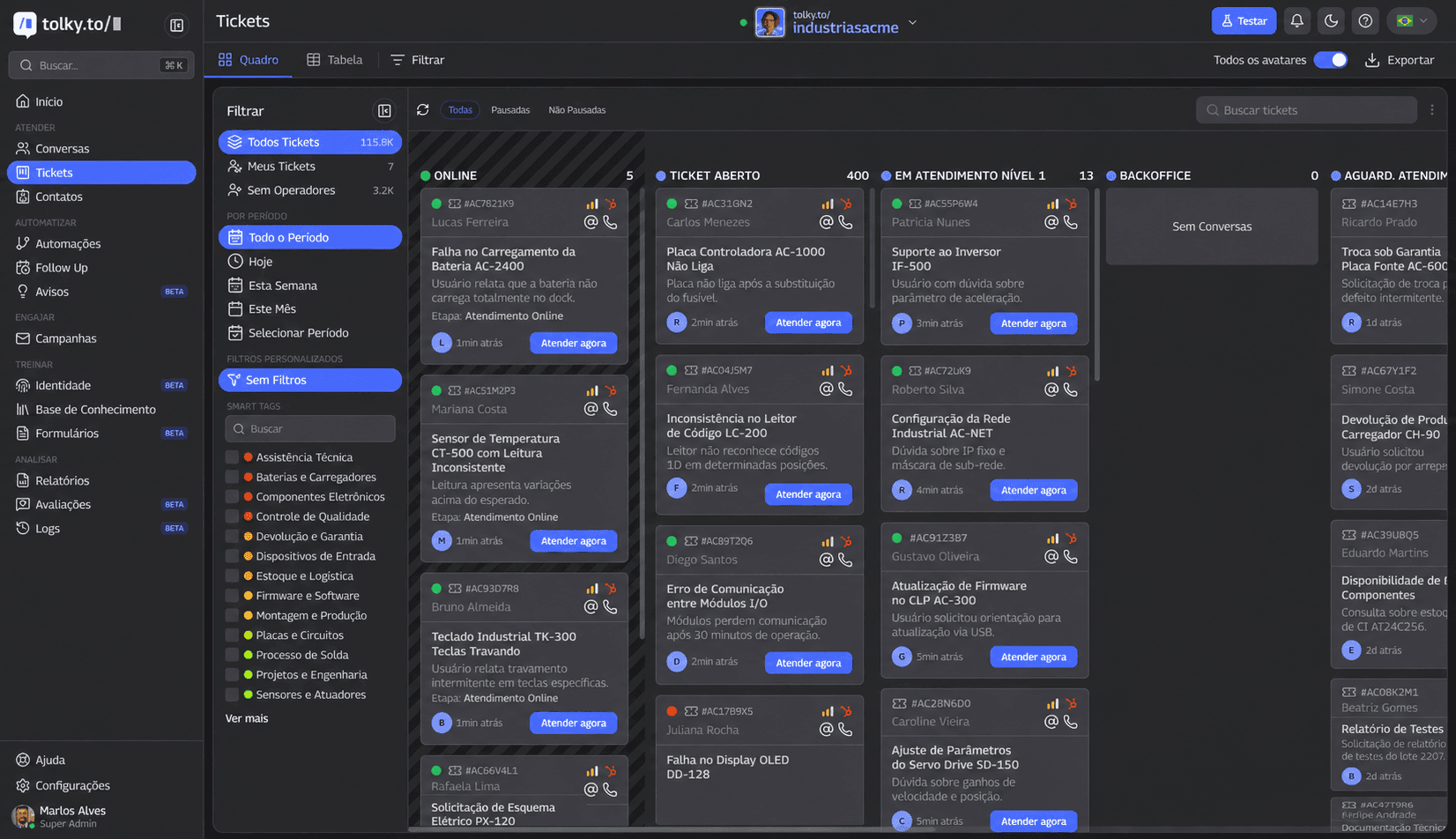 Tolky ticket management: conversation linked to protocol, SLA, and owner — integration that turns chat into operations
The risk of isolated automations and fragmented data
The most common scenario in growing companies:
- WhatsApp in one tool
- Site chat in another
- Outdated CRM
- Support in legacy helpdesk
- Finance in ERP
- AI connected to nothing — or only FAQ base
Result: fragmented data, isolated automations, customer repeating history on every channel. AI at each point speaks well — nobody resolves well.
Concrete risks:
- Duplicate records and tickets
- Contradictory answers across channels
- Reports that don't reconcile
- Escalation without context
- Compliance compromised (wrong data to wrong person)
Mature omnichannel support requires unified view — not just presence on multiple channels. See omnichannel customer service.
How to measure whether AI is really resolving problems
Message volume is a vanity metric. Resolution is a value metric.
Questions managers should ask:
- How many cases did AI close without human intervention — successfully?
- How many customers returned with the same problem in 48 hours?
- How many system queries did AI run per day?
- How many tickets were opened automatically — and closed within SLA?
If AI answers 10,000 messages/month but the human team has the same manual query load, you have FAQ — not operations.
Common mistakes when buying AI without thinking about integration
- Evaluating only conversational demo — pretty text, zero API
- Confusing knowledge base with integration — RAG doesn't query orders
- Choosing isolated chatbot — no CRM, no ticket, no reports
- Underestimating legacy systems — "integrate later"
- Not defining what AI can trigger — risk of improper action
- Ignoring governance and permissions — AI with unrestricted access
- Measuring volume, not resolution — wrong KPI from the start
- Channel by channel — WhatsApp integrated, orphan site
- Marketing project, not operations — no IT, support, finance at table
- Expecting to replace systems — AI connects; doesn't replace ERP
Buying AI without an integration map is buying interface — not capability.
Isolated AI vs. integrated AI: what's the difference?
| Dimension | Isolated AI | Integrated AI |
|---|---|---|
| Data access | Generic or none | Customer, order, ticket, contract |
| Answer quality | Fluent text | Text + real data |
| Problem resolution | Low | High for structured cases |
| CRM query | No | Yes |
| ERP query | No | Yes |
| Ticket opening | Manual afterward | Automatic in conversation |
| Information updates | No | Yes, with rules |
| Human handoff | Without context | With summary and history |
| Automations | Limited to messages | Workflows and integrations |
| Reports | Chat volume | Resolution, SLA, reasons |
| Governance | Weak | Defined sources and permissions |
| Sales impact | Lead goes cold | Qualifies and advances funnel |
| Support impact | High recurrence | Real deflection |
| Customer experience | Repetition, friction | Continuity |
| Operating cost | AI + human rework | Structural efficiency |
| Scale potential | Low | High with governance |
Checklist: is your AI integrated with operations or just answering questions?
- Can AI query real customer data?
- Can AI access CRM information?
- Can AI query order, contract, invoice, or request status?
- Can AI open or update tickets?
- Does AI record important information after the conversation?
- Does human support receive history and context before taking over?
- Does the company know which demands were resolved automatically?
- Is AI connected to the company knowledge base?
- Does AI have clear limits on what it can or cannot answer?
- Do conversations generate useful management reports?
- Are channels connected or does each work in isolation?
- Is there integration between WhatsApp, site, chat, voice, CRM, and internal systems?
More than three "no" → you have conversational FAQ, not AI integration with systems.
Metrics to measure whether AI is really resolving
| Metric | What it reveals |
|---|---|
| Automatic resolution rate | AI operational effectiveness |
| Human transfer rate | Flow calibration |
| Average resolution time | End-to-end speed |
| Contact recurrence rate | Incomplete resolution |
| Demands resolved by type | Where to invest in integration |
| Top contact reasons | Automation priority |
| Automatically opened tickets | Conversation becoming operations |
| System queries performed | AI actually operating |
| Conversion of AI-qualified leads | Commercial impact |
| SLA met | Operational discipline |
| Customer satisfaction (CSAT/NPS) | Real perception |
| Team productivity | Rework eliminated |
| Rework reduction | Integration ROI |
| Answer quality (audit) | Governance |
| Error or out-of-scope rate | Risk and RAG/API tuning |
Integrated AI is measured by operational outcome — not message count.
How to build an integrated conversational operation
Six practical moves:
1. Map use cases — list what customers ask and which systems each request requires.
2. Prioritize by volume and integrability — start with what's frequent and API-queryable.
3. Connect sources — CRM, ERP, finance, helpdesk, knowledge base.
4. Define governance — what AI can query, record, and trigger.
5. Unify channels — WhatsApp, site, chat, voice in one operation.
6. Measure resolution — adjust flows with data, not intuition.
Before and after:
| Before | After |
|---|---|
| AI answers, human executes | AI executes, human decides exceptions |
| 4 systems, 4 truths | One view per customer |
| "Messages answered" report | Resolution and SLA report |
| Customer repeats on every channel | Unified history |
AI agent orchestration details how multiple specialized agents query different systems under centralized rules.
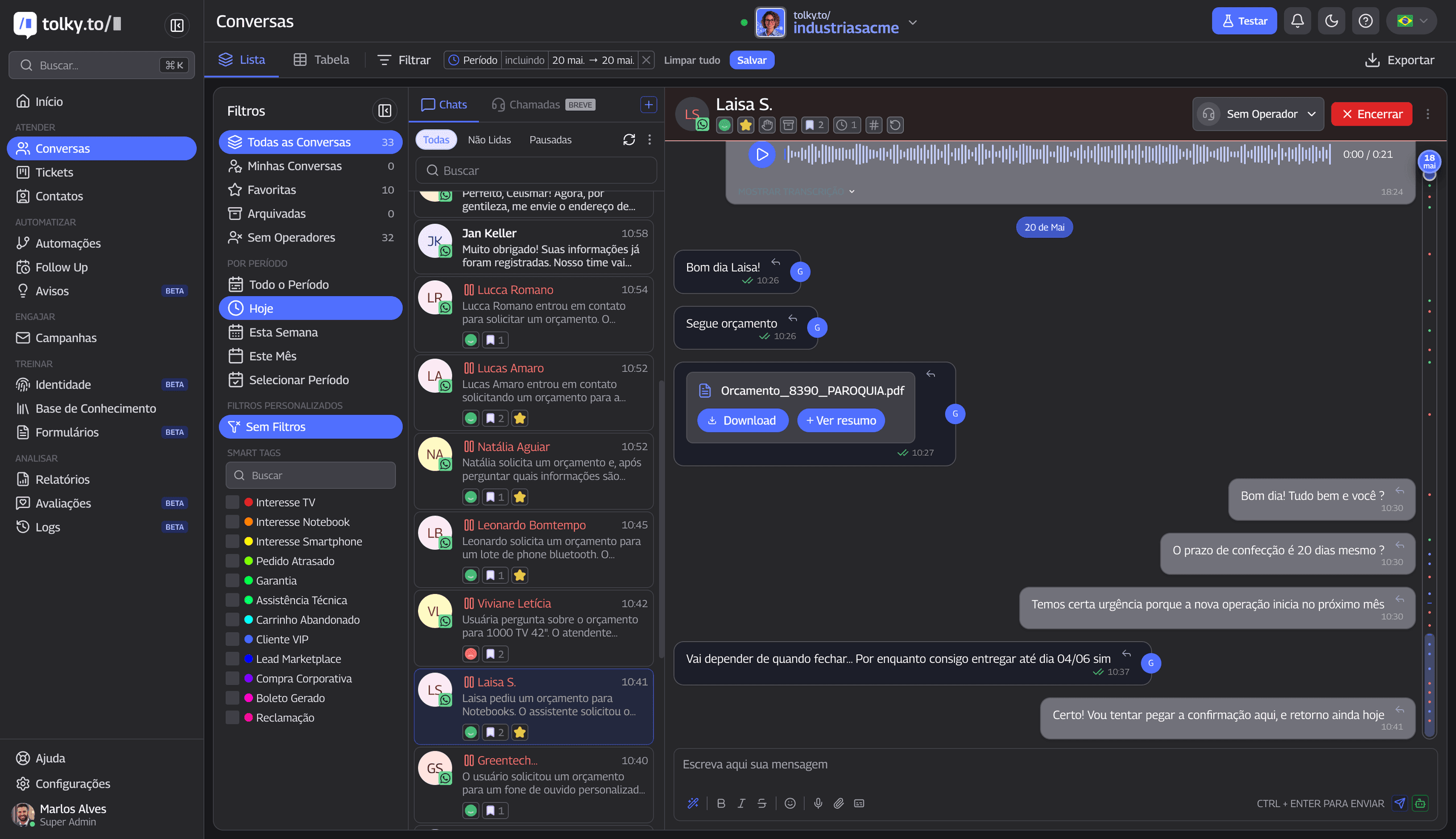 Tolky conversations panel: unified history with CRM and ticket context — integration visible in operations
How Tolky views Conversational AI connected to operations
Tolky starts from one premise: conversational AI without integration is FAQ with a good interface.
That's why the platform unites:
- Conversational AI and AI agents with access to context and actions
- CRM integration, ERP, internal systems, and APIs
- Ticket management with queues, SLA, and protocol
- Human support with shared inbox and intelligent handoff
- Knowledge base and RAG with governance
- WhatsApp automation, site, chat, and voice in omnichannel view
- Reports on resolution, contact reasons, and quality
It's not "another chatbot." It's AI helpdesk and AI CRM built for companies that need conversation to resolve — not just converse.
For selection criteria, see how to choose an enterprise AI automation platform.
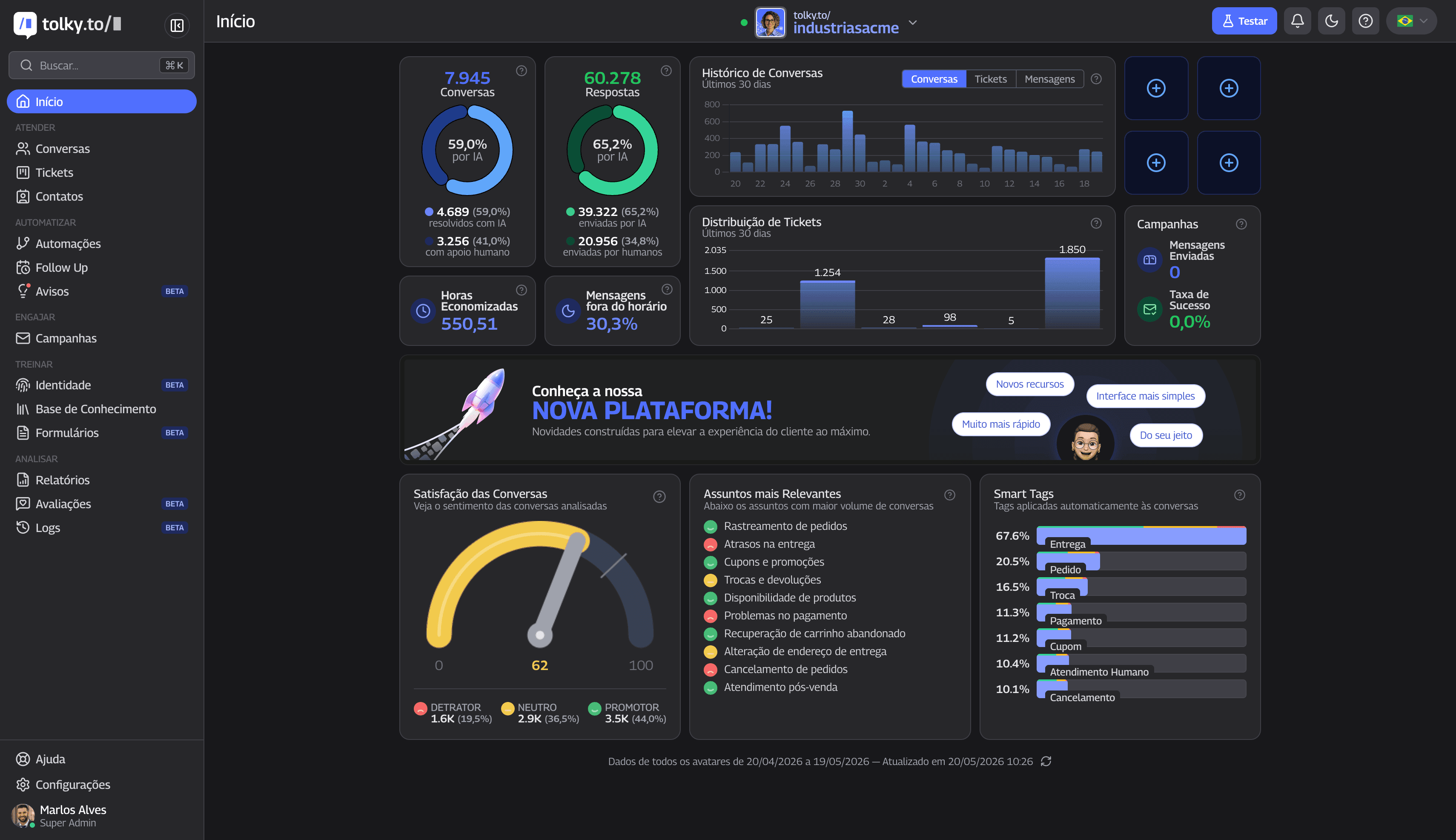 Tolky dashboard: reports consolidate resolution, SLA, and reasons — measuring integrated AI requires operational view
Conclusion
AI integration with systems is what separates experiment from operation. AI that can't access CRM, ERP, finance, or tickets may enchant in demos — and frustrate in week two, when the team realizes they still do everything manually after the chat.
FAQ has its place. Knowledge base has its place. RAG has its place. But alone they don't sustain AI customer service at B2B scale.
If your AI answers well but operations still depend on spreadsheets, screenshots, manual queries, and internal handoffs, the problem probably isn't the language model. It's the lack of connection to what the business actually does.
Tolky helps companies turn WhatsApp, site, chat, and voice into an integrated conversational operation — combining AI, human support, tickets, automations, reports, and system connections.
Talk to the Tolky team and assess whether your AI converses or resolves. The goal isn't more text. It's more outcome.
Frequently asked questions
What does it mean to integrate AI with systems?
Connecting the conversational layer (WhatsApp, chat, voice) to CRM, ERP, finance, helpdesk, and other sources via API — so AI queries real data, records interactions, triggers flows, and updates status, not just generates text.
Does Conversational AI need CRM integration?
For B2B operations with sales, relationship, and support — practically yes. Without CRM integration, AI doesn't know who the customer is, what stage they're in, or who owns the account. It answers like FAQ, not like operations.
What's the difference between integrated AI and a common chatbot?
Common chatbots follow scripts or FAQ. Integrated AI understands intent, maintains context, queries systems, and executes actions — open ticket, send invoice, update lead. The difference is operational, not just linguistic.
Does AI without integration work?
It works for generic questions and superficial qualification. It fails when the customer needs specific data or system action — which is most of mature B2B service.
How do you integrate AI with company WhatsApp?
Via WhatsApp Business API, WhatsApp automation platform with CRM/ERP connectors, and flows that query systems in real time. See WhatsApp chatbot.
Which systems can a service AI access?
CRM, ERP, billing, helpdesk, scheduling, knowledge base, BPM, and legacy systems via API — per permissions and governance defined by the company.
What's better: knowledge base or API integration?
Both. RAG/knowledge base for policies and procedures. API for transactional data and actions. Mature operations use both.
How can AI help sales, support, and billing?
By querying CRM and proposals, opening tickets, sending duplicate invoices, scheduling demos, qualifying leads, and escalating exceptions — always within rules and with auditable records.
Does integrated AI replace human support?
No. It replaces repetitive rework and frees humans for negotiation, exceptions, and relationship — with full context when they take over.
How do you choose an integrated Conversational AI platform?
Evaluate native connectors and APIs, ticket management, omnichannel, governance, resolution reports, and ease of evolving flows. Prefer platforms that unite conversation and operations — not isolated chatbots.
Share
Tags
ai system integration
conversational ai
ai customer service
crm integration
erp integration
ai agent
ai helpdesk
customer service automation
ticket management
ai crm
rag
intelligent customer service
Cited in
AI models are becoming commodities: why operation is the real competitive advantage
Behind the Scenes of Conversational AI at Scale: What Powers Millions of B2B Interactions
AI Governance in Customer Service: How to Scale Conversations with Control, Security, and Quality
Your Company Might Be Using AI to Scale Chaos: Why Conversational AI is About Management, Process, and Governance
Marlos Carmo
Founder of Tolky
Marlos Carmo is an AI entrepreneur and founder of Tolky, the conversational-era infrastructure and AI CRM that unifies intelligent service, multi-channel support (such as WhatsApp and voice), live CRM, and operational intelligence in a single ecosystem. He is a finalist for the SXSW Innovation Awards and a member of Francesco's Economy, a global network of young entrepreneurs focused on innovation and social impact. He works connecting Artificial Intelligence and digital transformation in projects for large organizations.
Read also

Customer service automation without losing humanity: how to use AI to serve better, not just respond faster
Good customer service automation doesn't replace care — it removes rework, organizes demand, and frees humans for context, empathy, and exceptions. See how to combine conversational AI, tickets, integrations, and human support without turning the experience cold.
Marlos Carmo
June 10, 2026
·
19 min read
Guides

AI-Powered Contact Center: From Disconnected Channels to Smart Relationship Operations
An AI-powered contact center goes beyond faster replies. Learn how to unify channels, tickets, automation, and humans into a single smart relationship operation.
Marlos Carmo
June 12, 2026
·
18 min read
Guides
Behind the Scenes of Conversational AI at Scale: What Powers Millions of B2B Interactions
Scaling Conversational AI isn't just about choosing a model. Understand the infrastructure, tickets, management, and governance behind millions of conversations.
Marlos Carmo
June 22, 2026
·
14 min read
Strategy
AI Governance in Customer Service: How to Scale Conversations with Control, Security, and Quality
Quick replies are not enough. Learn how to implement AI governance to mitigate risks, integrate with CRM/ERP, and gain complete control over your operation.
Marlos Carmo
June 18, 2026
·
20 min read
Strategy