Click to WhatsApp ads: how to create them without losing the lead
How to create click to WhatsApp ads in Ads Manager, what they cost, how Meta's free entry point window works and what to do after the click so the lead does not go cold.
TL;DR
A click to WhatsApp ad is a Facebook or Instagram ad that opens a conversation with the company's WhatsApp number, with a pre-filled message for the customer to send. You pay Meta for the ad and, if you reply within the customer service window through the API, a free entry point window opens for up to 7 days. Results depend on what happens after the click: an instant reply, qualification, CRM records and follow-up.
Share
Click to WhatsApp ads have become the shortest path from paid media to a conversation: the customer taps the ad and lands in the company's chat, with no form. The problem is that the funnel does not end at the click. Plenty of good campaigns lose the lead in the minutes that follow, when no one replies, the reply is generic or the conversation never reaches the CRM.
This guide covers what the format is, how to create it in Ads Manager, what it costs (including Meta's free entry point window), what to do after the click, which metrics to track and the mistakes that waste the most budget. Rules and menus were checked against Meta's official documentation on November 19, 2026.
Updated in November 2026.
What is a click to WhatsApp ad?
A click to WhatsApp ad (CTWA) is a Facebook or Instagram ad that, when tapped, opens a conversation with the company's WhatsApp number and a pre-filled message for the customer to send. According to Meta's developer documentation, the format supports image, video, carousel and slideshow, and it can also run on WhatsApp Status through placement settings.


The difference from a regular ad is the destination. Instead of sending people to a page with a form, it sends them into a conversation, where the company can answer questions, qualify and sell in the same place. That removes friction for the customer and raises the stakes for whoever answers: the conversation starts right away, and so does the expectation of a reply.
How it works, from click to conversation
The flow has four steps: the customer sees the ad, taps the button, sends the opening message on WhatsApp and the company replies. Everything before the first reply is on Meta; everything after it is on your operation.
- Ad. It shows on Facebook, Instagram or WhatsApp Status to the audience you defined.
- Click. The button opens WhatsApp on the phone, straight into the chat with the business number.
- Opening message. The customer sees pre-filled text, which you can customize, and chooses to send it.
- Reply. The conversation lands in the WhatsApp Business app or in the platform connected to the official API, and someone (or an AI agent) replies.
The number can be on the app or on the API. The app works for low volume, with one person on a phone. The API lets several agents answer, adds automation and CRM records, and is the condition for the free entry point window described below.
How to create the ad in Ads Manager, step by step
To create the ad, connect WhatsApp to your Facebook Page, create a campaign with a compatible objective, choose WhatsApp as the destination in the ad set and set up the creative and the opening message. The path below follows Meta's Help Center and the Marketing API documentation, checked on November 19, 2026; menu names change, so confirm them in your account.
| Step | Where | What to do |
|---|---|---|
| 1. Connect the number | Page settings, Linked accounts, WhatsApp | Enter the business number and confirm it with the code you receive |
| 2. Objective | Ads Manager, Create | Pick an objective that supports WhatsApp, such as Engagement, Leads, Sales or Traffic |
| 3. Destination | Ad set, conversion location or message destinations | Select WhatsApp, then the Page and the number |
| 4. Audience and budget | Ad set | Set the audience, placements, budget and schedule |
| 5. Creative | Ad | Image, video or carousel, copy and the send WhatsApp message button |
| 6. Opening message | Ad, message template | Customize the pre-filled text and, if you like, suggested questions |
| 7. Publish | Review | The ad goes through Meta's review before it runs |
A few things to watch at each step:
- The right number. A Page can have more than one WhatsApp number connected; check which one will receive the leads before you publish.
- Objective. Meta's documentation lists Engagement, Sales, Traffic and Leads as objectives that support the WhatsApp destination. Choose based on what you want to optimize: conversations started or actions after them.
- Portfolio. The Page, ad account and WhatsApp should sit in the company's own business portfolio. See how to set that up in the guide to Meta Business Suite and WhatsApp.
You can also advertise straight from the WhatsApp Business app, under Tools, Advertise, according to WhatsApp's Help Center. It is the simplest route for a shop with one phone, with less control over audience and measurement.
How to write the opening message
The opening message should say which offer the customer came from and ask for something useful, not just "I want more information." If you do not customize it, Meta uses a generic line, and whoever replies cannot tell which ad the customer came from.
Three illustrative examples:
- "Hi, I saw the ad for the annual plan and want the price for 5 people."
- "Hi, I want to book an assessment. Mornings work best for me."
- "Hello, I'm interested in the 2-bedroom apartment downtown."
A different opening message for each campaign also helps you see where the lead came from when you read the conversation. Suggested questions, shown as buttons, help sort intent from the first tap.
How much do click to WhatsApp ads cost?
You pay Meta for the ad through the budget you set in Ads Manager; messages follow their own rules and, on the official API, can be free during the free entry point window. Per the Marketing API documentation, this format is billed on impressions, so you pay for ad delivery, not per conversation.


According to the WhatsApp Business Platform pricing page, checked on November 19, 2026, the message rules are:
- The customer taps the ad and writes. This opens the 24-hour customer service window, and customer messages are not charged.
- The company replies within the window. That first reply is free and opens the free entry point window, which may stay open for up to 7 days.
- While the window is open, marketing, utility, authentication and service messages are not charged. Meta Business Agent messages are still charged.
- Condition: the customer must come from the ad on WhatsApp for Android or iOS; WhatsApp desktop and web do not count.
If the company is slow and the 24-hour customer service window closes, the conversation goes back to standard per-message pricing. Rates by category and country are in the guide to WhatsApp Business's new pricing and in the WhatsApp API cost calculator.
What happens after the click
What decides the ad's return is the speed and quality of the first reply: a click to WhatsApp lead has the phone in hand at that minute, and interest fades fast. The metric for this is speed to lead, the time between the customer's message and a useful reply.


An operation that makes the most of the click does five things:
- Replies right away, including nights and weekends, when many ads keep running.
- Qualifies in the conversation, with two or three questions that separate people ready to buy. The guide to AI lead qualification shows how to build that script.
- Records the contact and the conversation in the CRM, so the lead does not live only on one salesperson's phone.
- Hands off to a person with context when the lead asks or the sale needs negotiation.
- Follows up when the customer stops replying, within WhatsApp's rules. See the guide to lead follow-up on WhatsApp.
When one of these steps fails, the ad keeps generating conversations and the sales never show up. The full diagnosis is in lead loss on WhatsApp.
Which metrics to track
Ads Manager measures up to the conversation started; everything after that has to be measured in your support platform and your CRM. Judging a campaign only by cost per conversation hides whether those conversations became opportunities.
| Metric | Where to measure | What it shows |
|---|---|---|
| Cost per conversation started | Ads Manager | What it costs to open a conversation |
| Time to first reply | Support platform | Whether the lead was served while still interested |
| Conversations with a customer reply | Support platform | Whether the audience and offer attract people with intent |
| Qualified leads | CRM | How many conversations became real opportunities |
| Cost per qualified lead | Calculation: spend divided by qualified leads | The cost that matters to sales |
| Closed deals | CRM | The campaign's return |
To connect the ad to the sale, Meta sends, through the official API, data about the source ad along with the first message, such as the ad ID and a click identifier (ctwa_clid), according to the Conversions API for Business Messaging documentation. Using that data depends on the platform that receives the conversations; ask your vendor what it stores.
Common mistakes with click to WhatsApp ads
The costliest mistake is paying for the click and leaving the customer waiting: the budget is spent, and the conversation goes cold before the first reply. Other frequent mistakes:
- A generic opening message that does not say which offer the customer came from.
- Asking for a form or email up front, bringing back the friction the format removed.
- Ads running outside team hours with no one, and no agent, to reply.
- Conversations that never reach the CRM, because they stay on each salesperson's phone.
- No follow-up for people who stopped replying.
- Measuring only cost per conversation, without looking at qualification and sales.
Where Tolky fits
Tolky is an AI conversational CRM that serves the ad lead right away: the AI agent replies on WhatsApp through the official API, qualifies with the questions you define, records the contact and the conversation in the CRM and hands off to a person with context when it is time. Automatic Follow Up picks up stalled conversations, and the marketing and sales teams see each lead with its history.
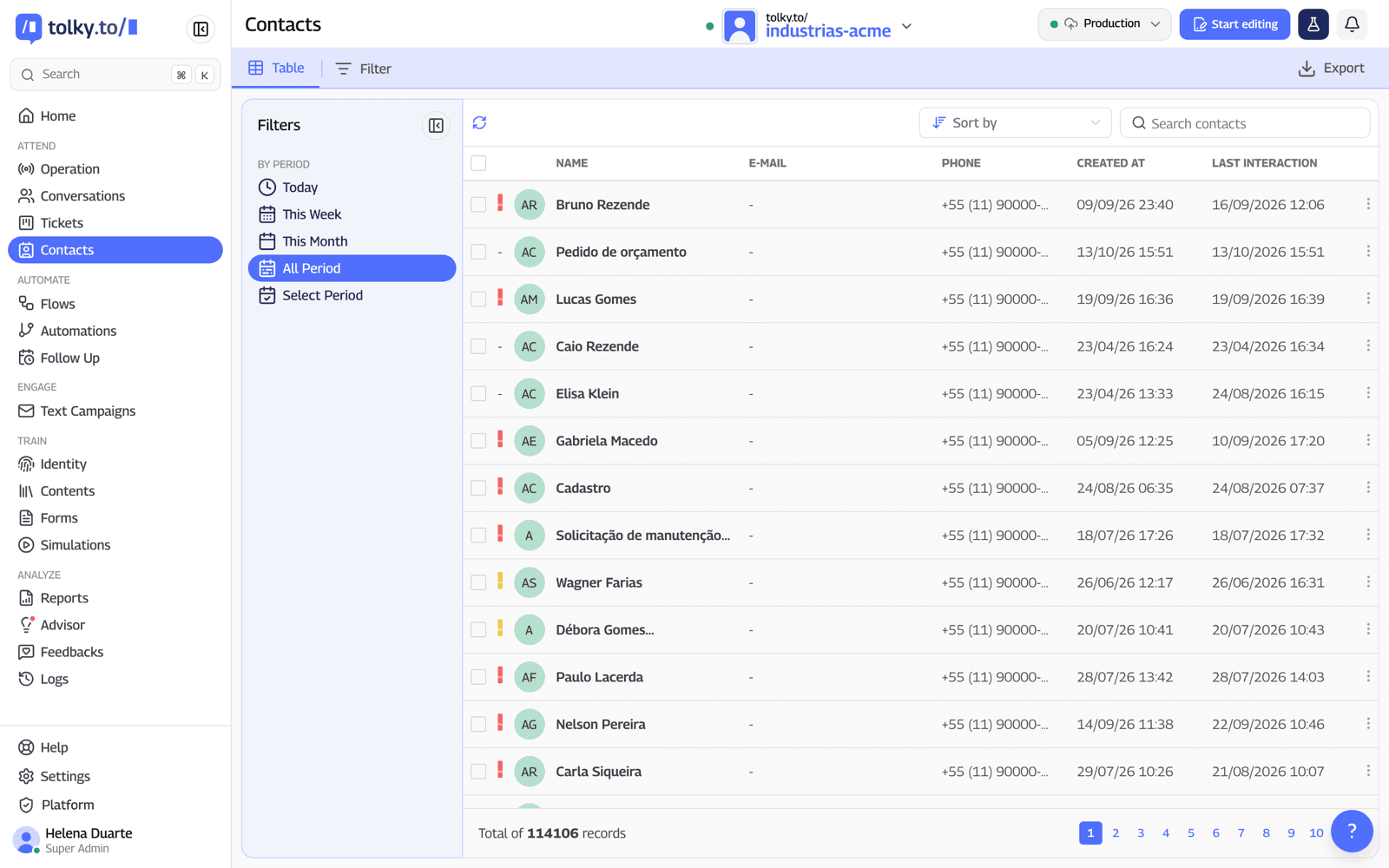
Because the number is on the official API, people who come from the ad can be answered within the customer service window, which opens Meta's free entry point window. The WhatsApp CRM keeps the contact and the conversation, and the handoff to a human carries the history along. WhatsApp is available from the Starter plan, at US$90 per month with 500 attendances; see the plans.
What Tolky does not do: it does not create or manage your ads, which stay in Ads Manager, and this guide does not promise that the CRM shows the source campaign or ad for each lead. If that attribution is a buying criterion, confirm it in a demo.
Frequently asked questions
How much does a click to WhatsApp ad cost?
The ad costs the budget you set in Ads Manager, paid to Meta. Messages follow the WhatsApp Business Platform rate card and, on the official API, are free during the free entry point window opened by the ad.
What is the free entry point window?
It is the period when the company's messages are not charged after a customer arrives through a click to WhatsApp ad. It opens when the company replies within the 24-hour customer service window and can last up to 7 days, according to Meta.
Do I need the official API to run click to WhatsApp ads?
No. The ad works with the WhatsApp Business app or with the API. The API is required for the free entry point window, for several agents to answer and for recording conversations in a CRM.
Which objective should I choose in Ads Manager?
Meta's documentation lists Engagement, Leads, Sales and Traffic as objectives that support WhatsApp as a destination. Choose based on the result you want to optimize and confirm the names in your account, since Meta changes the labels.
Can I customize the opening message?
Yes. When you create the ad, you edit the pre-filled text and can add suggested questions. One message per campaign helps you tell which offer the customer came from.
How do I avoid losing the lead that comes from the ad?
Reply right away, qualify in the conversation, record the contact in the CRM, hand off to a person with context and follow up. An AI agent helps cover the hours when the team is away.
Conclusion
Click to WhatsApp ads take the form out of the way and put the customer straight into the conversation. That only turns into sales when the operation replies right away, qualifies, records everything in the CRM and follows up, and when the campaign is measured up to the qualified lead, not just the conversation started.
See Tolky's plans, explore the WhatsApp CRM, learn about the free entry point window or talk to the team →. Let's talk?
Share
Tags
- click to whatsapp ads
- meta ads whatsapp
- whatsapp ads manager
- ads that click to whatsapp
- ctwa ads
- free entry point window
- speed to lead
- #conversational CRM
About the author

Co-founder of Tolky
Marlos Carmo is an AI entrepreneur and founder of Tolky, the conversational-era infrastructure and AI CRM that unifies intelligent service, multi-channel support (such as WhatsApp and voice), live CRM, and operational intelligence in a single ecosystem. He is a finalist for the SXSW Innovation Awards and a member of Francesco's Economy, a global network of young entrepreneurs focused on innovation and social impact. He works connecting Artificial Intelligence and digital transformation in projects for large organizations.
Next step
Want to bring this to your operation?
Tati, Tolky's AI assistant, understands your scenario in a few questions, suggests the best path and connects you with someone from the team, with full context.
Share