How to create a chatbot: step by step from goal to metrics
How to create a chatbot in seven steps: goal, channel, knowledge base, flows, testing, handoff to people and metrics, with criteria for choosing the right bot builder.
TL;DR
Creating a chatbot means making seven decisions in the right order: the goal, the channel, the knowledge base, the flows, the tests, the handoff to people and the metrics. The bot builder is the tool where all of this happens; choose it for the official channel, AI grounded in your own content, handoff with context and conversation records, not for the number of blocks in the editor.
Share
Creating a chatbot has become easy on the technical side: in many tools, you upload a document, write two instructions and the bot is already answering. The hard part is still everything else. Which question it solves, where it answers, what it does when it doesn't know, who takes over the conversation and how you will know it worked.
This guide walks through the steps in the order the decisions need to be made, with an example of how to do it in Tolky. If you are still getting to grips with the concept, start with the guide what is a chatbot.
Updated in November 2026.
What do you need to decide before creating a chatbot?
Creating a chatbot means defining what it solves, where it answers, where its answers come from, when it hands off to a person and how it will be measured; the tool comes after those decisions. Teams that start with the tool often build a good-looking bot that doesn't solve the main reason customers get in touch.


| Step | Decision | What you end up with |
|---|---|---|
| 1. Goal | Which contact reasons the bot solves | A list of 3 to 5 reasons and the expected result for each |
| 2. Channel | Where the bot answers first | Website, WhatsApp, Teams, email or voice, with the channel's rules |
| 3. Knowledge base | Where the answers come from | Approved documents, each with an owner and a review date |
| 4. Flows | What is fixed and what is open | Mandatory steps designed, AI for the rest |
| 5. Testing | How you know it is ready | A question script and a pass criterion |
| 6. Handoff to people | When and how the team takes over | Handoff triggers and a conversation summary |
| 7. Metrics | How you measure the result | Resolution, handoff, reopening and satisfaction |
This is a general guide. For a corporate project, with sign-off from IT, legal and security, see how to create a corporate chatbot with generative AI. For WhatsApp in detail, see WhatsApp chatbot: how it works and how to create one.
Step 1: what is the chatbot's goal?
The chatbot's goal is the short list of contact reasons it should solve from start to finish, with the expected result for each. "Improve customer service" is not a goal; "answer order status and send duplicate invoices without passing to the team" is.
To get that list, export the conversations from the last 30 to 60 days and group them by reason. In almost every operation, a few reasons account for a large share of the volume: opening hours, price, status, duplicate invoices, scheduling. Pick three to five that have a known answer and low risk.
For each reason, write the expected result in one sentence: "the customer gets the tracking code", "the lead leaves with a meeting booked", "the appointment is confirmed". That result becomes the test criterion in step 5 and the metric in step 7.
Step 2: which channel will the chatbot answer on?
Start with the channel where most conversations already arrive, because that is where the bot will have the volume to learn and show results. For many Brazilian companies, that channel is WhatsApp; for those who sell through their website, it is web chat.
Each channel has its own rules. On WhatsApp, the safe path for businesses is the official API, with approved message templates outside the 24-hour window and Meta fees per delivered message; see the 24-hour window and the WhatsApp API pricing. On the website, the bot answers visitors while they browse and doesn't depend on third-party approval. On Microsoft Teams, it answers employees. On voice, it has to handle interruptions and free speech.
One channel at a time. Once the first one is stable, taking the same bot to another channel is much faster, as long as the platform is omnichannel.
Step 3: how do you build the knowledge base?
The knowledge base is the set of approved documents the chatbot draws its answers from, and its quality defines the quality of the bot. An AI bot without a reviewed base confidently answers things that are not true.


Build the base from what the team already uses to answer: return policies, delivery time tables, FAQs, catalog, procedures. Three precautions make a difference:
- One owner per document. Who updates the return policy when it changes?
- Review date. Outdated prices and deadlines lead to complaints.
- What the bot doesn't answer. List the forbidden topics (discounts outside the rules, diagnoses, legal opinions) and the standard reply for them.
The guide on training the agent with a knowledge base shows how to organize the documents, and the knowledge base entry sums up the concept.
Step 4: how do you design the chatbot's flows?
Design as a fixed flow only what must always happen the same way, such as collecting required data and confirming a payment, and let the AI lead the rest of the conversation. Too many flows make the bot rigid; too few leave sensitive steps without control.
A common design, for illustration, for a clinic:
- The AI greets the patient, introduces itself as a virtual assistant and understands the request in free text.
- If the request is a booking, the fixed flow kicks in: specialty, date, time and confirmation.
- If it is a question about insurance coverage or exam preparation, the AI answers from the knowledge base.
- If it is about a test result or a symptom, the bot gives no opinion and hands off to the team.
The automation flows and the types of chatbots help you decide what stays fixed and what stays open.
Step 5: how do you test the chatbot before going live?
Test the chatbot with the real questions the team receives, written the way customers write them, and only go live when it meets the criterion you defined. Testing with neatly written questions from your own team hides the problems.
Put together a script with four groups of questions:
- The most frequent ones, copied from real conversations.
- The badly written ones, with typos, slang and short voice notes.
- The out-of-scope ones, to see whether the bot admits it doesn't know.
- The sensitive ones, such as complaints, cancellation threats and discount requests.
Define the criterion beforehand: for example, no wrong answers about price, deadlines and policy, reviewed by a person. Conversation simulation lets you run these cases without exposing customers. Then go live for a small group or a specific time slot before opening it to everyone.
Step 6: when should the chatbot hand off to a person?
The chatbot should hand off to a person when the customer asks, when the case falls outside the rules, when there is risk or when the bot doesn't have the answer, always with a summary of what has already been discussed. Handing off is not a failure; handing off late or without context is.


Common triggers: a direct request ("I want to talk to someone"), a billing dispute, a complaint in an aggressive tone, a request beyond the bot's authority and two attempts in a row without understanding. Also define what happens outside the team's hours: the bot says when someone will reply and logs the case.
A good handoff gives the person the reason, the data collected and the history, so the customer doesn't have to repeat anything. The rules for AI-to-human handoff include ready-made examples.
Step 7: which metrics show the chatbot works?
The metrics that show whether the chatbot works are the resolution rate, the handoff rate, reopening and satisfaction, read together with a sample of conversations. The number of messages answered says nothing about the customer.
- Resolution rate: conversations completed without a person, over the total. Formula and pitfalls in the guide to the AI resolution rate.
- Handoff rate: how many conversations went to the team and why. A recurring reason is a gap in the knowledge base.
- Reopening: did the customer come back with the same issue within a few days? Then it wasn't solved.
- Satisfaction: a short survey at the end, such as NPS.
Review every week in the first month. Each recurring handoff becomes a new document in the base or a flow adjustment.
Bot builder: what is it and how do you choose one?
A bot builder is the tool where you create, test and publish the chatbot: the flow editor, the AI configuration, the knowledge base and the connection to channels. The name says it: it is the tool that builds bots.
There are three families: visual flow editors (question and answer blocks), AI agent builders (instructions and documents) and code frameworks, programmed by a technical team. Most current platforms mix the first two. To choose, compare by criteria, not by demo:
| Criterion | Question for the vendor | Why it matters |
|---|---|---|
| Official channel | Is the WhatsApp connection through the official API? | An unofficial API can get the number blocked |
| AI grounded in your content | Does the AI answer only from my documents? | Fewer made-up answers |
| Flows and AI together | Can I fix sensitive steps and leave the rest open? | Control where needed, flexibility elsewhere |
| Handoff | Does the person get a summary and the history? | The customer doesn't repeat the story |
| Records | Is the conversation saved in the contact's history or a CRM? | Context for the next conversation and for sales |
| Testing | Can I simulate conversations before going live? | Avoids learning at the customer's expense |
| Cost | How are the platform, AI and Meta messages charged? | The total cost shows up in the third month, not the first |
If you want to build the bot with generic automation tools, the guide to an AI agent for WhatsApp with n8n covers the pros and cons. To compare ready-made platforms, see the alternatives.
How to create a chatbot in Tolky
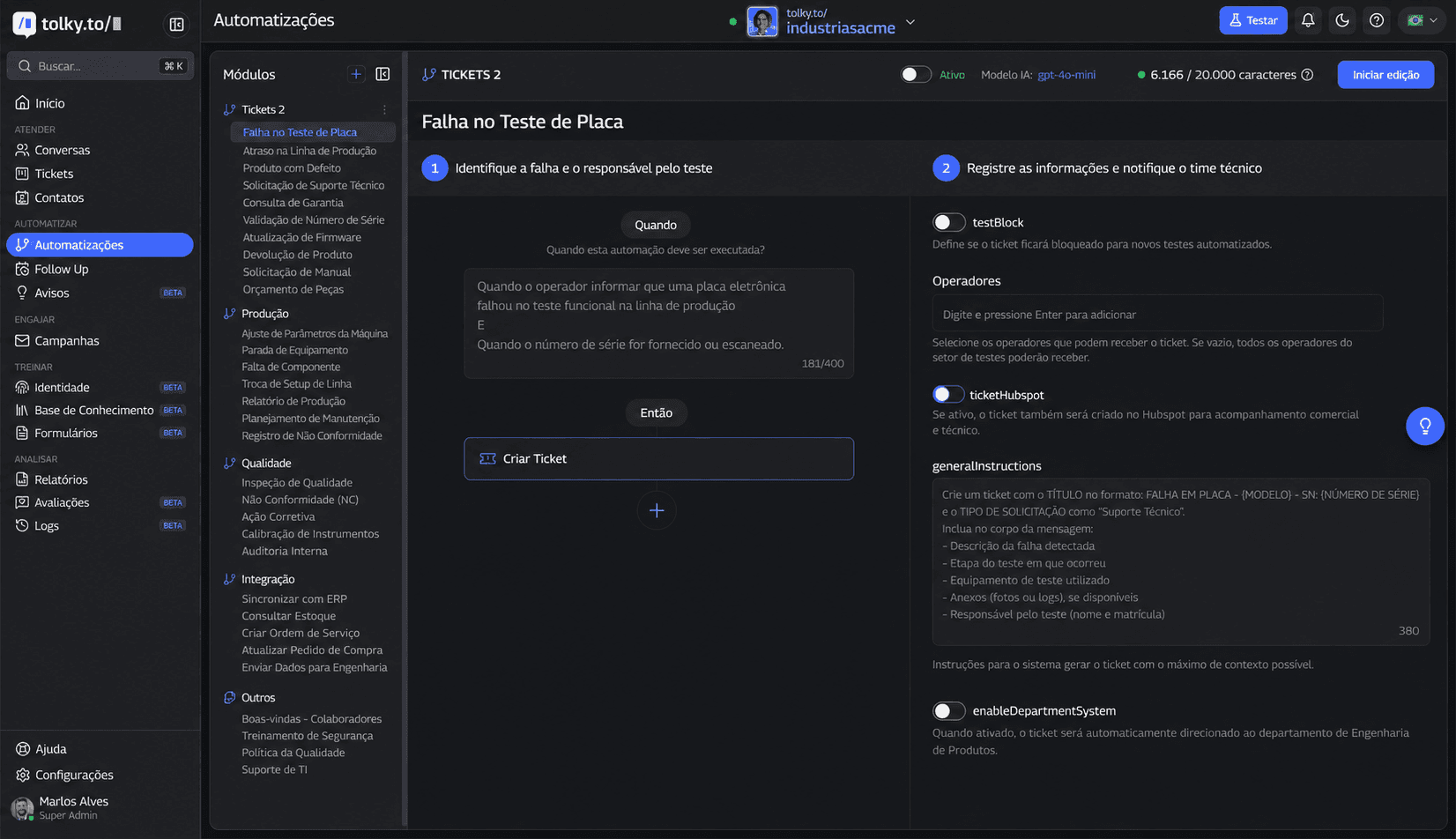
In Tolky, you create an AI agent instead of a menu chatbot: you define the identity and mission, upload the knowledge base, design flows and automations for the fixed parts and test before going live. Tolky is an AI conversational CRM, so the conversation is already recorded in the contact's history.
- Identity and mission: the agent's name, tone, opening message and mission, such as support or sales and relationship.
- Knowledge base: company documents the agent consults to answer.
- Flows and automations: fixed steps and actions such as creating a ticket, as in the screen above, written in natural language.
- Testing: the Test button and simulations let you talk to the agent before going live.
- People: the handoff carries the history to the team, and the reports show what the AI resolved.
The Individual plan is free and includes web chat, a knowledge base and flows; WhatsApp through the official API comes with the Starter plan and up. Details are on the pricing page and in the WhatsApp customer service solution.
What Tolky doesn't do: it doesn't support Instagram or SMS yet (both are coming soon), and it isn't a code framework for those who want to program the bot from scratch.
Frequently asked questions
How long does it take to create a chatbot?
A simple bot, with one channel and a few contact reasons, can be ready in days. What takes longest is organizing the knowledge base and testing with real questions. Integrations with internal systems extend the timeline.
Do I need to know how to code to create a chatbot?
No, not on most current platforms. Bot builders with a visual editor and AI let you build flows and upload documents without code. Programming comes in when there is a specific integration with internal systems or when the company chooses a code framework.
Can you create a chatbot for free?
Yes, with limits. The WhatsApp Business app has free automated messages, and several platforms, including Tolky, have a free plan. The guide to free chatbots compares the options and shows when it is worth paying.
What is the difference between a bot builder and a customer service platform?
The bot builder creates and publishes the bot. The customer service platform also organizes the conversations that go to people, with queues, history and reports. Some tools do both in the same place.
How do you stop a chatbot from making up answers?
Use a reviewed knowledge base, restrict the AI to that content, list the forbidden topics and set up a handoff for when the bot doesn't know. Review a sample of conversations every week.
Where should you start: website or WhatsApp?
With the channel where most conversations already arrive. The website doesn't depend on third-party approval and is good for testing; WhatsApp usually concentrates the volume, but it requires the official API and carries Meta fees.
Conclusion
Creating a chatbot that actually solves problems starts before the tool: a short goal, one channel, a reviewed knowledge base, flows only where needed, tests with real questions, handoff with context and resolution metrics. With that decided, the right bot builder is the one that meets those criteria without shortcuts.
See the plans, understand what a chatbot is, see chatbot examples or talk to the team →. Let's talk?
Share
Tags
- how to create a chatbot
- how to make a chatbot
- bot builder
- chatbot builder
- build a chatbot step by step
- chatbot platform
- knowledge base
- #conversational CRM
Cited in
- Free chatbot: options, limits and when it is worth paying
- Hotel chatbot: bookings, check-in and guest service on WhatsApp
- Chatbot examples: 12 use cases by function and industry, in dialogue
- What is a chatbot? Types, NLP, examples, cost and how to choose
- Chatbot vs conversational AI: the differences and a 15-minute test
- AI chatbot: what it is, how it works and what sets it apart
- WhatsApp Chatbot: How It Works and How to Create a WhatsApp Bot
- How to create a corporate chatbot with generative AI, step by step
About the author

Co-founder of Tolky
Marlos Carmo is an AI entrepreneur and founder of Tolky, the conversational-era infrastructure and AI CRM that unifies intelligent service, multi-channel support (such as WhatsApp and voice), live CRM, and operational intelligence in a single ecosystem. He is a finalist for the SXSW Innovation Awards and a member of Francesco's Economy, a global network of young entrepreneurs focused on innovation and social impact. He works connecting Artificial Intelligence and digital transformation in projects for large organizations.
Next step
Want to bring this to your operation?
Tati, Tolky's AI assistant, understands your scenario in a few questions, suggests the best path and connects you with someone from the team, with full context.
Share