Chatbot examples: 12 use cases by function and industry, in dialogue
Chatbot examples in customer service, sales, scheduling, collections, ecommerce, healthcare, banking, insurance, hospitality and HR, with illustrative dialogues and the point where the bot hands off.
TL;DR
The best chatbot examples handle a repetitive task with a known answer, such as order status, scheduling, a copy of an invoice or lead qualification, and hand anything that needs judgment to a person. This guide walks through 12 examples by function and industry, as short illustrative dialogues, showing what the bot resolves and when it hands off.
Share
People who search for chatbot examples almost always want the same thing: to see what the conversation looks like in practice before deciding where to use one. A feature list doesn't help; a dialogue does.
That's why this guide shows 12 examples as short dialogues, grouped by function (customer service, sales, scheduling, collections, internal support) and by industry (ecommerce, healthcare, banking, insurance, hospitality). Every dialogue is illustrative: written for this guide, not copied from real customer conversations.
Updated in November 2026.
What makes a good chatbot example?
A good chatbot example resolves a repetitive task from start to finish, with a known answer, and knows exactly when to hand the conversation to a person. Answering nicely isn't enough; the test is whether the customer left with the problem solved.
If you're still on the concept, the guide what is a chatbot explains the types (rule-based, NLP, generative AI and AI agent). The examples below mix those types, because that's how real projects work.
| # | Example | Function or industry | What the bot resolves | When it hands off to a person |
|---|---|---|---|---|
| 1 | Order status | Customer service | Looks up the order and gives the delivery date | Lost order or long delay |
| 2 | Invoice copy | Customer service | Sends the bill or invoice | The customer disputes the amount |
| 3 | Lead qualification | Sales | Asks the questions and books the meeting | Lead ready for a proposal |
| 4 | Scheduling | Services | Books, confirms and reschedules | Request outside the calendar |
| 5 | Payment reminder | Collections | Reminds of the due date and sends the payment method | Discount request outside the rules |
| 6 | Exchanges and returns | Ecommerce | Explains the policy and opens the request | Product with a serious defect |
| 7 | Size chart | Clothing store | Suggests the size from the chart | Custom-made item request |
| 8 | Test preparation | Healthcare | Shares the registered preparation | Question about a symptom or result |
| 9 | Card and statement | Banking | Gives the statement and limit after verifying identity | Suspected fraud |
| 10 | Claim notice | Insurance | Collects the initial details | Claim analysis and decision |
| 11 | Booking and check-in | Hospitality | Shares times and services | Booking change with a different rate |
| 12 | Vacation and benefits | Internal HR | Answers from the policy | Individual case or conflict |
Chatbot examples in customer service
In customer service, the chatbot handles questions that arrive every day with the same answer, such as order status and invoice copies, and frees the team for cases that need analysis. It is the most common use and usually the fastest to show results.


Example 1: order status
Illustrative dialogue.
Customer: where's my order? bought it last week
Virtual assistant: Hi, I'm the store's virtual assistant. I can look that up for you. What's the order number or the email used for the purchase?
Customer: 48213
Virtual assistant: Order 48213 went out for delivery today at 08:40 and should arrive by 18:00. Would you like the tracking code here?
The bot can only give the date for that specific order if it's integrated with the store's system; without integration, it answers with the general shipping policy. That's the difference between a chatbot and an AI agent.
Example 2: invoice copy
Illustrative dialogue.
Customer: I need this month's bill
Virtual assistant: Sure. For your security, please confirm the first three digits of your ID number.
Customer: 123
Virtual assistant: Thank you. The November invoice, due December 10, 2026, is available at this payment link. If you don't recognize the amount, I can pass you to the billing team.
That last sentence is what separates a good example from a bad one: the way out to a person appears before the customer has to ask. See the customer service area.
Chatbot examples in sales
In sales, the chatbot replies right away to people who came from an ad or the website, asks the qualification questions and passes to the sales rep only the leads ready to talk. The gain is speed: the lead is served while still interested.
Example 3: lead qualification
Illustrative dialogue.
Lead: saw the ad, how much is the system?
Virtual assistant: It depends on the size of your team. How many people will use it, and what's the main goal: sales, customer service or both?
Lead: about 8, mostly sales
Virtual assistant: For that profile, the best next step is a 30-minute call with a specialist. I have Thursday at 10:00 or 15:00. Which works better?
The bot records the answers in the CRM, and the rep arrives at the meeting already knowing the team size and the goal. The guide to lead generation chatbots covers the questions in detail, and the lead qualification concept is in the glossary.
Chatbot examples for scheduling
For scheduling, the chatbot checks the calendar, offers time slots, confirms and reminds the customer, and only calls in a person when the request doesn't fit the calendar. Clinics, salons, auto shops and schools use this model.


Example 4: rescheduling an appointment
Illustrative dialogue.
Patient: I can't make it tomorrow, can we change it?
Virtual assistant: I can reschedule. Your appointment with Dr. Paula is tomorrow, November 24, at 14:00. I have Wednesday at 09:30 or Friday at 16:00.
Patient: friday
Virtual assistant: Done: Friday, November 27, 2026, at 16:00. I'll send you a reminder the day before.
The same design works for pet grooming, test drives or property viewings. See the pet shop chatbot and the healthcare industry page.
Collections chatbot examples
In collections, the chatbot reminds customers of due dates, sends the payment method and records promises to pay, always respectfully and without exposing the debt to anyone else. Requests outside the rules, such as a bigger discount, go to a person.
Example 5: reminder before the due date
Illustrative dialogue.
Virtual assistant: Hi, Ana. This is the virtual assistant for School X. December's tuition is due on the 10th. Would you like the payment code?
Customer: I can only pay on the 15th
Virtual assistant: Got it. I've recorded your expected payment date as December 15. Shall I send the code on that date?
The guide to the collections chatbot shows the full sequence, and the collections area shows how Tolky organizes this work.
Chatbot examples in ecommerce and retail
In ecommerce and retail, the chatbot answers questions about products, sizes, shipping, exchanges and returns, the questions that most often stall a purchase or the post-sale experience. It also re-engages people who dropped off midway.
- Example 6, exchanges and returns. The customer writes "the blouse didn't fit." The bot explains the exchange window in the policy, asks for the order number and opens the request. If the product arrived with a serious defect, it passes the case to the team with the photos.
- Example 7, size chart. A customer asks "I wear a 10 in pants, which size should I get?" The bot checks the brand's size chart and suggests a size, noting that fits vary by style.
The guides to the ecommerce chatbot and the clothing store chatbot cover more cases, and the retail and ecommerce industry page shows the full operation.
Chatbot examples in healthcare, banking, insurance and hospitality
In regulated or sensitive industries, the chatbot informs, collects and routes, and leaves clinical, financial and coverage decisions to people. The scope is narrower, and the limits need to be written down.
- Example 8, healthcare. "Do I need to fast for the blood test?" The bot shares the preparation registered by the lab. If the question is about a symptom or a result, it gives no opinion and offers contact with the team.
- Example 9, banking. "How much is my statement?" The bot verifies identity before sharing any data. If the customer mentions a purchase they don't recognize, the conversation goes to the fraud team. See the banking chatbot.
- Example 10, insurance. "I crashed my car." The bot collects the initial details (license plate, location, time, photos) and opens the notice; the claim analysis belongs to the insurer. See the insurance chatbot.
- Example 11, hospitality. "What time is check-in?" The bot shares times, parking and breakfast; a booking change with a different rate goes to the front desk. See the hotel chatbot.
Chatbot examples for HR and internal support
Inside the company, the chatbot answers employees about vacation, benefits, documents and first-level IT, often in Microsoft Teams, where they already work. The knowledge base is usually ready: it's the internal policies.
- Example 12, HR. "How many vacation days do I have?" With an HR system integration, the bot gives the balance; without it, it explains the rule and points to where to check. Individual cases, such as a conflict with a manager, go to a person in HR.
See internal support and the guide to the AI agent for Microsoft Teams.
What do good chatbot examples have in common?
Good examples have a narrow scope, a reviewed knowledge base, customer verification when personal data is involved, a visible way out to a person and a record of the conversation. Use the list as a checklist before you publish yours.
| Item | How it shows up in the dialogue | If it's missing |
|---|---|---|
| Honest introduction | "I'm the store's virtual assistant" | The customer feels misled |
| Narrow scope | Handles a few reasons for contact, well | The bot gets everything wrong |
| Verification | Confirms an ID or detail before sharing data | Risk of exposing someone else's data |
| Way out to a person | Offers the team before the customer asks | Customer stuck in "I didn't understand" |
| Recorded action | Order, appointment or promise saved in the system | The next conversation starts from zero |
To build your own from these examples, follow the step-by-step guide on how to create a chatbot.
Where does Tolky fit?
Tolky is an AI conversational CRM: the examples in this guide run as AI agents that serve customers on WhatsApp through the official API, on the website, in Microsoft Teams, by email and by voice, with every conversation recorded in the contact's history. When the team takes over, they see what the agent has already done.
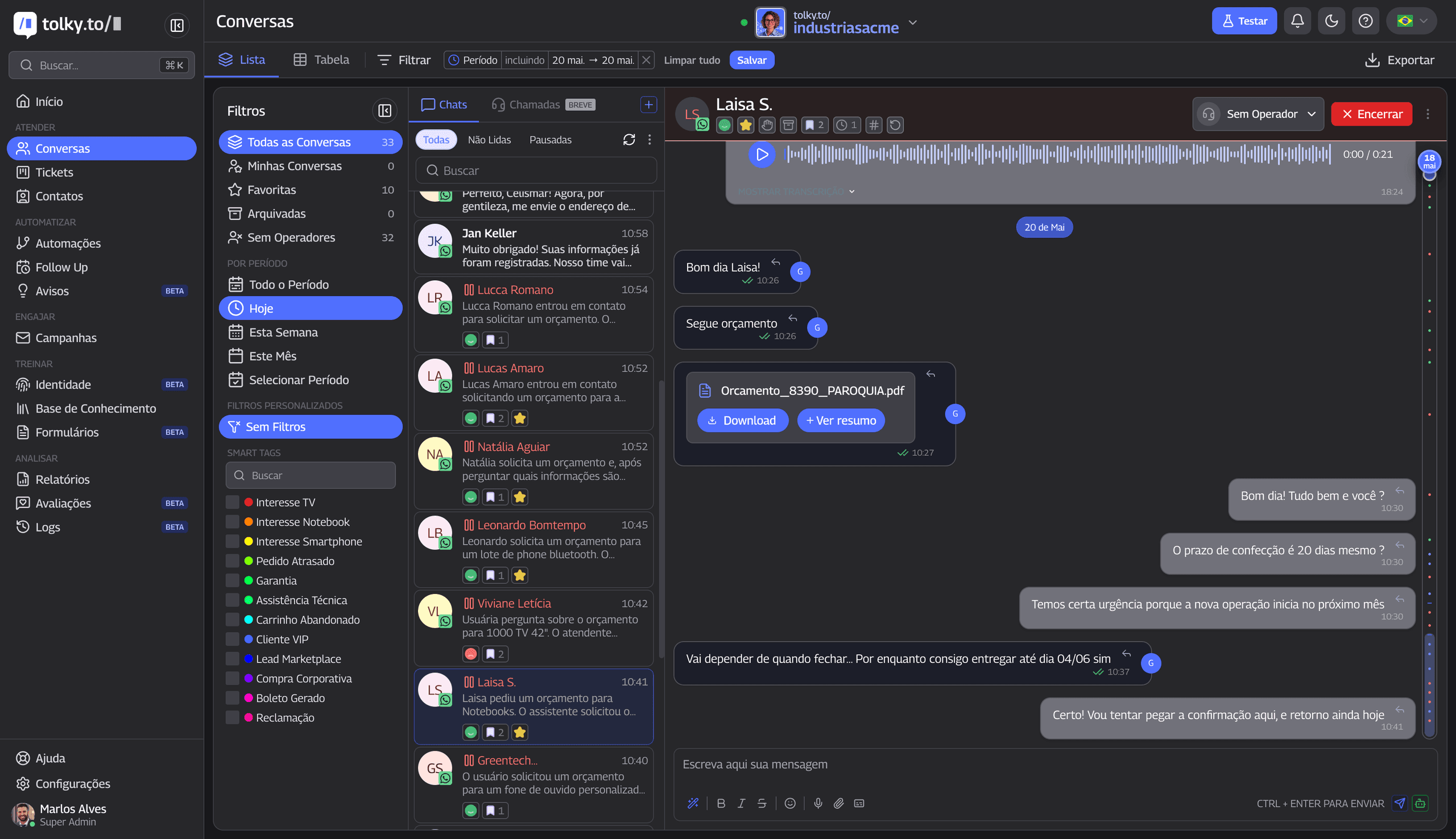
The smart tags in the screenshot above classify conversations by topic, which helps you see which examples come up most in your operation. See the WhatsApp customer service solution and the plans; there is a free Individual plan.
What Tolky doesn't do: it doesn't support Instagram or SMS yet (both are coming soon).
Frequently asked questions
What is the most common chatbot example?
Customer service, with order status, invoice copies and frequently asked questions. These are high-volume tasks with known answers, which makes the results easy to measure.
Are the dialogues in this guide from real customers?
No. All dialogues are illustrative, written to show how each type of conversation works. They don't reproduce conversations from real companies or people.
Can one chatbot handle more than one function?
It can, but it's better to start with one. Once the bot handles customer service well, for example, you expand to scheduling or sales, with separate flows and knowledge bases for each mission.
Which chatbot example works for small businesses?
Answering opening hours, prices and appointments on WhatsApp is usually the first step. The guide to the WhatsApp chatbot for small business shows how to start small.
Can a chatbot handle healthcare or banking data?
It can, with care: verify identity before sharing any data, limit what the bot answers and pass clinical and financial decisions to people. Brazil's data protection law, the LGPD, treats health data as sensitive.
Conclusion
Chatbot examples that work share the same design: a repetitive task, a known answer, customer verification when personal data is involved and a way out to a person at the right moment. Pick the example closest to your operation, start there and measure what was resolved.
See the plans, learn how to create a chatbot, see the free chatbot options or talk to the team →. Let's talk?
Share
Tags
- chatbot examples
- chatbot example
- chatbot use cases
- customer service chatbot
- sales chatbot
- appointment scheduling chatbot
- chatbot for business
- #conversational CRM
Cited in
- Free chatbot: options, limits and when it is worth paying
- How to create a chatbot: step by step from goal to metrics
- What is a chatbot? Types, NLP, examples, cost and how to choose
- Chatbot vs conversational AI: the differences and a 15-minute test
- AI chatbot: what it is, how it works and what sets it apart
- WhatsApp Chatbot: How It Works and How to Create a WhatsApp Bot
- How to create a corporate chatbot with generative AI, step by step
About the author

Co-founder of Tolky
Marlos Carmo is an AI entrepreneur and founder of Tolky, the conversational-era infrastructure and AI CRM that unifies intelligent service, multi-channel support (such as WhatsApp and voice), live CRM, and operational intelligence in a single ecosystem. He is a finalist for the SXSW Innovation Awards and a member of Francesco's Economy, a global network of young entrepreneurs focused on innovation and social impact. He works connecting Artificial Intelligence and digital transformation in projects for large organizations.
Next step
Want to bring this to your operation?
Tati, Tolky's AI assistant, understands your scenario in a few questions, suggests the best path and connects you with someone from the team, with full context.
Share