Intelligent IVR: what it is, cognitive IVR and building one with AI
What an intelligent IVR is, what vendors mean by cognitive, semantic and conversational IVR, and a step-by-step plan to build an AI IVR, from call reasons to metrics.
TL;DR
An intelligent IVR is an automated phone system that understands what callers say, instead of asking them to press keys, and then resolves or routes the call. Cognitive, semantic and conversational IVR are vendor names for variations of the same idea. To build one with AI, map your call reasons, design intents and destinations, prepare the knowledge base and the voice, set handoff rules, test and measure.
Share
People who search for "intelligent IVR" are usually in one of two places: the company's press-1 phone menu has become a source of complaints, or a vendor pitched a "cognitive IVR" and nobody is quite sure what changes.
This guide sorts out the names the market uses and walks through a practical plan to build an AI IVR, from listing why people call to the metrics you track after launch.
Updated in November 2026.
What is an intelligent IVR?
An intelligent IVR is an interactive voice response system that understands the caller's speech in natural language and uses it to resolve the request or route the call, without keypad menus. The caller says "I want to know where my order is" and the IVR understands the intent, instead of reading out options 1 through 9.
Three pieces work together behind it: speech recognition (STT), which transcribes the audio; a language model, which understands the intent and decides the next step; and speech synthesis (TTS), which turns the reply into audio. Calls arrive through SIP telephony or through WhatsApp calls.
The comparison between a traditional keypad IVR and free speech is covered in voice AI and semantic IVR. This post has a different focus: the market's names and how to build one.
Intelligent, cognitive, semantic or conversational IVR: what's the difference?
In practice, intelligent, cognitive, semantic and conversational IVR all describe the same family of products: an IVR that understands natural speech. The difference lies in which word each vendor chooses to stress, not in a technical standard. None of these terms has an official definition, so always ask what the product actually does.
| Name | What it usually means | Question to ask the vendor |
|---|---|---|
| Intelligent IVR | Broad term for any IVR that understands speech, sometimes only keywords | Does it understand free-form sentences or only words from a list? |
| Cognitive IVR | Emphasis on interpreting intent with AI | Which model interprets speech and how is it tuned? |
| Semantic IVR | Emphasis on the meaning of what the caller says, in their own words | Does it follow along when the caller changes topic? |
| Conversational IVR | The IVR doesn't just route: it asks and answers | Does it resolve the request or only send it to a queue? |
| Generative AI IVR | An AI voice agent with a language model that answers from company content | Where do the answers come from and how does it avoid making things up? |
The last column is what separates products. An IVR that only recognizes "bill," "order" and "agent" is still a menu, just a spoken one. An IVR that holds a conversation needs a knowledge base, handoff rules and ongoing review, which is what the steps below cover.
If you're weighing IVR against voicebots and callbots, see voicebot vs callbot. For IVRs that call customers, see inbound vs outbound IVR and outbound IVR.
How to build an AI IVR in 8 steps
Building an AI IVR is a customer service project, not a technology project: it starts with what callers ask for and ends with measuring what the AI actually resolved. The tool changes the configuration screen, but this sequence works for any of them.
| Step | What to do | What you get |
|---|---|---|
| 1. Map call reasons | List why people call, with rough volume | Your top 10 to 20 reasons |
| 2. Intents and destinations | Decide what the AI resolves and where the rest goes | Map of intent, action and destination |
| 3. Knowledge base | Write the answers the AI is allowed to give | Reviewed base with an owner |
| 4. Greeting and voice | Set the opening, voice, accent and answer length | Opening script and chosen voice |
| 5. Handoff | Define when and how a person steps in | Handoff triggers and destinations |
| 6. Testing | Simulate real calls, with noise and interruptions | List of fixes |
| 7. Launch | Connect the IVR to a number, gradually | IVR live on one number or time slot |
| 8. Metrics | Track resolution, handoffs and abandonment | Weekly knowledge base review |
How do you map call reasons and design intents and destinations?
The first two steps set the IVR's scope: what it will listen for, what it resolves on its own and where everything else goes. It's the step teams skip most often and the one that causes the most rework later.


Map your call reasons
Start with the data you already have: reports from your current IVR, agent notes, tickets opened after calls and the questions that come in by text. Group them into reasons named the way customers talk, not by department: "copy of my bill," not "billing." Note the volume of each and whether the answer requires looking something up in a system. A handful of reasons usually accounts for most calls, and that's where the IVR should start.
Design intents and destinations
For each reason, define the intent (what the caller wants), the action (what the AI does) and the destination (who takes over when the AI can't resolve it). An illustrative example:
- Copy of a bill: the AI confirms the account and sends the bill. If that fails, it goes to billing.
- Order status: the AI looks up the order and gives the estimate. If it's late, it goes to support.
- Cancellation: the AI captures the reason and transfers to retention, always to a person.
- Anything off the list: the AI asks once more and, if it still doesn't understand, transfers.
Not every intent needs to be resolved by the AI. The IVR also adds value by handing over the hard calls with the reason already identified.
How do you prepare the knowledge base, greeting and voice?
An AI IVR only answers well what's written in its knowledge base, and only sounds good if the greeting is short and the voice fits the brand. Steps 3 and 4 turn the intent map into spoken answers.


Write one answer per intent, in short sentences, the way you'd explain it over the phone. Text written for a screen doesn't work in voice: tables, links and long lists need to become two or three sentences. Give each topic an owner and a review date. The guide on how to train an AI agent with your knowledge base applies to voice as well.
The greeting should say the company name, make clear it's a virtual assistant and invite the caller to speak ("Tell me what you need"). Listing options in the opening turns the IVR back into a menu.
For the voice, pick a tone and accent that fit your audience and keep answers short. Two properties shape the experience: latency, the time between the caller finishing and hearing a reply, and barge-in, which lets the caller interrupt the AI.
When should the IVR hand off to a person?
An AI IVR should hand off when the caller asks for a person, when the topic is out of scope, when the AI still doesn't understand after one more try and when the case is sensitive. Clear handoff rules are what separate an intelligent IVR from one that traps the caller.
For each trigger, define the destination and what goes with it: the identified reason and the transcript, so the caller doesn't repeat the story. If the assigned person doesn't pick up, the call needs a fallback path. See AI to human handoff and the handoff glossary entry.
In Brazil, some companies face specific rules. Decree No. 13,135/2026, which governs customer service (SAC) for services regulated by Brazil's federal executive branch and for digital financial services supervised by the Central Bank, allows AI in triage as long as consumers can choose real-time service from a person (art. 3). On the phone, the first level must tell callers about that option, which applies at every level, and service can't take more than five levels (art. 16). Human service must run from 8 a.m. to 8 p.m., seven days a week (art. 14). Checked on November 20, 2026. Rules vary by country, so check the ones that apply where you operate.
How do you test, launch and measure an AI IVR?
Test with real calls before launch, roll out gradually and measure the IVR by what it resolves, not by how many calls it answers. Steps 6, 7 and 8 keep the new IVR from repeating the old one's problems.
Test before you launch
Call the IVR as a customer, using different phrasings for the same request. Include background noise, accents, numbers spoken out loud, interruptions, topic changes and a caller who asks for a person in the very first sentence. Note where the AI got it wrong or took too long, adjust the knowledge base and test again. Then launch on one number or during a quieter time slot before moving to the main line.
What to measure after launch
| Metric | What it shows | Warning sign |
|---|---|---|
| AI resolution | Calls closed with the request handled | The caller calls back the next day |
| Handoff reasons | Where the knowledge base or scope falls short | Lots of handoffs for "didn't understand" |
| Abandonment | Callers who hang up before being helped | A spike right after the greeting |
| FCR | Requests resolved on first contact | Same caller, same reason, within days |
| AHT | Average call length | Long calls for simple requests |
Read a sample of transcripts every week during the first month: that's where you'll find the phrases the AI didn't understand. For the math, see how to measure AI resolution rate.
What mistakes should you avoid when building an AI IVR?
The most common mistakes are turning the old menu into a spoken menu, starting with too broad a scope and hiding the way out to a person. All of them show up in testing if you look for them.
- Spoken menu. "Say bill, order or agent" is the keypad IVR in different clothes.
- Scope too broad. Start with your highest-volume reasons.
- Knowledge base written for screens. Long answers wear callers out.
- Hidden way out. If the caller asks for a person and the AI keeps pushing, complaints follow.
- No AI disclosure. Say in the opening that it's a virtual assistant. Voice and transcripts are personal data under Brazil's LGPD and similar laws elsewhere.
Where Tolky fits in an AI IVR
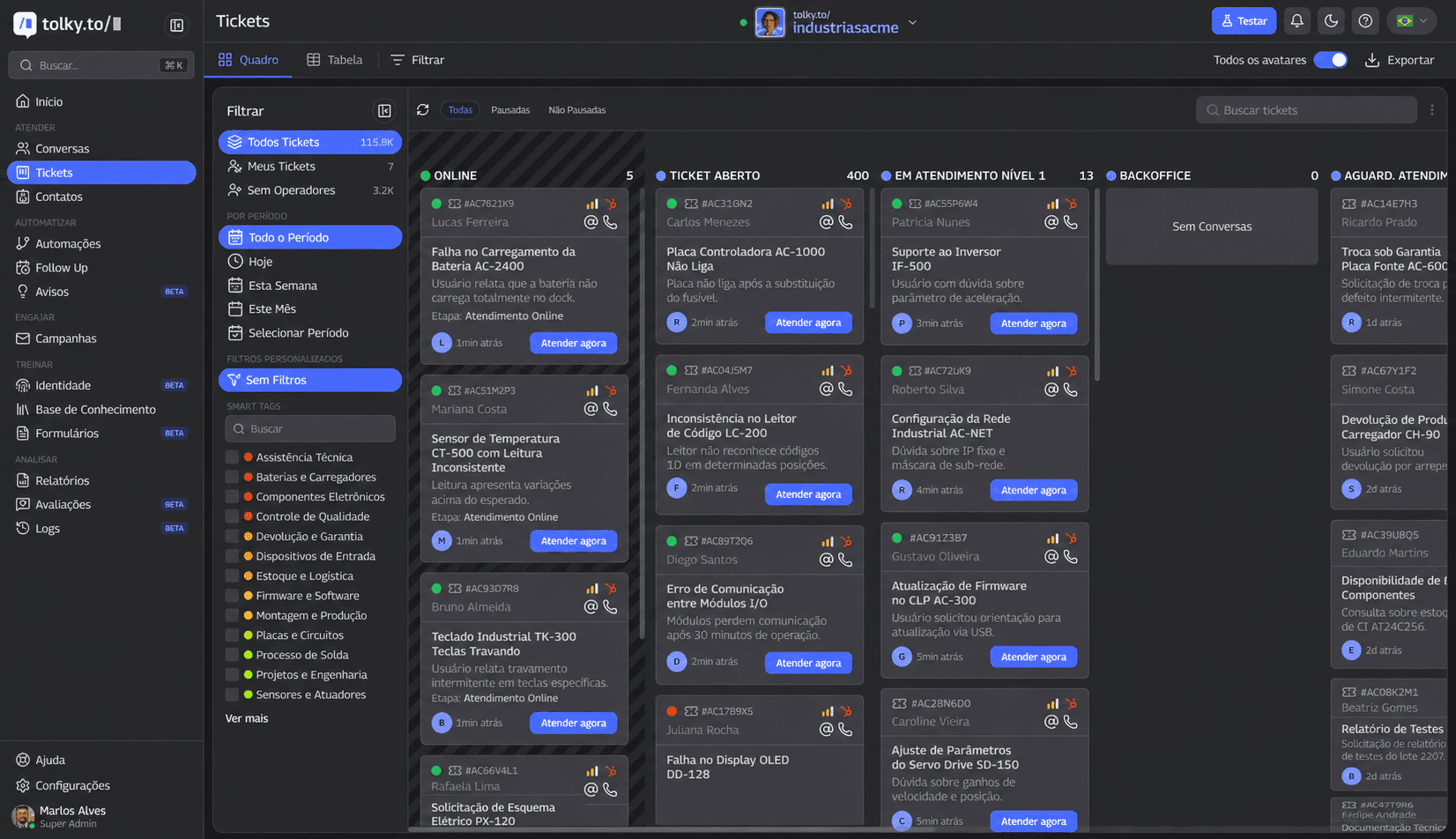
At Tolky, the intelligent IVR is the voice agent itself: the same AI that handles text answers calls over the phone, on WhatsApp and through voice on your website, upon activation. For phone lines, you choose the number, and each number has its own agent. See Voice Customer Service and the AI voice agent.
- Greeting and voice. Opening greeting, voice chosen with a preview, regional accent and shorter answers, in cascade or real-time mode.
- Natural conversation. Callers can interrupt the AI, and real-time transcription follows the language the caller speaks.
- Handoff. The AI transfers to an agent; if the assigned person doesn't answer, the call rings other operators.
- Team on the line. The team follows live calls and can listen in. When an operator joins the audio, the AI goes silent.
- One history. The transcript lands in the contact's history, next to text conversations.
If what you need is the AI calling your customer base with a script and a goal, that's Voice Campaigns. What Tolky doesn't do: voice isn't on by default, because it requires activation, and Tolky isn't a voiceover or voice cloning tool.
Frequently asked questions
What is an intelligent IVR?
It's an IVR that understands what callers say in natural language and resolves or routes the call without keypad menus. It combines speech recognition, a language model and speech synthesis.
Are cognitive IVR and intelligent IVR the same thing?
In practice, yes: both names describe an IVR that understands natural speech. No technical standard tells them apart, so ask whether the IVR understands free-form sentences and whether it resolves or only routes.
How do you build an IVR with AI?
Map your call reasons, design intents and destinations, write the knowledge base, set the greeting and voice, define handoff rules, test with real calls, launch gradually and track the metrics.
Does an intelligent IVR need to offer a human option?
It's the recommended practice for any company. In Brazil, Decree No. 13,135/2026 requires the option of a human agent, from the first level, for customer service at companies within its scope. Other countries have their own rules.
Can you have an AI IVR on WhatsApp?
Yes. WhatsApp calls can be answered by a voice agent, just like regular phone calls. For a business to call someone on WhatsApp, the contact must give permission first.
Conclusion
Intelligent, cognitive, semantic or conversational: the name matters less than whether the IVR understands the caller and resolves the request or just routes it. Start from real call reasons, write the knowledge base to be spoken, keep the way out to a person always open and measure by resolution. For the big picture, see AI voice agents for customer service.
Explore Voice Customer Service, see Voice Campaigns, see the plans or talk to the team →. Let's talk?
Share
Tags
- intelligent ivr
- ai ivr
- build an ivr with ai
- cognitive ivr
- #conversational ivr
- #semantic ivr
- #ai voice agent
- #conversational CRM
Cited in
- AI for call centers: what to automate, how to roll it out and measure
- Inbound vs outbound IVR: differences, examples and when to use each
- Outbound IVR: what it is, how it works, pricing and the AI version
- Voicebot vs callbot: what they are and how voice agents differ
- AI voice agent for customer service: what it is and how it works
About the author

Co-founder of Tolky
Marlos Carmo is an AI entrepreneur and founder of Tolky, the conversational-era infrastructure and AI CRM that unifies intelligent service, multi-channel support (such as WhatsApp and voice), live CRM, and operational intelligence in a single ecosystem. He is a finalist for the SXSW Innovation Awards and a member of Francesco's Economy, a global network of young entrepreneurs focused on innovation and social impact. He works connecting Artificial Intelligence and digital transformation in projects for large organizations.
Next step
Want to bring this to your operation?
Tati, Tolky's AI assistant, understands your scenario in a few questions, suggests the best path and connects you with someone from the team, with full context.
Share