Meta AI on WhatsApp: what it does, what it reads, what it changes
Meta AI is the AI assistant inside WhatsApp, now running on Muse Spark. See what it does, which messages Meta reads, whether you can turn it off and what changes for businesses.
TL;DR
Meta AI on WhatsApp is Meta's free AI assistant, which answers questions, summarizes unread messages and creates images; since May 2026 it runs on the Muse Spark model. Meta only reads messages sent to Meta AI, messages that mention it and messages in groups where it was added; everything else stays end-to-end encrypted. For businesses, what changes is transparency: conversations handled by Meta's own AI are read by Meta, and the customer sees that notice.
Share
Meta AI's blue circle is on the WhatsApp of almost every Brazilian, and the questions keep coming back: what it does, whether it reads conversations, whether you can remove it and whether anything changes for businesses that serve customers through the app.
This guide answers with what Meta has published on its official pages and in the WhatsApp Help Center, separating what applies to everyday users from what applies to a business that serves customers on WhatsApp.
Updated in November 2026, with Meta's official pages checked on November 19, 2026.
What is Meta AI on WhatsApp?
Meta AI is Meta's free AI assistant built into WhatsApp, Instagram, Facebook and Messenger, which answers questions, writes text, creates images and summarizes conversations. On WhatsApp, it shows up as its own chat, in the circular icon and in the search bar.


Meta said it had more than 1 billion monthly Meta AI users on its earnings call of October 29, 2025, and in 2026 it said WhatsApp is the main entry point for the assistant.
Meta AI is not the AI that serves customers on behalf of businesses. That is Meta Business Agent, explained in is the WhatsApp Business AI agent free?. It is also not the Muse agent, which carries out tasks for the user and has not reached Brazil yet (Meta's Muse agent).
What does Meta AI do on WhatsApp?
According to the official Meta AI page on WhatsApp, it helps by text or voice, creates and edits images, removes objects and swaps photo backgrounds, summarizes unread messages, writes text and offers private chats. The page itself warns that features may not be available to everyone.
| Feature | What it does | Note |
|---|---|---|
| Questions and writing | Answers questions and helps draft messages | In any language, with limits by market |
| Voice | Spoken conversation with the assistant | Portuguese is not on the voice language list in the Help Center |
| Images | Creates and edits images; removes objects and swaps backgrounds | Meta uses the Muse models for images |
| Unread summary | Summarizes conversations that piled up | Uses Private Processing |
| Groups | Joins the group as a participant | Admins can remove it at any time |
| Private chat | A conversation that not even Meta sees and that disappears on its own | Rolling out gradually since May 2026 |
The Help Center also mentions reminders and scheduled tasks. Availability of each feature varies by country and by app version.
Which AI model does Meta AI use?
Meta AI uses Muse Spark, the first model in the Muse family, created by Meta Superintelligence Labs. Spark started answering in the Meta AI app on April 8, 2026 and, according to the May 12 update to Meta's announcement, reached WhatsApp, Instagram, Facebook, Messenger and Threads.
Before that, Meta AI ran on Llama models. The switch explains why the answers changed in style over 2026. The full family, with API pricing, is in what is Meta's Muse.
Does Meta AI read my WhatsApp conversations?
Not your personal conversations: according to the Help Center, Meta only reads messages that mention @Meta AI or that people share with Meta AI; other personal conversations stay end-to-end encrypted. Meta may use those questions and shared messages to improve its AI (Help Center).


| Situation | What Meta receives | Source |
|---|---|---|
| Personal conversation with no mention of Meta AI | Nothing; end-to-end encryption | Help Center |
| Message that mentions @Meta AI | The message that mentions it | Help Center |
| Group with Meta AI as a participant | New messages sent in the group | Help Center |
| Private chat (Incognito) | Nothing visible to Meta, according to Meta | May 13, 2026 announcement |
| Conversation with a business served by Meta's AI | The messages in the conversation, to improve the AI | Help Center |
| Conversation with a business that uses its own system | Nothing; end-to-end encryption | Help Center |
The most confusing point is groups: once someone adds Meta AI as a participant, Meta can read new messages in that group, not only the ones that mention it. Admins can remove it whenever they want.
What are Incognito Chat and Private Processing?
Incognito Chat is a mode of conversation with Meta AI processed in a secure environment that, according to Meta, not even Meta can see, with messages that disappear by default and are not saved. It was announced on May 13, 2026 and is rolling out gradually on WhatsApp and in the Meta AI app (Meta's announcement).
It uses Private Processing, a technology Meta introduced in April 2025: messages are processed in confidential virtual machines, an isolated environment that, according to Meta, neither Meta nor WhatsApp can read (Meta's engineering blog). It powers the unread message summary and writing suggestions, and it is optional.
Meta also announced Side Chat, private help from Meta AI inside any conversation, using the context of that conversation. As of November 19, 2026, no launch date had been published.
Can you turn off or remove Meta AI from WhatsApp?
The Help Center says Meta AI is an optional service and that you can delete your chats with it, but the official pages we checked do not explain how to remove the assistant from the app. In other words: you can choose not to use it and delete what you discussed, but you cannot remove the icon (Help Center).
What is within your reach:
- Don't start conversations with Meta AI or mention it in groups.
- Delete your chats with Meta AI and ask Meta to delete what you shared.
- Remove Meta AI from groups, if you are an admin.
- Use Incognito Chat when it is available, for conversations that are not saved.
- Don't turn on Private Processing, which Meta describes as optional, if you don't want summaries and writing suggestions.
Does Meta use conversations with Meta AI for ads?
Yes: since December 16, 2025, in most regions, Meta uses interactions with its AI features, by text or voice, to personalize content and ads. Notifications started on October 7, 2025 (Meta's announcement, October 1, 2025).
Two published limits: sensitive topics are excluded, and on WhatsApp this only applies if the account is in the same Accounts Center as Instagram or Facebook. Brazil does not appear among the announced exceptions, and Meta has not described a specific way to opt out.
What does Meta AI change for businesses that serve customers on WhatsApp?
For businesses, Meta AI changes three things: customers arrive better prepared (with summaries and text written by AI), transparency about AI in customer service became a visible rule in the app, and the choice between Meta's AI and your own platform now affects privacy. None of them requires immediate action, but all of them call for a decision.
- Customers with AI in their pocket. A customer can summarize your conversation, translate it or ask for help writing a complaint. Messages arrive longer and more organized, and the team needs to answer with the same clarity.
- AI notice in the conversation. When a business uses Meta Business Agent, WhatsApp shows that "Meta's AI generates messages for this business and receives the messages in the chat to improve the quality of the AI," and the replies carry an AI label. The customer can ask the AI to stop replying and use commands to download or delete their data (Help Center).
- Collection even with the agent muted. According to the Help Center, Meta keeps receiving messages even if the business mutes the agent; only deleting the agent stops it.
- Your own conversations stay encrypted. Businesses that manage their own conversations keep end-to-end encryption; conversations hosted by Meta or managed by a vendor are labeled as such for the customer (Help Center).
For industries with sensitive data, such as healthcare, legal and finance, this difference matters when assessing compliance with Brazil's data protection law (LGPD) and sensitive personal data. See also security and privacy in AI platforms.
Meta AI, Business Agent or a platform on the API: what should a business use?
Meta AI is for personal use and does not serve customers; Business Agent serves customers for the business in the app, with Meta receiving the messages; and an agent on the official API with a platform serves customers with your own rules, integrations and CRM. The choice depends on team, volume and data sensitivity.
If you handle customers alone and want to start at no cost, you can try Business Agent. Businesses with a team, systems and a need for control over their data usually move to the official WhatsApp Business API with a platform. We compare the three paths in which Meta AI to use in your business.
Where does Tolky fit in?
Tolky is a conversational AI CRM that serves customers through the official WhatsApp API: AI agents answer with the rules you write, hand the conversation to the right person with its history and log everything in the CRM. The operation runs on a platform your business controls.
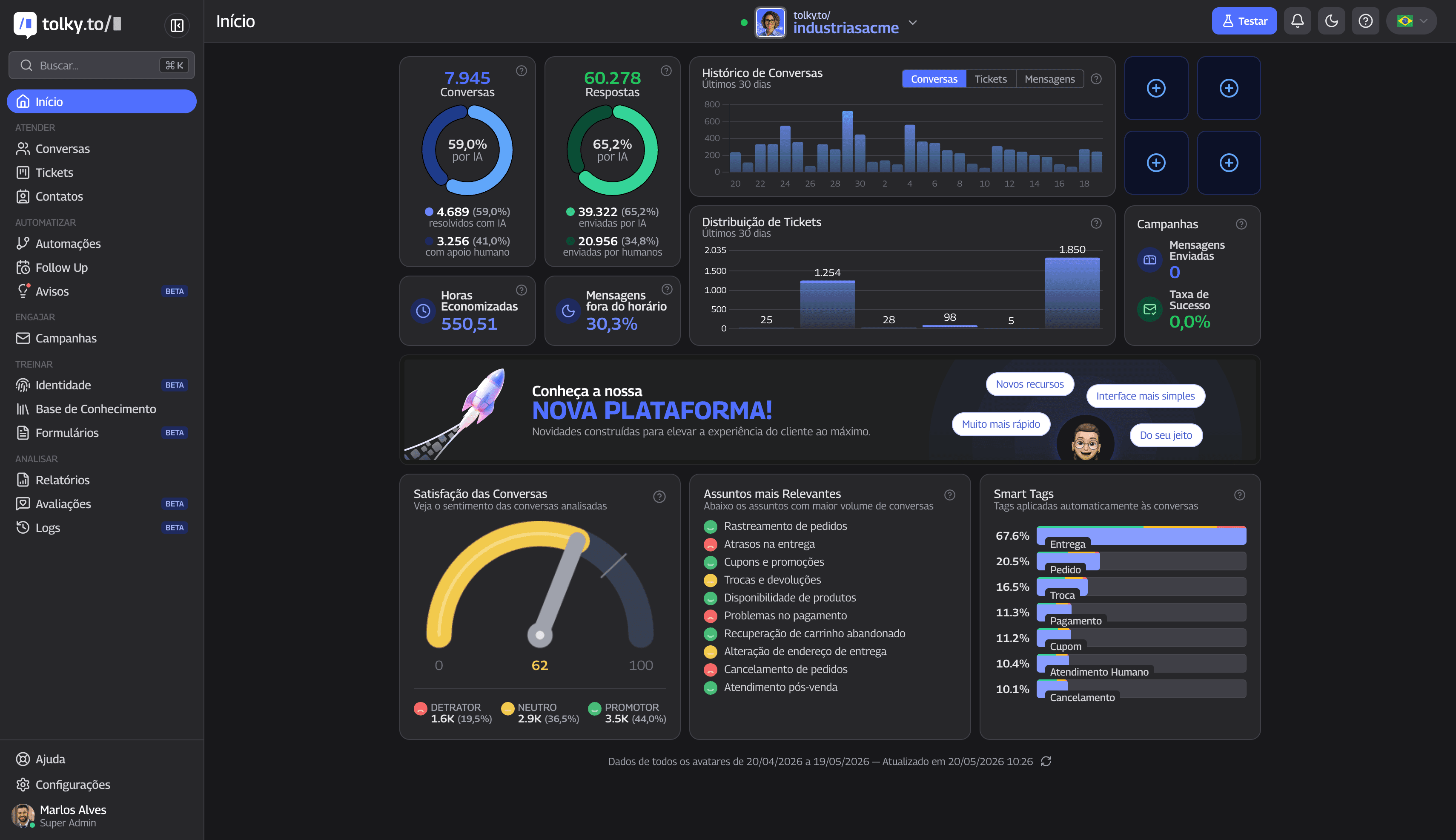
- Agents with limits: mission, tone, forbidden topics and when to hand off. See the AI chatbot for WhatsApp.
- The team on the same number, with queues and handoff with context. See multi-agent support on WhatsApp.
- Management: automatic NPS, access profiles and an activity log with export. The verified controls are at /seguranca.
What Tolky does not do: it does not control Meta AI on your customers' phones or change WhatsApp's privacy rules. It takes care of the conversation between the customer and your business.
Frequently asked questions
Does Meta AI read my WhatsApp conversations?
Not your regular personal conversations. According to the Help Center, Meta only reads messages sent to Meta AI, messages that mention it and new messages in groups where it was added as a participant.
How do you turn off Meta AI on WhatsApp?
Meta says the service is optional and that you can delete your chats with it, but it has not published step-by-step instructions for removing the assistant from the app. You can choose not to use it, delete your chats and remove Meta AI from groups you manage.
Which AI is behind Meta AI?
Muse Spark, the first model in Meta's Muse family. It replaced the Llama models in Meta AI between April and May 2026.
Does Meta AI work in other languages?
By text, yes, in many languages, with limits by market; Portuguese was announced in July 2024. For voice, the Help Center language list, checked on November 19, 2026, includes English, Arabic, Bengali, French, German, Hindi, Indonesian, Italian, Spanish, Tagalog, Thai and Vietnamese, but not Portuguese.
Can businesses use Meta AI to serve customers?
Not Meta AI, which is a personal assistant. To serve customers, Meta offers Meta Business Agent; the alternative is an AI agent on the official WhatsApp API, through a platform.
Does Meta use my conversations with Meta AI for ads?
Since December 16, 2025, in most regions, Meta uses interactions with its AI to personalize content and ads, except for sensitive topics. On WhatsApp, this applies to accounts linked in the same Accounts Center.
Conclusion
Meta AI is a personal assistant, now running on Muse Spark, and it does not read regular conversations; it reads what is sent to it, what mentions it and the groups it joins. For businesses, what matters is who serves the customer: Meta's AI, which receives the messages, or your own agent on the official API, with rules and a CRM.
See the plans, understand what Muse is, compare Meta's AI options for businesses or talk to the team →. Let's talk?
Share
Tags
- meta ai on whatsapp
- does meta ai read my messages
- how to turn off meta ai on whatsapp
- meta ai muse spark
- meta ai incognito chat
- meta ai for business
- whatsapp ai privacy
- #conversational CRM
Cited in
- Voice AI on WhatsApp: an agent that takes calls and voice notes
- Is the WhatsApp Business AI agent free? What it means for businesses
- Meta's Muse agent: what it is and what it means for businesses
- Meta AI for business: Meta AI, Meta Business Agent or Muse?
- What is Meta Muse? Models, API pricing and use in business
- WhatsApp bans general-purpose AI chatbots? What applies in 2026
About the author

Co-founder of Tolky
Marlos Carmo is an AI entrepreneur and founder of Tolky, the conversational-era infrastructure and AI CRM that unifies intelligent service, multi-channel support (such as WhatsApp and voice), live CRM, and operational intelligence in a single ecosystem. He is a finalist for the SXSW Innovation Awards and a member of Francesco's Economy, a global network of young entrepreneurs focused on innovation and social impact. He works connecting Artificial Intelligence and digital transformation in projects for large organizations.
Next step
Want to bring this to your operation?
Tati, Tolky's AI assistant, understands your scenario in a few questions, suggests the best path and connects you with someone from the team, with full context.
Share