Meta AI for business: Meta AI, Meta Business Agent or Muse?
Meta has at least five AI products in 2026, and only some of them serve customers. Compare Meta AI, Meta Business Agent, the Muse agent, the Muse API and agents on the official WhatsApp API.
TL;DR
Meta AI for business comes in five options: Meta AI (a personal assistant that does not serve customers), Meta Business Agent (answers on the business's behalf in the app, free to start), the Muse agent (a consumer's personal agent), the Muse models API (for developers) and the open models Glimmer and Spark Open. To serve customers with a team, systems and a CRM, the alternative is an agent on the official WhatsApp API with a platform, which can use any model.
Share
Meta AI, Business Agent, Muse, Muse Spark, Muse Wonder, Meta One. In 2026, Meta launched so many AI products that it became hard to tell which one fits your business and which one is just for personal use.
This guide sorts the options by what matters to the person deciding: who answers the customer, how much it costs, where the data goes and when it makes sense to move from Meta's AI to your own agent on the official WhatsApp API.
Updated in November 2026, with Meta's official pages checked on November 19, 2026.
What are Meta's AI products in 2026?
In 2026, Meta offers five AI fronts: Meta AI, Meta Business Agent, the Muse agent, the Muse models API and the open-weight models Muse Glimmer and Muse Spark Open. All of them use the Muse model family, built by Meta Superintelligence Labs, which debuted on April 8, 2026.


- Meta AI: the personal assistant inside WhatsApp, Instagram and Facebook.
- Meta Business Agent: the AI that answers customers on behalf of a business in WhatsApp Business, Messenger and Instagram.
- Muse agent: a personal agent that carries out tasks for the consumer, available in the United States, Singapore and Australia.
- Muse API: paid access to the Spark, Wonder and Ember models for people who build software.
- Open models: Glimmer and Spark Open, which a business downloads and runs on its own infrastructure.
The model family is explained in what is Meta's Muse.
Summary in one table
Only two of the five options were built to serve customers: Meta Business Agent and, indirectly, the Muse API, which needs software around it. The table compares the essentials.
| Option | For whom | Serves customers? | Published price | In Brazil |
|---|---|---|---|---|
| Meta AI | People | No | Free for everyday use | Yes, by text in Portuguese |
| Meta Business Agent | Businesses in the app or on the API | Yes | Free to start; Meta One from US$ 14.99 per month; API at US$ 2.00 per million tokens | Yes, since February 2026 |
| Muse agent | Consumers | No; it acts on the consumer's behalf | Free for most use, with subscriptions | No, as of November 19, 2026 |
| Muse API | Developers | Only inside software | From US$ 0.10 to US$ 4.00 per million input tokens | No published restriction |
| Glimmer and Spark Open | Technical teams | Only inside software | Free download, with different licenses | No published restriction |
Sources: Meta Business Agent announcement (June 3, 2026), Meta One announcement (September 15, 2026), WhatsApp platform pricing, Muse agent announcement (September 8, 2026) and Muse API pricing, all checked on November 19, 2026.
Is Meta AI useful for my business?
Meta AI does not serve customers: it is a personal assistant that helps WhatsApp users search, write and create images. An employee can use it to draft a message, but it does not answer on the business's behalf or access your catalog.
What changes for the business is the other side: customers now arrive with AI in their pocket, summarize chats and write with the assistant's help. The guide Meta AI on WhatsApp shows what it does and which messages Meta reads.
When is Meta Business Agent the right choice?
Meta Business Agent is the right choice for solo professionals and small businesses that serve customers with one number, one or two people and a catalog, and want to start at no cost. It learns from your Facebook Page, website, catalog and past chats, and hands you the topics you flag.
According to the June 3, 2026 announcement, more than 1 million businesses were already using the agent on WhatsApp and Messenger. For larger businesses, Meta presented integrations with systems such as Shopify and Zendesk.
Two points weigh on the decision:
- Data: when a business uses Meta's AI, WhatsApp tells the customer that Meta receives the messages in the chat to improve its AI (Help Center).
- Team: in the app, the limit is four devices, or ten with multiple agents through Meta Verified or Meta One, with no department queues and no CRM.
The step by step, prices and limits are in is the WhatsApp Business AI agent free?.
When should you use the Muse API or the open models?
The Muse API and the open models make sense for teams that build their own customer service or automation software and want to pick the AI model by price, quality or data control. They are the engine, not the car: channel, rules, integrations and CRM are still on you.


- Muse API: compatible with the OpenAI and Anthropic SDKs, which makes it easy to test Muse alongside other models. The Contributor tier is cheaper but, according to press reports, allows Meta to retain data.
- Glimmer: 30 billion parameters, Apache 2.0 license, runs on a computer with a consumer graphics card.
- Spark Open: 816 billion parameters in total, its own license with limited commercial terms, available on major clouds and inference providers.
One rule to keep in mind: if your product is an AI assistant open to any question, Meta's terms prohibit distributing it through the WhatsApp API, a rule suspended in Brazil by CADE, the country's antitrust authority. See does WhatsApp ban general-purpose AI chatbots?.
Does the Muse agent change anything for businesses?
The Muse agent is not a business product, but it changes how businesses serve customers: it sends emails, fills out forms and negotiates on the consumer's behalf. As of November 19, 2026, it works in the United States, Singapore and Australia, and Meta has not announced a date for Brazil.
Preparing for it is the same as for any customer agent: clear public information, confirmation from the account holder before sensitive actions and handoff to people. The full guide is in Meta's Muse agent.
When should you move from Meta's AI to an agent on the official API?
A business needs an agent on the official API with a platform when several people answer the same number, when the AI has to look up systems or when the conversation needs to become data in a CRM. At that point, choosing the AI model becomes a configuration detail.
| Business situation | Best option |
|---|---|
| One person answers, repeated questions, simple catalog | Meta Business Agent in the app |
| More than two people on the same number | Agent on the official API with a multi-agent platform |
| AI needs to look up orders, bank slips or schedules | Agent on the official API with integrations |
| Management wants conversion, response time and AI resolution | Platform with reports and CRM |
| Sensitive data (health, legal, financial) | Your own agent on the API, with access control and logging |
| Technical team wants to build everything from scratch | Muse API or another model, plus in-house development |
With coexistence between the app and the API, when available for the account, the same number keeps working on the phone. The path to building the agent is in how to create an AI agent for WhatsApp.
What mistakes should you avoid when choosing Meta's AI?
The most common mistakes are confusing Meta AI with a customer service tool, choosing by the model instead of the operation and ignoring where customer data goes. All of them cost a lot later.
- Thinking Meta AI serves customers. It is personal; what answers for the business is Business Agent or your own agent.
- Choosing by model name. Spark, Wonder, GPT or Claude change the result less than the knowledge base, integrations and rules. See AI models have become a commodity.
- Forgetting Brazil's data protection law (LGPD). Know who receives the messages and for what purpose, and record it in your LGPD policy.
- Having no handoff to people. Every customer service AI needs to know when to stop; see the handoff rules.
- Using an unofficial tool to get around limits. The number can be banned; see the risks of the unofficial API.
Where does Tolky fit in?
Tolky is a conversational AI CRM that serves customers on the official WhatsApp API, on the website, by email, in Microsoft Teams and by voice, with AI agents, team and CRM in one place. It does not sell access to a specific model: it treats the LLM as infrastructure and puts the value in the operation.
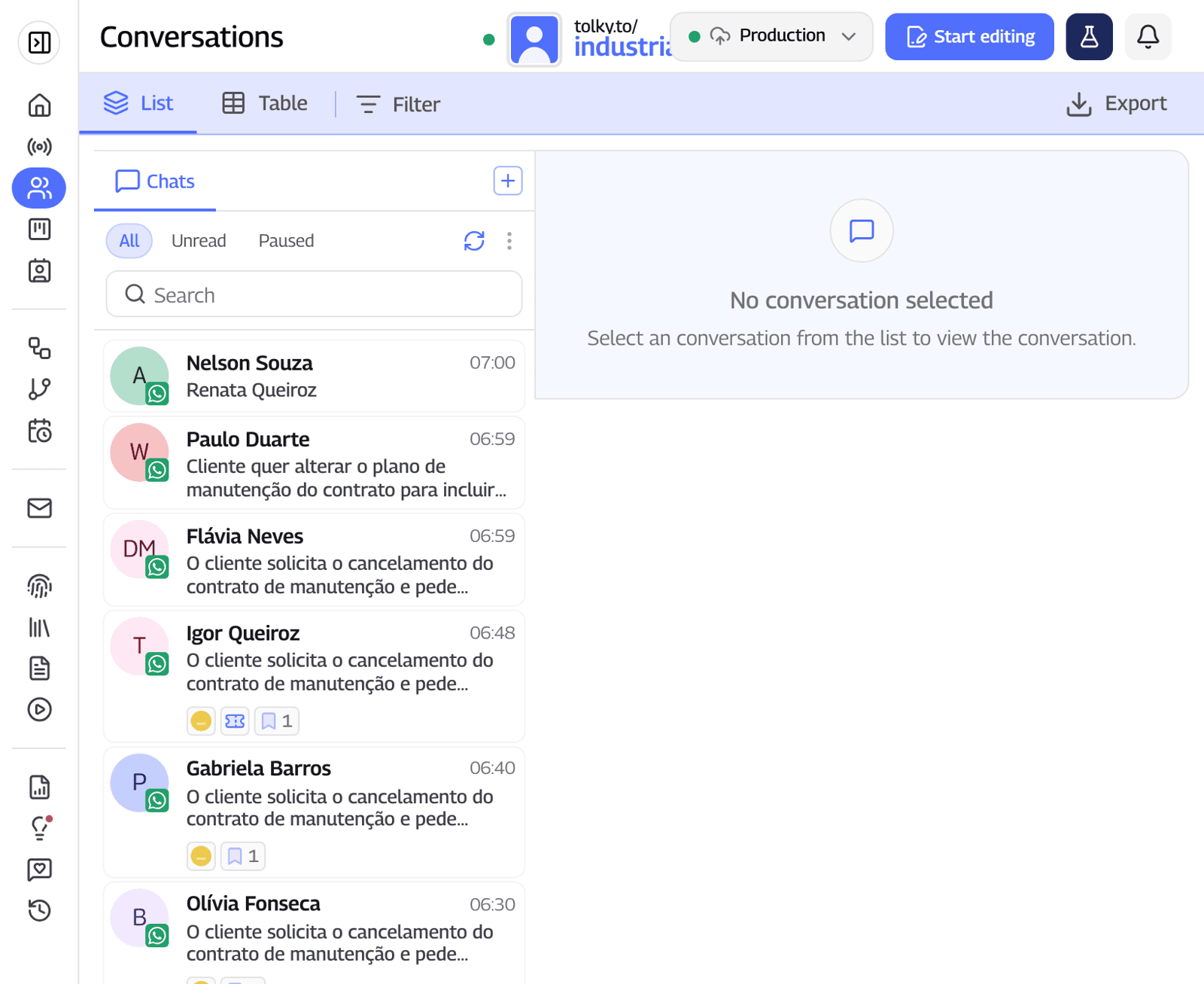
- Agents with rules and handoff to the right person with the history. See the AI chatbot for WhatsApp.
- Multi-agent support, with distribution among people and, on Professional, departments and queues. See WhatsApp multi-agent support.
- CRM and integrations: customer records, pipeline, native HubSpot, REST API, webhooks and MCP tools. See Tolky's CRM.
What Tolky does not do: it is not free for WhatsApp (the channel comes with Starter and up), it does not pay Meta's fees and it does not yet support Instagram or SMS, which are coming soon. Prices are at /precos.
Frequently asked questions
Which Meta AI can serve customers?
Meta Business Agent, which answers on the business's behalf in WhatsApp Business, Messenger and Instagram. Meta AI and the Muse agent are products for people, not for customer service.
Are Meta AI and Meta Business Agent the same thing?
No. Meta AI is the personal assistant for WhatsApp users. Meta Business Agent is the AI a business turns on to answer its customers.
Does Muse replace Meta Business Agent?
No. Muse is the name of Meta's model family and also of the consumer's personal agent. Meta does not say which model powers Business Agent, which remains a separate product.
How much does Meta AI for business cost?
Business Agent is free to start in the app, has Meta One plans from US$ 14.99 per month and costs US$ 2.00 per million tokens on the API. The Muse API ranges from US$ 0.10 to US$ 4.00 per million input tokens, depending on the model.
Can I use Muse in my WhatsApp agent?
Yes, as the model of an agent that serves your business's customers on the official API, as long as your software or platform lets you choose that model. What Meta's terms prohibit is distributing a general-purpose AI assistant through WhatsApp.
When is it worth switching from Meta's AI to a platform?
When several people answer the same number, when the AI needs to look up systems such as orders and schedules, or when management needs a CRM and reports. In these cases, an agent on the official API with a platform covers what the app does not.
Conclusion
Meta AI for business, in practice, is Meta Business Agent; the rest is a personal assistant, a consumer agent or a model for developers. For anyone answering alone, it is a good start. For a business with a team, systems and sensitive data, the path is an agent on the official API with a platform, rules and a CRM.
See the plans, understand Meta Business Agent, explore multi-agent support or talk to the team →. Let's talk?
Share
Tags
- meta ai for business
- meta ai for small business
- meta business agent vs api
- muse for business
- which ai to use on whatsapp
- whatsapp ai agent for business
- meta one business agent
- #conversational CRM
About the author

Co-founder of Tolky
Marlos Carmo is an AI entrepreneur and founder of Tolky, the conversational-era infrastructure and AI CRM that unifies intelligent service, multi-channel support (such as WhatsApp and voice), live CRM, and operational intelligence in a single ecosystem. He is a finalist for the SXSW Innovation Awards and a member of Francesco's Economy, a global network of young entrepreneurs focused on innovation and social impact. He works connecting Artificial Intelligence and digital transformation in projects for large organizations.
Next step
Want to bring this to your operation?
Tati, Tolky's AI assistant, understands your scenario in a few questions, suggests the best path and connects you with someone from the team, with full context.
Share