How to sell on WhatsApp: catalog, sales script, follow-up and AI
How to sell on WhatsApp with a method: catalog, fast replies, a conversation script, follow-up, CRM, payment options and an AI agent that qualifies customers and hands them to sales.
TL;DR
Selling on WhatsApp works when the business treats the chat as a sales process: an organized storefront (profile and catalog), replies within minutes, a script that uncovers the need before pitching, follow-up within Meta's rules, every deal recorded in a CRM and a clear way to pay. An AI agent can answer instantly, qualify and hand the customer to a salesperson with the full history.
Share
Many sales already start on WhatsApp: the customer sees an ad, a post or the storefront and sends "how much is it?". What happens next decides the sale. A slow reply, a price with no context and no follow-up the next day send the customer to the competitor who answered first.
This guide shows how to sell on WhatsApp with a method: how to set up the storefront, why speed matters, a conversation script, follow-up, CRM, payment options and where an AI agent helps without taking the salesperson out of the deal.
Updated November 2026.
What does selling on WhatsApp mean?
Selling on WhatsApp means running the whole sale, or most of it, inside the chat: presenting the product, answering questions, negotiating, closing and agreeing on payment and delivery without the customer leaving the app. It is the most common form of conversational commerce.
It works for almost any kind of business, with adjustments. A clothing store sells through the catalog and photos; a clinic sells appointments and books them; a B2B company uses WhatsApp to qualify and set the meeting. What changes is the length of the cycle, not the logic: reply fast, understand the need, offer the right thing and do not let the conversation die.
How do you set up your WhatsApp storefront?
Your WhatsApp storefront is a complete business profile plus a catalog of products or services the customer can browse without asking. It answers the basic questions before the conversation even starts.


- Complete profile. Name, description, address, hours, website and email. An empty profile looks like a scam.
- Catalog in the app. The WhatsApp Business app has a catalog with a photo, price and description for each item. The WhatsApp Business guide for companies shows what the app offers.
- Catalog on the API. On the official platform, the catalog lives in Meta Commerce Manager and can be sent as a single-product message, a multi-product message (up to 30 products, in sections) or a carousel. The customer builds a cart in the chat and the business receives the order, but the business cannot start a cart for the customer, according to Meta's catalog documentation, checked on November 23, 2026.
- Commerce policies. Meta reviews catalog items and rejects anything that breaks its commerce policies. Check before listing regulated products.
Keep prices and stock up to date. An outdated catalog leads to the worst possible conversation: "that one is sold out".
Why does replying fast decide the sale?
Replying fast decides the sale because a customer asking for a price on WhatsApp often asks several businesses at the same time, and interest cools with every minute without an answer. The market calls this speed to lead.


There is no universal number for how much a sale drops per minute of waiting, and be wary of statistics without a source. What you can measure is your own operation: compare the conversion rate of customers answered within 5 minutes with that of customers who waited more than an hour. The guide to lead response SLAs shows how to set and track that time, and the hidden cost of slow response times helps put the wait in money terms.
Three practices cut the wait: someone, a person or an AI agent, on call outside business hours; a shared queue for salespeople instead of everyone on their own phone; and alerts for unanswered conversations.
What does a WhatsApp sales script look like?
A good WhatsApp sales script greets the customer, uncovers the need with a few questions, recommends one option, handles objections, proposes the next step and confirms the agreement in writing. It guides the conversation without sounding like a form.
| Step | Goal | Sample message (illustrative) |
|---|---|---|
| Opening | Show there is someone there | "Hi Marina, this is Pedro from Example Store. I'll help you with the sneakers." |
| Discovery | Understand use, size, timing and budget | "Is it for running or everyday wear? What size do you wear?" |
| Recommendation | Offer one or two options, not the whole catalog | "For light running, this model is our best seller. We have it in a 7." |
| Objection | Answer price, shipping or timing with facts | "Shipping to your zip code is $9.90 and arrives in 3 business days." |
| Close | Propose a concrete next step | "Want me to set aside the 7 and send you the payment link?" |
| Confirmation | Record the agreement | "Order 4821 confirmed: sneakers size 7, delivery by November 28." |
Two rules improve any script: ask before sending the price when the answer changes the recommendation, and never let the conversation end without an agreed next step, even if it is "can I check in with you on Friday?".
How do you follow up on WhatsApp without being annoying?
Follow up with an agreed date, a clear reason and growing intervals, and stop after two or three attempts with no reply. Follow-up is where the almost-sale lives.
Meta's rule matters here. Inside the 24-hour window opened by the customer's last message, you can write freely; after it, only with an approved template, which counts as utility or marketing depending on the content. The guide to the 24-hour window and templates explains the categories.
- First follow-up on the same day, while the window is open: "Did you get a chance to see the photos? I'm holding the size 7 until tomorrow."
- Second follow-up two or three days later, by template, with something new: another option, a deadline, a common question answered.
- Last follow-up with a graceful exit: "I'll stop messaging you about this. If you change your mind, just reply here."
For templates and cadences, see lead follow-up on WhatsApp and what to do when a lead doesn't reply on WhatsApp.
Why use a CRM to sell on WhatsApp?
A CRM records each deal with its stage, value, next step and conversation history, and it is what tells you how many sales are open, who needs a follow-up today and where customers came from. Without it, the pipeline lives in the salesperson's memory and phone.
The signs that a CRM is missing are familiar: a salesperson leaves and takes the customers along, a customer gets the same offer from two people, nobody knows how much WhatsApp sold this month. The post WhatsApp is not a CRM covers these signs, and the guide to choosing a sales CRM lists the criteria. To start at no cost, see the options for a free CRM for WhatsApp.
How do you get paid through WhatsApp?
The most common ways to get paid through WhatsApp are instant payment codes (such as Pix in Brazil), payment links and bank slips, sent in the chat after the close. The money lands in the business's bank or payment provider, not in WhatsApp.
| Method | How it works | Watch out for |
|---|---|---|
| Pix copy-and-paste code or QR (Brazil) | The customer copies the code and pays in their banking app | Show the payee name so the customer can check it |
| Payment link | A payment provider page for card or instant payment | Use your provider's domain, no link shorteners |
| Bank slip (boleto) | PDF or code sent in the chat | Ask the customer to check the beneficiary before paying |
| Payment inside WhatsApp | A Meta feature available in some countries | See the post on WhatsApp Pay for the current status |
Always agree on payment from the same official number and explain to customers how to recognize a legitimate charge. Scammers imitate businesses precisely at the payment moment, and the guide to WhatsApp scams shows how to protect the people who buy from you.
How does AI help you sell on WhatsApp?
An AI sales agent on WhatsApp replies instantly, answers questions based on your catalog and rules, asks the qualification questions and hands the customer to a salesperson when they are ready to close, with a summary of the conversation. It solves the wait and the triage; the salesperson keeps the negotiation.


- Instant replies, including nights and weekends.
- Qualification with the questions your team defines: what they need, by when, how much they plan to spend.
- Handoff with context. The salesperson receives a qualified customer with the history, without asking them to repeat themselves. See the rules for AI to human handoff.
- CRM record. The deal starts with the data the conversation revealed.
The limits must be clear too: the AI should not offer discounts outside the rules or promise deadlines the business cannot meet. The guide to chatbots for lead generation shows how to design the qualification, and AI for B2B lead qualification covers complex sales.
Where Tolky fits in selling on WhatsApp
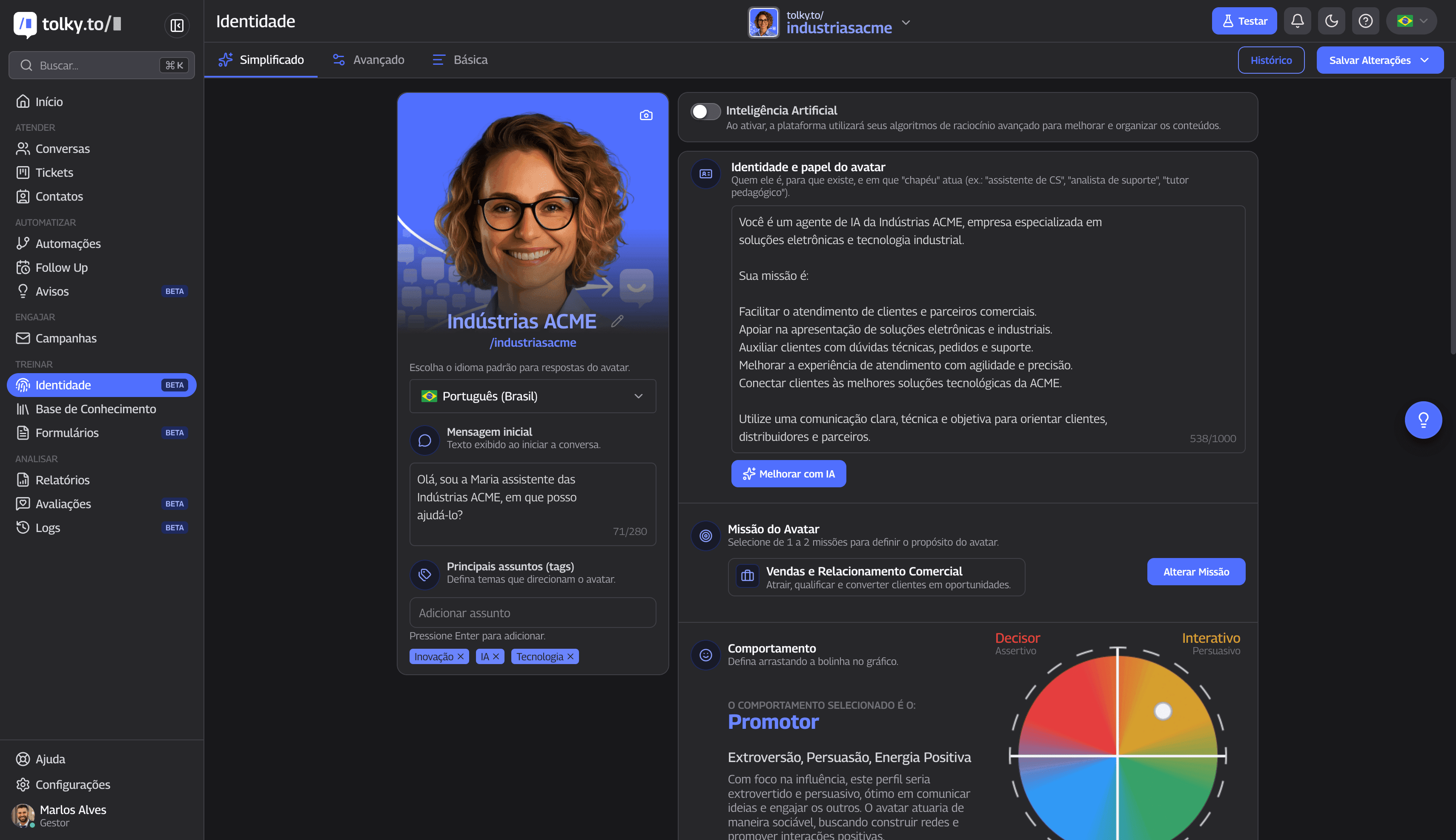
Tolky is an AI conversational CRM where an AI agent answers on the official WhatsApp number, qualifies and hands the customer to a salesperson, with the conversation and the deal recorded in the same CRM. The agent is configured by mission, such as Sales and Business Relationships.
- Sales agent. You define the identity, greeting, topics and mission; the agent answers from your knowledge base and hands off when the case calls for it.
- Sales CRM. Opportunities, companies, activities and goals, from the Starter plan, which also includes WhatsApp.
- Follow Up and campaigns. Re-engaging stalled conversations and WhatsApp campaigns, on the Professional and Enterprise plans.
- Pix in the message. Text Campaigns can include a button to copy a Pix code, fixed or one per contact.
What Tolky does not do: it does not process payments and is not a payment provider, and it does not replace an online store with a checkout. The Pix button copies a code you generate at your bank or payment provider. The only native external CRM integration is HubSpot; see Tolky's CRM and the plans.
Frequently asked questions
How can I sell more on WhatsApp?
Reply within minutes, uncover the need before sending a price, recommend one or two options and always agree on the next step. Follow up with a date and a reason, and record each deal in a CRM so nobody falls through the cracks.
Do I need a catalog to sell on WhatsApp?
It is not required, but it helps. A catalog answers basic questions without a conversation and lets you send products with photos and prices. In the app it lives in WhatsApp Business itself; on the API, in Meta Commerce Manager.
Can I get paid through WhatsApp?
Yes, by sending an instant payment code, a payment link or a bank slip in the chat. The money goes to the business's bank or payment provider. Paying inside WhatsApp itself depends on the country; see the post on WhatsApp Pay.
What is the best time to sell on WhatsApp?
Whenever your customers write. Check your reports for when most messages arrive and make sure someone, a team member or an AI agent, replies in that window. For business-initiated messages, respect business hours.
Can I send sales messages to people who haven't contacted me?
Only with opt-in, meaning the person's prior permission, and through an approved template on the official API. Messages nobody asked for lead to blocks and reports and can limit your number.
Can the AI close the sale on its own?
It can complete simple sales within the rules you set, such as confirming an order and sending the payment code. For negotiations involving discounts, special terms or large amounts, it is better for the AI to qualify and hand off to a salesperson.
Conclusion
Selling on WhatsApp is a process, not improvisation on a phone: an organized storefront, replies within minutes, a script that listens before pitching, follow-up within the rules, a CRM so nobody gets lost and a clear, safe way to pay. AI comes in to reply instantly and qualify; the salesperson comes in to close.
See WhatsApp Service, explore the CRM, see the plans or talk to the team →. Let's talk?
Share
Tags
- sell on whatsapp
- how to sell on whatsapp
- #whatsapp sales
- whatsapp business catalog
- whatsapp sales script
- whatsapp follow-up
- ai for sales
- #conversational CRM
Cited in
- WhatsApp Channels: what they are, how to create one, business uses
- Ecommerce chatbot: orders, tracking, returns and abandoned carts
- Chatbot for clothing stores: sizing, exchanges and WhatsApp sales
- Conversational commerce: what it is and how to sell on WhatsApp
- WhatsApp Business calls: how to make, receive and answer them with AI
- Click to WhatsApp ads: how to create them without losing the lead
- Free WhatsApp CRM: what is really free and what you pay for
- WhatsApp Business auto reply: greeting, away messages and templates
- WhatsApp Business: what it is, benefits, tools and when to migrate
- WhatsApp Flows: what it is, what it is for and use case examples
About the author

Co-founder of Tolky
Marlos Carmo is an AI entrepreneur and founder of Tolky, the conversational-era infrastructure and AI CRM that unifies intelligent service, multi-channel support (such as WhatsApp and voice), live CRM, and operational intelligence in a single ecosystem. He is a finalist for the SXSW Innovation Awards and a member of Francesco's Economy, a global network of young entrepreneurs focused on innovation and social impact. He works connecting Artificial Intelligence and digital transformation in projects for large organizations.
Next step
Want to bring this to your operation?
Tati, Tolky's AI assistant, understands your scenario in a few questions, suggests the best path and connects you with someone from the team, with full context.
Share